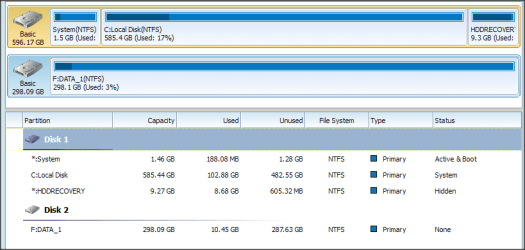
I have an external 300GB USB HDD that I want to create a second partition on.
- the HDD is 4% used (96% available)
- as a precaution I have backed up all data (5,500 files)
Is it possible to create the second partition via Windows or must I use a bootable (MiniTools) ?
- recently on another PC I resized the C:\ partition with 100% success using bootable MiniTools
- I have both bootable and installed MiniTools
Should I ...

-------
SIDE NOTE:
I spent 3 days testing "Copy/Move" programs, some are not very user friendly and some do not verify copied files.
For 12GB -- Windows "Copy" required 1½hrs ... portable "FastCopy" by PortableApps.com ... 42 minutes
With Log report enabled FastCopy lists any errors/problems on both the GUI and a .LOG file
.
- the HDD is 4% used (96% available)
- as a precaution I have backed up all data (5,500 files)
Is it possible to create the second partition via Windows or must I use a bootable (MiniTools) ?
- recently on another PC I resized the C:\ partition with 100% success using bootable MiniTools
- I have both bootable and installed MiniTools
Should I ...
- defrag the USB (spinner) drive before adding the second partition ?
- use a bootable MiniTools to create the new partition ?
Or can I create the new partition via Windows with local installed MinTools ?
I also have local install of AOMEI
-------
SIDE NOTE:
I spent 3 days testing "Copy/Move" programs, some are not very user friendly and some do not verify copied files.
For 12GB -- Windows "Copy" required 1½hrs ... portable "FastCopy" by PortableApps.com ... 42 minutes
With Log report enabled FastCopy lists any errors/problems on both the GUI and a .LOG file
.
My Computer
- Computer type
- PC/Desktop
- Computer Manufacturer/Model Number
- Toshiba, Lenovo (laptops) + 4 rigs
- OS
- XP Pro (x86) | 7 HP (x86) & (x64) | 7 Pro (x64)