external HDD not detected

himanshuvyas

New member
Local time
6:24 PM
Messages
2
hello,
i am new to this forum & want to solve a problem about my external HDD.
the HDD is a make of I OMEGA & is of 320 gb capacity..
i am running on windows 7 home basic on dell laptop..
i have tried different usb ports but still the problem is same..
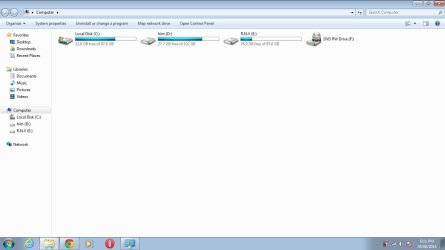
whenever i attach the HDD it plays the sound of device attached but nothing gets appeared on my computer..
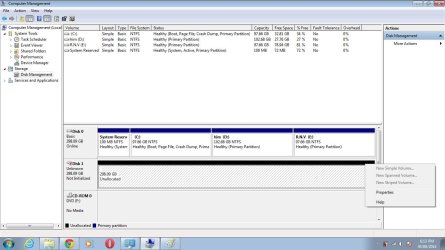
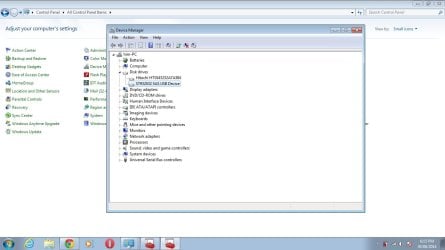
i am posting some screenshots which may help to solve the problem..
as you can see the HDD can be seen in device manager & disk management tool..but there are no options to recover or open it.. i have tried to uninstall the driver & reinstall it..
any help would be appreciated.. :)
 

Attachments

  • AFTER.jpg
    AFTER.jpg
    42.9 KB · Views: 2
  • Untitled.jpg
    Untitled.jpg
    109.9 KB · Views: 5
  • Untitled2.jpg
    Untitled2.jpg
    74.5 KB · Views: 2

My Computer

Computer type
Laptop
Computer Manufacturer/Model Number
dell
OS
windows 7 home basic 64 bit
CPU
intel core i3 350 2.27Ghz
Memory
3gb
Graphics Card(s)
512 mb
Hard Drives
hitachi 2.5 inch 320gb 5400rpm

My Computer

Computer type
PC/Desktop
Computer Manufacturer/Model Number
Custom Build
OS
Windows 7 Home Premium 32-Bit - Build 7600 SP1
CPU
Intel Core i3-2120 3.30Ghz
Motherboard
Asus P8Z68-V LX Intel Z68 Socket H2 ATX
Memory
Kingston 4 GB DDR3 1333 mhz
Graphics Card(s)
AMD Radeon HD6670
Sound Card
Sound Blaster Audigy SE 24-Bit
Monitor(s) Displays
Asus VE228
Screen Resolution
1440 X 900
Hard Drives
OCZ Vertex 3 120 GB Sata 3 SSD ==
Kingston SH103/S3 120 G Hyper X 120 GB SSD ==
Western Digital 500 GB Caviar Green 7200 RPM ==
PSU
Corsair CX600M == 600 Watt
Case
NZXT Apollo - Silver with Clear Side Panel
Cooling
Three 120 mm Fans
Keyboard
Microsoft Natural 4000
Mouse
Microsoft Custom Optical 3000
Internet Speed
AT&T Fiber Optic Wireless Network
Antivirus
Microsoft Security Essentials
Browser
Chrome
Other Info
120 mm Blue LED Fan -- Three Blue LED Lazer Light Sticks
Hi Himanshuvyas,

If you have any data on that external HDD, then do not format.

Download and run Partition Wizard Home edition 8.1.1 Free download Magic Partition Manager Software, partition magic alternative, free partition magic, partition magic Windows 7 and server partition software - Partition Wizard Online

Select your external drive in it and run Partition Recovery Wizard.

Partition Recovery>Full Disk>Next> Quick Scan>Next

If you can see all partitions, put a tick mark against all and each partition shown. Check that the bottom disk map shows all partitions. Better post a screenshot at this stage and proceed after further instructions.

Further steps you would execute after instructed to do so:

Click on Finish.

That should take you back to the main screen.

Does it show all partitions on your external drive?

Does the lost partition now has a drive letter?

If not right click on it and assign a drive letter.

Click on Apply on the top menu bar for the changes to take effect.

Close Partition Wizard and reboot.

It may also be necessary to "Rebuild MBR" but let us see as we chug along.
 

My Computer

OS
Windows 7 Home Premium 32 bit
hi all,
first of all thanks a lot for giving a quick reply..
i think you both are trying to say me to run partition recovery wizard..
as said by jumanji i have very important data on disk so i don't want to format it..it would be the last option for me..
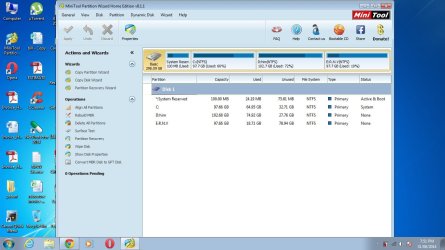
for now i am posting the screenshot of partition recovery wizard so that you can see my external HDD is not listed in that..:cry:
eager for your reply.. thanking you in meantime.. :)
 

Attachments

  • Untitled3.jpg
    Untitled3.jpg
    101.2 KB · Views: 1
Last edited:

My Computer

Computer type
Laptop
Computer Manufacturer/Model Number
dell
OS
windows 7 home basic 64 bit
CPU
intel core i3 350 2.27Ghz
Memory
3gb
Graphics Card(s)
512 mb
Hard Drives
hitachi 2.5 inch 320gb 5400rpm
I am wondering whether you have connected your IOmega external drive at all. :D

OK , Shut down your laptop. Plug out your external drive and then plug it in. ( Just to make sure you have plugged it in. :))

Boot and check.

1. Does it show up in Windows Disk Management and Device Manager as shown in your first post? YES/NO

2. Run Partition Wizard now and check. Does your external drive show in it? YES/NO

If YES, post a screenshot but post the screenshot of only the PW window and not the full screen for clarity.

Do it now and post your answers.
 

My Computer

OS
Windows 7 Home Premium 32 bit
The HDD, 320 GB shows in Disk Management as unallocated. It needs to be formatted and assigned a letter. That is all it needs.

The OP has said " .....i have very important data on disk so i don't want to format it..it would be the last option for me......"

Do you want him to format the drive and then recover the data from the formatted drive?
 

My Computer

OS
Windows 7 Home Premium 32 bit
The HDD, 320 GB shows in Disk Management as unallocated. It needs to be formatted and assigned a letter. That is all it needs.

The OP has said " .....i have very important data on disk so i don't want to format it..it would be the last option for me......"

Do you want him to format the drive and then recover the data from the formatted drive?

Look at Disk 1 in his Disk Management. It is Unallocated, there couldn't be any data on it.
 

My Computer

Computer type
PC/Desktop
Computer Manufacturer/Model Number
Custom Build
OS
Windows 7 Home Premium 32-Bit - Build 7600 SP1
CPU
Intel Core i3-2120 3.30Ghz
Motherboard
Asus P8Z68-V LX Intel Z68 Socket H2 ATX
Memory
Kingston 4 GB DDR3 1333 mhz
Graphics Card(s)
AMD Radeon HD6670
Sound Card
Sound Blaster Audigy SE 24-Bit
Monitor(s) Displays
Asus VE228
Screen Resolution
1440 X 900
Hard Drives
OCZ Vertex 3 120 GB Sata 3 SSD ==
Kingston SH103/S3 120 G Hyper X 120 GB SSD ==
Western Digital 500 GB Caviar Green 7200 RPM ==
PSU
Corsair CX600M == 600 Watt
Case
NZXT Apollo - Silver with Clear Side Panel
Cooling
Three 120 mm Fans
Keyboard
Microsoft Natural 4000
Mouse
Microsoft Custom Optical 3000
Internet Speed
AT&T Fiber Optic Wireless Network
Antivirus
Microsoft Security Essentials
Browser
Chrome
Other Info
120 mm Blue LED Fan -- Three Blue LED Lazer Light Sticks
:)

Please have a look at the screenshot of Windows Disk Management in post #1 in this thread http://www.sevenforums.com/hardware...al-hard-drive-suddenly-became-unllocated.html
- where the OP's external disk which had a lot of data suddenly became unallocated.

It took a lot of cajoling to apply the two pending operations after he ran Partition Recovery Wizard in Partition Wizard - which indeed found the lost partitions - and finally he did it

" Thank you so much indeed, Mr.jumanji for your continuing helping me.
I really applied the two operations pending with the partition recovery wizard yesterday before seeing your last post. I have not experienced such a problem at all. That drive has been having all my datas. I am going to copy it to at least three another external hard drives.

I am quite surprised that when I appied the two operations pending in partition recovery wizard, I saw that the hard drive returned as it was."
-Post # 20

Just to bring out the fact when a drive suddenly turns unallocated, it does not necessarily mean that there is no data in it or all the data in it is lost.
 

My Computer

OS
Windows 7 Home Premium 32 bit
Back
Top