Extra long shutdown

whs

New member
Guru
Gold Member
VIP
Local time
10:53 AM
Messages
26,200
Location
Florida in winter, Black Forest/Germany
On my desktop with an i7 and a M4 SSD, the time to shutdown is almost longer than the boot time. I have already set the registry to 2000ms, but the system seems to ignore that.

In contrast, my laptop with an i5 and a Vertex2 shuts down almost instantly. It has a quasi identical Win7 setup.

The desktop shutdown does not bother me when I walk away from it at night. But for the occasional restart, it is a bit of a pain. Does anybody have an idea what else can be done to speed that up.
 

My Computer

Computer Manufacturer/Model Number
HP, Dell, Gateway, Toshiba - 4 laptops and 2 desktops
OS
Vista, Windows7, Mint Mate, Zorin, Windows 8
CPU
from 1.6GHz Duo to i7
Monitor(s) Displays
2x HP w2207
Hard Drives
5x HDD, 7x SSD, 12x Externals
Keyboard
with trackball - no mices
Mouse
Trackball mice
Internet Speed
DSL 6000
wolfgang, have you tried these tweaks?

Code:
[HKEY_CURRENT_USER\Control Panel\Desktop]
"AutoEndTasks"="1"
"HungAppTimeout"="200"
"MenuShowDelay"="0"
"WaitToKillAppTimeout"="200"
"LowLevelHooksTimeout"="200"

[HKEY_LOCAL_MACHINE\SYSTEM\ControlSet002\Control]
"WaitToKillServiceTimeout"="200"

[HKEY_LOCAL_MACHINE\SYSTEM\ControlSet001\Control]
"WaitToKillServiceTimeout"="200"

[HKEY_LOCAL_MACHINE\SYSTEM\CurrentControlSet\Control]
"WaitToKillServiceTimeout"="200"

[HKEY_LOCAL_MACHINE\SYSTEM\CurrentControlSet\Control\Session Manager\Memory Management]
"ClearPageFileAtShutdown"=dword:00000000

[HKEY_USERS\S-1-5-19\Control Panel\Desktop]
"AutoEndTasks"="1"
"HungAppTimeout"="200"
"MenuShowDelay"="0"
"WaitToKillAppTimeout"="200"

[HKEY_USERS\S-1-5-20\Control Panel\Desktop]
"AutoEndTasks"="1"
"HungAppTimeout"="200"
"MenuShowDelay"="0"
"WaitToKillAppTimeout"="200"

or merge the attached registry file.

you may want to experiment a bit with the numbers - and make sure that it still asks to save opened files.

i used to use these on my old rig with great success - it would shut down very quickly, fortunately i don't seem to need it any more.

   Warning
i know whs knows this, but for any other readers, please please backup your registry before mucking around with it!
 

Attachments

My Computer

Computer Manufacturer/Model Number
mickey megabyte 1234
OS
ultimate 64 sp1
CPU
i5 2500K [email protected]
Motherboard
MSI P67A-GD53
Memory
8 gigs GSkill Ripjaws 1600
Graphics Card(s)
amd hd6950
Sound Card
creative x-fi gamer
Monitor(s) Displays
samsung 24"
Screen Resolution
1920x1080
Hard Drives
ocz vertex 2e 60 gig, samsung f3 1tb, buffalo 2tb ext
PSU
antec 550
Case
antec three hundred
Cooling
i'm a cooling fan
Keyboard
saitek eclipse ii
Mouse
logitech g3
Internet Speed
about 4 Mbps
Other Info
i love win7
You could always take a trace, via my tutorial, of the shutdown process and get a visualization of what's causing it too...
 

My Computer

Computer type
PC/Desktop
Computer Manufacturer/Model Number
Custom
OS
Windows 10 Pro x64
CPU
Intel Core i7 4790K @ 4.5GHz
Motherboard
Asus Maximus Hero VII
Memory
32GB DDR3
Graphics Card(s)
Nvidia GeForce GTX970
Sound Card
Realtek HD Audio
Screen Resolution
1920x1200
Hard Drives
1x Samsung 250GB SSD
4x WD RE 2TB (RAIDZ)
PSU
Corsair AX760i
Case
Fractal Design Define R4
Cooling
Noctua NH-D15
Thanks Mickey. I have already done that using 2000ms. But the shutdown still is a lot longer. The system seems to ignore my settings.

Thanks Carl. I will try the trace. Looks promising.
 

My Computer

Computer Manufacturer/Model Number
HP, Dell, Gateway, Toshiba - 4 laptops and 2 desktops
OS
Vista, Windows7, Mint Mate, Zorin, Windows 8
CPU
from 1.6GHz Duo to i7
Monitor(s) Displays
2x HP w2207
Hard Drives
5x HDD, 7x SSD, 12x Externals
Keyboard
with trackball - no mices
Mouse
Trackball mice
Internet Speed
DSL 6000
Are those trace commands case-sensitive?
 

My Computer

Computer Manufacturer/Model Number
8 home-builds from the 80's into 2004
OS
W7 Home Premium 32bit
No, they are not. However, there's a ton of text, so case-sensitive means it's easier to read (and it's an old habit).
 

My Computer

Computer type
PC/Desktop
Computer Manufacturer/Model Number
Custom
OS
Windows 10 Pro x64
CPU
Intel Core i7 4790K @ 4.5GHz
Motherboard
Asus Maximus Hero VII
Memory
32GB DDR3
Graphics Card(s)
Nvidia GeForce GTX970
Sound Card
Realtek HD Audio
Screen Resolution
1920x1200
Hard Drives
1x Samsung 250GB SSD
4x WD RE 2TB (RAIDZ)
PSU
Corsair AX760i
Case
Fractal Design Define R4
Cooling
Noctua NH-D15

My Computer

Computer type
Laptop
Computer Manufacturer/Model Number
Dell Precision M6600
OS
Windows 7 Professional 64bit
CPU
Intel Core i7 2820QM 2.3GHz
Memory
8GB ( 1666 MHz )
Graphics Card(s)
ATI Fire Pro M8900
Sound Card
MOTU UltraLite mk3 Hybrid ( external )
Screen Resolution
1200
Hard Drives
250GB 7200 rpm
Keyboard
It lights up
Mouse
Logitech laser
Internet Speed
Blazing
Antivirus
COMODO Internet Security (There is NO OTHER)
Browser
Firefox (There is NO OTHER)...well Opera is cool
Do you have external drives USB connected that you leave on? If so, try closing the drives first. You really need to read this before disconnecting drives: http://www.sevenforums.com/tutorials/10169-safely-remove-hardware-eject-device.html
My box looks like a porcupine. 12 USB ports have devices hanging on the box. It would be completely impractical disconnecting those. For some I would have to crawl under the desk and go into the back of the box. Try that at age 74.
 

My Computer

Computer Manufacturer/Model Number
HP, Dell, Gateway, Toshiba - 4 laptops and 2 desktops
OS
Vista, Windows7, Mint Mate, Zorin, Windows 8
CPU
from 1.6GHz Duo to i7
Monitor(s) Displays
2x HP w2207
Hard Drives
5x HDD, 7x SSD, 12x Externals
Keyboard
with trackball - no mices
Mouse
Trackball mice
Internet Speed
DSL 6000
You don't have to get on your knees to eject drives

Do you have external drives USB connected that you leave on? If so, try closing the drives first. You really need to read this before disconnecting drives: http://www.sevenforums.com/tutorials/10169-safely-remove-hardware-eject-device.html
My box looks like a porcupine. 12 USB ports have devices hanging on the box. It would be completely impractical disconnecting those. For some I would have to crawl under the desk and go into the back of the box. Try that at age 74.

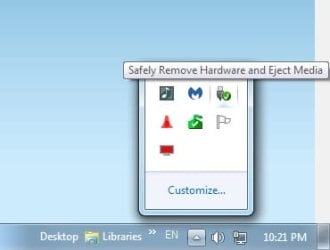
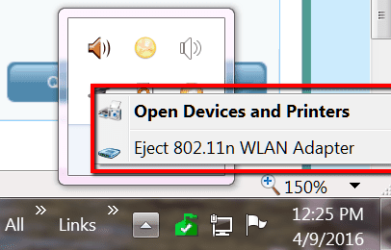
You may not have to physically disconnect them. Just right click on the notification area to eject the drives. If any of them don't eject properly, I've found that sometimes clicking on "Open Devices And Printers" will work. It's a mystery why. Anyway, once done, the external drives are ejected without having to be done with any crawling or kneepads.
 

Attachments

  • SafelyRemove.jpg
    SafelyRemove.jpg
    9.9 KB · Views: 18
  • Devices.jpg
    Devices.jpg
    10.2 KB · Views: 18

My Computer

Computer Manufacturer/Model Number
HP Pavilion p6745f
OS
Microsoft Windows 7 Home Premium 64-bit 7601 Multiprocessor Free Service Pack 1
CPU
Intel(R) Core(TM) i5-2300 CPU @ 2.80GHz
Motherboard
PEGATRON CORPORATION 2AB6
Memory
6 GB
Graphics Card(s)
Radeon 6750 1gb
Sound Card
(1) IDT High Definition Audio CODEC (2) Intel(R) Display A
Monitor(s) Displays
Acer x193w
Hard Drives
(1) WDC WD15EARS-60MVWB0 (2) Generic- Compact Flash USB Device (3) Generic- MS/MS-Pro USB Device (4) Generic- SD/MMC USB Device (5) Generic- SM/xD-Picture USB Device (6) WD My Book 1110 USB Device
PSU
Internal 500W (100V-240V)
Case
Mid-size ATX
Cooling
unknown
Keyboard
HP usb multimedia keyboard
Mouse
HP usb compliant mouse
Internet Speed
256 kbps
Other Info
Ver: CHI_713.bin vCHI7.13
Do you have external drives USB connected that you leave on? If so, try closing the drives first. You really need to read this before disconnecting drives: http://www.sevenforums.com/tutorials/10169-safely-remove-hardware-eject-device.html
My box looks like a porcupine. 12 USB ports have devices hanging on the box. It would be completely impractical disconnecting those. For some I would have to crawl under the desk and go into the back of the box. Try that at age 74.

You may not have to physically disconnect them. Just right click on the notification area to eject the drives. If any of them don't eject properly, I've found that sometimes clicking on "Open Devices And Printers" will work. It's a mystery why. Anyway, once done, the external drives are ejected without having to be done with any crawling or kneepads.

& experiment with ejecting only the newest, the oldest, etc, til you find out which one might be giving you problems.
 

My Computer

Computer Manufacturer/Model Number
HP Pavilion p6745f
OS
Microsoft Windows 7 Home Premium 64-bit 7601 Multiprocessor Free Service Pack 1
CPU
Intel(R) Core(TM) i5-2300 CPU @ 2.80GHz
Motherboard
PEGATRON CORPORATION 2AB6
Memory
6 GB
Graphics Card(s)
Radeon 6750 1gb
Sound Card
(1) IDT High Definition Audio CODEC (2) Intel(R) Display A
Monitor(s) Displays
Acer x193w
Hard Drives
(1) WDC WD15EARS-60MVWB0 (2) Generic- Compact Flash USB Device (3) Generic- MS/MS-Pro USB Device (4) Generic- SD/MMC USB Device (5) Generic- SM/xD-Picture USB Device (6) WD My Book 1110 USB Device
PSU
Internal 500W (100V-240V)
Case
Mid-size ATX
Cooling
unknown
Keyboard
HP usb multimedia keyboard
Mouse
HP usb compliant mouse
Internet Speed
256 kbps
Other Info
Ver: CHI_713.bin vCHI7.13
Problem is, there is nothing to eject.
 

Attachments

  • 2016-04-09_1225.png
    2016-04-09_1225.png
    15.8 KB · Views: 21

My Computer

Computer Manufacturer/Model Number
HP, Dell, Gateway, Toshiba - 4 laptops and 2 desktops
OS
Vista, Windows7, Mint Mate, Zorin, Windows 8
CPU
from 1.6GHz Duo to i7
Monitor(s) Displays
2x HP w2207
Hard Drives
5x HDD, 7x SSD, 12x Externals
Keyboard
with trackball - no mices
Mouse
Trackball mice
Internet Speed
DSL 6000
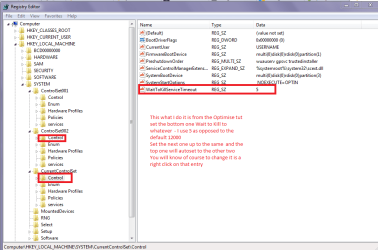
Wolfgang I don't know how you set your 2000ms and I am guessing it is my method but the pic shows how I set all my machines.
 

Attachments

  • SHUTDOWN.PNG
    SHUTDOWN.PNG
    28.8 KB · Views: 2

My Computer

Computer type
PC/Desktop
Computer Manufacturer/Model Number
Own build (new) Desk1 / Asus ROG Win 7 / Desk2 1st build
OS
Desk1 7 Home Prem / Desk2 10 Pro / Main lap Asus ROG 10 Pro 2 laptop Toshiba 7 Pro Asus P2520 7 & 10
CPU
Desk1 i5 3750K / Laptop i7 GTX 860M / Desk2 i5 2500
Motherboard
Desk1 Asus P877-V / Desk2 Gigabyte H67 UD3H / Laptop ?
Memory
Desk1 8GB (1866) / Desk2 16GB (1333) / Laptop 8Gb DDR3
Graphics Card(s)
Desk 1& 2NVidia GTX 650 & Laptops on board Intel
Sound Card
Desk 1 & 2 -XONAR DG Realtek High Def audio Laptop
Monitor(s) Displays
Desk 1 Benq HD 2450 / Desk2 Philips 24" / Laptop 17.5"
Screen Resolution
1920x1080 D1 & D2 & Laptop 1
Hard Drives
Desk1 Samsung 120GB 830 SSD
Asus ROG 256GB 850 Pro SSD
Desk2 Samsung 840 256 SSD
Toshiba 120GB EVO
PSU
Desk 1 Corsair HX 1050/ Laptop ? / Desk 2 Corsair HX 650
Case
Desk 1 Cooler HAF XM ? Toshiba laptop / Desk2 Coolermaster
Cooling
Fans on all Desk1 -2 Desk2 - all Coolermasters 5 Laptop ?
Keyboard
Desk 1 MS Sidewinder X6 Desk 2 MS Sidewinder X 4
Mouse
Desk 1&2 - Gigabyte MS 900 gamer - laptop - Logitec wireless
Internet Speed
ADSL2+
Other Info
One other Desktop (tester) and spare Toshba laptop both with SSD's
Running Kaspersky 2016 ISS on all machines config'd identically
Logitec audio stereo systems on each machine (x3)
Canon MG5250MFC
Router/modem TP-Link running WPA2SK
It is set to 2000. And the funny thing is, when I ran one of those shutdown tracing programs, it said that it shut down in 2 sec - which of course is not true.

It is not a big problem. On a real shutdown it does not matter. It is only a bit boring for restarts.
 

My Computer

Computer Manufacturer/Model Number
HP, Dell, Gateway, Toshiba - 4 laptops and 2 desktops
OS
Vista, Windows7, Mint Mate, Zorin, Windows 8
CPU
from 1.6GHz Duo to i7
Monitor(s) Displays
2x HP w2207
Hard Drives
5x HDD, 7x SSD, 12x Externals
Keyboard
with trackball - no mices
Mouse
Trackball mice
Internet Speed
DSL 6000
I'd just dissable the adapter in device manager.

Roy
 

My Computer

Computer type
PC/Desktop
Computer Manufacturer/Model Number
medionl/Aspire 6930G/acer x55a
OS
W7 home premium 32bit/W7HP 64bit/w10 tp insider ring
CPU
E5300 dual core
Motherboard
medion MS7366
Memory
3gb
Graphics Card(s)
Nvidia Geforce 7100 Nforce 630i
Monitor(s) Displays
avixc
Internet Speed
n (isp resticted to 72)
Antivirus
mse/pands
Browser
palemoon
Other Info
Belkin Fd7050 n USB using Railink RT2870 drivers, more upto date
It is set to 2000. And the funny thing is, when I ran one of those shutdown tracing programs, it said that it shut down in 2 sec - which of course is not true.
Yes mate I have even set mine for 0 in the past and it is not really zero I think the default figure or whatever you set is arbitrary to what one has running - to a point. I suppose it you think about it to set it to zero means the thing has to stop instantaneously which unless I am terribly wrong would be nigh impossible.

My worst shortcoming is having a document left open - shut down and come back ten minutes later with a screen saying do I want to save this document :o
 

My Computer

Computer type
PC/Desktop
Computer Manufacturer/Model Number
Own build (new) Desk1 / Asus ROG Win 7 / Desk2 1st build
OS
Desk1 7 Home Prem / Desk2 10 Pro / Main lap Asus ROG 10 Pro 2 laptop Toshiba 7 Pro Asus P2520 7 & 10
CPU
Desk1 i5 3750K / Laptop i7 GTX 860M / Desk2 i5 2500
Motherboard
Desk1 Asus P877-V / Desk2 Gigabyte H67 UD3H / Laptop ?
Memory
Desk1 8GB (1866) / Desk2 16GB (1333) / Laptop 8Gb DDR3
Graphics Card(s)
Desk 1& 2NVidia GTX 650 & Laptops on board Intel
Sound Card
Desk 1 & 2 -XONAR DG Realtek High Def audio Laptop
Monitor(s) Displays
Desk 1 Benq HD 2450 / Desk2 Philips 24" / Laptop 17.5"
Screen Resolution
1920x1080 D1 & D2 & Laptop 1
Hard Drives
Desk1 Samsung 120GB 830 SSD
Asus ROG 256GB 850 Pro SSD
Desk2 Samsung 840 256 SSD
Toshiba 120GB EVO
PSU
Desk 1 Corsair HX 1050/ Laptop ? / Desk 2 Corsair HX 650
Case
Desk 1 Cooler HAF XM ? Toshiba laptop / Desk2 Coolermaster
Cooling
Fans on all Desk1 -2 Desk2 - all Coolermasters 5 Laptop ?
Keyboard
Desk 1 MS Sidewinder X6 Desk 2 MS Sidewinder X 4
Mouse
Desk 1&2 - Gigabyte MS 900 gamer - laptop - Logitec wireless
Internet Speed
ADSL2+
Other Info
One other Desktop (tester) and spare Toshba laptop both with SSD's
Running Kaspersky 2016 ISS on all machines config'd identically
Logitec audio stereo systems on each machine (x3)
Canon MG5250MFC
Router/modem TP-Link running WPA2SK
Back
Top