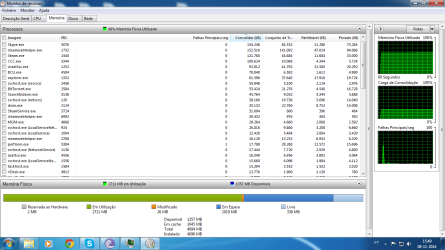
Extremely high physical memory usage on idle! (77%)

Bernas24

New member
Local time
5:23 AM
Messages
12
I've posted a thread regarding this a month ago here. I had scanned my PC with Malware bytes and turns out I had 4 malwares. Rebooted it and figured it was the end of it. The thing is this happens occasionally when I'm normally browsing Chrome, the memory usage goes up to 3,89GB out of 4GB out of nowhere. I go to the task manager/resource monitor and I can't find anything relevant I wouldn't normally have. Sure I have about 70 tasks but they're all small and shouldn't be causing trouble. Today it happened while I was installing Sniper Elite v2 - lengthy installation, it was using my whole RAM understandably, yet after it was finished I'm still left with about 80% of memory usage? Please help.

http://oi59.tinypic.com/r1kfbt.jpg
 

My Computer

Computer type
PC/Desktop
Computer Manufacturer/Model Number
Custom build
OS
Windows 7 Ultimate x64
CPU
AMD Phenom II x4 965 BE 3.4Ghz
Motherboard
ASUS M4A88T-M USB/3
Memory
4GB AMD
Graphics Card(s)
Asus Radeon HD 6850
Hard Drives
Seagate Barracuda 500GB 7200rpm
Antivirus
Avast

My Computer

Computer type
PC/Desktop
Computer Manufacturer/Model Number
Home made Desktop
OS
Windows 10 Pro. 64/ version 1709 Windows 7 Pro/64
CPU
Intel i7-6800K @ 4.3
Motherboard
ASUS X-99 Deluxe II
Memory
Corsair Platinum 16 gig @2400
Graphics Card(s)
EVGA GTX 1070 OC
Monitor(s) Displays
Asus 27" LED LCD/VE278Q
Screen Resolution
1920-1080 or 1280-720 HDMI
Hard Drives
INTEL SSD 730-240 Gb Sata 3.0/
PSU
EVGA Platium 1200W
Case
Phanteks Luxe Tempered Glass 8 fans/ one radiator
Cooling
XSPC/ Water Cooled CPU
Keyboard
Das 4 Professional
Mouse
Logitech M705/MX Anywhere 2-S
Internet Speed
100 mbits
Antivirus
Microsoft Security Essentials/ Malwarebytes Premium 3.0/ SAS
Browser
I.E. 11 default/Firefox/ ISP Time Warner Cable/Spectrum
Other Info
LG BluRay Burner/
Sound system-KLipsch-THX/
Icy Dock ssd Hot Swap bays.

Attachments

  • Sem Título.png
    Sem Título.png
    149.6 KB · Views: 6

My Computer

Computer type
PC/Desktop
Computer Manufacturer/Model Number
Custom build
OS
Windows 7 Ultimate x64
CPU
AMD Phenom II x4 965 BE 3.4Ghz
Motherboard
ASUS M4A88T-M USB/3
Memory
4GB AMD
Graphics Card(s)
Asus Radeon HD 6850
Hard Drives
Seagate Barracuda 500GB 7200rpm
Antivirus
Avast
The best place to start with memory problems is a screenshot of Task Manager - Performance tab.
 

My Computer

Computer type
PC/Desktop
Computer Manufacturer/Model Number
HP
OS
Windows 7 Pro 64 bit
CPU
Xeon W3520
Memory
8 GB
Graphics Card(s)
Nvidia Geforce 210
All I see is that you are using your ram with a lot of things.
Bittorrent
Imagem
Steam
Skipe

Using that much ram with the things your computer is doing looks normal to me.
 

My Computer

Computer type
PC/Desktop
Computer Manufacturer/Model Number
Home made Desktop
OS
Windows 10 Pro. 64/ version 1709 Windows 7 Pro/64
CPU
Intel i7-6800K @ 4.3
Motherboard
ASUS X-99 Deluxe II
Memory
Corsair Platinum 16 gig @2400
Graphics Card(s)
EVGA GTX 1070 OC
Monitor(s) Displays
Asus 27" LED LCD/VE278Q
Screen Resolution
1920-1080 or 1280-720 HDMI
Hard Drives
INTEL SSD 730-240 Gb Sata 3.0/
PSU
EVGA Platium 1200W
Case
Phanteks Luxe Tempered Glass 8 fans/ one radiator
Cooling
XSPC/ Water Cooled CPU
Keyboard
Das 4 Professional
Mouse
Logitech M705/MX Anywhere 2-S
Internet Speed
100 mbits
Antivirus
Microsoft Security Essentials/ Malwarebytes Premium 3.0/ SAS
Browser
I.E. 11 default/Firefox/ ISP Time Warner Cable/Spectrum
Other Info
LG BluRay Burner/
Sound system-KLipsch-THX/
Icy Dock ssd Hot Swap bays.
Back
Top