Facebook redirects

RonNYC

New member
Member
Local time
4:17 PM
Messages
49
I get this every now and then, just with Facebook, no other web site. I use Chrome. Just now I tried to go to Facebook and was directed to Stock Market

Not sure what this is. I've found that clearing temp data doesn't help. I use:


ipconfig /flushdns
ipconfig /release
ipconfig /renew


and that works. A lot of the time I get to some site on akamai.net but this time it was that financial site. And Chrome didn't say I was being redirected. facebook.com evalutated to that site.

Any ideas why this happens? I know others on here have reported similar issues.

RON
 

My Computer

Computer Manufacturer/Model Number
HP G60 230US
OS
Windows 7
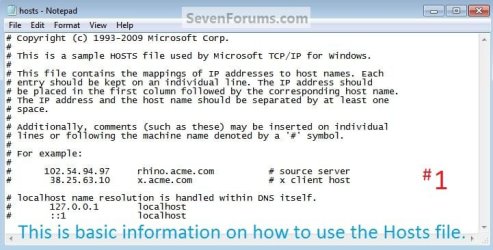
Check screenshot in attachment.
This is what your HOSTS file should look like (All lines should start with #).
Like that or totally blank. Malware loves to force redirections through this file.

Please post it's content.
To open it, use instructions from here.
 

Attachments

  • 67149d1271253303-hosts-file-use-windows-7-vista-hosts_info.jpg
    67149d1271253303-hosts-file-use-windows-7-vista-hosts_info.jpg
    48.1 KB · Views: 22

My Computer

Computer type
PC/Desktop
OS
Windows 8.1 ; Windows 7 x86 (Dec2008-Jan2013)
Other Info
"The scale icon at the top right of a post or tutorial is how you can give rep to the member."
# Copyright (c) 1993-2009 Microsoft Corp.
#
# This is a sample HOSTS file used by Microsoft TCP/IP for Windows.
#
# This file contains the mappings of IP addresses to host names. Each
# entry should be kept on an individual line. The IP address should
# be placed in the first column followed by the corresponding host name.
# The IP address and the host name should be separated by at least one
# space.
#
# Additionally, comments (such as these) may be inserted on individual
# lines or following the machine name denoted by a '#' symbol.
#
# For example:
#
# 102.54.94.97 rhino.acme.com # source server
# 38.25.63.10 x.acme.com # x client host

# localhost name resolution is handled within DNS itself.
# 127.0.0.1 localhost
# ::1 localhost
#
 

My Computer

Computer Manufacturer/Model Number
HP G60 230US
OS
Windows 7
What I don't understand is how this behavior is entirely limited to Facebook. No other site.
 

My Computer

Computer Manufacturer/Model Number
HP G60 230US
OS
Windows 7
Are you still having problems? Try using the IP address instead, 69.171.229.11
 

My Computer

Computer type
PC/Desktop
Computer Manufacturer/Model Number
Dwarf Dwf/11/2012 r09/2013
OS
Windows 8.1 Pro RTM x64
CPU
Intel Core-i5-3570K 4-core @ 3.4GHz (Ivy Bridge) (OC 4.4GHz)
Motherboard
ASRock Z77 Extreme4-M
Memory
4 x 4GB DDR3-1600 Corsair Vengeance CMZ8GX3M2A1600C9B (16GB)
Graphics Card(s)
MSI GeForce GTX770 Gaming OC 2GB
Sound Card
Realtek High Definition on board solution (ALC 898)
Monitor(s) Displays
ViewSonic VA1912w Widescreen (VGA)
Screen Resolution
1440x900
Hard Drives
OCZ Agility 3 SSD 120GB SATA III x2 (RAID 0)
Samsung HD501LJ 500GB SATA II x2
Hitachi HDS721010CLA332 1TB SATA II
Iomega 1.5TB Ext USB 2.0
WD 2.0TB Ext USB 3.0
PSU
XFX Pro Series 850W Semi-Modular
Case
Gigabyte IF233
Cooling
1 x 120mm Front Inlet 1 x 120mm Rear Exhaust
Keyboard
Microsoft Comfort Curve Keyboard 3000 (USB)
Mouse
Microsoft Comfort Mouse 3000 for Business (USB)
Internet Speed
NetGear DG834Gv3 ADSL Modem/Router (Ethernet) ~4.0 Mb/s (O2)
Antivirus
Avast! 8.0.1497
Browser
IE 11
Other Info
Optical Drive: HL-DT-ST BD-RE BH10LS30 SATA Bluray
Lexmark S305 Printer/Scanner/Copier (USB)
WEI Score: 8.1/8.1/8.5/8.5/8.25
Asus Eee PC 1011PX Netbook (Windows 7 x86 Starter)
The problems come and go. If I do the ipconfig /flushall thing it's OK, but why does this happen? And just with FB, nothing else.
 

My Computer

Computer Manufacturer/Model Number
HP G60 230US
OS
Windows 7
Back
Top