Factory restored, how update service packs

Dachia

New member
Local time
4:29 PM
Messages
7
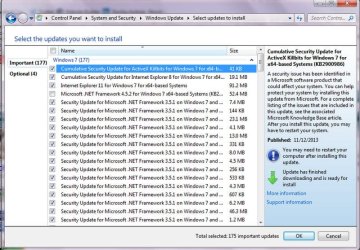
I just did a factory restore (from the "healthy partition" inside hard drive) and as I was logging off it said I had 177 updates so I left it alone. This morning it said it was unable to install correctly and reverted back. So, I have 177 updates waiting to be installed, but I wonder if I would be better off doing them in groups, assuming that later ones are building on the earlier ones... and all at once might not work. Is that correct? What do you suggest to bring the system up to date?

After it is up to date, I'd like to create a backup of the whole, newly updated system, in case I need to restore again some time in the future. A new one would include all the programs I have downloaded and settings etc. Is that possible? I have a large external hard drive to put it on, but how do I do that?
 

My Computer My Computer

At a glance

Windows 7 Home Premium ?
Computer type
PC/Desktop
Computer Manufacturer/Model Number
Sony Vaio
OS
Windows 7 Home Premium ?
Antivirus
AVG
Browser
Firefox
Regarding the second part of your question
Download the free Macrium Reflect. After you have all your updates, make an image with Reflect and put it on the external drive. If you ever have problems you can restore with the image. I know because Macrium has saved me several times.
Regarding the updates, install a few at a time, go in chronological order and be sure that the watch the size. The number is less important than the size.
 

My Computer My Computer

At a glance

Windows 10, Home Clean InstallIntel Core2 processsor Q8200(2.33Ghz 1333FSB)...6 gbATI Radeon 256MB HD3650
Computer type
PC/Desktop
Computer Manufacturer/Model Number
Dell XPS 420
OS
Windows 10, Home Clean Install
CPU
Intel Core2 processsor Q8200(2.33Ghz 1333FSB) Quad Core Tech
Motherboard
Dell
Memory
6 gb
Graphics Card(s)
ATI Radeon 256MB HD3650
Sound Card
Intergrated 7.1 Channel Audio
Monitor(s) Displays
Dell SP2009W 20"
Hard Drives
640 GB Serial ATA Hard drive
Cooling
Fan
Keyboard
Dell USB Keyboard
Mouse
Dell Premium Optical USB
Internet Speed
DSL 2.85
I do not know which are earliest or latest. There is no date attached to the updates. How can I pick the early ones, preferably as a whole group, install and then do the next?
 

Attachments

  • Fullscreen capture 2122015 94423 AM.jpg
    Fullscreen capture 2122015 94423 AM.jpg
    109.8 KB · Views: 0

My Computer My Computer

At a glance

Windows 7 Home Premium ?
Computer type
PC/Desktop
Computer Manufacturer/Model Number
Sony Vaio
OS
Windows 7 Home Premium ?
Antivirus
AVG
Browser
Firefox
I would do them in groups starting at the top. If there are some rather large ones in the group, install the first group in 2 parts.
 

My Computer My Computer

At a glance

Windows 10, Home Clean InstallIntel Core2 processsor Q8200(2.33Ghz 1333FSB)...6 gbATI Radeon 256MB HD3650
Computer type
PC/Desktop
Computer Manufacturer/Model Number
Dell XPS 420
OS
Windows 10, Home Clean Install
CPU
Intel Core2 processsor Q8200(2.33Ghz 1333FSB) Quad Core Tech
Motherboard
Dell
Memory
6 gb
Graphics Card(s)
ATI Radeon 256MB HD3650
Sound Card
Intergrated 7.1 Channel Audio
Monitor(s) Displays
Dell SP2009W 20"
Hard Drives
640 GB Serial ATA Hard drive
Cooling
Fan
Keyboard
Dell USB Keyboard
Mouse
Dell Premium Optical USB
Internet Speed
DSL 2.85
Is it pretty certain that the older ones are at the top. It makes sense, but just wanted to be as sure as possible... another restore would really suck. And how many at a time, 5 10 ... 20? And thank, BTW. :-)
 

My Computer My Computer

At a glance

Windows 7 Home Premium ?
Computer type
PC/Desktop
Computer Manufacturer/Model Number
Sony Vaio
OS
Windows 7 Home Premium ?
Antivirus
AVG
Browser
Firefox
I just did a Repair Install to SP1 and it still required many dozens of updates like yours. IMO the best approach is to simply click OK and let MS/Windows do its thing. In any case it's going to require a bunch of reboots IME.
 

My Computer My Computer

At a glance

Windows 7 Professional 64bitIntel Core i7 4600M @ 2.90GHz16.0GB Dual-Channel DDR3 @ 797MHz (11-11-11-28)Intel HD Graphics 4600 (Dell) 2048MB ATI AMD ...
Computer type
Laptop
Computer Manufacturer/Model Number
Dell Latitude E6540 Laptop
OS
Windows 7 Professional 64bit
CPU
Intel Core i7 4600M @ 2.90GHz
Motherboard
Dell Inc. 0CYT5F (SOCKET 0)
Memory
16.0GB Dual-Channel DDR3 @ 797MHz (11-11-11-28)
Graphics Card(s)
Intel HD Graphics 4600 (Dell) 2048MB ATI AMD Radeon HD 8790M
Sound Card
Realtek High Definition Audio
Monitor(s) Displays
HP ZR30w (2560x1600@60Hz)
Hard Drives
256GB LITEONIT LMT-256M6M-41 mm SATA (SSD)
1TB Samsung SSD 860 EVO mSATA SATA (SSD)
2TB USB 3.0 USB Device
115GB SanDisk Ultra Fit USB
Other Info
Multiple Dell E-Port Plus II Port Replicator/Docking Stations 0Y72NH USB 3.0 + 130W AC Adapters
Maxseven- It tried to do it on its own and couldn't. The only list I have is from the Windows Update program... I tried to find the Service pack one online and just do it first, but I can't find it and I'm not certain that is the best route. So, if there is a link to get the updates in good groups, great. Otherwise... should I continue/start downloading/installing my list off 177?
 

My Computer My Computer

At a glance

Windows 7 Home Premium ?
Computer type
PC/Desktop
Computer Manufacturer/Model Number
Sony Vaio
OS
Windows 7 Home Premium ?
Antivirus
AVG
Browser
Firefox
In most cases what Max suggests is the way to go but that does not seem to work in your case. I would do it in batches of 10, but take the larger ones out and do it as the second part of the install. for the first 10. Then go for the second 10. It will take time, but better than a restore.
 

My Computer My Computer

At a glance

Windows 10, Home Clean InstallIntel Core2 processsor Q8200(2.33Ghz 1333FSB)...6 gbATI Radeon 256MB HD3650
Computer type
PC/Desktop
Computer Manufacturer/Model Number
Dell XPS 420
OS
Windows 10, Home Clean Install
CPU
Intel Core2 processsor Q8200(2.33Ghz 1333FSB) Quad Core Tech
Motherboard
Dell
Memory
6 gb
Graphics Card(s)
ATI Radeon 256MB HD3650
Sound Card
Intergrated 7.1 Channel Audio
Monitor(s) Displays
Dell SP2009W 20"
Hard Drives
640 GB Serial ATA Hard drive
Cooling
Fan
Keyboard
Dell USB Keyboard
Mouse
Dell Premium Optical USB
Internet Speed
DSL 2.85
Perfect. Thanks... see ya in a few hours. :-) Oh, do I need to shut down and start after each 10?
 

My Computer My Computer

At a glance

Windows 7 Home Premium ?
Computer type
PC/Desktop
Computer Manufacturer/Model Number
Sony Vaio
OS
Windows 7 Home Premium ?
Antivirus
AVG
Browser
Firefox
If you have to restart, it will tell you. That is not a shut down, just a reboot
 

My Computer My Computer

At a glance

Windows 10, Home Clean InstallIntel Core2 processsor Q8200(2.33Ghz 1333FSB)...6 gbATI Radeon 256MB HD3650
Computer type
PC/Desktop
Computer Manufacturer/Model Number
Dell XPS 420
OS
Windows 10, Home Clean Install
CPU
Intel Core2 processsor Q8200(2.33Ghz 1333FSB) Quad Core Tech
Motherboard
Dell
Memory
6 gb
Graphics Card(s)
ATI Radeon 256MB HD3650
Sound Card
Intergrated 7.1 Channel Audio
Monitor(s) Displays
Dell SP2009W 20"
Hard Drives
640 GB Serial ATA Hard drive
Cooling
Fan
Keyboard
Dell USB Keyboard
Mouse
Dell Premium Optical USB
Internet Speed
DSL 2.85
Awesome. Thanks again.
 

My Computer My Computer

At a glance

Windows 7 Home Premium ?
Computer type
PC/Desktop
Computer Manufacturer/Model Number
Sony Vaio
OS
Windows 7 Home Premium ?
Antivirus
AVG
Browser
Firefox
You are very welcome, but maybe we should wait until we see how this works out. Good luck to you.
 

My Computer My Computer

At a glance

Windows 10, Home Clean InstallIntel Core2 processsor Q8200(2.33Ghz 1333FSB)...6 gbATI Radeon 256MB HD3650
Computer type
PC/Desktop
Computer Manufacturer/Model Number
Dell XPS 420
OS
Windows 10, Home Clean Install
CPU
Intel Core2 processsor Q8200(2.33Ghz 1333FSB) Quad Core Tech
Motherboard
Dell
Memory
6 gb
Graphics Card(s)
ATI Radeon 256MB HD3650
Sound Card
Intergrated 7.1 Channel Audio
Monitor(s) Displays
Dell SP2009W 20"
Hard Drives
640 GB Serial ATA Hard drive
Cooling
Fan
Keyboard
Dell USB Keyboard
Mouse
Dell Premium Optical USB
Internet Speed
DSL 2.85
I can only add Dachia to not be too surprised (or disappointed) to find that you need even more than 177 updates. It is sorta painful to think you're done and then do another Check for Updates and find MS wants to do more...

:(

Best of luck to you!
 

My Computer My Computer

At a glance

Windows 7 Professional 64bitIntel Core i7 4600M @ 2.90GHz16.0GB Dual-Channel DDR3 @ 797MHz (11-11-11-28)Intel HD Graphics 4600 (Dell) 2048MB ATI AMD ...
Computer type
Laptop
Computer Manufacturer/Model Number
Dell Latitude E6540 Laptop
OS
Windows 7 Professional 64bit
CPU
Intel Core i7 4600M @ 2.90GHz
Motherboard
Dell Inc. 0CYT5F (SOCKET 0)
Memory
16.0GB Dual-Channel DDR3 @ 797MHz (11-11-11-28)
Graphics Card(s)
Intel HD Graphics 4600 (Dell) 2048MB ATI AMD Radeon HD 8790M
Sound Card
Realtek High Definition Audio
Monitor(s) Displays
HP ZR30w (2560x1600@60Hz)
Hard Drives
256GB LITEONIT LMT-256M6M-41 mm SATA (SSD)
1TB Samsung SSD 860 EVO mSATA SATA (SSD)
2TB USB 3.0 USB Device
115GB SanDisk Ultra Fit USB
Other Info
Multiple Dell E-Port Plus II Port Replicator/Docking Stations 0Y72NH USB 3.0 + 130W AC Adapters
I agree with that Max.
 

My Computer My Computer

At a glance

Windows 10, Home Clean InstallIntel Core2 processsor Q8200(2.33Ghz 1333FSB)...6 gbATI Radeon 256MB HD3650
Computer type
PC/Desktop
Computer Manufacturer/Model Number
Dell XPS 420
OS
Windows 10, Home Clean Install
CPU
Intel Core2 processsor Q8200(2.33Ghz 1333FSB) Quad Core Tech
Motherboard
Dell
Memory
6 gb
Graphics Card(s)
ATI Radeon 256MB HD3650
Sound Card
Intergrated 7.1 Channel Audio
Monitor(s) Displays
Dell SP2009W 20"
Hard Drives
640 GB Serial ATA Hard drive
Cooling
Fan
Keyboard
Dell USB Keyboard
Mouse
Dell Premium Optical USB
Internet Speed
DSL 2.85
Done... and it isn't smoking. Yes, there were 16 new updates afterward, but they went fast. Everything appears to be working. There was one point where it said that one update failed but still wanted me to restart and I did... then just picked the next group to install... and no more messages. So, don't know what happened to that one update... but ....

Ok, now I need to back up the whole system just as it is. I know somebody mentioned using some program online, and I'll look at that again. The system asks me i I want to do a back up. My thought was to just click yes and hook up the external drive and go be busy for a while. Is it not easy to do that?
 

My Computer My Computer

At a glance

Windows 7 Home Premium ?
Computer type
PC/Desktop
Computer Manufacturer/Model Number
Sony Vaio
OS
Windows 7 Home Premium ?
Antivirus
AVG
Browser
Firefox
You can click on yes and back up, but in addition rely on the Macrium Backups. I know from personal experience that they can save the day.
 

My Computer My Computer

At a glance

Windows 10, Home Clean InstallIntel Core2 processsor Q8200(2.33Ghz 1333FSB)...6 gbATI Radeon 256MB HD3650
Computer type
PC/Desktop
Computer Manufacturer/Model Number
Dell XPS 420
OS
Windows 10, Home Clean Install
CPU
Intel Core2 processsor Q8200(2.33Ghz 1333FSB) Quad Core Tech
Motherboard
Dell
Memory
6 gb
Graphics Card(s)
ATI Radeon 256MB HD3650
Sound Card
Intergrated 7.1 Channel Audio
Monitor(s) Displays
Dell SP2009W 20"
Hard Drives
640 GB Serial ATA Hard drive
Cooling
Fan
Keyboard
Dell USB Keyboard
Mouse
Dell Premium Optical USB
Internet Speed
DSL 2.85
Back
Top