crystaldrone
New member
- Local time
- 2:14 AM
- Messages
- 9
'Failed to initialize' driver error
Hi,
I own an external firewire soundcard (Yamaha n12 mixer) which connects to the PCI firewire card (SIIG with a Texas Instruments Chipset) on my CPU. and I am facing a similar problem I faced a couple of times before where I resorted to the ultimate cure - reinstalling windows just to get a driver working since nothing else worked. That nightmare is back.
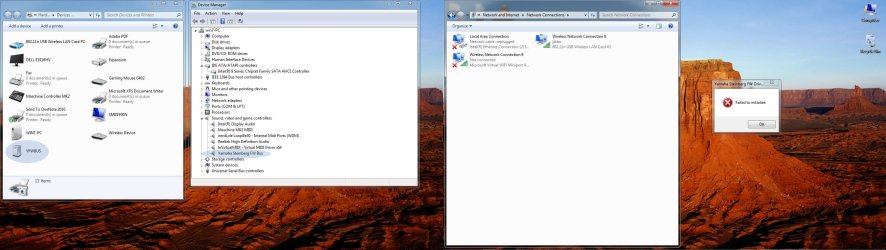
So all was working fine till yesterday. But today when I got my computer and the soundcard powered, I got the dreaded 'Failed to Initialize' message for the soundcard's ASIO firewire driver that comes with the soundcard. This is all the manual had to say about this issue -
Error message: Failed to initialize.
Cause: Initialization of Yamaha Steinberg FW Driver has failed.
Solution: Restart the computer.
Just for you to better diagnose the problem, I had also installed the latest Yamaha USB drivers a few days ago, since I thought of also incorporating an old yamaha device in my setup. Both, the firewire driver and the USB driver seemed to work fine, but on the next boot the error started showing up for the firewire driver.
So I uninstalled the Yamaha USB driver but no matter how many times I re-install the FW driver now (latest or the previous version), restart my PC before installing this, after deleting that etc etc, or even delete registry entries for the yamaha FW and the USB midi drivers (assuming I deleted the right entries) and then reinstalling, the error message still remains, with the control panel of the FW driver greyed out.
There is absolutely no response from the manufacturer about this matter and I really don't know where to go from here. The FW driver installation goes fine. I tried the IEEE 1394 host controller(Legacy) , Texas instruments 1394 host controller in device manager, disabling other devices, uninstalled ASIO4ALL since i thought another ASIO driver might be causing problems. But got no results.
I can live without the device running on the USB driver but really need to get the FW driver up. Most of the forum posts about this issue end with 'It suddenly started working this morning', and thats what happened to me the last time too, but I haven't been that lucky this time.
All the latest drivers, firmware have been downloaded and installed from the yamaha website.
Can someone please tell me what should I do to get the driver working and how to deal with such traumatizing driver issues when they show absolutely no direction as to what is wrong? :'(
OS- Windows 7 Ultimate x64
Thank you!
Regards
Hi,
I own an external firewire soundcard (Yamaha n12 mixer) which connects to the PCI firewire card (SIIG with a Texas Instruments Chipset) on my CPU. and I am facing a similar problem I faced a couple of times before where I resorted to the ultimate cure - reinstalling windows just to get a driver working since nothing else worked. That nightmare is back.
So all was working fine till yesterday. But today when I got my computer and the soundcard powered, I got the dreaded 'Failed to Initialize' message for the soundcard's ASIO firewire driver that comes with the soundcard. This is all the manual had to say about this issue -
Error message: Failed to initialize.
Cause: Initialization of Yamaha Steinberg FW Driver has failed.
Solution: Restart the computer.
Just for you to better diagnose the problem, I had also installed the latest Yamaha USB drivers a few days ago, since I thought of also incorporating an old yamaha device in my setup. Both, the firewire driver and the USB driver seemed to work fine, but on the next boot the error started showing up for the firewire driver.
So I uninstalled the Yamaha USB driver but no matter how many times I re-install the FW driver now (latest or the previous version), restart my PC before installing this, after deleting that etc etc, or even delete registry entries for the yamaha FW and the USB midi drivers (assuming I deleted the right entries) and then reinstalling, the error message still remains, with the control panel of the FW driver greyed out.
There is absolutely no response from the manufacturer about this matter and I really don't know where to go from here. The FW driver installation goes fine. I tried the IEEE 1394 host controller(Legacy) , Texas instruments 1394 host controller in device manager, disabling other devices, uninstalled ASIO4ALL since i thought another ASIO driver might be causing problems. But got no results.
I can live without the device running on the USB driver but really need to get the FW driver up. Most of the forum posts about this issue end with 'It suddenly started working this morning', and thats what happened to me the last time too, but I haven't been that lucky this time.
All the latest drivers, firmware have been downloaded and installed from the yamaha website.
Can someone please tell me what should I do to get the driver working and how to deal with such traumatizing driver issues when they show absolutely no direction as to what is wrong? :'(
OS- Windows 7 Ultimate x64
Thank you!
Regards
Last edited:
My Computer
At a glance
Windows 7 Ultimate x64Intel16GB
- Computer type
- PC/Desktop
- Computer Manufacturer/Model Number
- Custom Build
- OS
- Windows 7 Ultimate x64
- CPU
- Intel
- Motherboard
- Asus
- Memory
- 16GB
- Sound Card
- Yamaha n12 Digital Mixer
- Monitor(s) Displays
- Samsung & Dell
- Hard Drives
- Kingston Boot Drive & Toshiba HD
- Keyboard
- Dell
- Antivirus
- Avira
- Browser
- Google Chrome
- Other Info
- I have a music studio so use an external firewire sound card (Yamaha n12 mixer) which connects to a PCI Firewire card on my CPU. This required me to install an ASIO driver by Yamaha and have also installed ASIO4All which is handy sometimes. I also have 3 USB midi devices and one android device which send midi over wifi. These also required drivers to run.