Fan not spinning at all? (toshib laptop)

joseph10444

New member
Member
VIP
Local time
11:42 PM
Messages
175
i have a p200 laptop and earlier today i was using the laptop with battery only for the first time and i used it from 100% to ~19%. before i went to charge it, i took compressed air and blew it all over the fan vents. you know how sometimes, the compressed air solution sometimes gets released instead of the compressed air? well it happened a couple of times. (it's some chemical liquid that dries super quickly) and i think it went into the fan..

when i turned on the computer to resume some work, the computer was going super slow and was at 100% processor utilization. eventually, it just shut itself down with no warning. i turned it on again and it was slow again and then shut itself down again.

this time i lifted the laptop while booting it and it turns out that the fan wasn't running anymore. occasionally, when i open something like firefox, there's this loud fan noise meaning that it was spinning very fast to blow the heat produced from the cpu but now it doesn't do even that anymore. the fan jjust doesn't run at all..

any possible solutions??

i recently lost a laptop due to integrated graphics failure so i hope this won't screw me over again.

thanks.

ps i can still turn it on and kill some startup process i dont need and it'll work fine for however long i can use it not intensively. i never tried watching HD video or editing a photo, or using youtube because im scared it'll crash again due to extensive heat.
 

My Computer My Computer

At a glance

Win7 Pro 64i7-3610QM8GB DDR3GTX 660M
Computer type
Laptop
Computer Manufacturer/Model Number
Y580
OS
Win7 Pro 64
CPU
i7-3610QM
Memory
8GB DDR3
Graphics Card(s)
GTX 660M
Screen Resolution
1920x1080
Mouse
G500s
Browser
Chrome
Too late now, sorry, but the laptop maintenance guides I have read all suggest stopping the fan blades with a toothpick or similar before blowing them clean with compressed air. The worry is that the fan itself can generate electricity in reverse, which can burn up the fan or short out a circuit. I've never given that worry much weight though - seemed implausible. But maybe you have proven the point.

You could open up the laptop and remove the fan and test it to see if it works. If it doesn't work you need a new fan. If it does work you could have shorted the circuit on the motherboard.

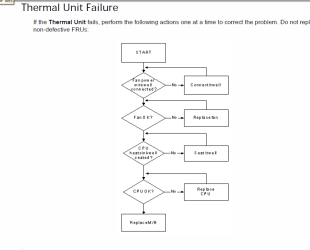
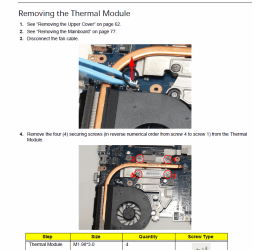
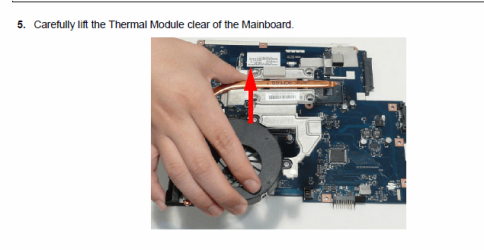
You should find and read the Service Manual for your laptop before attempting this and only if you are mechanically inclined. Otherwise, take it to a repair shop. I would not run the unit for long without a working thermal unit or you could do more damage.

Some stuff from a Service Manual below:
 

Attachments

  • Flowchart.PNG
    Flowchart.PNG
    15.4 KB · Views: 146
  • Remove 1.PNG
    Remove 1.PNG
    127.9 KB · Views: 194
  • Remove 2.PNG
    Remove 2.PNG
    57.5 KB · Views: 116

My Computer My Computer

At a glance

Windows 7 64 Bit Home Premium SP1i7-3820GSkill F3-14900CL9Q - 16GBEVGA GeForce GTX660 - Driver 352.86
Computer type
PC/Desktop
Computer Manufacturer/Model Number
Home Built - Jan 2013
OS
Windows 7 64 Bit Home Premium SP1
CPU
i7-3820
Motherboard
Asus P9X79-PRO - Bios 4608
Memory
GSkill F3-14900CL9Q - 16GB
Graphics Card(s)
EVGA GeForce GTX660 - Driver 352.86
Sound Card
On board Realtek ALC898
Monitor(s) Displays
Acer S271HL
Screen Resolution
1920 x 1080
Hard Drives
#1- Samsung 840 Pro Series
#2- Western Digital WD1002FAEX Sata3 Black
#3- Western Digital WD1002FAEX Sata3 Black
PSU
Corsair CMPSU-850TX-V2 - 850 watt (by Seasonic)
Case
Corsair Obsidian 550D
Cooling
Standard 3 120mm case fans, Cooler Master Hyper 212 EVO
Keyboard
MS KC-0405
Mouse
Intellimouse 5-button
Internet Speed
56 Mbits/Sec (on a good day)
Antivirus
Avast & Malwarebytes
Browser
Firefox
Other Info
Asus DVD - DRW-24B1ST 24X
the problem is i cannot find a service manual and sorry i wasnt clearer earlier but i put the computer to sleep mode (fan disabled), then i applied compressed air. i guess the motherboard is still drawing power meanwhile. still the computer works fine though (on soft usage - used it for like 2 hours by now)


thanks for taking your time to solve my problem.
 

My Computer My Computer

At a glance

Win7 Pro 64i7-3610QM8GB DDR3GTX 660M
Computer type
Laptop
Computer Manufacturer/Model Number
Y580
OS
Win7 Pro 64
CPU
i7-3610QM
Memory
8GB DDR3
Graphics Card(s)
GTX 660M
Screen Resolution
1920x1080
Mouse
G500s
Browser
Chrome

My Computer My Computer

At a glance

Win7 Ultimate x64382012 GB kitXFX nVidia GeForce GTX 560
Computer Manufacturer/Model Number
Home build
OS
Win7 Ultimate x64
CPU
3820
Motherboard
Rampage IV formula
Memory
12 GB kit
Graphics Card(s)
XFX nVidia GeForce GTX 560
Sound Card
On board card
Monitor(s) Displays
LG 27" x 2
Screen Resolution
1920 x 1080
Hard Drives
1 x OCZ Vertex 4 , 256Gb
PSU
875W Thermal Take
Case
Antec P160W
Cooling
Noctua
Keyboard
Logitech Wave Pro
Mouse
Logitech
Internet Speed
1.5 Mb
Other Info
Logitech G25 steering wheel, Logitech Extreme 3D Pro joystick.
Logitech surround sound speaker system.
Laptop makers do not make it easy to find the service manuals. If you find them they will be buried deep within the websites. You must be persistent.

I've had good luck finding them by searching for the model # and the word "repair", scrolling pages that explain repairs in detail, and finding links to the pdf there!
 

My Computer My Computer

At a glance

Windows 7 64 Bit Home Premium SP1i7-3820GSkill F3-14900CL9Q - 16GBEVGA GeForce GTX660 - Driver 352.86
Computer type
PC/Desktop
Computer Manufacturer/Model Number
Home Built - Jan 2013
OS
Windows 7 64 Bit Home Premium SP1
CPU
i7-3820
Motherboard
Asus P9X79-PRO - Bios 4608
Memory
GSkill F3-14900CL9Q - 16GB
Graphics Card(s)
EVGA GeForce GTX660 - Driver 352.86
Sound Card
On board Realtek ALC898
Monitor(s) Displays
Acer S271HL
Screen Resolution
1920 x 1080
Hard Drives
#1- Samsung 840 Pro Series
#2- Western Digital WD1002FAEX Sata3 Black
#3- Western Digital WD1002FAEX Sata3 Black
PSU
Corsair CMPSU-850TX-V2 - 850 watt (by Seasonic)
Case
Corsair Obsidian 550D
Cooling
Standard 3 120mm case fans, Cooler Master Hyper 212 EVO
Keyboard
MS KC-0405
Mouse
Intellimouse 5-button
Internet Speed
56 Mbits/Sec (on a good day)
Antivirus
Avast & Malwarebytes
Browser
Firefox
Other Info
Asus DVD - DRW-24B1ST 24X
thanks for all your help guys. actually, when i was using the computer earlier today to watch a tv show, i heard a fan running and in fact it was back in working order but this time it wasn't as strong. the fan is super weak now. it spins but very slowly and doesn't make the loud spinning sound anymore. something's up. at least it's connected right? but it's still weak cause when i use the computer, the processor usage goes to 100% and stays there. when i put a taken apart computer fan beside the fan vents, the usage goes down and the computer starts operating faster. so the problem here is that the fan isn't spinning fast enough.. : ( i guess i can use the external computer fan constantlyy
 

My Computer My Computer

At a glance

Win7 Pro 64i7-3610QM8GB DDR3GTX 660M
Computer type
Laptop
Computer Manufacturer/Model Number
Y580
OS
Win7 Pro 64
CPU
i7-3610QM
Memory
8GB DDR3
Graphics Card(s)
GTX 660M
Screen Resolution
1920x1080
Mouse
G500s
Browser
Chrome
The "booster fan" is a fine temporary solution. Nice improvisation!

But you need to replace that thermal fan.

There is a possibility that it is clogged with dust, hair, or sludge and could be cleaned, but my guess is burned out.
 

My Computer My Computer

At a glance

Windows 7 64 Bit Home Premium SP1i7-3820GSkill F3-14900CL9Q - 16GBEVGA GeForce GTX660 - Driver 352.86
Computer type
PC/Desktop
Computer Manufacturer/Model Number
Home Built - Jan 2013
OS
Windows 7 64 Bit Home Premium SP1
CPU
i7-3820
Motherboard
Asus P9X79-PRO - Bios 4608
Memory
GSkill F3-14900CL9Q - 16GB
Graphics Card(s)
EVGA GeForce GTX660 - Driver 352.86
Sound Card
On board Realtek ALC898
Monitor(s) Displays
Acer S271HL
Screen Resolution
1920 x 1080
Hard Drives
#1- Samsung 840 Pro Series
#2- Western Digital WD1002FAEX Sata3 Black
#3- Western Digital WD1002FAEX Sata3 Black
PSU
Corsair CMPSU-850TX-V2 - 850 watt (by Seasonic)
Case
Corsair Obsidian 550D
Cooling
Standard 3 120mm case fans, Cooler Master Hyper 212 EVO
Keyboard
MS KC-0405
Mouse
Intellimouse 5-button
Internet Speed
56 Mbits/Sec (on a good day)
Antivirus
Avast & Malwarebytes
Browser
Firefox
Other Info
Asus DVD - DRW-24B1ST 24X
hi! im shander, i have dell latitude e6400. my laptop is working normal but the fan is not spinning, i already replace the fan w/ new and working fan, but still the laptop fan not spinning.can you help me to fix it.
 

My Computer My Computer

At a glance

windows 7 home basic 32bit
OS
windows 7 home basic 32bit
Back
Top