
Solved Fat32 formatter crashed and deleted windows 7 partition

skivar

New member
Local time
4:42 PM
Messages
5
Location
Bergen, Norway
It all started when I was going to format a USB stick with fat32formatter. When I hit initialize drive, windows went to blue screen with lots of errors. Cant remember which. When the PC boots again its just blinking _.

I ran Seagate Seatools and checked the harddisk. It passed the short test. It shows up as it should in BIOS. I tried win startup repair and recovery, but its stuck at attempting to repair for hours without anything happening.

I ran win 7 installation from USB and the harddisk shows up, but only as Disk 0 Unallocated Space 1863 GB(usually a bit over 2TB).

I have lots of data that I want to keep. How can I save the data? And how can I repair the windows installation?

How in the world can this happen? How can windows 7 delete itself while in windows 7. :shock:

Computer:
Win 7 64-bit
i5 2.9GHz
ASUS P8H67
Seagate Barracuda green 2TB
8GB 1333mhz RAM
HD 6870
 

My Computer My Computer

At a glance

Win 7 64-biti5 2310 2.9Ghz8 GB 1333mhz CrucialSapphire HD 6870
OS
Win 7 64-bit
CPU
i5 2310 2.9Ghz
Motherboard
ASUS P8H67
Memory
8 GB 1333mhz Crucial
Graphics Card(s)
Sapphire HD 6870
Hi,

Follow this to backup your data first:

http://www.sevenforums.com/tutorial...ate-live-cd-dvd-usb-use-emergency-backup.html

Why did you not just format to FAT32 using the Windows inbuilt format option???? It sounds to me as if you may have mistakenly formatted your C:

Use this to display your Disk Management screen, then take a photo of that and post it here. Do NOT do any other manipulation of the partitions yet.

http://www.sevenforums.com/tutorials/93322-partition-wizard-use-bootable-cd.html

Regards,
Golden
 

My Computer My Computer

At a glance

Windows 10 Pro x64 ; Xubuntu x64Intel i7 860 @ 2.80 GHz O/C'ed to 4.0GHz16GB Corsair Vengance DDR3 @ 661 MHz Dual Cha...EVGA NVidia GTX 560 1024MB
Computer type
PC/Desktop
Computer Manufacturer/Model Number
Golden Mk. I.4
OS
Windows 10 Pro x64 ; Xubuntu x64
CPU
Intel i7 860 @ 2.80 GHz O/C'ed to 4.0GHz
Motherboard
Gigabyte P55A-UD3R Rev.1. Award BIOS F13
Memory
16GB Corsair Vengance DDR3 @ 661 MHz Dual Channel (9-9-9-24)
Graphics Card(s)
EVGA NVidia GTX 560 1024MB
Sound Card
Realtek Integrated
Monitor(s) Displays
Dual Samsung SyncMaster 2494HS
Screen Resolution
1920*1080 and 1920*1080
Hard Drives
1*Samsung 840 EVO 120GB SSD;
1*OCZ Vertex 2 60GB SSD;
2*Samsung F3 SpinPoint 1TB in RAID0;
1*Samsung F1 SpinPoint 1TB;
2*Western Digital 1TB External USB 3.0
1*Western Digital 500GB External USB 3.0
1*Seagate 500GB External USB 2.0
PSU
Thermaltake ToughPower QFan 750W
Case
Thermaltake Element S VK60001W2Z
Cooling
Corsair H60 Water Cooling, 2*230mm and 2*80mm case fans
Keyboard
Logitech G110
Mouse
Logitech MX518
I tried Peppermint, but no files shows up in its browser.
 

My Computer My Computer

At a glance

Win 7 64-biti5 2310 2.9Ghz8 GB 1333mhz CrucialSapphire HD 6870
OS
Win 7 64-bit
CPU
i5 2310 2.9Ghz
Motherboard
ASUS P8H67
Memory
8 GB 1333mhz Crucial
Graphics Card(s)
Sapphire HD 6870
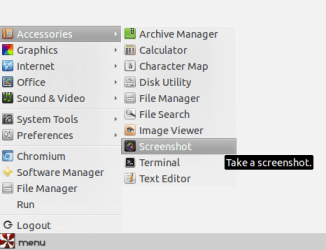
You used Peppermint. OK run Gparted in it. It will show you the hard disk. Take a screenshot and post it. ( Peppermint has a screenshot utility in it. I even made a screenshot with it yesterday.:)) Let us see whether we can make something out of it.
 

My Computer My Computer

At a glance

Windows 7 Home Premium 32 bit
OS
Windows 7 Home Premium 32 bit
It shows unallocated space 1.82GB. I didnt find the print screen app.
 

My Computer My Computer

At a glance

Win 7 64-biti5 2310 2.9Ghz8 GB 1333mhz CrucialSapphire HD 6870
OS
Win 7 64-bit
CPU
i5 2310 2.9Ghz
Motherboard
ASUS P8H67
Memory
8 GB 1333mhz Crucial
Graphics Card(s)
Sapphire HD 6870
Yeah you selected the wrong drive to format.
 

My Computer My Computer

At a glance

7 x64
OS
7 x64
It shows unallocated space 1.82GB. I didnt find the print screen app.

Menu>Accessories>Screenshot

screenshot.png

EDIT: Save the screenshot to an external device and post it.
 

My Computer My Computer

At a glance

Windows 7 Home Premium 32 bit
OS
Windows 7 Home Premium 32 bit
I dont have a external device to store on. Why cant I store it on the usb stick?

Gparted shows:
PARTITION - FILE SYSTEM--SIZE
/dev/sda1 (exclemation symbol)NTFS 100.00 MB --
unallocated unallocated 1.82 TB
 

My Computer My Computer

At a glance

Win 7 64-biti5 2310 2.9Ghz8 GB 1333mhz CrucialSapphire HD 6870
OS
Win 7 64-bit
CPU
i5 2310 2.9Ghz
Motherboard
ASUS P8H67
Memory
8 GB 1333mhz Crucial
Graphics Card(s)
Sapphire HD 6870
A USB stick is an External Device.
 

My Computer My Computer

At a glance

7 x64
OS
7 x64
Well Im back up and running thanks to testdisk. Everythings back to where it was. :)

I ran testdisk in dos and fixed the boot partition.
I used this tutorial

Thanks for the guidance.
 

My Computer My Computer

At a glance

Win 7 64-biti5 2310 2.9Ghz8 GB 1333mhz CrucialSapphire HD 6870
OS
Win 7 64-bit
CPU
i5 2310 2.9Ghz
Motherboard
ASUS P8H67
Memory
8 GB 1333mhz Crucial
Graphics Card(s)
Sapphire HD 6870
Hi,
I think I am stuck on the same problem. my Sony laptop crashed white I was using fat32 formatter to format a toshiba external hard drive but I didn't realize my laptop also has a toshiba hard drive and I think I just wiped my computer. I have read all the posts here but I'm not confident in using dos and don't completely understand the instructions. At the moment the screen tells be to insert the boot disc which I don't have because the laptop didn't come with one when I bought it. I am downloading one which I hope will work but I have no idea where to go from there. I am hoping once I have a boot disc I can access system restore and restore it back to it's previous state. Does anyone know if this might work? Have I deleted all my data and is there any way to get it back now. Do you think Sony support could help walk me through?

Any ideas?

Thanks.
 

My Computer My Computer

At a glance

Windows 7 ultimate 32 bit
OS
Windows 7 ultimate 32 bit
Back
Top