few seconds black screen with cursor after windows logo

winkawak

New member
Member
VIP
Local time
9:09 PM
Messages
107
I have my OS installed on my SSD. Sometimes when i power on my computer, after it shows the windows logo screen there will be a black screen with cursor for like 15-20 seconds before logon screen comes on. This doesnt always happen, i find it doing this most of the time if i had the pc off over night and power it on in the morning.
 

My Computer My Computer

Computer type
PC/Desktop
OS
windows 7 pro 64bit
CPU
i7 5820k
Motherboard
Asrock x99x killer
Memory
Crucial ballistix sport 2x4gb
Graphics Card(s)
Msi gtx 970
Hard Drives
Crucial mx100 256gb
Wd blue 1 tb
PSU
evga 850w
It's not abnormal to have a black screen before the login screen. 15 to 20 seconds is a little long if you're using an SSD, but during that time Windows is loading drivers and all of the stuff in your system tray.

Have you got a lot of programs in your system tray? Or set to load at bootup? Try using msconfig and setting all of the startup programs to off, except your anti-virus and see if that speeds things up.
 

My Computer My Computer

Computer type
PC/Desktop
Computer Manufacturer/Model Number
Mellon Labs (custom build)
OS
Win 7 Pro x64/Win 10 Pro x64 dual boot
CPU
AMD FX 8350 Vishera @ 4200
Motherboard
ASUS M5A97 R2.0
Memory
16 GB Mushkin Blackline DDR3-2400 @ 1866 (9-10-10-10-31)
Graphics Card(s)
XFX Radeon R9 280 Double D Black Edition
Sound Card
Realtek HD Audio on MB. Sounds great.
Monitor(s) Displays
Acer 24", Acer 22"
Screen Resolution
3840 x 1080
Hard Drives
1 x Mushkin Chronos 120 GB SSD (Win 10)
1 x Samsung 850 EVO 250 GB SSD (Win 7)
1 x WD 1TB SATA Blue
1 x WD 1TB SATA Green
PSU
Corsair TX-750
Case
CoolerMaster HAF 912+
Cooling
Coolermaster Seidon 240M Liquid AIO. 6 case fans
Keyboard
Logitech G710+
Mouse
Logitech G500s
Internet Speed
Much better since I got fiber, but still way overpriced.
Antivirus
MSE, Malware Bytes for scanning
Browser
Firefox
Other Info
Corsair VOID USB headphones.

A Mellon Labs X-1 - LCD Smartie driven system status display.

Brought to you by the letter E
It's not abnormal to have a black screen before the login screen. 15 to 20 seconds is a little long if you're using an SSD, but during that time Windows is loading drivers and all of the stuff in your system tray.

Have you got a lot of programs in your system tray? Or set to load at bootup? Try using msconfig and setting all of the startup programs to off, except your anti-virus and see if that speeds things up.
No and no, the only thing on my startup is my antivirus. The weird part is this delay is random and tend to happen when i power on in the morning when it has been off overnight. After that if i restart or shut off during the day it will boot up immediately. Any guesses ?
 

My Computer My Computer

Computer type
PC/Desktop
OS
windows 7 pro 64bit
CPU
i7 5820k
Motherboard
Asrock x99x killer
Memory
Crucial ballistix sport 2x4gb
Graphics Card(s)
Msi gtx 970
Hard Drives
Crucial mx100 256gb
Wd blue 1 tb
PSU
evga 850w
If this is after the Win7 boot animation then drivers have already loaded.

Try removing the password, reboot a few times to see if that's what's buggy.

What AV? Try turning it off or uninstalling it to run a few restarts. If it's the culprit you can improve performance with a free lightweight AV like MSE.

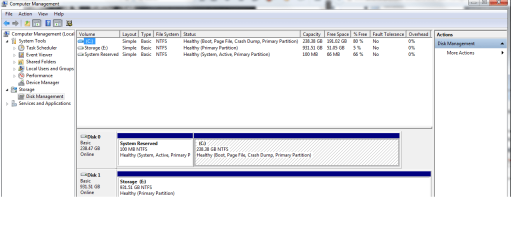
I'd say check the startup with a Startup Repair but if it's already past the boot animation I don't think that applies, but you can try it anyway. If you have boot issues we should see a screenshot of Disk Management - Post a Screen Capture Image
 
If this is after the Win7 boot animation then drivers have already loaded.

Try removing the password, reboot a few times to see if that's what's buggy.

What AV? Try turning it off or uninstalling it to run a few restarts. If it's the culprit you can improve performance with a free lightweight AV like MSE.

I'd say check the startup with a Startup Repair but if it's already past the boot animation I don't think that applies, but you can try it anyway. If you have boot issues we should see a screenshot of Disk Management - Post a Screen Capture Image
Cant be the password of antivirus or login, because this 15-20 second delay happens sometimes and when it does happen it wont do it again rest of the day. I have bitdefender antivirus, i ran checkdisk and wd diagnostic on my os drive and storage both seems fine. Anymore guesses? Have you guys heard or seen this problem before? i feel like i always get the weird problems no one else has.
 

My Computer My Computer

Computer type
PC/Desktop
OS
windows 7 pro 64bit
CPU
i7 5820k
Motherboard
Asrock x99x killer
Memory
Crucial ballistix sport 2x4gb
Graphics Card(s)
Msi gtx 970
Hard Drives
Crucial mx100 256gb
Wd blue 1 tb
PSU
evga 850w
We solve most problems here when there is cooperation and an open mind.

It is an unusual problem but we solve most of those too.

Let me know the results of the steps I suggested and then we will try more. Someone else may have other ideas or have seen this specific issue.
 
So i tried unistalling my antivirus and removed my login password, still happens randomly when i start the computer in the morning.
 

My Computer My Computer

Computer type
PC/Desktop
OS
windows 7 pro 64bit
CPU
i7 5820k
Motherboard
Asrock x99x killer
Memory
Crucial ballistix sport 2x4gb
Graphics Card(s)
Msi gtx 970
Hard Drives
Crucial mx100 256gb
Wd blue 1 tb
PSU
evga 850w
here you go
 

Attachments

  • Untitled.png
    Untitled.png
    31.1 KB · Views: 3

My Computer My Computer

Computer type
PC/Desktop
OS
windows 7 pro 64bit
CPU
i7 5820k
Motherboard
Asrock x99x killer
Memory
Crucial ballistix sport 2x4gb
Graphics Card(s)
Msi gtx 970
Hard Drives
Crucial mx100 256gb
Wd blue 1 tb
PSU
evga 850w
bump
 

My Computer My Computer

Computer type
PC/Desktop
OS
windows 7 pro 64bit
CPU
i7 5820k
Motherboard
Asrock x99x killer
Memory
Crucial ballistix sport 2x4gb
Graphics Card(s)
Msi gtx 970
Hard Drives
Crucial mx100 256gb
Wd blue 1 tb
PSU
evga 850w
Looks correct. Did you try all the steps given? Some of us will stop helping when steps are in any way debated. If you have questions then ask them but we wouldn't suggest steps not based on actual experience, often in thousands of cases.
 
Back
Top