Solved File associations

Retiredbill

New member
Member
VIP
Local time
9:17 PM
Messages
247
I'm running Win 7, home premium, 64 bit. I'm trying to set up file associations. I went to the control panel and opened file associations. The .xls file type (Excel) is not listed. Any idea how I would get it included? I got an .XLS file sent to me and I can't open it without saving it and opening Excel to get it.
 

My Computer

Computer Manufacturer/Model Number
Gateway SX 2841
OS
Win7, home premium, 64 bit
CPU
2.9 GHZ
Memory
6 Gbytes
Hard Drives
1 terra byte

My Computer

Computer Manufacturer/Model Number
HP Pavilion Elite 495UK
OS
Windows 7 Ultimate SP1 64-Bit
CPU
Intel Core i7 870 @ 2.93GHz
Motherboard
MSI 2A9C (CPU1)
Memory
8Gb Dual-Channel DDR3 @ 664MHz
Graphics Card(s)
nVidia GeForce GTX 460 1024MB dedicated RAM
Sound Card
Realtek HD Audio
Monitor(s) Displays
HP2310i
Screen Resolution
1920 x 1080
Hard Drives
1x1954GB Hitachi HDS22020ALA 330 (RAID), 1x1954GB Hitachi External for backup and storage
PSU
460W
Case
HP Elite
Cooling
Air cooled
Keyboard
Logitech K750 solar-powered keyboard
Mouse
Logitech Wireless M180 mouse
Internet Speed
2Mb
Other Info
Pure Avanti Flow Internet Radio with iPod Dock, 64Gb iPod, HP USB Speakers, Sony MDR-V500 Headphones, Sony Vaio F-Series Laptop
I'm running Win 7, home premium, 64 bit. I'm trying to set up file associations. I went to the control panel and opened file associations. The .xls file type (Excel) is not listed. Any idea how I would get it included? I got an .XLS file sent to me and I can't open it without saving it and opening Excel to get it.
Very strange, if you installed a standard version of Microsoft Office. It should have automatically added default file associations for both XLS and XLSX to Excel.


Anyway, if you do a HELP for "file associations" here's another way you can establish a default association:

Change the program that opens a type of file.

If you double-click a file in Windows and it opens in the wrong software program, follow these steps to choose the program you would prefer to use. You can change this setting for an individual file, or you change this setting so Windows opens all files of the same type in the software program you choose.

  1. Open the folder that contains the file you want to change.
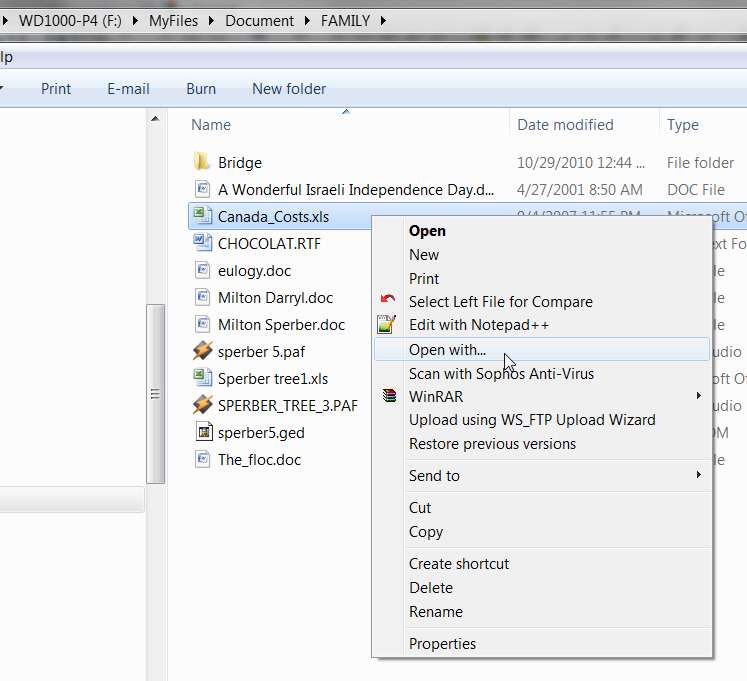
  2. Right-click the file you want to change and then, depending on the type of file, either click Open with or point to Open with and then click Choose default program.
  3. Click the program you want to use to open the file.
  4. Do one of the following:
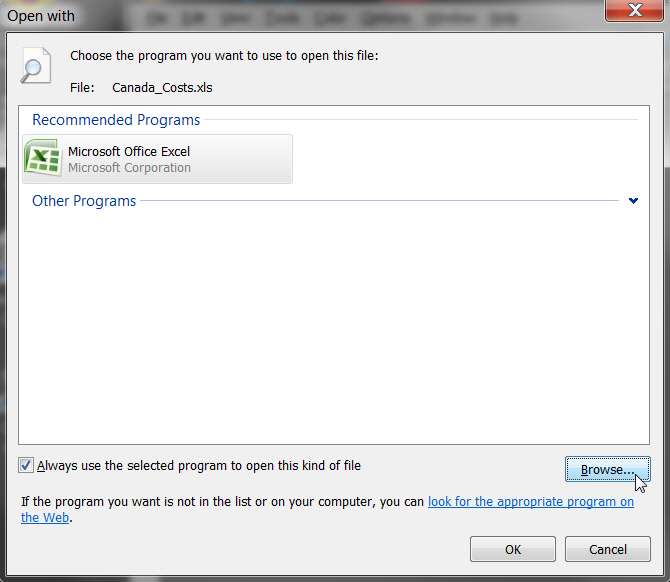
    • If you want all files of that type to open in the same software program, select the Always use the selected program to open this kind of file check box, and then click OK.
    • If you want only that file to open in the software program this one time, clear the Always use the selected program to open this kind of file check box, and then click OK.
 

My Computer

Computer type
PC/Desktop
Computer Manufacturer/Model Number
Home-built, two systems (1) and (2)
OS
Windows 7 Pro x64 (1), Win7 Pro X64 (2)
CPU
i5-3350p 3.1Ghz/6MB-cache (1); E8400 3.0Ghz/6MB-cache (2)
Motherboard
ASUS P8Z77-V Pro (1); ASUS P5Q3 (2)
Memory
8GB PC3-12800 DDR3 (1); 4GB PC3-10600 DDR3 (2)
Graphics Card(s)
ATI HD7750 (1), (see TV cards); ATI R7 250 (2)
Sound Card
Realtek ALC892 HD Audio (1); Realtek ALC1200 HD Audio (2)
Monitor(s) Displays
Eizo HD2441W LCD, Eizo S2433W (1); Eizo 24" S2433W (2)
Screen Resolution
1920x1200, 1920x1200 (1); 1920x1200 (2)
Hard Drives
(1) 1TB SATA-II (7200RPM), 2x2TB SATA-III (7200RPM), 250GB SATA-III (10000RPM) for OS; 2x2TB external USB 3.0

(2) 320GB SATA-II (7200RPM), 750GB SATA-II (7200RPM), 150GB SATA-II (10000RPM) for OS; 2TB external USB 3.0
PSU
Nesteq ECS-6001 600W (1); Nesteq ECS-5001 500W (2)
Case
Acousti-Case 360 (1) and (2)
Cooling
Noctua NH-U12P SE2 for CPU, 2x120mm case fans (1) and (2)
Keyboard
IBM PS/2 (1) and (2)
Mouse
Logitech MX Revolution wireless (1); Microsoft wired (2)
Internet Speed
100mbps down / 10mbps up
Antivirus
Microsoft Security Essentials; Malwarebyte Anti-Malware Pro
Browser
Firefox
Other Info
Ceton InfiniTV 4-tuner cablecard-enabled TV card as well as Hauppauge HVR-2250 OTA/ATSC 2-tuner TV card in (1), running under Win7 WMC
I would like to have the .xls file listed as now I'm using Open Office instead of an old Excel. How do I get it listed in the file associations list? XLS is not currently listed.
 

My Computer

Computer Manufacturer/Model Number
Gateway SX 2841
OS
Win7, home premium, 64 bit
CPU
2.9 GHZ
Memory
6 Gbytes
Hard Drives
1 terra byte
I would like to have the .xls file listed as now I'm using Open Office instead of an old Excel. How do I get it listed in the file associations list? XLS is not currently listed.
As was described above in the HELP snippet shown, you just need to use the "Open with..." dialog to set the default program to be used anytime you open an XLS file.

For example, open Windows Explorer and navigate to some folder where you've saved one of these XLS files. Then right-click on the file name and notice that there is an "open with..." item in the context menu:

http://www.sevenforums.com/tutorials/12196-open-change-default-program.html


openwith1.jpg


Click on that "open with..." item, and you'll get a new window that allows you to pick the appropriate program to be used for opening any file of this type. If the program you want to use isn't shown in the list populated by Windows, you can push the "Browse" button to navigate to the appropriate program and select it.

There's also a checkbox, to designate whether or not you want the program you just selected to be used to open this file to be used for (a) just this one particular file, in which case you'd un-check the "always use..." item, or (b) ALWAYS use the designated program for a file of this type, in which case you'd check the "always use..." item.

openwith2.jpg


I believe this process should probably establish an entry in the "Default Programs" list for the specified file type, if there wasn't one already there before.
 
Last edited by a moderator:

My Computer

Computer type
PC/Desktop
Computer Manufacturer/Model Number
Home-built, two systems (1) and (2)
OS
Windows 7 Pro x64 (1), Win7 Pro X64 (2)
CPU
i5-3350p 3.1Ghz/6MB-cache (1); E8400 3.0Ghz/6MB-cache (2)
Motherboard
ASUS P8Z77-V Pro (1); ASUS P5Q3 (2)
Memory
8GB PC3-12800 DDR3 (1); 4GB PC3-10600 DDR3 (2)
Graphics Card(s)
ATI HD7750 (1), (see TV cards); ATI R7 250 (2)
Sound Card
Realtek ALC892 HD Audio (1); Realtek ALC1200 HD Audio (2)
Monitor(s) Displays
Eizo HD2441W LCD, Eizo S2433W (1); Eizo 24" S2433W (2)
Screen Resolution
1920x1200, 1920x1200 (1); 1920x1200 (2)
Hard Drives
(1) 1TB SATA-II (7200RPM), 2x2TB SATA-III (7200RPM), 250GB SATA-III (10000RPM) for OS; 2x2TB external USB 3.0

(2) 320GB SATA-II (7200RPM), 750GB SATA-II (7200RPM), 150GB SATA-II (10000RPM) for OS; 2TB external USB 3.0
PSU
Nesteq ECS-6001 600W (1); Nesteq ECS-5001 500W (2)
Case
Acousti-Case 360 (1) and (2)
Cooling
Noctua NH-U12P SE2 for CPU, 2x120mm case fans (1) and (2)
Keyboard
IBM PS/2 (1) and (2)
Mouse
Logitech MX Revolution wireless (1); Microsoft wired (2)
Internet Speed
100mbps down / 10mbps up
Antivirus
Microsoft Security Essentials; Malwarebyte Anti-Malware Pro
Browser
Firefox
Other Info
Ceton InfiniTV 4-tuner cablecard-enabled TV card as well as Hauppauge HVR-2250 OTA/ATSC 2-tuner TV card in (1), running under Win7 WMC
If you haven't installed Microsoft Excel, then its file associations will not be listed.

As you are using Open Office you could download the Excel Viewer and use that to view Excel files.

How to obtain the latest Microsoft Excel Viewer
 

My Computer

Computer Manufacturer/Model Number
HP Pavilion Elite 495UK
OS
Windows 7 Ultimate SP1 64-Bit
CPU
Intel Core i7 870 @ 2.93GHz
Motherboard
MSI 2A9C (CPU1)
Memory
8Gb Dual-Channel DDR3 @ 664MHz
Graphics Card(s)
nVidia GeForce GTX 460 1024MB dedicated RAM
Sound Card
Realtek HD Audio
Monitor(s) Displays
HP2310i
Screen Resolution
1920 x 1080
Hard Drives
1x1954GB Hitachi HDS22020ALA 330 (RAID), 1x1954GB Hitachi External for backup and storage
PSU
460W
Case
HP Elite
Cooling
Air cooled
Keyboard
Logitech K750 solar-powered keyboard
Mouse
Logitech Wireless M180 mouse
Internet Speed
2Mb
Other Info
Pure Avanti Flow Internet Radio with iPod Dock, 64Gb iPod, HP USB Speakers, Sony MDR-V500 Headphones, Sony Vaio F-Series Laptop
Thanks. I saved the file that came in with that came in the email and did as you suggested and opened the file a selected the Open Office app and specified that files like this should be opened with this app. It worked and I checked the file associations and sure enough .xls was now included with Open Office as the designated opener.

I really appreciate your help
 

My Computer

Computer Manufacturer/Model Number
Gateway SX 2841
OS
Win7, home premium, 64 bit
CPU
2.9 GHZ
Memory
6 Gbytes
Hard Drives
1 terra byte
Excellent!

Glad to be of assistance, and that your problem is now resolved.
 

My Computer

Computer type
PC/Desktop
Computer Manufacturer/Model Number
Home-built, two systems (1) and (2)
OS
Windows 7 Pro x64 (1), Win7 Pro X64 (2)
CPU
i5-3350p 3.1Ghz/6MB-cache (1); E8400 3.0Ghz/6MB-cache (2)
Motherboard
ASUS P8Z77-V Pro (1); ASUS P5Q3 (2)
Memory
8GB PC3-12800 DDR3 (1); 4GB PC3-10600 DDR3 (2)
Graphics Card(s)
ATI HD7750 (1), (see TV cards); ATI R7 250 (2)
Sound Card
Realtek ALC892 HD Audio (1); Realtek ALC1200 HD Audio (2)
Monitor(s) Displays
Eizo HD2441W LCD, Eizo S2433W (1); Eizo 24" S2433W (2)
Screen Resolution
1920x1200, 1920x1200 (1); 1920x1200 (2)
Hard Drives
(1) 1TB SATA-II (7200RPM), 2x2TB SATA-III (7200RPM), 250GB SATA-III (10000RPM) for OS; 2x2TB external USB 3.0

(2) 320GB SATA-II (7200RPM), 750GB SATA-II (7200RPM), 150GB SATA-II (10000RPM) for OS; 2TB external USB 3.0
PSU
Nesteq ECS-6001 600W (1); Nesteq ECS-5001 500W (2)
Case
Acousti-Case 360 (1) and (2)
Cooling
Noctua NH-U12P SE2 for CPU, 2x120mm case fans (1) and (2)
Keyboard
IBM PS/2 (1) and (2)
Mouse
Logitech MX Revolution wireless (1); Microsoft wired (2)
Internet Speed
100mbps down / 10mbps up
Antivirus
Microsoft Security Essentials; Malwarebyte Anti-Malware Pro
Browser
Firefox
Other Info
Ceton InfiniTV 4-tuner cablecard-enabled TV card as well as Hauppauge HVR-2250 OTA/ATSC 2-tuner TV card in (1), running under Win7 WMC
Back
Top