Solved File Transfer speed slows down over time.

imeem

New member
Member
VIP
Local time
4:17 PM
Messages
387
Is this normal? Over a long period of time, my file transfer/copying speed slows down. For example, at the beginning it's 80-90 mb/s. Then like 5-10 mins later it goes to 30 mb/s or lower. I notice this for big files, not so much with smaller files.

I tried with my internal hard drive and the same hard drive in a enclosure via esata.

This is annoying especially you need to transfer over 100 GBs of data...

I notices this when copying/transferring files from my internal Seagate drive to my external WD drive and vice versa.
 
Last edited:

My Computer

Computer type
PC/Desktop
Computer Manufacturer/Model Number
Acer M802
OS
Win 7 & 10 x64
CPU
Intel(R) Core(TM)2 Quad CPU Q8400 @ 2.66GHz (4 CPUs), ~2.7GH
Motherboard
MB.SCQ07.002 MB KIT G43 ICH10R HMII EUPLOT6 ECS R
Memory
8GB DDR2
Graphics Card(s)
HD 6970 2 GB
Sound Card
Realtek ALC 888s
Monitor(s) Displays
AOC
Screen Resolution
1920x1080 60hz
Hard Drives
WD Black 1 TB

WD My Book Essential 1 TB external HDD
PSU
Corsair TX650m
Case
CM 690 II Advanced mid tower
Cooling
fan
Have you done Checkdisk to see if there is any errors??

Use this to post a snapshot of the SMART values of the drive you are referring to.....

What Temp is your HDD running on??
 

My Computer

Computer Manufacturer/Model Number
Nothing specific....what ever the clients provide for Repair
OS
Windows 7 ultimate x64

Attachments

  • Capture.JPG
    Capture.JPG
    93.9 KB · Views: 68

My Computer

Computer type
PC/Desktop
Computer Manufacturer/Model Number
Acer M802
OS
Win 7 & 10 x64
CPU
Intel(R) Core(TM)2 Quad CPU Q8400 @ 2.66GHz (4 CPUs), ~2.7GH
Motherboard
MB.SCQ07.002 MB KIT G43 ICH10R HMII EUPLOT6 ECS R
Memory
8GB DDR2
Graphics Card(s)
HD 6970 2 GB
Sound Card
Realtek ALC 888s
Monitor(s) Displays
AOC
Screen Resolution
1920x1080 60hz
Hard Drives
WD Black 1 TB

WD My Book Essential 1 TB external HDD
PSU
Corsair TX650m
Case
CM 690 II Advanced mid tower
Cooling
fan
well i need the SMART for the Seagate Barracuda,,,, and the one you showed here the external drive...

If you see crystal info... click on the second hard drive on the top... where it says caution...\

Post the pic here again
 

My Computer

Computer Manufacturer/Model Number
Nothing specific....what ever the clients provide for Repair
OS
Windows 7 ultimate x64
What are the quoted speeds for your drive?

Usually the "sustained" speeds are considerbly lower.

I have always found transfers start off fast and slow after a few minutes.
 

My Computer

OS
Windows 7 Professional 64 bit
well i need the SMART for the Seagate Barracuda,,,, and the one you showed here the external drive...

If you see crystal info... click on the second hard drive on the top... where it says caution...\

Post the pic here again

but my question is referring to my external drive tho.


What are the quoted speeds for your drive?

Usually the "sustained" speeds are considerbly lower.

I have always found transfers start off fast and slow after a few minutes.

I have no idea. srry
 

My Computer

Computer type
PC/Desktop
Computer Manufacturer/Model Number
Acer M802
OS
Win 7 & 10 x64
CPU
Intel(R) Core(TM)2 Quad CPU Q8400 @ 2.66GHz (4 CPUs), ~2.7GH
Motherboard
MB.SCQ07.002 MB KIT G43 ICH10R HMII EUPLOT6 ECS R
Memory
8GB DDR2
Graphics Card(s)
HD 6970 2 GB
Sound Card
Realtek ALC 888s
Monitor(s) Displays
AOC
Screen Resolution
1920x1080 60hz
Hard Drives
WD Black 1 TB

WD My Book Essential 1 TB external HDD
PSU
Corsair TX650m
Case
CM 690 II Advanced mid tower
Cooling
fan
yes i understand

WD is fine... there is not issue with it..... but if your are copying from the seagate to your WD... then there is a problem.... because... if the other drive has bad sectors... then your file transfer will take ages...

So if you let me knwo the SMART values of the other driver... i can advice
 

My Computer

Computer Manufacturer/Model Number
Nothing specific....what ever the clients provide for Repair
OS
Windows 7 ultimate x64

Attachments

  • Capture.JPG
    Capture.JPG
    104.2 KB · Views: 124

My Computer

Computer type
PC/Desktop
Computer Manufacturer/Model Number
Acer M802
OS
Win 7 & 10 x64
CPU
Intel(R) Core(TM)2 Quad CPU Q8400 @ 2.66GHz (4 CPUs), ~2.7GH
Motherboard
MB.SCQ07.002 MB KIT G43 ICH10R HMII EUPLOT6 ECS R
Memory
8GB DDR2
Graphics Card(s)
HD 6970 2 GB
Sound Card
Realtek ALC 888s
Monitor(s) Displays
AOC
Screen Resolution
1920x1080 60hz
Hard Drives
WD Black 1 TB

WD My Book Essential 1 TB external HDD
PSU
Corsair TX650m
Case
CM 690 II Advanced mid tower
Cooling
fan
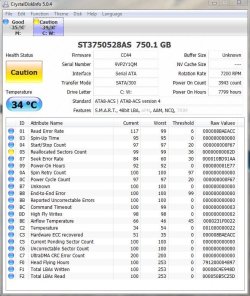
There you go

you have "Reallocated sector counts"... the raw value is 45 (in decimel)... way above the Threshold value of 36..... thats an warning for a drive failure..

Please back up any files from this drive asap.... and get it replaced if under warranty

That also explains.... why you will have a slow speed of transfer from your seagate to WD
 

My Computer

Computer Manufacturer/Model Number
Nothing specific....what ever the clients provide for Repair
OS
Windows 7 ultimate x64
There you go

you have "Reallocated sector counts"... the raw value is 45 (in decimel)... way above the Threshold value of 36..... thats an warning for a drive failure..

Please back up any files from this drive asap.... and get it replaced if under warranty

That also explains.... why you will have a slow speed of transfer from your seagate to WD

k thx. Is there anything i can do other than back up my drive? Like run check disk/fix errors and stuff?
 

My Computer

Computer type
PC/Desktop
Computer Manufacturer/Model Number
Acer M802
OS
Win 7 & 10 x64
CPU
Intel(R) Core(TM)2 Quad CPU Q8400 @ 2.66GHz (4 CPUs), ~2.7GH
Motherboard
MB.SCQ07.002 MB KIT G43 ICH10R HMII EUPLOT6 ECS R
Memory
8GB DDR2
Graphics Card(s)
HD 6970 2 GB
Sound Card
Realtek ALC 888s
Monitor(s) Displays
AOC
Screen Resolution
1920x1080 60hz
Hard Drives
WD Black 1 TB

WD My Book Essential 1 TB external HDD
PSU
Corsair TX650m
Case
CM 690 II Advanced mid tower
Cooling
fan
Well it bad sector...

if it more of surface errors you can do a checkdisk to clear this off...

but from the looks of it...it more hardware...

just give a shot with chkdsk and let me know
 

My Computer

Computer Manufacturer/Model Number
Nothing specific....what ever the clients provide for Repair
OS
Windows 7 ultimate x64
Well it bad sector...

if it more of surface errors you can do a checkdisk to clear this off...

but from the looks of it...it more hardware...

just give a shot with chkdsk and let me know

i left the 2 boxes unchecked and scanned and said there was no errors.
 

My Computer

Computer type
PC/Desktop
Computer Manufacturer/Model Number
Acer M802
OS
Win 7 & 10 x64
CPU
Intel(R) Core(TM)2 Quad CPU Q8400 @ 2.66GHz (4 CPUs), ~2.7GH
Motherboard
MB.SCQ07.002 MB KIT G43 ICH10R HMII EUPLOT6 ECS R
Memory
8GB DDR2
Graphics Card(s)
HD 6970 2 GB
Sound Card
Realtek ALC 888s
Monitor(s) Displays
AOC
Screen Resolution
1920x1080 60hz
Hard Drives
WD Black 1 TB

WD My Book Essential 1 TB external HDD
PSU
Corsair TX650m
Case
CM 690 II Advanced mid tower
Cooling
fan
Well this should explain it better

You can't get rid of the smart errors using checkdisk. The HD firmware will do transparent bad sector reallocation, outside of windows control. There is reserve space on the disk for it to be able to transparently do this until that area of the disk fills up. SMART will have thresholds in place, once the reallocated sector count gets high enough it will trigger the warning/error. The bad sectors still shouldn't be visible to windows at this point.

If it ever gets to the point where windows can see bad sectors (ie you can use checkdisk to find them and mark them as bad), the area assigned for re-allocation has filled up and the HD can't do it transparently any more, and its time to chuck the disk.
 

My Computer

Computer Manufacturer/Model Number
Nothing specific....what ever the clients provide for Repair
OS
Windows 7 ultimate x64
and this is the wikipedia definition of reallocated sector count


Count of reallocated sectors. When the hard drive finds a read/write/verification error, it marks that sector as "reallocated" and transfers data to a special reserved area (spare area). This process is also known as remapping, and reallocated sectors are called "remaps". The raw value normally represents a count of the bad sectors that have been found and remapped. Thus, the higher the attribute value, the more sectors the drive has had to reallocate. This allows a drive with bad sectors to continue operation; however, a drive which has had any reallocations at all is significantly more likely to fail in the near future.[2] While primarily used as a metric of the life expectancy of the drive, this number also affects performance. As the count of reallocated sectors increases, the read/write speed tends to become worse because the drive head is forced to seek to the reserved area whenever a remap is accessed.
 

My Computer

Computer Manufacturer/Model Number
Nothing specific....what ever the clients provide for Repair
OS
Windows 7 ultimate x64
Your speed issue may not have anything to do with the reallocated sectors. You may not have anything to fix. The drive has sectors in reserve that it uses to replace bad ones when it detects them. Those could even be from the factory, but it probably means it has detected quite a few bad sectors and replaced them.

You can go to Seagate and get seatools to run a long drive test, but but you should back up the data first.
 

My Computer

Computer type
PC/Desktop
Computer Manufacturer/Model Number
Home built (GeneO industries)/Model 4
OS
Windows 10 Pro. EFI boot partition, full EFI boot
CPU
i7 4770k 4.4GHz (44-44-43-43 turbo) @ 1.248V
Motherboard
ASUS Maximus VI Hero
Memory
16GB (8GBx2) @2200 MHz G.skill Sniper 10-11-10-30-1, 1.6V
Graphics Card(s)
MSI GTX 970 Gaming 4G
Sound Card
Onboard SupremeFX Audio
Monitor(s) Displays
NEC Spectraview 2490WUXi-SV
Screen Resolution
1920 x 1200
Hard Drives
Samsung 850 Pro 256GB (OS), Samsung 2x 128GB 840 Pro SSD in RAID0, 3x WD Blue 6Gb/s 1TB RAID0, WD 2TB Black external USB 3.0, 2TB WD20EARS Green external USB 3.0, 2x 500GB Seagate and 1 750 GB external USB, 1x 350GB external USB3
PSU
Seasonic X-850 (2012 KM3 model)
Case
Fractal Design Define R4
Cooling
NH-D14, NF-F12, NF-A15; NF-P14, NF-P12,NF-A14, S12A PWM
Keyboard
Cooler Master Storm Quickfire Rapid - Brown
Mouse
Logitech G602
Internet Speed
126.4 Mb/s down, 24.3 Mb/s up
Other Info
USB 3.0 x8 , SATA III x8, eSATA, USB 2.0 x6. Samsung DVD R/W drive.

WEI: CPU 7.8, Memory 7.9, Graphics 7.9, Disk 7.9
GeneO

The reallocated sector count raw value is 45 and the threshold limit is 36.. which mean its 9 more than the available reserved spare space for allocation.... This could very well be scattered anywhere on the disk... and not necessary all together..

try running a file transfer on a drive with Bad sector..you will see a considerable decrease in the speed of the transfer... thats because the drive head is forced to seek the reserved area..

This drive maybe able to run for years or maybe days with these bad sectors... we cant be sure.. when it would fail...This is just an indication of an impending drive failure...
 

My Computer

Computer Manufacturer/Model Number
Nothing specific....what ever the clients provide for Repair
OS
Windows 7 ultimate x64
GeneO

The reallocated sector count raw value is 45 and the threshold limit is 36.. which mean its 9 more than the available reserved spare space for allocation.... This could very well be scattered anywhere on the disk... and not necessary all together..

try running a file transfer on a drive with Bad sector..you will see a considerable decrease in the speed of the transfer... thats because the drive head is forced to seek the reserved area..

This drive maybe able to run for years or maybe days with these bad sectors... we cant be sure.. when it would fail...This is just an indication of an impending drive failure...

That doesn't make sense. The SMART threshold does not equal what the drive has reserved - obviously since the drive has reallocated more than the threshold. The reallocated sectors will not slow the drive down but if the drive comes across new ones it will. So if it still transfers slowly and the reallocated sector count does not increase, then the speed has nothing to do with this.

The transfer speed behavior is not abnormal IME. Transfer speed calculation often starts out optimistic as it si filling buffer space etc. then decreases. If the files are not very big, the overhead of processing each file can be significant. The data gets moved from the source to memory then from memory to the destination. It is not uncommon for copying data to see around 1/2 the maximum transfer speed of the disk in my experience.
 

My Computer

Computer type
PC/Desktop
Computer Manufacturer/Model Number
Home built (GeneO industries)/Model 4
OS
Windows 10 Pro. EFI boot partition, full EFI boot
CPU
i7 4770k 4.4GHz (44-44-43-43 turbo) @ 1.248V
Motherboard
ASUS Maximus VI Hero
Memory
16GB (8GBx2) @2200 MHz G.skill Sniper 10-11-10-30-1, 1.6V
Graphics Card(s)
MSI GTX 970 Gaming 4G
Sound Card
Onboard SupremeFX Audio
Monitor(s) Displays
NEC Spectraview 2490WUXi-SV
Screen Resolution
1920 x 1200
Hard Drives
Samsung 850 Pro 256GB (OS), Samsung 2x 128GB 840 Pro SSD in RAID0, 3x WD Blue 6Gb/s 1TB RAID0, WD 2TB Black external USB 3.0, 2TB WD20EARS Green external USB 3.0, 2x 500GB Seagate and 1 750 GB external USB, 1x 350GB external USB3
PSU
Seasonic X-850 (2012 KM3 model)
Case
Fractal Design Define R4
Cooling
NH-D14, NF-F12, NF-A15; NF-P14, NF-P12,NF-A14, S12A PWM
Keyboard
Cooler Master Storm Quickfire Rapid - Brown
Mouse
Logitech G602
Internet Speed
126.4 Mb/s down, 24.3 Mb/s up
Other Info
USB 3.0 x8 , SATA III x8, eSATA, USB 2.0 x6. Samsung DVD R/W drive.

WEI: CPU 7.8, Memory 7.9, Graphics 7.9, Disk 7.9
GeneO

If you have a better solution to the user's problem... please feel free to reopen the thread by informing imeem about it...
 

My Computer

Computer Manufacturer/Model Number
Nothing specific....what ever the clients provide for Repair
OS
Windows 7 ultimate x64
You can go to Seagate and get seatools to run a long drive test, but but you should back up the data first.

K running seatools now. Give me a few hours.

EDIT: Long test said it passed.
 
Last edited:

My Computer

Computer type
PC/Desktop
Computer Manufacturer/Model Number
Acer M802
OS
Win 7 & 10 x64
CPU
Intel(R) Core(TM)2 Quad CPU Q8400 @ 2.66GHz (4 CPUs), ~2.7GH
Motherboard
MB.SCQ07.002 MB KIT G43 ICH10R HMII EUPLOT6 ECS R
Memory
8GB DDR2
Graphics Card(s)
HD 6970 2 GB
Sound Card
Realtek ALC 888s
Monitor(s) Displays
AOC
Screen Resolution
1920x1080 60hz
Hard Drives
WD Black 1 TB

WD My Book Essential 1 TB external HDD
PSU
Corsair TX650m
Case
CM 690 II Advanced mid tower
Cooling
fan
Has your reallocated sector count increased?

You might try your disk read rate with HDTune (free version). It will test the rate from one end of the platter to the other.

Cheers
 
Last edited:

My Computer

Computer type
PC/Desktop
Computer Manufacturer/Model Number
Home built (GeneO industries)/Model 4
OS
Windows 10 Pro. EFI boot partition, full EFI boot
CPU
i7 4770k 4.4GHz (44-44-43-43 turbo) @ 1.248V
Motherboard
ASUS Maximus VI Hero
Memory
16GB (8GBx2) @2200 MHz G.skill Sniper 10-11-10-30-1, 1.6V
Graphics Card(s)
MSI GTX 970 Gaming 4G
Sound Card
Onboard SupremeFX Audio
Monitor(s) Displays
NEC Spectraview 2490WUXi-SV
Screen Resolution
1920 x 1200
Hard Drives
Samsung 850 Pro 256GB (OS), Samsung 2x 128GB 840 Pro SSD in RAID0, 3x WD Blue 6Gb/s 1TB RAID0, WD 2TB Black external USB 3.0, 2TB WD20EARS Green external USB 3.0, 2x 500GB Seagate and 1 750 GB external USB, 1x 350GB external USB3
PSU
Seasonic X-850 (2012 KM3 model)
Case
Fractal Design Define R4
Cooling
NH-D14, NF-F12, NF-A15; NF-P14, NF-P12,NF-A14, S12A PWM
Keyboard
Cooler Master Storm Quickfire Rapid - Brown
Mouse
Logitech G602
Internet Speed
126.4 Mb/s down, 24.3 Mb/s up
Other Info
USB 3.0 x8 , SATA III x8, eSATA, USB 2.0 x6. Samsung DVD R/W drive.

WEI: CPU 7.8, Memory 7.9, Graphics 7.9, Disk 7.9
Back
Top