Files disappeared from Portable Hard Drive

Jurrienci

New member
Local time
9:17 AM
Messages
4
Hello Sevenforums,

I have a expansion portable drive 2tb from Seagate, I have been using it for over 2 years now without any problems until recently, today when I plugged it into my laptop all of my files were missing! I had over 700gb of files stored but now it shows me only 500mb is used of the 1,8tb available. So I tried using a program called 'Active Partition Recovery' And using that program I can see my files are still in there, they just dont show up when I open it manually. I am not very known with all this stuff so do you guys maybe know what is wrong?
If you need more information you can always ask ofcourse
 

My Computer My Computer

Computer type
PC/Desktop
OS
Windows,10 64bit
Welcome to the forum.

Open disk management, expand the columns so we can read them and with the sniping tool take a snapshot of the whole image.
Post it here as an attachment. (Go Advanced - Manage Attachments - Browse - upload)
 

My Computers My Computers

System One System Two

  • Computer type
    PC/Desktop
    Computer Manufacturer/Model Number
    custom build
    OS
    Windows 7 HP 64
    CPU
    i5 6600K - 800MHz to 4200MHz
    Motherboard
    GA-Z170-HD3P
    Memory
    4+4G GSkill DDR4 3000
    Graphics Card(s)
    IG - Intel 530
    Monitor(s) Displays
    Samsung 226BW
    Screen Resolution
    1680x1050
    Hard Drives
    (1) -1 SM951 – 128GB M.2 AHCI PCIe SSD drive for Windows 7 and Lubuntu
    (2) -1 WD SATA 3 - 1T for Data
    (3) -1 WD SATA 3 - 1T for backup
    PSU
    Thermaltake 450W TR2 gold
    Keyboard
    Old and good Chicony mechanical keyboard
    Mouse
    Logitech mX performance - 9 buttons (had to disable some)
    Internet Speed
    500Mb/s
    Browser
    Firefox 64
    Other Info
    TinyWall firewall
  • Computer type
    Laptop
    System Manufacturer/Model Number
    Asus Q550LF
    OS
    Windows 7 Pro
    CPU
    i7-4500U 800MHz to 3.0GHz
    Motherboard
    Asus Q550LF
    Memory
    (4+4)G DDR3 1600
    Graphics Card(s)
    IG intel 4400 + NVIDIA GeForce GT 745M
    Sound Card
    Realtek
    Monitor(s) Displays
    LG Display LP156WF4-SPH1
    Screen Resolution
    1920 x 1080
    Hard Drives
    BX500 120G SSD for Windows and programs +
    1T HDD for data
    Internet Speed
    500 Mb/s
    Browser
    Firefox
    Other Info
    TinyWall firewall
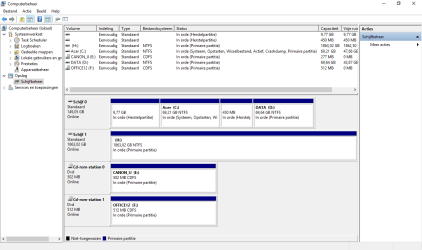
Sorry for the late reaction, here is the picture. Is that what you wanted? Sorry because my system is not in the english language. Schijf 1 (H) Is my Seagate portable drive

#Edit
I will include pictures of the program Im using too.
You can see that 'H: Local Disk' Doesnt have the files 'Seagate expansion drive' does have (The files that disappeared are all in there) But whenever I open the drive I only get to see the files in 'Local Disk'.Is it because it crashed? Because the program is showing alot of bad sectors (the red dots)
 

Attachments

  • Naamloos.png
    Naamloos.png
    26.5 KB · Views: 9
  • Naamlooss.png
    Naamlooss.png
    42.2 KB · Views: 9

My Computer My Computer

Computer type
PC/Desktop
OS
Windows,10 64bit
Its showing blank so partition recovery software is your best bet there are lots of free ones
 

My Computer My Computer

Computer type
PC/Desktop
OS
win 8 32 bit
Its showing blank so partition recovery software is your best bet there are lots of free ones

Do you have one in mind? If not I will explore the internet myself no problem! But can you tell me what exactly happened to the harddrive? Can I still use it or is it dead, I have no idea
 

My Computer My Computer

Computer type
PC/Desktop
OS
Windows,10 64bit

My Computers My Computers

System One System Two

  • Computer type
    PC/Desktop
    Computer Manufacturer/Model Number
    custom build
    OS
    Windows 7 HP 64
    CPU
    i5 6600K - 800MHz to 4200MHz
    Motherboard
    GA-Z170-HD3P
    Memory
    4+4G GSkill DDR4 3000
    Graphics Card(s)
    IG - Intel 530
    Monitor(s) Displays
    Samsung 226BW
    Screen Resolution
    1680x1050
    Hard Drives
    (1) -1 SM951 – 128GB M.2 AHCI PCIe SSD drive for Windows 7 and Lubuntu
    (2) -1 WD SATA 3 - 1T for Data
    (3) -1 WD SATA 3 - 1T for backup
    PSU
    Thermaltake 450W TR2 gold
    Keyboard
    Old and good Chicony mechanical keyboard
    Mouse
    Logitech mX performance - 9 buttons (had to disable some)
    Internet Speed
    500Mb/s
    Browser
    Firefox 64
    Other Info
    TinyWall firewall
  • Computer type
    Laptop
    System Manufacturer/Model Number
    Asus Q550LF
    OS
    Windows 7 Pro
    CPU
    i7-4500U 800MHz to 3.0GHz
    Motherboard
    Asus Q550LF
    Memory
    (4+4)G DDR3 1600
    Graphics Card(s)
    IG intel 4400 + NVIDIA GeForce GT 745M
    Sound Card
    Realtek
    Monitor(s) Displays
    LG Display LP156WF4-SPH1
    Screen Resolution
    1920 x 1080
    Hard Drives
    BX500 120G SSD for Windows and programs +
    1T HDD for data
    Internet Speed
    500 Mb/s
    Browser
    Firefox
    Other Info
    TinyWall firewall
OK, I have seen the Windows Disk Management picture. Now download install and run MiniTool Parttiton Wizard free Edition Version 9.1 (30.49MB) Free download Magic Partition Manager Software, partition magic alternative, free partition magic, partition magic Windows 7 and server partition software - Partition Wizard Online
Post a screenshot of how your disk looks. - the very first screen when you launch PW.

Then on the left Pane click on Partition Recovery Wizard > Next > Select your Drive > Next > Full Disk > Next > QuickScan > Next. Allow the quick scan to complete. At the end of the quickscan you will get a window showing all the found partitions. Post a screenshot of it ( only that Window. No need of any background).After you have taken the screenshot click on Cancel button on that Window and close PW. You can run it again if need be.
 

My Computer My Computer

OS
Windows 7 Home Premium 32 bit
Back
Top