Firefox 5.0 Beta

Status
Not open for further replies.
well if they starting doing a new major version every 6 weeks I think its unreasonable to expect extension dev's to keep up with that very fast, they are after all mostly provided for free in people's own time.
 

My Computer

Computer type
PC/Desktop
Computer Manufacturer/Model Number
home built
OS
windows 8.1 Pro x64
CPU
intel i5 4670k @ 4.3ghz
Motherboard
asus z87-plus
Memory
16 gig ram ddr3 @ 1600 corsair vengeance
Graphics Card(s)
evga 970 GTX 4 GIG FTW ACX 2.0
Sound Card
asus xonar D2X
Monitor(s) Displays
benq gw2765ht
Screen Resolution
2560x1440
Hard Drives
Samsung 850 pro SSD 512gig - boot device wooosh
WD black cavalier 640gig WD6401AALS
Seagate 500gig ST3500630AS
WD 2TB Green WDC20EARS
2 x WD Red 3TB WD30EFRX
Samsung 750gig HD753LG - on asmedia controller
PSU
coolermaster silent pro 600watt modular
Case
fractal define R4
Cooling
artic freezer i30, 3 case fans
Keyboard
microsoft business ps2 keyboard
Mouse
microsoft optical black mouse
Internet Speed
80/20 FTTC SkyBB
Antivirus
Nod32 AV v8, HitmanProAlert, SRP, System Hardening
Browser
Chrome x64
Other Info
Intel controller is in AHCI mode currently using IaSTOR 12.8.0.1016 drivers
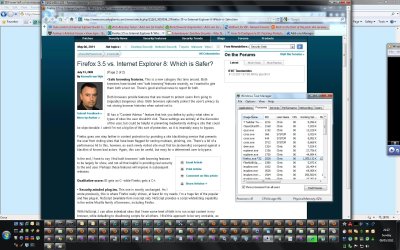
here is a screenshot of some memory usage for FF4, 9 tabs loaded idle for a day and half. Also 2nd showing addons installed.
 

Attachments

  • ff4.jpg
    ff4.jpg
    582.5 KB · Views: 39
  • ff4b.jpg
    ff4b.jpg
    476.8 KB · Views: 32

My Computer

Computer type
PC/Desktop
Computer Manufacturer/Model Number
home built
OS
windows 8.1 Pro x64
CPU
intel i5 4670k @ 4.3ghz
Motherboard
asus z87-plus
Memory
16 gig ram ddr3 @ 1600 corsair vengeance
Graphics Card(s)
evga 970 GTX 4 GIG FTW ACX 2.0
Sound Card
asus xonar D2X
Monitor(s) Displays
benq gw2765ht
Screen Resolution
2560x1440
Hard Drives
Samsung 850 pro SSD 512gig - boot device wooosh
WD black cavalier 640gig WD6401AALS
Seagate 500gig ST3500630AS
WD 2TB Green WDC20EARS
2 x WD Red 3TB WD30EFRX
Samsung 750gig HD753LG - on asmedia controller
PSU
coolermaster silent pro 600watt modular
Case
fractal define R4
Cooling
artic freezer i30, 3 case fans
Keyboard
microsoft business ps2 keyboard
Mouse
microsoft optical black mouse
Internet Speed
80/20 FTTC SkyBB
Antivirus
Nod32 AV v8, HitmanProAlert, SRP, System Hardening
Browser
Chrome x64
Other Info
Intel controller is in AHCI mode currently using IaSTOR 12.8.0.1016 drivers
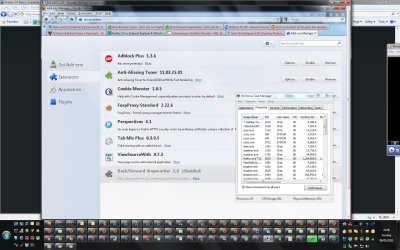
9 tabs in that window, and if I'm seeing things right, 29 Firefox windows open at the same time as well. If that is what I am seeing, small wonder Firefox is using ~1.5 GB of memory.
 

My Computer

Computer type
PC/Desktop
Computer Manufacturer/Model Number
Me
OS
Win 7 Ultimate x64
CPU
FX-8350 @ 4.6 GHz so far
Motherboard
Asus M5A97 EVO
Memory
ADATA XPG V1 Series Black 8GB DDR3 1600
Graphics Card(s)
Sapphire R9 270x Dual-X
Sound Card
Xonar DGX w/ Corsair Vengence 1300
Monitor(s) Displays
Acer S232HL Abid
Screen Resolution
1920x1080
Hard Drives
120 GB OCZ Vertex 3
500 GB Seagate 7200.12
PSU
Antec Earthwatts 650W Green
Case
Antec Three Hundred
Cooling
Cooler Master 212 EVO
Keyboard
Logitech G510
Mouse
Logitech G500s
Internet Speed
35000/3000
here is a screenshot of some memory usage for FF4, 9 tabs loaded idle for a day and half. Also 2nd showing addons installed.

I think you are expecting far too much from FF (or any other browser). If some people merely leave their browser open for a day and a half with one tab it eaither consumes memory like cookies and milk, or crashes.

The number of tabs and the length of time is more the problem and just to be thorough I tried the same number of tabs on FF 3.6, IE 8, and 9, and some version of Chrome, and after 2 days of wasted idle time the other broswers (especially 3.6.16) exebit the same problem.
 

My Computer

Computer Manufacturer/Model Number
HP Pavillion dv-7 1005 Tx
OS
Win 8 Release candidate 8400
CPU
[email protected]
Memory
4 gigs
Graphics Card(s)
Nvidia 9600M
Sound Card
HD built-in
Monitor(s) Displays
17" Wxga
Screen Resolution
1440x900
Cooling
none
Internet Speed
45Mb down 5Mb up
9 tabs in that window, and if I'm seeing things right, 29 Firefox windows open at the same time as well. If that is what I am seeing, small wonder Firefox is using ~1.5 GB of memory.

no its the only firefox window.
the firefox icons on the taskbar are on this system, different firefox ;)

you will see that task manager is inside the remote desktop.

on this system with all those windows and over 200 tabs and many days uptime ff3.6 is only using 624meg ram which is quite efficient although it is using the bartab addon.
 

My Computer

Computer type
PC/Desktop
Computer Manufacturer/Model Number
home built
OS
windows 8.1 Pro x64
CPU
intel i5 4670k @ 4.3ghz
Motherboard
asus z87-plus
Memory
16 gig ram ddr3 @ 1600 corsair vengeance
Graphics Card(s)
evga 970 GTX 4 GIG FTW ACX 2.0
Sound Card
asus xonar D2X
Monitor(s) Displays
benq gw2765ht
Screen Resolution
2560x1440
Hard Drives
Samsung 850 pro SSD 512gig - boot device wooosh
WD black cavalier 640gig WD6401AALS
Seagate 500gig ST3500630AS
WD 2TB Green WDC20EARS
2 x WD Red 3TB WD30EFRX
Samsung 750gig HD753LG - on asmedia controller
PSU
coolermaster silent pro 600watt modular
Case
fractal define R4
Cooling
artic freezer i30, 3 case fans
Keyboard
microsoft business ps2 keyboard
Mouse
microsoft optical black mouse
Internet Speed
80/20 FTTC SkyBB
Antivirus
Nod32 AV v8, HitmanProAlert, SRP, System Hardening
Browser
Chrome x64
Other Info
Intel controller is in AHCI mode currently using IaSTOR 12.8.0.1016 drivers
here is a screenshot of some memory usage for FF4, 9 tabs loaded idle for a day and half. Also 2nd showing addons installed.

I think you are expecting far too much from FF (or any other browser). If some people merely leave their browser open for a day and a half with one tab it eaither consumes memory like cookies and milk, or crashes.

The number of tabs and the length of time is more the problem and just to be thorough I tried the same number of tabs on FF 3.6, IE 8, and 9, and some version of Chrome, and after 2 days of wasted idle time the other broswers (especially 3.6.16) exebit the same problem.

IE9 was left open for the same duration and is still open now not restarted, you can see the processes below the firefox one. one 250 meg + 2x 25 meg + 65 meg. for 17 tabs in 2 IE windows. I tuned IE to improve gdi handle resource usage but the tuning has little affect on ram usage, the tuning I did was to set tabprocgrowth to 1 so each session only has 1 process for all tabs (IE7 behaviour) still seperated process for gui tho so protected mode works. I also start each IE window with -nomerge so thats why 4 processes for 2 windows.

I agree all browsers leak memory but not to the extenct I am seeing with FF4. 9 tabs is nothing very low usage. None of them are multimedia either no flash stuff loaded.
 

My Computer

Computer type
PC/Desktop
Computer Manufacturer/Model Number
home built
OS
windows 8.1 Pro x64
CPU
intel i5 4670k @ 4.3ghz
Motherboard
asus z87-plus
Memory
16 gig ram ddr3 @ 1600 corsair vengeance
Graphics Card(s)
evga 970 GTX 4 GIG FTW ACX 2.0
Sound Card
asus xonar D2X
Monitor(s) Displays
benq gw2765ht
Screen Resolution
2560x1440
Hard Drives
Samsung 850 pro SSD 512gig - boot device wooosh
WD black cavalier 640gig WD6401AALS
Seagate 500gig ST3500630AS
WD 2TB Green WDC20EARS
2 x WD Red 3TB WD30EFRX
Samsung 750gig HD753LG - on asmedia controller
PSU
coolermaster silent pro 600watt modular
Case
fractal define R4
Cooling
artic freezer i30, 3 case fans
Keyboard
microsoft business ps2 keyboard
Mouse
microsoft optical black mouse
Internet Speed
80/20 FTTC SkyBB
Antivirus
Nod32 AV v8, HitmanProAlert, SRP, System Hardening
Browser
Chrome x64
Other Info
Intel controller is in AHCI mode currently using IaSTOR 12.8.0.1016 drivers
Adons are the primary source of both memory leaks and usage. I use a set of abt 15 and wouldnt trade them for anything.

In 3.6 with my usual tabs and duration FF 3.6.16 will grow to abt 600 Megs, when I launch 4.01, or for that matter 6.01a (since im testing it) they each use the same ad-dons are open the same duration and use below 400 Megs.

So I guess each individual system is different and frankly I dont care if FF uses 4 gigs. You couldnt force me to use IE, and without the skins and addons it would just be another browser.
 

My Computer

Computer Manufacturer/Model Number
HP Pavillion dv-7 1005 Tx
OS
Win 8 Release candidate 8400
CPU
[email protected]
Memory
4 gigs
Graphics Card(s)
Nvidia 9600M
Sound Card
HD built-in
Monitor(s) Displays
17" Wxga
Screen Resolution
1440x900
Cooling
none
Internet Speed
45Mb down 5Mb up
my worst memory leak when it used over 2 gig in 12 hours uptime was without any addons on, its actually been more moderate since then. I am not trying to make you use IE or anything else :) just reporting the behaviour here I am seeing. That FF4 was installed clean, iniitally no addons, massive memory leak, since then installed the addons and had more memory leaks. The ff4 is mainly untuned with a few privacy options tuned for cookies and thats about it. So I havent tuned things that reduce ram usage, I may do some tuning on it and report back any improvements as by default I know firefox is tuned for high ram usage. However it really shouldnt be increasing ram usage whilst sitting idle. Also all those addons are on my ff3.6 install, the ff3.6 has more on top of that as well.

I agree on each system been different, which is what makes tracking down the source of bugs diffilcult.
 

My Computer

Computer type
PC/Desktop
Computer Manufacturer/Model Number
home built
OS
windows 8.1 Pro x64
CPU
intel i5 4670k @ 4.3ghz
Motherboard
asus z87-plus
Memory
16 gig ram ddr3 @ 1600 corsair vengeance
Graphics Card(s)
evga 970 GTX 4 GIG FTW ACX 2.0
Sound Card
asus xonar D2X
Monitor(s) Displays
benq gw2765ht
Screen Resolution
2560x1440
Hard Drives
Samsung 850 pro SSD 512gig - boot device wooosh
WD black cavalier 640gig WD6401AALS
Seagate 500gig ST3500630AS
WD 2TB Green WDC20EARS
2 x WD Red 3TB WD30EFRX
Samsung 750gig HD753LG - on asmedia controller
PSU
coolermaster silent pro 600watt modular
Case
fractal define R4
Cooling
artic freezer i30, 3 case fans
Keyboard
microsoft business ps2 keyboard
Mouse
microsoft optical black mouse
Internet Speed
80/20 FTTC SkyBB
Antivirus
Nod32 AV v8, HitmanProAlert, SRP, System Hardening
Browser
Chrome x64
Other Info
Intel controller is in AHCI mode currently using IaSTOR 12.8.0.1016 drivers
There is a tool for beta testers and developers to help track down leaks. Might want to check. I cant tell you where and what due to a non disclosure agreement.
 

My Computer

Computer Manufacturer/Model Number
HP Pavillion dv-7 1005 Tx
OS
Win 8 Release candidate 8400
CPU
[email protected]
Memory
4 gigs
Graphics Card(s)
Nvidia 9600M
Sound Card
HD built-in
Monitor(s) Displays
17" Wxga
Screen Resolution
1440x900
Cooling
none
Internet Speed
45Mb down 5Mb up
why would they limit sharing of such a useful tool? seems counter productive.
 

My Computer

Computer type
PC/Desktop
Computer Manufacturer/Model Number
home built
OS
windows 8.1 Pro x64
CPU
intel i5 4670k @ 4.3ghz
Motherboard
asus z87-plus
Memory
16 gig ram ddr3 @ 1600 corsair vengeance
Graphics Card(s)
evga 970 GTX 4 GIG FTW ACX 2.0
Sound Card
asus xonar D2X
Monitor(s) Displays
benq gw2765ht
Screen Resolution
2560x1440
Hard Drives
Samsung 850 pro SSD 512gig - boot device wooosh
WD black cavalier 640gig WD6401AALS
Seagate 500gig ST3500630AS
WD 2TB Green WDC20EARS
2 x WD Red 3TB WD30EFRX
Samsung 750gig HD753LG - on asmedia controller
PSU
coolermaster silent pro 600watt modular
Case
fractal define R4
Cooling
artic freezer i30, 3 case fans
Keyboard
microsoft business ps2 keyboard
Mouse
microsoft optical black mouse
Internet Speed
80/20 FTTC SkyBB
Antivirus
Nod32 AV v8, HitmanProAlert, SRP, System Hardening
Browser
Chrome x64
Other Info
Intel controller is in AHCI mode currently using IaSTOR 12.8.0.1016 drivers
ok zigzag I found some leak tools but they all look hard to use so havent loaded one yet. Since bartab isnt available for ff4 yet (probably best addon ever made) I enabled this option to a value of 0 "browser.sessionstore.max_concurrent_tabs"
This sort of provides part of what bartab does and doesnt load all the tabs into memory at startup, I then left it for some hours.
It started off using 192 meg ram. with 1 tab loaded. others in background not loaded.
After the hours of uptime (dont know exactly how long but I think about half a day or so) it was around 340meg ram usage. I then click on a different tab and bam down to 250 meg usage. Since I now installed ramback addon I clicked on clear cache and it went down to 195meg again. However where was this 60meg cache been used? because about:cache which I had already checked showed no ram cache been used, so either thats buggy and it was been used or there is a ram cache not shown in about:cache.

I have now started it again with all tabs loaded and when it gets above a gig ram usage I will hit the clear cache button and see if all the gig or so of usage is cache.
 

My Computer

Computer type
PC/Desktop
Computer Manufacturer/Model Number
home built
OS
windows 8.1 Pro x64
CPU
intel i5 4670k @ 4.3ghz
Motherboard
asus z87-plus
Memory
16 gig ram ddr3 @ 1600 corsair vengeance
Graphics Card(s)
evga 970 GTX 4 GIG FTW ACX 2.0
Sound Card
asus xonar D2X
Monitor(s) Displays
benq gw2765ht
Screen Resolution
2560x1440
Hard Drives
Samsung 850 pro SSD 512gig - boot device wooosh
WD black cavalier 640gig WD6401AALS
Seagate 500gig ST3500630AS
WD 2TB Green WDC20EARS
2 x WD Red 3TB WD30EFRX
Samsung 750gig HD753LG - on asmedia controller
PSU
coolermaster silent pro 600watt modular
Case
fractal define R4
Cooling
artic freezer i30, 3 case fans
Keyboard
microsoft business ps2 keyboard
Mouse
microsoft optical black mouse
Internet Speed
80/20 FTTC SkyBB
Antivirus
Nod32 AV v8, HitmanProAlert, SRP, System Hardening
Browser
Chrome x64
Other Info
Intel controller is in AHCI mode currently using IaSTOR 12.8.0.1016 drivers
here is a screenshot of some memory usage for FF4, 9 tabs loaded idle for a day and half. Also 2nd showing addons installed.

Update Tab Mix Plus to the dev build .386
It helped make Firefox's memory consumption a lot more reasonable for me - highest ever was 800 odd MB instead of the 1.4GB which I had previously seen. Has something to do with the way TMP handles session management.
 

My Computer

Computer Manufacturer/Model Number
Custom
OS
7 ultimate x64
CPU
i7 920 @ 3.5ghz
Motherboard
P6t Deluxe
Memory
6gb corsair dominator
Graphics Card(s)
Gigabyte Geforce GTX 460 1GB SLI
Sound Card
onboard
Monitor(s) Displays
samsung BX2450
Screen Resolution
1920x1080
Hard Drives
Seagate 7200.11 1Tb; WD green EADS 1TB
PSU
corsair tx750
Case
CM HAF 922
Cooling
coolermaster V8 + standard case fans
Keyboard
Logitech Classic Keyboard
Mouse
Logitech G500
Internet Speed
256k :P
here is a screenshot of some memory usage for FF4, 9 tabs loaded idle for a day and half. Also 2nd showing addons installed.

Update Tab Mix Plus to the dev build .386
It helped make Firefox's memory consumption a lot more reasonable for me - highest ever was 800 odd MB instead of the 1.4GB which I had previously seen. Has something to do with the way TMP handles session management.

seems was no need, it just prompted me to update to 386 anyway as thats the now stable version of TMP.

so restarted on 386 TMP and will see what diff that makes.

Before the restart it was using 1 gig (with all tabs loaded in memory) I hit clear cache and it dropped to 740meg so it didnt recover it all. Prior to hitting clear cache, ram cache usage was just 29meg in about:cache so was a hidden 230meg of cache data somewhere in ram. This issue is compounded by the fact bartab doesnt work on ff4.

I am not confident of the TMP upgrade solving this as I had the memory leak with no extensions installed. But will report back on the effect.

Googling reveals dozens if not 100s of mem leak reports for ff4, so it looks conclusive from where I sit anyway.
 

My Computer

Computer type
PC/Desktop
Computer Manufacturer/Model Number
home built
OS
windows 8.1 Pro x64
CPU
intel i5 4670k @ 4.3ghz
Motherboard
asus z87-plus
Memory
16 gig ram ddr3 @ 1600 corsair vengeance
Graphics Card(s)
evga 970 GTX 4 GIG FTW ACX 2.0
Sound Card
asus xonar D2X
Monitor(s) Displays
benq gw2765ht
Screen Resolution
2560x1440
Hard Drives
Samsung 850 pro SSD 512gig - boot device wooosh
WD black cavalier 640gig WD6401AALS
Seagate 500gig ST3500630AS
WD 2TB Green WDC20EARS
2 x WD Red 3TB WD30EFRX
Samsung 750gig HD753LG - on asmedia controller
PSU
coolermaster silent pro 600watt modular
Case
fractal define R4
Cooling
artic freezer i30, 3 case fans
Keyboard
microsoft business ps2 keyboard
Mouse
microsoft optical black mouse
Internet Speed
80/20 FTTC SkyBB
Antivirus
Nod32 AV v8, HitmanProAlert, SRP, System Hardening
Browser
Chrome x64
Other Info
Intel controller is in AHCI mode currently using IaSTOR 12.8.0.1016 drivers
I guess you've already tried the usual reset to defaults, new profile, update flash and stuff. I hope you find your problem, for me it was TMP, I didn't know a stable build was released as I've been using dev build from their site for 2 weeks now .. but try having a look at it. Helped me big time! It's decent for me - 21 add ons, 3 windows and around 30 tabs were 580 MB .. much better than when I had .385 (used to average 900mb easily).

Tab Mix Plus • View topic - Tab Mix Plus Dev-Build 0.3.8.X
 
Last edited:

My Computer

Computer Manufacturer/Model Number
Custom
OS
7 ultimate x64
CPU
i7 920 @ 3.5ghz
Motherboard
P6t Deluxe
Memory
6gb corsair dominator
Graphics Card(s)
Gigabyte Geforce GTX 460 1GB SLI
Sound Card
onboard
Monitor(s) Displays
samsung BX2450
Screen Resolution
1920x1080
Hard Drives
Seagate 7200.11 1Tb; WD green EADS 1TB
PSU
corsair tx750
Case
CM HAF 922
Cooling
coolermaster V8 + standard case fans
Keyboard
Logitech Classic Keyboard
Mouse
Logitech G500
Internet Speed
256k :P
its already running, start ram usage 240meg, current 700 meg.

In ff 3.6 (with more plugins) the ram usage and leaks is only a fraction.
 

My Computer

Computer type
PC/Desktop
Computer Manufacturer/Model Number
home built
OS
windows 8.1 Pro x64
CPU
intel i5 4670k @ 4.3ghz
Motherboard
asus z87-plus
Memory
16 gig ram ddr3 @ 1600 corsair vengeance
Graphics Card(s)
evga 970 GTX 4 GIG FTW ACX 2.0
Sound Card
asus xonar D2X
Monitor(s) Displays
benq gw2765ht
Screen Resolution
2560x1440
Hard Drives
Samsung 850 pro SSD 512gig - boot device wooosh
WD black cavalier 640gig WD6401AALS
Seagate 500gig ST3500630AS
WD 2TB Green WDC20EARS
2 x WD Red 3TB WD30EFRX
Samsung 750gig HD753LG - on asmedia controller
PSU
coolermaster silent pro 600watt modular
Case
fractal define R4
Cooling
artic freezer i30, 3 case fans
Keyboard
microsoft business ps2 keyboard
Mouse
microsoft optical black mouse
Internet Speed
80/20 FTTC SkyBB
Antivirus
Nod32 AV v8, HitmanProAlert, SRP, System Hardening
Browser
Chrome x64
Other Info
Intel controller is in AHCI mode currently using IaSTOR 12.8.0.1016 drivers
Wow! Crazy RAM usage! Safe mode makes any difference? Are you using recent video drivers? FF felt sluggish with any driver prior to 260.99 for me. Worth a shot. If it's still a problem, I guess it's IE9 or Chrome then .. a browser isn't worth so much effort! Oh btw, you've not applied any reg tweaks, right?
 

My Computer

Computer Manufacturer/Model Number
Custom
OS
7 ultimate x64
CPU
i7 920 @ 3.5ghz
Motherboard
P6t Deluxe
Memory
6gb corsair dominator
Graphics Card(s)
Gigabyte Geforce GTX 460 1GB SLI
Sound Card
onboard
Monitor(s) Displays
samsung BX2450
Screen Resolution
1920x1080
Hard Drives
Seagate 7200.11 1Tb; WD green EADS 1TB
PSU
corsair tx750
Case
CM HAF 922
Cooling
coolermaster V8 + standard case fans
Keyboard
Logitech Classic Keyboard
Mouse
Logitech G500
Internet Speed
256k :P

My Computer

Computer type
PC/Desktop
Computer Manufacturer/Model Number
Custom Build
OS
Windows 10 Pro x64, Arch Linux
CPU
Intel Core 2 Quad Q8200 OC'd 3.08GHz
Motherboard
Asus Rampage formula LGA775
Memory
8GB DDR2 900Mhz
Graphics Card(s)
MSI GT730 2GB GDDR5 (Kepler)
Sound Card
Supreme FX2
Monitor(s) Displays
Samsung LS22F350 LED
Screen Resolution
1080P
Hard Drives
Kingston SSDNow UV400 120GB, 500GB Hitachi, 2TB Samsung, 500GB Seagate FreeAgent, 640GB Samsung, 160GB Toshiba (Arch)
PSU
AeroCool 500W Bronze
Cooling
Cooler Master V6 + 3X fans
Keyboard
Prolink keyboard
Mouse
Logitech M705
Internet Speed
1MiB/s
Browser
Chrome Beta
Ironically since this is a ff5 thread I think I am going to test ff5 and see if that has the same leaks, maybe its already fixed in ff5, because I think they wont fix a ff4 issue only ff5.

The system in question has next to no reg tweaks, the only thing I tweak on windows 7 systems usually is desktop heap and some mouse hover settings but I have not done that on the test pc as I dont run enough apps to saturate the default limit.

Before I try ff5 I may try to see behaviour with one site loaded at time but will be a slow process.
 

My Computer

Computer type
PC/Desktop
Computer Manufacturer/Model Number
home built
OS
windows 8.1 Pro x64
CPU
intel i5 4670k @ 4.3ghz
Motherboard
asus z87-plus
Memory
16 gig ram ddr3 @ 1600 corsair vengeance
Graphics Card(s)
evga 970 GTX 4 GIG FTW ACX 2.0
Sound Card
asus xonar D2X
Monitor(s) Displays
benq gw2765ht
Screen Resolution
2560x1440
Hard Drives
Samsung 850 pro SSD 512gig - boot device wooosh
WD black cavalier 640gig WD6401AALS
Seagate 500gig ST3500630AS
WD 2TB Green WDC20EARS
2 x WD Red 3TB WD30EFRX
Samsung 750gig HD753LG - on asmedia controller
PSU
coolermaster silent pro 600watt modular
Case
fractal define R4
Cooling
artic freezer i30, 3 case fans
Keyboard
microsoft business ps2 keyboard
Mouse
microsoft optical black mouse
Internet Speed
80/20 FTTC SkyBB
Antivirus
Nod32 AV v8, HitmanProAlert, SRP, System Hardening
Browser
Chrome x64
Other Info
Intel controller is in AHCI mode currently using IaSTOR 12.8.0.1016 drivers
heh bug report filed to ff team, I left it for 3-4 days and when I went back to the machine I had a crash report on screen, FF when crashed was using 77% of system memory. (4 gig).

Will be trying ff5 now to see if this is fixed on that.
 

Attachments

  • ff4crash.png
    ff4crash.png
    159.2 KB · Views: 6
  • ff4crash.txt
    ff4crash.txt
    1.8 KB · Views: 2

My Computer

Computer type
PC/Desktop
Computer Manufacturer/Model Number
home built
OS
windows 8.1 Pro x64
CPU
intel i5 4670k @ 4.3ghz
Motherboard
asus z87-plus
Memory
16 gig ram ddr3 @ 1600 corsair vengeance
Graphics Card(s)
evga 970 GTX 4 GIG FTW ACX 2.0
Sound Card
asus xonar D2X
Monitor(s) Displays
benq gw2765ht
Screen Resolution
2560x1440
Hard Drives
Samsung 850 pro SSD 512gig - boot device wooosh
WD black cavalier 640gig WD6401AALS
Seagate 500gig ST3500630AS
WD 2TB Green WDC20EARS
2 x WD Red 3TB WD30EFRX
Samsung 750gig HD753LG - on asmedia controller
PSU
coolermaster silent pro 600watt modular
Case
fractal define R4
Cooling
artic freezer i30, 3 case fans
Keyboard
microsoft business ps2 keyboard
Mouse
microsoft optical black mouse
Internet Speed
80/20 FTTC SkyBB
Antivirus
Nod32 AV v8, HitmanProAlert, SRP, System Hardening
Browser
Chrome x64
Other Info
Intel controller is in AHCI mode currently using IaSTOR 12.8.0.1016 drivers

My Computer

Computer type
PC/Desktop
Computer Manufacturer/Model Number
Custom Build
OS
Windows 7 Home Premium 64 bit SP1
CPU
Intel i7 4790k
Motherboard
MSI Z97-G55 SLI
Memory
16 GB Corsair 2400 MHz DDR3
Graphics Card(s)
Visiontek Radeon R9 285
Sound Card
None
Monitor(s) Displays
Gateway FHX2402L
Screen Resolution
1920 X 1080
Hard Drives
Samsung 840 EVO 500GB
PSU
Corsair 750 TX
Case
Fractal Design
Cooling
Stock fans
Keyboard
Logitech K800
Mouse
Logitech M510
Internet Speed
60.88 Mbps download 10.47 Mbps upload (Speedtest.net)
Antivirus
Norton
Browser
Opera
Other Info
First Computer used: A Commodore Pet of course
Love using Manjaro KDE Linux 64 bit and Windows 7/10 64 bit
Status
Not open for further replies.
Back
Top