

- Local time
- 11:20 AM
- Messages
- 715
I have tried this with two different versions of Firefox and both did the same thing.
I wanted the Video Download Helper addon. I found a page where that addon was at:
https://addons.mozilla.org/en-US/firefox/addon/video-downloadhelper/
I clicked on the "+ Add to Firefox" button and got this:

Clicked on "Install Now" button and it said it did install and to restart Firefox and I did.
Here is what I see on FF:
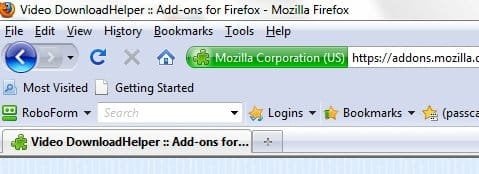
If I go to a page that has a video clip either stay on that page or play the video it DOES NOT give me option to download the video.
I have used that addon before and the icon does NOT look right to me.
What am I doing wrong?
I wanted the Video Download Helper addon. I found a page where that addon was at:
https://addons.mozilla.org/en-US/firefox/addon/video-downloadhelper/
I clicked on the "+ Add to Firefox" button and got this:
Clicked on "Install Now" button and it said it did install and to restart Firefox and I did.
Here is what I see on FF:
If I go to a page that has a video clip either stay on that page or play the video it DOES NOT give me option to download the video.
I have used that addon before and the icon does NOT look right to me.
What am I doing wrong?
My Computer
- OS
- Windows 7 Pro
- CPU
- Intel(R) Pentium(R) Duel CPU E2200 2.20 Ghz
- Motherboard
- GA-G41M-ES2L
- Memory
- 4 gb 2.96 Usable
- Graphics Card(s)
- Onboard
- Sound Card
- Onboard
- Hard Drives
- 2 - 1TB WD Sata Drives


