Firefox bookmarks ?

brightsun

Banned
Local time
4:35 PM
Messages
256
I did reinstalled Firefox to look like a new install do I saved the first bookmarks ?
I import and backup,my bookmarks and choose export HTML. I saved my bookmarks in an HTML file on my Desktop I do not know where to restore the bookmarks back in Firefox?
 

My Computer

OS
w7
In Firefox 3.6.4: Bookmarks >> Organize Bookmarks >> Import and Backup >> Import HTML

Hope that helps!
 

My Computer

Computer Manufacturer/Model Number
Alienware X51
OS
Windows 7 Home Premium x64
CPU
Intel Core i7-2600 @3.40GHz
Memory
8.00GB DDR3
Graphics Card(s)
NVIDIA GeForce GTX 555 w/1.0GB RAM
Monitor(s) Displays
BenQ XL2420TX
Screen Resolution
1920x1080@120Hz
Hard Drives
1TB
PSU
330-watt
Keyboard
Logitech Wireless Illuminated Keyboard K800
Mouse
Razer Orochi
Internet Speed
Campus Internet
Firefox bookmark ?

In Firefox 3.6.4: Bookmarks can you tell me the differance between doing restoring Import HTML and where to restore json ?
 

My Computer

OS
w7
In Firefox 3.6.4: Bookmarks can you tell me the differance between doing restoring Import HTML and where to restore json ?

Booksmarks > Organize Bookmarks > Import and Backup

Then

Restore is the json and Import html is the HTML restore
 

My Computer

Computer Manufacturer/Model Number
Dell e6410
OS
Windows 7 Pro
CPU
Intel Core i5 M520 @ 240GHz
Memory
2 Gig
Graphics Card(s)
Intel Grap
Sound Card
Intel Graphics Media Accelerator HD
Monitor(s) Displays
Built in (LapTop)
Screen Resolution
1440x900
Hard Drives
250 Gig STAT
Mouse
Logitech Bluetooth
Firefox bookmark ?

I did reinstalled Firefox to look like a new install when I saved the bookmarks then choose export HTML. I saved my bookmarks in an HTML file on my Desktop and restored the bookmarks back in Firefox it had the old firefox settings I wanted my bookmarks with the new firefox install settings is their a way to have my old bookmarks with the new firefox install
 

My Computer

OS
w7
Yeah, the others explained where to navigate to import your saved html bookmarks back into your new FF install. Did you follow the steps?

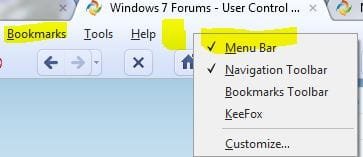
Right click on the top bar on a blank space until you see where it says menu bar, like in the picture. Check it so you have the menu bar there, then go to bookmarks.
sample1.JPG

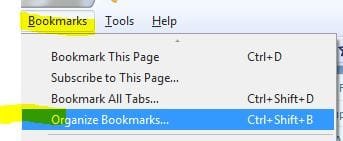
Then go to where it says Organize bookmarks.

sample2.JPG

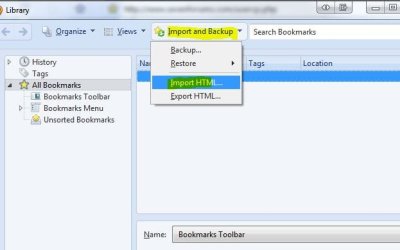
Then go to where it says Import and backup, and go to Import HTML.

sample3.JPG

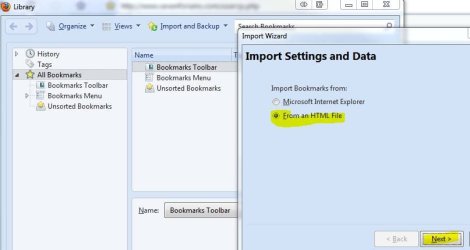
Click on that, then have from an HTML file and Next. then pick where your file is, on the desktop, and finish.

sample4.JPG
 

My Computer

Computer type
PC/Desktop
Computer Manufacturer/Model Number
Airbot 2.0
OS
Windows 7 Ultimate x64 SP1
CPU
Core i7 920 (D0) @ 4Ghz, *26c idle *65c full load on air
Motherboard
Asus P6X58D Premium - Sata 6Gb/s - USB 3.0
Memory
12GB DDR3 Corsair Dominator -CMD12GX3M6A1600C8 at 1600MHz
Graphics Card(s)
Zotac Geforce GTX 770
Sound Card
ASUS Xonar D2X
Monitor(s) Displays
1 LG 24" Flatron W2453V-PF 1 Samsung 24" P2450H both 2ms RT
Screen Resolution
1920x1080@60hz
Hard Drives
1 Samsung 250GB 840 Evo SSD
1 OCZ Vertex2 180GB SSD
1 TB Samsung Spinpoint F1 7200RPM 32MB cache
2 500GB WD Caviar Blacks 7200RPM 32MB cache (WD5001AALS)

Pioneer DVD Burner DVR-S18M
PSU
Corsair HX1000W
Case
Cooler Master HAF 932
Cooling
Case Fans *3 230mm, *1 140mm/CPU - *Tuniq Tower 120 Extreme
Keyboard
Logitech Wireless MK700
Mouse
Logitech Wireless MK700
Internet Speed
DL 15 Mbps UL 0.98 Mbps
Antivirus
None
Browser
Firefox Nightly
Other Info
Processor-7.7 *RAM- 7.9 *Graphics-7.9 *Gaming Graphics- 7.9 *SSD- 7.8 W.E.I final score= 7.7
*Phone- LG Nexus 5
Still don't understand what you mean by "old settings"? Are you trying to get just your old bookmarks back into Firefox, or all your old settings that you had in your old Firefox install?

If you want the old settings and everything, you would have to use your old Firefox profile, if you still have it, and make the new firefox install use that instead of the new profile it's using.
 

My Computer

Computer type
PC/Desktop
Computer Manufacturer/Model Number
Airbot 2.0
OS
Windows 7 Ultimate x64 SP1
CPU
Core i7 920 (D0) @ 4Ghz, *26c idle *65c full load on air
Motherboard
Asus P6X58D Premium - Sata 6Gb/s - USB 3.0
Memory
12GB DDR3 Corsair Dominator -CMD12GX3M6A1600C8 at 1600MHz
Graphics Card(s)
Zotac Geforce GTX 770
Sound Card
ASUS Xonar D2X
Monitor(s) Displays
1 LG 24" Flatron W2453V-PF 1 Samsung 24" P2450H both 2ms RT
Screen Resolution
1920x1080@60hz
Hard Drives
1 Samsung 250GB 840 Evo SSD
1 OCZ Vertex2 180GB SSD
1 TB Samsung Spinpoint F1 7200RPM 32MB cache
2 500GB WD Caviar Blacks 7200RPM 32MB cache (WD5001AALS)

Pioneer DVD Burner DVR-S18M
PSU
Corsair HX1000W
Case
Cooler Master HAF 932
Cooling
Case Fans *3 230mm, *1 140mm/CPU - *Tuniq Tower 120 Extreme
Keyboard
Logitech Wireless MK700
Mouse
Logitech Wireless MK700
Internet Speed
DL 15 Mbps UL 0.98 Mbps
Antivirus
None
Browser
Firefox Nightly
Other Info
Processor-7.7 *RAM- 7.9 *Graphics-7.9 *Gaming Graphics- 7.9 *SSD- 7.8 W.E.I final score= 7.7
*Phone- LG Nexus 5
Airbot when I did firefox safe mode work looks like a new install

http://www.howtogeek.com/howto/internet/firefox/restore-the-default-settings-in-firefox-without-uninstalling-it/"

then I put my bookmarks settings in firefox in the new install it made duplicates features of firefox like recently bookmarks mozilla firefox etc duplicates settings ?
 

My Computer

OS
w7
Back
Top