Firefox - Enable Aero Glass Transparency

How to Have Firefox with Glass Transparency in Windows 7

   Information
In this tutorial I will show you how to make your Firefox have the Aero Glass Transparency look.
   Note
I do not take credit for any of the scripts uploaded within this tutorial, apparently I don't even have any knowledge about CSS scripts before but learning it bit by bit was fun. I am not that good with CSS so I borrowed the scripts used in this tutorial. The scripts were made by YupYup and 12eason from this thread, you can view the thread for reference and questions. What I did in this tutorial is I merged their methods to achieve a much more flexible solution in glassing Mozilla Firefox. Slight modifications were made by me from their script for my own personal liking but you can tweak the style to your own liking as well :).

• Okay then, let's begin.... :)
   Warning
Remember to always backup your files before proceeding
•This method only works for the latest version of Firefox (Mozilla Firefox 3.5.1)

•This method only works with Glasser and NOT with All-Glass


Here's How:

Step 1: Install Nightly Tester Tools to get Glasser Extension to work (in case you don't have it yet), if you already have Nightly Tester Tools then proceed to Step 2.

Step 2: Download Glasser 1.1.1 here - Glasser 1.1.1 and use force install to make it work with Firefox.

Step 3: On your windows explorer type %appdata%\Mozilla and browse inside your Firefox Profile then go through the following folders: extensions > [email protected] > chrome > content

Replace the 'dwm-overlay.js' in your Firefox Profile with this one -View attachment dwm-overlay.js.txt

   Tip
» Copy the content of the text document and save it as "dwm-overlay.js" without quotations.
   Information

You could add more websites onto the whitelist if you would like to apply your own 'Glass Style' on that certain website..


Step 4: On your windows explorer type %appdata%\Mozilla and browse inside your Firefox Profile then go through the following folders: extensions > [email protected] > chrome > skin > classic

Replace the 'overlay.css' in your Firefox Profile with this one - View attachment overlay.css.txt

   Tip
» Copy the content of the text document and save it as "overlay.css" without quotations.


Step 5: Install Stylish (in case you don't have it yet- then restart firefox if needed), if you already have Stylish then proceed to Step 6.

Step 6: Choose and download the appropriate updated style for you from the files I attached below:

View attachment Aero Fox 7 - Glassed for Default Sidebar.txt

View attachment Aero Fox 7 - Glassed for All-in-One Sidebar.txt

   Information
I managed to somehow make the styles work with other themes but I'm not sure if it works on all themes


Step 7:

  • Open the style you just downloaded with notepad or word pad or whichever you prefer, and copy the entire contents.
  • Now in Firefox click on Tools > Add-ons > User styles and click the write new style button at the top right corner.
  • At the top of new style window give it a name and paste what you just copied in step into the main area and click save. The style will automatically be enabled.
Step 8: Restart Firefox.


   Information
There are still bugs and some fixes that needs to be done.. like the scroll bars appearing black on websites and some tooltips
   Tip
Just switch tabs to gain normal view when the page seems illegible, this usually happens after switching from a Glassed tab to a non-Glassed tab


   Information
Here's the glass theme for "Windows 7 v2 b" for sevenforums made by 12eason
-View attachment Seven Forums - Aero Effect Win v2 b theme.css.txt


For the Google and about:blank page you could use YupYup's code here in this thread.

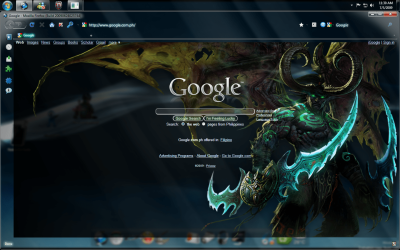
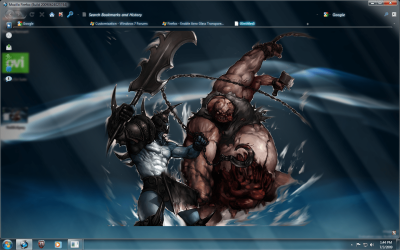
The Google and about:blank page on the screenshots below are what I'm currently using, if you like them I'll upload them for you :)

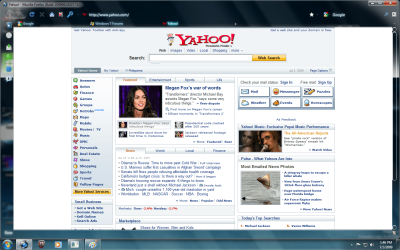
Screenshots:
Untitle2d.pngUntitled.pngUntitled3.pngUntitled4.png

   Information
The Screenshots above show that "google.com" and "sevenforums.com" are glassed. Those webpages were glassed because i have a Stylish code for those websites to make them look glass, but in order to achieve the full glass effect, you would still have to put the domain of those websites on your whitelist. On the other hand "yahoo.com" is not glassed since i don't have a Stylish code for that website and it looks normal because I did not put its domain on my white list. Even though the webpage looks normal as it should, I still have the transparency on my browser.


Last edited by a moderator:
or edit the script and add .au to all the google urls.
 

My Computer My Computer

Computer Manufacturer/Model Number
self built
OS
Windows 7 Professional 64-bit
CPU
Intel E8400 3GHz
Motherboard
Intel DX48BT2
Memory
Kingston PC3-10700H 4Gb
Graphics Card(s)
XFX Radeon HD 5850 BlackEd.
Sound Card
Asus Xonar DG
Monitor(s) Displays
2x Samsung SM-T220HD 22"
Screen Resolution
1680x1050 on two monitors
Hard Drives
OCZ Vertex 2 120gb 3.5" (OS)
Seagate Momentus XT 500gb
Samsung F3 1Tb (games)
2x Samsung F1 1Tb
PSU
Thermaltake ToughPower 850w
Case
Thermaltake Armor
Cooling
Scythe Mugen II
Keyboard
Microsoft Comfort Curve USB
Mouse
Razer Diamondback 3G
Internet Speed
8128/443
or edit the script and add .au to all the google urls.

Yes that is what i meant by change the style.

Thanks guys, still no luck, i think it some else conflicting with google style, i was going to load basic Firefox 3.5 into VM Ware, but Aero does not work in Vm Ware.

So, here other pic
firefoxerror1.jpg
 

My Computer My Computer

OS
Dual Boot 7600 RTM x64
Motherboard
Asus P5B
Memory
6GB
Graphics Card(s)
NVIDIA GeForce 9600GT
Monitor(s) Displays
Benq 24" x 2
Screen Resolution
1600 x 1024
Hard Drives
Seagate 160 GB Sata
Western Digital 1.5 TB Sata
Seagate 400 GB External
Case
Antec
Thanks guys, still no luck, i think it some else conflicting with google style, i was going to load basic Firefox 3.5 into VM Ware, but Aero does not work in Vm Ware.
You will need to add the domain to the whitelist in the "dwm-overlay.js" file as well.
 

My Computer My Computer

OS
Win 7
You will need to add the domain to the whitelist in the "dwm-overlay.js" file as well.

googleerror.jpg


firefoxdone.jpg


I think my google and sevenforum window problems are the same, not what that is yet, but i will work it out.

thanks for the help
xxrazor:confused:
 
Last edited:

My Computer My Computer

OS
Dual Boot 7600 RTM x64
Motherboard
Asus P5B
Memory
6GB
Graphics Card(s)
NVIDIA GeForce 9600GT
Monitor(s) Displays
Benq 24" x 2
Screen Resolution
1600 x 1024
Hard Drives
Seagate 160 GB Sata
Western Digital 1.5 TB Sata
Seagate 400 GB External
Case
Antec
Clearly it is working on seven forums, if you have set the seven forms to windows 7 v2 b as well it could be a cookie issue not letting you change the style. If that is the case logging out and clearing your cookies for seven forums and logging back in will correct that.
 

My Computer My Computer

OS
Win 7
Clearly it is working on seven forums, if you have set the seven forms to windows 7 v2 b as well it could be a cookie issue not letting you change the style. If that is the case logging out and clearing your cookies for seven forums and logging back in will correct that.

Well, here you go, i have managed to get the google web browser working, none of the sub address are working though, they are still Black, Mail, image, group, and video, etc. It's funny though, did have google mail front page glass up until now.

googleerrord.jpg


xxrazor;)
 

My Computer My Computer

OS
Dual Boot 7600 RTM x64
Motherboard
Asus P5B
Memory
6GB
Graphics Card(s)
NVIDIA GeForce 9600GT
Monitor(s) Displays
Benq 24" x 2
Screen Resolution
1600 x 1024
Hard Drives
Seagate 160 GB Sata
Western Digital 1.5 TB Sata
Seagate 400 GB External
Case
Antec
Well, here you go, i have managed to get the google web browser working, none of the sub address are working though, they are still Black, Mail, image, group, and video, etc. It's funny though, did have google mail front page glass up until now.

xxrazor;)

When you use the whitelist you need to add every address that you want the glass to be applied.
 

My Computer My Computer

OS
Win 7
When you use the whitelist you need to add every address that you want the glass to be applied.

YupYup

Can you give me an example of how the text should look in the white list for the other address, i have tried a few combinations without any luck.:confused:

Thanks

xxrazor
 

My Computer My Computer

OS
Dual Boot 7600 RTM x64
Motherboard
Asus P5B
Memory
6GB
Graphics Card(s)
NVIDIA GeForce 9600GT
Monitor(s) Displays
Benq 24" x 2
Screen Resolution
1600 x 1024
Hard Drives
Seagate 160 GB Sata
Western Digital 1.5 TB Sata
Seagate 400 GB External
Case
Antec
YupYup

Can you give me an example of how the text should look in the white list for the other address, i have tried a few combinations without any luck.:confused:

Thanks

xxrazor

I don't use the white list but i would imagine it would look like this

Code:
var whiteListItem = new Array
(
"www.google.com.au",
"images.google.com.au",
"video.google.com.au",
"groups.google.com.au",
"mail.google.com",
"www.sevenforums.com"
)

If not try adding http:// in front
 

My Computer My Computer

OS
Win 7
googleerrorc.jpg
I don't use the white list but i would imagine it would look like this

Code:
var whiteListItem = new Array
(
"[URL="http://www.google.com.au"]www.google.com.au[/URL]",
"images.google.com.au",
"video.google.com.au",
"groups.google.com.au",
"mail.google.com",
"[URL="http://www.sevenforums.com"]www.sevenforums.com[/URL]"
)
If not try adding http:// in front


Thanks mate, i have every google page working bar the gmail, email list, i have made a lot of changes with this one still no luck, almost the same problem i have with seven forum glass, got to work on that one still, deleted all the cookie as suggested no luck there either.


googleerrorc.jpg
 

My Computer My Computer

OS
Dual Boot 7600 RTM x64
Motherboard
Asus P5B
Memory
6GB
Graphics Card(s)
NVIDIA GeForce 9600GT
Monitor(s) Displays
Benq 24" x 2
Screen Resolution
1600 x 1024
Hard Drives
Seagate 160 GB Sata
Western Digital 1.5 TB Sata
Seagate 400 GB External
Case
Antec
Thanks mate, i have every google page working bar the gmail, email list, i have made a lot of changes with this one still no luck, almost the same problem i have with seven forum glass, got to work on that one still, deleted all the cookie as suggested no luck there either.

googleerrorc.jpg

Gmail is working as intended, the style is not complete yet. Have you checked if you can change the seven forums to other styles? if so it is not a cookie issue.
 

My Computer My Computer

OS
Win 7
Gmail is working as intended, the style is not complete yet. Have you checked if you can change the seven forums to other styles? if so it is not a cookie issue.

I am not sure what you mean here

"the style is not complete yet" do you mean for gmail, if so what should i change.

And here

"change the seven forums to other styles?" not sure when other style.

Have to say this has come a long way, never say die.

thanks
;)xxrazor
 

My Computer My Computer

OS
Dual Boot 7600 RTM x64
Motherboard
Asus P5B
Memory
6GB
Graphics Card(s)
NVIDIA GeForce 9600GT
Monitor(s) Displays
Benq 24" x 2
Screen Resolution
1600 x 1024
Hard Drives
Seagate 160 GB Sata
Western Digital 1.5 TB Sata
Seagate 400 GB External
Case
Antec
I am not sure what you mean here

"the style is not complete yet" do you mean for gmail, if so what should i change.

And here

"change the seven forums to other styles?" not sure when other style.

Have to say this has come a long way, never say die.

thanks
;)xxrazor

Yes the gmail style is not finished yet, i have not had a chance to even look at gmail yet so i can't say what needs to be changed. As for the seven forums scroll down to the bottom of the page there you will see a dropdown list to choose the style, it needs to be on "windows 7 v2 b" for it to work with the matching style in stylish.
 

My Computer My Computer

OS
Win 7
Yes the gmail style is not finished yet, i have not had a chance to even look at gmail yet so i can't say what needs to be changed. As for the seven forums scroll down to the bottom of the page there you will see a dropdown list to choose the style, it needs to be on "windows 7 v2 b" for it to work with the matching style in stylish.

Got it style change at the bottom of the page made all the difference, I am interested in glassing a web page, can you point me in the right direction please.

Well the only thing i have left to do is gmail, i am happy to lend any assistant you require to complete.

I am going to work on Longhorn patch's for new verison of W7 now.

Thanks for your help in this matter, i have learn't heaps.

Thanks to the team, big thanks to YupYup

xxrazor
 

My Computer My Computer

OS
Dual Boot 7600 RTM x64
Motherboard
Asus P5B
Memory
6GB
Graphics Card(s)
NVIDIA GeForce 9600GT
Monitor(s) Displays
Benq 24" x 2
Screen Resolution
1600 x 1024
Hard Drives
Seagate 160 GB Sata
Western Digital 1.5 TB Sata
Seagate 400 GB External
Case
Antec
Thanks guys, still no luck, i think it some else conflicting with google style, i was going to load basic Firefox 3.5 into VM Ware, but Aero does not work in Vm Ware.

So, here other pic
firefoxerror1.jpg

You see those url-prefix lines with google in it? You need to add .com.au to each one.
 

My Computer My Computer

Computer Manufacturer/Model Number
self built
OS
Windows 7 Professional 64-bit
CPU
Intel E8400 3GHz
Motherboard
Intel DX48BT2
Memory
Kingston PC3-10700H 4Gb
Graphics Card(s)
XFX Radeon HD 5850 BlackEd.
Sound Card
Asus Xonar DG
Monitor(s) Displays
2x Samsung SM-T220HD 22"
Screen Resolution
1680x1050 on two monitors
Hard Drives
OCZ Vertex 2 120gb 3.5" (OS)
Seagate Momentus XT 500gb
Samsung F3 1Tb (games)
2x Samsung F1 1Tb
PSU
Thermaltake ToughPower 850w
Case
Thermaltake Armor
Cooling
Scythe Mugen II
Keyboard
Microsoft Comfort Curve USB
Mouse
Razer Diamondback 3G
Internet Speed
8128/443
You see those url-prefix lines with google in it? You need to add .com.au to each one.
Actually with the style pictured you don't need to add anything for it to work, the problem he had was adding the domains to the whitelist.
 

My Computer My Computer

OS
Win 7
You see those url-prefix lines with google in it? You need to add .com.au to each one.

Thanks swarfega, i have every google page working except> Gmail, my email page, the login is fine, but once you log in, all my email are white.

Everything is good, i will keep trying with the last one untll i get it, never say die.

Thanks

xxrazor,

Ps you guys rock:D:D:D
 

My Computer My Computer

OS
Dual Boot 7600 RTM x64
Motherboard
Asus P5B
Memory
6GB
Graphics Card(s)
NVIDIA GeForce 9600GT
Monitor(s) Displays
Benq 24" x 2
Screen Resolution
1600 x 1024
Hard Drives
Seagate 160 GB Sata
Western Digital 1.5 TB Sata
Seagate 400 GB External
Case
Antec
Ok I did everything but the glassser@sixxx folder isn't there

Can you upload the folders from step 3 and 4 for me?
 

My Computer My Computer

Computer Manufacturer/Model Number
HP dv7t 1000 CTO
OS
Windows 7 Ultimate 7600 RTM - Windows Server 2008 R2 7600 RTM Dual Boot
CPU
Intel Core Duo
Memory
4 gigs
Graphics Card(s)
NVIDIA 9600 GT
Sound Card
IDT HD Audio
Monitor(s) Displays
Generic 1680x1050
Screen Resolution
1680x1050
Hard Drives
TOSHIBA MK2552GSX ATA Device 320 gigs
Mouse
Synaptics Port Device PS/2
Back
Top