
Solved Firefox variant - how to backup profile?

Callender

New member
Guru
Gold Member
VIP
Local time
11:57 PM
Messages
4,776
Location
United Kingdom
Up until now I've always used MozBackup - Backup tool for Firefox and Thunderbird to backup/ restore Firefox profiles. This method worked with Cyberfox/ Waterfox or other Firefox variants that shared the same profile as Firefox. However in preparation for a future upgrade to Cyberfox v.29 the latest version now uses it's own separate profile and MozBackup will not detect the folder path.

So I've started using FEBE Firefox Extension to backup/ restore profiles instead and it seems to work.
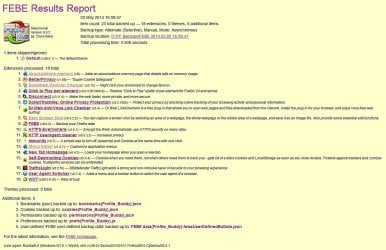
FEBE.jpg

The only problem is that it requires actually running Cyberfox then starting the FEBE add on in order to perform profile backup/ restore operations. MozBackup could restore a profile without having to run the browser.

Does anybody know of a reliable alternative Firefox variant profile backup/ restore utility that's similar to MozBackup? I know about copying and creating profiles using Profile Manager but again it requires use of the browser and I'm looking for a solution that will work independently.
 

My Computer My Computer

Computer type
Laptop
Computer Manufacturer/Model Number
ASUS
OS
Microsoft Windows 7 Home Premium 64-bit 7601 Multiprocessor Free Service Pack 1
CPU
AMD C-60 APU with Radeon(tm) HD Graphics
Motherboard
ASUSTeK COMPUTER INC. X501U
Memory
4.00 GB
Graphics Card(s)
AMD Radeon HD 6290 Graphics
Sound Card
(1) AMD High Definition Audio Device (2) Realtek High Defi
Screen Resolution
1366 x 768 x 32 bits (4294967296 colors) @ 60 Hz
Hard Drives
Hitachi HTS545050A7E380 SATA Disk Device
Antivirus
Comodo CIS & FW, SecureAplus App Whitelisting, Threatfire
Browser
Cyberfox 64bit, Opera 64bit, Airfox
Other Info
Spy-The-Spy, HitmanPro.Alert, Norton Connect Safe, MJRegWatcher, BitDefender TrafficLight, Voodoo Shield, Zemana AntiMalware
Hi,
That's a heck of a list :confused:
I live a some what simple life,
So are Firefox... profiles that venerable ?
I manually backup my Favorites would I need a third party to do this for me ?
Been that way for a far as I can remember,
Cheers.
 

My Computer My Computer

Computer type
PC/Desktop
Computer Manufacturer/Model Number
Custom assembled by me :}
OS
Win-7-Pro64bit 7-H-Prem-64bit
CPU
i7-5930K 2nd i9-9940x both water blocked VRM's too
Motherboard
ASUS SABERTOOTH X99 2nd ASUS x299 Apex
Memory
Trident-z 3200C14 2nd Trident-z 3600C16
Graphics Card(s)
EVGA 1080ti ftw3 2nd Titan Xp both water blocked
Sound Card
Built-in Realtek
Monitor(s) Displays
1-AOC G2460PG 24"G-Sync 144Hz/ 2nd 1-ASUS VG248QE 24" 144Hz
Screen Resolution
1920 x 1080 144Hz
Hard Drives
2-Samsung M.2 Evo & Evo Plus
2-Samsung 850 EVO 500GB SSD's/ 3-2.5 W.D. Black 1tb-&3-1tb/3-3.5 WD Black 1tb hdd's
PSU
EVGA SuperNOVA 1000-P2 2nd 1200-P2
Case
2-Corsair Obsidian Series 450D Black ATX Mid Tower
Cooling
Custom water loops
Keyboard
Logitech G710+/ 2nd Logitech G910
Mouse
2-RedDragon M901 Perdition 16400 dpi Gaming mouse = wired
Internet Speed
Comcast Ping 19ms 89.31mbps download speed 6.12mbps upload
Antivirus
Malwarebytes Pro/ Superantispyware Pro
Browser
FireFox & Pale moon
Other Info
2nd ASUS X299 Apex/Intel i9-9940x with Custom water loop/7H-Prem-x64/Corsair 450D case/Ram Trident-z 3600C16 4x8gb / Samsung970Evo plus 500gb SSD/Dual ssd EZ swap evo/PSU EVGA SuperNova 1200w-P2 80+Platinum/GPU Titan Xp /8-ML-140 on push-pull on 2-280GTX rads
Profile backup

It's not as bad as it sounds. It's just that on a few occasions (typically once or twice per year) I've installed an add on that didn't work correctly resulting in a corrupted profile or experienced unexpected high RAM usage or it just went screwy for some other reason. Rather than spending time trying to fix it or creating a new profile it's easier to restore a backed up profile with all customizations/ performance/ privacy tweaks applied without having to

1) Remember the ones that worked and the ones that didn't.
2) Re-tweak and apply every setting and about:config preference one at a time!

I'm not worried about bookmarks - just the rest of it. :D
 

My Computer My Computer

Computer type
Laptop
Computer Manufacturer/Model Number
ASUS
OS
Microsoft Windows 7 Home Premium 64-bit 7601 Multiprocessor Free Service Pack 1
CPU
AMD C-60 APU with Radeon(tm) HD Graphics
Motherboard
ASUSTeK COMPUTER INC. X501U
Memory
4.00 GB
Graphics Card(s)
AMD Radeon HD 6290 Graphics
Sound Card
(1) AMD High Definition Audio Device (2) Realtek High Defi
Screen Resolution
1366 x 768 x 32 bits (4294967296 colors) @ 60 Hz
Hard Drives
Hitachi HTS545050A7E380 SATA Disk Device
Antivirus
Comodo CIS & FW, SecureAplus App Whitelisting, Threatfire
Browser
Cyberfox 64bit, Opera 64bit, Airfox
Other Info
Spy-The-Spy, HitmanPro.Alert, Norton Connect Safe, MJRegWatcher, BitDefender TrafficLight, Voodoo Shield, Zemana AntiMalware
Speaking about Firefox itself, I back up:

AppData\Roaming\Mozilla\Firefox\Profiles\
AppData\Roaming\Mozilla\Firefox\Profiles.ini

I have three profiles in the Profiles folder, and besides doing this for backup, I can copy them along with the .ini file to duplicate my environment on other machines. I guess if I ever wanted to selectively restore pieces of a profile, I could restore a backup profile to a VM and extract it from there using whatever means there are for that, maybe involving an extension like the one you posted. However, I don't see any reason to use an extension all the time for backup/restore. Copying the profile folder and .ini file does it all for my bookmarks and extensive organization in the sidebar and toolbar, other customizations, history, cookies, saved passwords, and the extensions I use, which include Tabmix Plus, All-In-One-Sidebar, Noscript, Adblock Plus, Video DownloadHelper, GreaseMonkey, and in one profile, Classic Theme Restorer.
 

My Computer My Computer

Computer type
PC/Desktop
OS
Windows 7 Ultimate x64
Solved

Speaking about Firefox itself, I back up:

AppData\Roaming\Mozilla\Firefox\Profiles\
AppData\Roaming\Mozilla\Firefox\Profiles.ini

I have three profiles in the Profiles folder, and besides doing this for backup, I can copy them along with the .ini file to duplicate my environment on other machines. I guess if I ever wanted to selectively restore pieces of a profile, I could restore a backup profile to a VM and extract it from there using whatever means there are for that, maybe involving an extension like the one you posted. However, I don't see any reason to use an extension all the time for backup/restore. Copying the profile folder and .ini file does it all for my bookmarks and extensive organization in the sidebar and toolbar, other customizations, history, cookies, saved passwords, and the extensions I use, which include Tabmix Plus, All-In-One-Sidebar, Noscript, Adblock Plus, Video DownloadHelper, GreaseMonkey, and in one profile, Classic Theme Restorer.

Thanks for the suggestion. Tested and it works just as you described. Okay so everything is backed up rather than selected items but that's no problem! Your solution is so simple and will save time and effort in future so I'm very grateful. Currently I have the default profile along with another tweaked profile and added extensions.
 

My Computer My Computer

Computer type
Laptop
Computer Manufacturer/Model Number
ASUS
OS
Microsoft Windows 7 Home Premium 64-bit 7601 Multiprocessor Free Service Pack 1
CPU
AMD C-60 APU with Radeon(tm) HD Graphics
Motherboard
ASUSTeK COMPUTER INC. X501U
Memory
4.00 GB
Graphics Card(s)
AMD Radeon HD 6290 Graphics
Sound Card
(1) AMD High Definition Audio Device (2) Realtek High Defi
Screen Resolution
1366 x 768 x 32 bits (4294967296 colors) @ 60 Hz
Hard Drives
Hitachi HTS545050A7E380 SATA Disk Device
Antivirus
Comodo CIS & FW, SecureAplus App Whitelisting, Threatfire
Browser
Cyberfox 64bit, Opera 64bit, Airfox
Other Info
Spy-The-Spy, HitmanPro.Alert, Norton Connect Safe, MJRegWatcher, BitDefender TrafficLight, Voodoo Shield, Zemana AntiMalware
Back
Top