Solved FireWire (IEEE 1394) Not recognized...

tonibgd

New member
Local time
5:56 AM
Messages
14
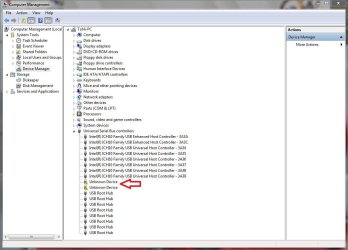
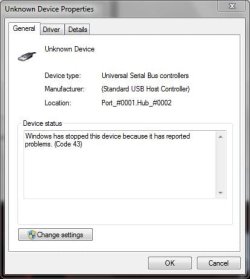
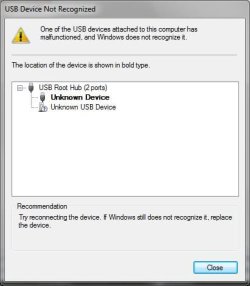
I have a Sony handycam and every time i connect it to the computer with IEEE 1394 i get "USB Device Not Recognized". It's worked before when i had Windows XP, now in the device manager there is nothing that looks like IEEE 1394.

The IEEE 1394 is connected directly to motherboard, and its located on the front panel of my case.

Sony Handycam: DCR-HC39E PAL
DCR-HC39E (DCRHC39E, DCRHC39E.CEH) : Cameras & camcorders : Sony

Case: CoolerMaster Centurion 590
Centurion 590 - Cooler Master - Leading Provider of Computer Case | Cooler | Power Supply


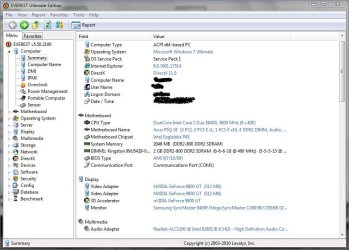
Operating System: Windows 7 Ultimate (64bit)
OS Service Pack: Service Pack 1

CPU Type: Intel Core 2 Duo E8400
Motherboard Name: Asus P5Q SE
ASUSTeK Computer Inc. - Motherboards- ASUS P5Q SE

System Memory: 2048 MB (DDR2-800 DDR2 SDRAM)
Video Adapter: NVIDIA GeForce 9800 GT (512 MB)

I saw some similar topics on many forums but nobody had the answer to this problem...

I uploaded some screenshots that might help...
 

Attachments
  • Capture.JPG
    Capture.JPG
    27.6 KB · Views: 54
  • Capture4.JPG
    Capture4.JPG
    90.2 KB · Views: 136
  • Capture2.JPG
    Capture2.JPG
    91.2 KB · Views: 205
  • Capture1.JPG
    Capture1.JPG
    16.9 KB · Views: 36
  • Capture3.JPG
    Capture3.JPG
    28.2 KB · Views: 43

My Computer

OS
Windows 7 Ultimate (64 bit)
CPU
Intel Core2Duo E8400 (3.00 GHz)
Motherboard
Asus P5Q SE
Memory
2GB Kingston DDR2
Graphics Card(s)
GeForce 9800 GT
Sound Card
Realtek High Definition Audio
Monitor(s) Displays
SyncMaster 940BF
Hard Drives
Western Digital 300GB
Case
CoolerMaster Centurion 590 Mid tower
Cooling
Cooler Master
Keyboard
Logitech Classic Keyboard
Mouse
Logitech MX518
Internet Speed
3 Mbps
I have a Sony handycam and every time i connect it to the computer with IEEE 1394 i get "USB Device Not Recognized". It's worked before when i had Windows XP, now in the device manager there is nothing that looks like IEEE 1394.
Hello tonibdg,
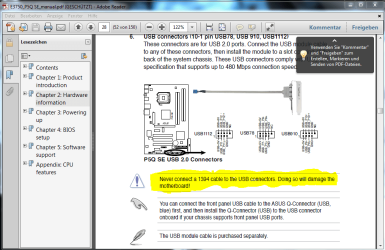
I find no mention of IEEE 1394 Firewire in the specs of your Motherboard and when I look at the above mentioned Motherboard there is no Firewire connection to be seen.

Just how is this connection connected to your Motherboard?

The USB headers on a MB look the same as a Firewire header except they are different colours. It would not be good if this Firewire cable is connected to a USB header.
 

My Computer

Computer Manufacturer/Model Number
Something I threw together
OS
Windows 7 Ultimate x64
CPU
Intel Core i7-2600K
Motherboard
Asus P8P67
Memory
16 GB G Skill F3-10666 CL9D-4GBRL
Graphics Card(s)
ATI Radeon HD 6870
Sound Card
ATI Radeon HDMI / Realtek ALC892
Monitor(s) Displays
2 x 22" standard monitors / LG32LC56v TV to watch films
Screen Resolution
1920 x1080
Hard Drives
2 x OCZ Vertex2 111.79GB
3 x Samsung103SJ
1 x Samsung103UJ
1 x WD3200BEVT
1 x Hitachi5K320-160
PSU
Thermaltake Toughpower Cable Management 750W
Case
Antec 300
Cooling
Noctua NH-U12P SE2 and 5 120mm Case fans
Keyboard
Microsoft Comfort Curve Keyboard 2000
Mouse
Hama M3110 / Logitech M305
Internet Speed
16000
Other Info
I have also used Fedora, Suse, Ubuntu Linux
And all other Windows from 95 to date except ME
Hello tonibdg,
I find no mention of IEEE 1394 Firewire in the specs of your Motherboard and when I look at the above mentioned Motherboard there is no Firewire connection to be seen.

Just how is this connection connected to your Motherboard?

The USB headers on a MB look the same as a Firewire header except they are different colours. It would not be good if this Firewire cable is connected to a USB header.

You were right abut the headers, but its strange how its worked when i had Windows XP...
I got it from the store like this, so i guess they didn't know where to plug the IEEE connector....

I took some photos:
ImageShack Album - 3 images

Do i have any other choices or must a buy a PCI IEEE 1394 Card?
 

My Computer

OS
Windows 7 Ultimate (64 bit)
CPU
Intel Core2Duo E8400 (3.00 GHz)
Motherboard
Asus P5Q SE
Memory
2GB Kingston DDR2
Graphics Card(s)
GeForce 9800 GT
Sound Card
Realtek High Definition Audio
Monitor(s) Displays
SyncMaster 940BF
Hard Drives
Western Digital 300GB
Case
CoolerMaster Centurion 590 Mid tower
Cooling
Cooler Master
Keyboard
Logitech Classic Keyboard
Mouse
Logitech MX518
Internet Speed
3 Mbps
I would recommend buying a card,
 

Attachments

  • Unbenannt.PNG
    Unbenannt.PNG
    57.9 KB · Views: 269

My Computer

Computer Manufacturer/Model Number
Something I threw together
OS
Windows 7 Ultimate x64
CPU
Intel Core i7-2600K
Motherboard
Asus P8P67
Memory
16 GB G Skill F3-10666 CL9D-4GBRL
Graphics Card(s)
ATI Radeon HD 6870
Sound Card
ATI Radeon HDMI / Realtek ALC892
Monitor(s) Displays
2 x 22" standard monitors / LG32LC56v TV to watch films
Screen Resolution
1920 x1080
Hard Drives
2 x OCZ Vertex2 111.79GB
3 x Samsung103SJ
1 x Samsung103UJ
1 x WD3200BEVT
1 x Hitachi5K320-160
PSU
Thermaltake Toughpower Cable Management 750W
Case
Antec 300
Cooling
Noctua NH-U12P SE2 and 5 120mm Case fans
Keyboard
Microsoft Comfort Curve Keyboard 2000
Mouse
Hama M3110 / Logitech M305
Internet Speed
16000
Other Info
I have also used Fedora, Suse, Ubuntu Linux
And all other Windows from 95 to date except ME
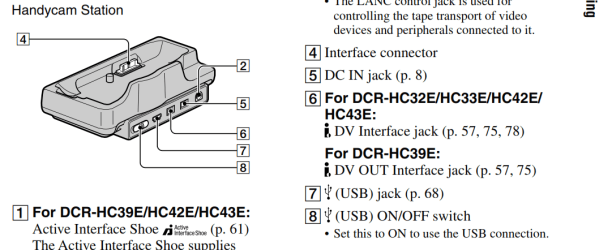
I believe your Sony has i,link (Firewire) and USB ports. Check the manual and see what it says. Is this the exact same setup that you had with XP?

Do you have this unit?

Sony.PNG

Jim :geek:
 

My Computer

Computer type
PC/Desktop
Computer Manufacturer/Model Number
Home Built
OS
Windows 8.1 Pro w/Media Center 64bit, Windows 7 HP 64bit
CPU
Phenom II X6 1100T
Motherboard
ASUS M5A99X EVO
Memory
Crucial Balistic 8gb DDR3-1866 CL9
Graphics Card(s)
MSI R6850 Cyclone IGD5 PE
Sound Card
On Board
Monitor(s) Displays
ASUS VE258Q 25" LED with DVI-HDMI-DisplayPort
Screen Resolution
1920 x 1080
Hard Drives
Two WD Cavier Black 2TB Sata III, WD My Book Essential 2TB USB 3.0
PSU
Seasonic X650 80 Plus GOLD Modular
Case
Corsair 400R
Cooling
Antec Kuhler H2O 620, Two 120mm and four 140mm
Keyboard
Logitech K120
Mouse
Logitech Marble Mouse USB, Logitech Precision Game Pad
Internet Speed
15MB
Antivirus
Norton IS 2013, Malwarebytes Pro Beta 2
Browser
IE-11, FF-27
Other Info
APC UPS ES 750, Netgear WNR3500L Gigabit & Wireless N Router with SamKnows Test Program, Motorola SB6120 Gigabit Cable Modem. Brother HL-2170W Laser Printer, Epson V300 Scanner
I bought a IEEE 1394 Firewire PCI Expansion Card and everything works fine now.

Thx for all your help... :)
 

My Computer

OS
Windows 7 Ultimate (64 bit)
CPU
Intel Core2Duo E8400 (3.00 GHz)
Motherboard
Asus P5Q SE
Memory
2GB Kingston DDR2
Graphics Card(s)
GeForce 9800 GT
Sound Card
Realtek High Definition Audio
Monitor(s) Displays
SyncMaster 940BF
Hard Drives
Western Digital 300GB
Case
CoolerMaster Centurion 590 Mid tower
Cooling
Cooler Master
Keyboard
Logitech Classic Keyboard
Mouse
Logitech MX518
Internet Speed
3 Mbps
I bought a IEEE 1394 Firewire PCI Expansion Card and everything works fine now.

Thx for all your help... :)
Thats great :) and no problem :D
 

My Computer

Computer Manufacturer/Model Number
Something I threw together
OS
Windows 7 Ultimate x64
CPU
Intel Core i7-2600K
Motherboard
Asus P8P67
Memory
16 GB G Skill F3-10666 CL9D-4GBRL
Graphics Card(s)
ATI Radeon HD 6870
Sound Card
ATI Radeon HDMI / Realtek ALC892
Monitor(s) Displays
2 x 22" standard monitors / LG32LC56v TV to watch films
Screen Resolution
1920 x1080
Hard Drives
2 x OCZ Vertex2 111.79GB
3 x Samsung103SJ
1 x Samsung103UJ
1 x WD3200BEVT
1 x Hitachi5K320-160
PSU
Thermaltake Toughpower Cable Management 750W
Case
Antec 300
Cooling
Noctua NH-U12P SE2 and 5 120mm Case fans
Keyboard
Microsoft Comfort Curve Keyboard 2000
Mouse
Hama M3110 / Logitech M305
Internet Speed
16000
Other Info
I have also used Fedora, Suse, Ubuntu Linux
And all other Windows from 95 to date except ME
Back
Top