
Flickering Lines

Thanks for the PSU spec. It has a MAX of 19A for +12v and you GT440 needs a MIN of 22A, so you are under powering it. This may cause flickering and overheating in the GT440 and the PSU which would lower its output even more.
I would get a new PSU of at least 600W or what has a +12V rating of at least 28A to give some overhead for you. The hard drives use the same 12V too along with CD/DVD combo drives. The PSU you haver has 2 12V rails which means you have to balance the load on each one, a better choice is a single 12V rail and there's no balance issue.

I have confirmed that driver 275.xx is not a good one. You should still use driver sweeper to sweep the driver. The nVIDIA clean install leaves behind some registry entries and a few .dlls.

Here is a good PSU Corsair CX600 and is not too costly. It has active PFC and a single 12V rail with 40A.

Thanks!

What version of graphic driver should I download rather than downloading 275.xx?

And also, before using Driver Sweeper. Is it a good idea to run in safe mode, and then after using driver sweeper, install the recommended version Graphic Driver for my new graphic card? (Not 275.xx)
 

My Computer

Computer type
PC/Desktop
Computer Manufacturer/Model Number
ECS/GeForce 8000 Series
OS
Windows 7 Ultimate SP1 86x
CPU
AMD Athlon(tm) 64 X2 Dual Core Processor 5000+, 2600 MHz
Motherboard
EliteGroup: GF8200A Black Edition
Memory
4 GB (3.00 Usable)
Graphics Card(s)
Nvidia - GeForce: 440GT 1GB GDDR5
Sound Card
IDT High-Definition Audio CODEC
Monitor(s) Displays
AOC M19W531
Screen Resolution
1440x900 60Hz
PSU
HEC - Raptor R400
Case
Standard PC Case
Cooling
20% More PC Cooling
Keyboard
CD-R KING DA Series
Mouse
Logitech Mouse
Internet Speed
150 kbp/s
Antivirus
avast! Antivirus
Other Info
My PC needs to be about 20% Cooler.
Download this driver geForce/ION 270.61 and save to desktop. run Driver Sweeper and clean all nVIDIA drivers on your system. Screen will go black, flicker, etc during this, it is normal. After DriverSweeper, install the new 270.61, reboot and you will be good.

Safe mode is not needed, this may work better NOT in safe mode, graphics drivers are disabled in safe mode.
 

My Computer

Computer type
PC/Desktop
Computer Manufacturer/Model Number
Home Built Desktop By DataTech
OS
Windows 7 Ultimate X64 SP1
CPU
Intel i5-2550K, Differing ~4.4-4.8GHz No built in GPU
Motherboard
ASUS P8Z68-V PRO/GEN3
Memory
16GB G.Skill Sniper 1866MHz @ 2133MHz 2x8GB
Graphics Card(s)
ASUS GTX650TIB-DC2OC-2GD5, (650TI Boost)
Sound Card
Onboard Realtek 5-1
Monitor(s) Displays
Samsung P2570HD
Screen Resolution
1920x1080
Hard Drives
Samsung 840 Pro 256GB SSD for OS, 500GB Seagate Constellation (Enterprise drive) for Data
PSU
Corsair HX650W
Case
Inwin Dragon Rider
Cooling
Hyper 212 EVO w/two Noctua fans, push-pull, @1300 RPM
Keyboard
E-Z Eyes, bright yellow keys with large characters
Mouse
steelseries SENSEI Laser Pro Gaming
Internet Speed
48-51Mbs Mbs down, 11 Mbs up Xfinity Cable
Antivirus
Norton Internet Security 2013
Browser
IE 10, Opera, Pale Moon if needed
Other Info
4 case fans, LG BluRay-RE, ASUS DVD-RW, Mr. Fusion power supply, 1.21 gigawatts.
Download this driver geForce/ION 270.61 and save to desktop. run Driver Sweeper and clean all nVIDIA drivers on your system. Screen will go black, flicker, etc during this, it is normal. After DriverSweeper, install the new 270.61, reboot and you will be good.

Safe mode is not needed, this may work better NOT in safe mode, graphics drivers are disabled in safe mode.

It says I have to reboot after I cleaned all the Nvidia drivers. Do I have to reboot before installing recommended graphic driver or do I have to install BEFORE rebooting my computer?
 

My Computer

Computer type
PC/Desktop
Computer Manufacturer/Model Number
ECS/GeForce 8000 Series
OS
Windows 7 Ultimate SP1 86x
CPU
AMD Athlon(tm) 64 X2 Dual Core Processor 5000+, 2600 MHz
Motherboard
EliteGroup: GF8200A Black Edition
Memory
4 GB (3.00 Usable)
Graphics Card(s)
Nvidia - GeForce: 440GT 1GB GDDR5
Sound Card
IDT High-Definition Audio CODEC
Monitor(s) Displays
AOC M19W531
Screen Resolution
1440x900 60Hz
PSU
HEC - Raptor R400
Case
Standard PC Case
Cooling
20% More PC Cooling
Keyboard
CD-R KING DA Series
Mouse
Logitech Mouse
Internet Speed
150 kbp/s
Antivirus
avast! Antivirus
Other Info
My PC needs to be about 20% Cooler.
Clean the drivers, reboot, and then install the updated drivers. When you've done that you'll most likely be asked to reboot one more time.

When you install the driver update you may be given the option of a clean install - take the option and any references to the old driver will be cleaned up.

And as suggested by Britton30, do not go into Safe Mode as the graphics drivers are not loaded when you boot via that method.
 

My Computer

Computer Manufacturer/Model Number
HP Pavilion Elite 495UK
OS
Windows 7 Ultimate SP1 64-Bit
CPU
Intel Core i7 870 @ 2.93GHz
Motherboard
MSI 2A9C (CPU1)
Memory
8Gb Dual-Channel DDR3 @ 664MHz
Graphics Card(s)
nVidia GeForce GTX 460 1024MB dedicated RAM
Sound Card
Realtek HD Audio
Monitor(s) Displays
HP2310i
Screen Resolution
1920 x 1080
Hard Drives
1x1954GB Hitachi HDS22020ALA 330 (RAID), 1x1954GB Hitachi External for backup and storage
PSU
460W
Case
HP Elite
Cooling
Air cooled
Keyboard
Logitech K750 solar-powered keyboard
Mouse
Logitech Wireless M180 mouse
Internet Speed
2Mb
Other Info
Pure Avanti Flow Internet Radio with iPod Dock, 64Gb iPod, HP USB Speakers, Sony MDR-V500 Headphones, Sony Vaio F-Series Laptop
Clean the drivers, reboot, and then install the updated drivers. When you've done that you'll most likely be asked to reboot one more time.

When you install the driver update you may be given the option of a clean install - take the option and any references to the old driver will be cleaned up.

Okay! Thank you! :D
 

My Computer

Computer type
PC/Desktop
Computer Manufacturer/Model Number
ECS/GeForce 8000 Series
OS
Windows 7 Ultimate SP1 86x
CPU
AMD Athlon(tm) 64 X2 Dual Core Processor 5000+, 2600 MHz
Motherboard
EliteGroup: GF8200A Black Edition
Memory
4 GB (3.00 Usable)
Graphics Card(s)
Nvidia - GeForce: 440GT 1GB GDDR5
Sound Card
IDT High-Definition Audio CODEC
Monitor(s) Displays
AOC M19W531
Screen Resolution
1440x900 60Hz
PSU
HEC - Raptor R400
Case
Standard PC Case
Cooling
20% More PC Cooling
Keyboard
CD-R KING DA Series
Mouse
Logitech Mouse
Internet Speed
150 kbp/s
Antivirus
avast! Antivirus
Other Info
My PC needs to be about 20% Cooler.
There is still another problem, though. 270.xx didn't fix. There are flickering lines messing up my screen on DeviantArt. Some program like Picasa (When zoom in, there are flickering lines on the black transparent background), and some sites too. Flickering lines are mostly showing up when something is/are mixed black, some uncommon and similar colors, and dA's green. :confused:

Oh, and hey, every time when I turn on my computer, it goes black screen for a quick time then repeat after about 5-10 seconds? :huh:
 

My Computer

Computer type
PC/Desktop
Computer Manufacturer/Model Number
ECS/GeForce 8000 Series
OS
Windows 7 Ultimate SP1 86x
CPU
AMD Athlon(tm) 64 X2 Dual Core Processor 5000+, 2600 MHz
Motherboard
EliteGroup: GF8200A Black Edition
Memory
4 GB (3.00 Usable)
Graphics Card(s)
Nvidia - GeForce: 440GT 1GB GDDR5
Sound Card
IDT High-Definition Audio CODEC
Monitor(s) Displays
AOC M19W531
Screen Resolution
1440x900 60Hz
PSU
HEC - Raptor R400
Case
Standard PC Case
Cooling
20% More PC Cooling
Keyboard
CD-R KING DA Series
Mouse
Logitech Mouse
Internet Speed
150 kbp/s
Antivirus
avast! Antivirus
Other Info
My PC needs to be about 20% Cooler.
With all we've done here I would think the only probable things left are your monitor is bad or at least has a bad connector or the graphics cards are faulty. The Power supply is also still suspect as it is not putting out enough and it is not a recognized good brand.
Once more, take the GFX card out, make sure its clean, put it back making sure it is seated properly.

If possible try the monitor on another PC and another monitor on your PC.

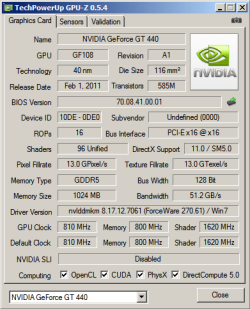
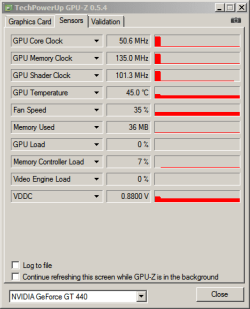
Download GPU-Z and run it and post snips of each tab opened.
 
Last edited:

My Computer

Computer type
PC/Desktop
Computer Manufacturer/Model Number
Home Built Desktop By DataTech
OS
Windows 7 Ultimate X64 SP1
CPU
Intel i5-2550K, Differing ~4.4-4.8GHz No built in GPU
Motherboard
ASUS P8Z68-V PRO/GEN3
Memory
16GB G.Skill Sniper 1866MHz @ 2133MHz 2x8GB
Graphics Card(s)
ASUS GTX650TIB-DC2OC-2GD5, (650TI Boost)
Sound Card
Onboard Realtek 5-1
Monitor(s) Displays
Samsung P2570HD
Screen Resolution
1920x1080
Hard Drives
Samsung 840 Pro 256GB SSD for OS, 500GB Seagate Constellation (Enterprise drive) for Data
PSU
Corsair HX650W
Case
Inwin Dragon Rider
Cooling
Hyper 212 EVO w/two Noctua fans, push-pull, @1300 RPM
Keyboard
E-Z Eyes, bright yellow keys with large characters
Mouse
steelseries SENSEI Laser Pro Gaming
Internet Speed
48-51Mbs Mbs down, 11 Mbs up Xfinity Cable
Antivirus
Norton Internet Security 2013
Browser
IE 10, Opera, Pale Moon if needed
Other Info
4 case fans, LG BluRay-RE, ASUS DVD-RW, Mr. Fusion power supply, 1.21 gigawatts.
With all we've done here I would think the only probable things left are your monitor is bad or at least has a bad connector or the graphics cards are faulty. The Power supply is also still suspect as it is not putting out enough and it is not a recognised good brand.
Once more, take the GFX card out, make sure its clean, put it back making sure it is seted proerly.


My monitor is 3 years old, though. My CPU, and graphic card were cleaned already last Sunday.

Is there a DVI to VGA adapter for my monitor? Although, my graphic card has a HDMI support. So, is HDMI anything good? But I think my monitor supports DVI and VGA. Can it supports HDMI too? :huh:

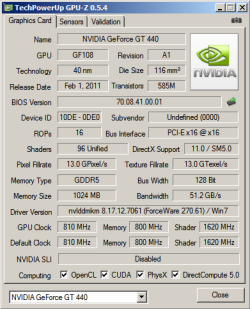
Download GPU-Z and run it and post snips of each tab opened.

Okay, here ya go!

Graphic Card
GPU-Z Graphic Card.PNG

Sensors
GPU-Z Sensors.PNG
 
Last edited:

My Computer

Computer type
PC/Desktop
Computer Manufacturer/Model Number
ECS/GeForce 8000 Series
OS
Windows 7 Ultimate SP1 86x
CPU
AMD Athlon(tm) 64 X2 Dual Core Processor 5000+, 2600 MHz
Motherboard
EliteGroup: GF8200A Black Edition
Memory
4 GB (3.00 Usable)
Graphics Card(s)
Nvidia - GeForce: 440GT 1GB GDDR5
Sound Card
IDT High-Definition Audio CODEC
Monitor(s) Displays
AOC M19W531
Screen Resolution
1440x900 60Hz
PSU
HEC - Raptor R400
Case
Standard PC Case
Cooling
20% More PC Cooling
Keyboard
CD-R KING DA Series
Mouse
Logitech Mouse
Internet Speed
150 kbp/s
Antivirus
avast! Antivirus
Other Info
My PC needs to be about 20% Cooler.
My post was edited.

Your monitor would have to have an HDMI connector. It is less desirable for video, in my opinion, than DVI. HDMI is an easy way to run a home theater system since it carries both audio and video.
There are DVI>VGA (D-sub) and VGA>DVI adapters available. Run a google on either term for your area of the worl.
 

My Computer

Computer type
PC/Desktop
Computer Manufacturer/Model Number
Home Built Desktop By DataTech
OS
Windows 7 Ultimate X64 SP1
CPU
Intel i5-2550K, Differing ~4.4-4.8GHz No built in GPU
Motherboard
ASUS P8Z68-V PRO/GEN3
Memory
16GB G.Skill Sniper 1866MHz @ 2133MHz 2x8GB
Graphics Card(s)
ASUS GTX650TIB-DC2OC-2GD5, (650TI Boost)
Sound Card
Onboard Realtek 5-1
Monitor(s) Displays
Samsung P2570HD
Screen Resolution
1920x1080
Hard Drives
Samsung 840 Pro 256GB SSD for OS, 500GB Seagate Constellation (Enterprise drive) for Data
PSU
Corsair HX650W
Case
Inwin Dragon Rider
Cooling
Hyper 212 EVO w/two Noctua fans, push-pull, @1300 RPM
Keyboard
E-Z Eyes, bright yellow keys with large characters
Mouse
steelseries SENSEI Laser Pro Gaming
Internet Speed
48-51Mbs Mbs down, 11 Mbs up Xfinity Cable
Antivirus
Norton Internet Security 2013
Browser
IE 10, Opera, Pale Moon if needed
Other Info
4 case fans, LG BluRay-RE, ASUS DVD-RW, Mr. Fusion power supply, 1.21 gigawatts.
My post was edited.

Your monitor would have to have an HDMI connector. It is less desirable for video, in my opinion, than DVI. HDMI is an easy way to run a home theater system since it carries both audio and video.
There are DVI>VGA (D-sub) and VGA>DVI adapters available. Run a google on either term for your area of the worl.

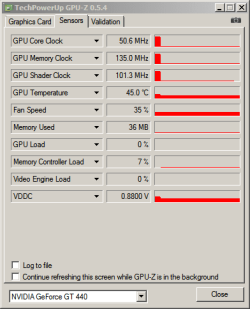
Yes, I've read your edited post. You are asking about GPU-Z. So here is it.

Graphic Card
GPU-Z Graphic Card.PNG

Sensors
GPU-Z Sensors.PNG

And also, thank you for the answer about the adapters and HDMI! :)
 

My Computer

Computer type
PC/Desktop
Computer Manufacturer/Model Number
ECS/GeForce 8000 Series
OS
Windows 7 Ultimate SP1 86x
CPU
AMD Athlon(tm) 64 X2 Dual Core Processor 5000+, 2600 MHz
Motherboard
EliteGroup: GF8200A Black Edition
Memory
4 GB (3.00 Usable)
Graphics Card(s)
Nvidia - GeForce: 440GT 1GB GDDR5
Sound Card
IDT High-Definition Audio CODEC
Monitor(s) Displays
AOC M19W531
Screen Resolution
1440x900 60Hz
PSU
HEC - Raptor R400
Case
Standard PC Case
Cooling
20% More PC Cooling
Keyboard
CD-R KING DA Series
Mouse
Logitech Mouse
Internet Speed
150 kbp/s
Antivirus
avast! Antivirus
Other Info
My PC needs to be about 20% Cooler.
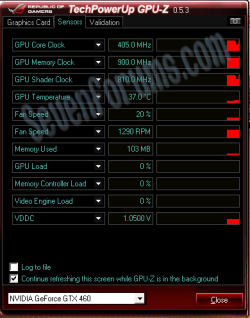
Your GPU is idle but seems a bit hot at 45C. Here is mine at idle and 37C.
Can you try the monitor and different PC as suggested?
GPUz.PNG
 

My Computer

Computer type
PC/Desktop
Computer Manufacturer/Model Number
Home Built Desktop By DataTech
OS
Windows 7 Ultimate X64 SP1
CPU
Intel i5-2550K, Differing ~4.4-4.8GHz No built in GPU
Motherboard
ASUS P8Z68-V PRO/GEN3
Memory
16GB G.Skill Sniper 1866MHz @ 2133MHz 2x8GB
Graphics Card(s)
ASUS GTX650TIB-DC2OC-2GD5, (650TI Boost)
Sound Card
Onboard Realtek 5-1
Monitor(s) Displays
Samsung P2570HD
Screen Resolution
1920x1080
Hard Drives
Samsung 840 Pro 256GB SSD for OS, 500GB Seagate Constellation (Enterprise drive) for Data
PSU
Corsair HX650W
Case
Inwin Dragon Rider
Cooling
Hyper 212 EVO w/two Noctua fans, push-pull, @1300 RPM
Keyboard
E-Z Eyes, bright yellow keys with large characters
Mouse
steelseries SENSEI Laser Pro Gaming
Internet Speed
48-51Mbs Mbs down, 11 Mbs up Xfinity Cable
Antivirus
Norton Internet Security 2013
Browser
IE 10, Opera, Pale Moon if needed
Other Info
4 case fans, LG BluRay-RE, ASUS DVD-RW, Mr. Fusion power supply, 1.21 gigawatts.
Your GPU is idle but seems a bit hot at 45C. Here is mine at idle and 37C.
Can you try the monitor and different PC as suggested?
View attachment 163734

My other PCs are 7 years old though. Their motherboards are <b>REALLY</b> old, and they are not supported to my new PC.
 

My Computer

Computer type
PC/Desktop
Computer Manufacturer/Model Number
ECS/GeForce 8000 Series
OS
Windows 7 Ultimate SP1 86x
CPU
AMD Athlon(tm) 64 X2 Dual Core Processor 5000+, 2600 MHz
Motherboard
EliteGroup: GF8200A Black Edition
Memory
4 GB (3.00 Usable)
Graphics Card(s)
Nvidia - GeForce: 440GT 1GB GDDR5
Sound Card
IDT High-Definition Audio CODEC
Monitor(s) Displays
AOC M19W531
Screen Resolution
1440x900 60Hz
PSU
HEC - Raptor R400
Case
Standard PC Case
Cooling
20% More PC Cooling
Keyboard
CD-R KING DA Series
Mouse
Logitech Mouse
Internet Speed
150 kbp/s
Antivirus
avast! Antivirus
Other Info
My PC needs to be about 20% Cooler.
If possible try the monitor on another PC and another monitor on your PC.
 

My Computer

Computer type
PC/Desktop
Computer Manufacturer/Model Number
Home Built Desktop By DataTech
OS
Windows 7 Ultimate X64 SP1
CPU
Intel i5-2550K, Differing ~4.4-4.8GHz No built in GPU
Motherboard
ASUS P8Z68-V PRO/GEN3
Memory
16GB G.Skill Sniper 1866MHz @ 2133MHz 2x8GB
Graphics Card(s)
ASUS GTX650TIB-DC2OC-2GD5, (650TI Boost)
Sound Card
Onboard Realtek 5-1
Monitor(s) Displays
Samsung P2570HD
Screen Resolution
1920x1080
Hard Drives
Samsung 840 Pro 256GB SSD for OS, 500GB Seagate Constellation (Enterprise drive) for Data
PSU
Corsair HX650W
Case
Inwin Dragon Rider
Cooling
Hyper 212 EVO w/two Noctua fans, push-pull, @1300 RPM
Keyboard
E-Z Eyes, bright yellow keys with large characters
Mouse
steelseries SENSEI Laser Pro Gaming
Internet Speed
48-51Mbs Mbs down, 11 Mbs up Xfinity Cable
Antivirus
Norton Internet Security 2013
Browser
IE 10, Opera, Pale Moon if needed
Other Info
4 case fans, LG BluRay-RE, ASUS DVD-RW, Mr. Fusion power supply, 1.21 gigawatts.
If possible try the monitor on another PC and another monitor on your PC.

My other monitors are CRT and are very old. Will it work?
 

My Computer

Computer type
PC/Desktop
Computer Manufacturer/Model Number
ECS/GeForce 8000 Series
OS
Windows 7 Ultimate SP1 86x
CPU
AMD Athlon(tm) 64 X2 Dual Core Processor 5000+, 2600 MHz
Motherboard
EliteGroup: GF8200A Black Edition
Memory
4 GB (3.00 Usable)
Graphics Card(s)
Nvidia - GeForce: 440GT 1GB GDDR5
Sound Card
IDT High-Definition Audio CODEC
Monitor(s) Displays
AOC M19W531
Screen Resolution
1440x900 60Hz
PSU
HEC - Raptor R400
Case
Standard PC Case
Cooling
20% More PC Cooling
Keyboard
CD-R KING DA Series
Mouse
Logitech Mouse
Internet Speed
150 kbp/s
Antivirus
avast! Antivirus
Other Info
My PC needs to be about 20% Cooler.
Back
Top