flock browser installation could not be started

3night

New member
Member
Local time
6:05 AM
Messages
38
the installation could not be started after i uninstalled it to try the newer version.

i downladed the file from the official site, i double clicked, and right clicked it with admin, both nothing happened.

any one has same problem just like me?
 

My Computer

OS
windows 7
Look at the processes tab of the task manager ... if it is there , notice the CPU usage thereto . If it is high enough, end the task . Change the color scheme to basic , and try it again .

If it is not even in the task manager, you got a corrupted download ; so you are to download it again .
 

My Computer

Computer type
PC/Desktop
Computer Manufacturer/Model Number
Self Assembled
OS
Microsoft Windows 10 Pro Insider Preview 64-bit
CPU
Intel(R) Core(TM) i3-4130 CPU @ 3.40GHz
Motherboard
Gigabyte Technology Co., Ltd. B85M-D3H
Memory
Corsair Vengence 4GB x2 (8.00GB Dual-Channel DDR3 @ 798MHz)
Graphics Card(s)
2047MB GeForce GTS 450 (ZOTAC International)
Sound Card
Onboard (Realtek High Definition Audio)
Monitor(s) Displays
LG Flatron E2040T
Screen Resolution
1600x900
Hard Drives
Western Digital 1 TB
Seagate 500 GB
PSU
Corsair VS550
Case
Cooler Master K380
Cooling
Cooler Master Seidon 120V Plus
Keyboard
Logitech MK260r
Mouse
Logitech MK260r
Internet Speed
PMPL Broadband
Antivirus
Windows Defender + MBAM
Browser
Firefox
Other Info
Dell Studio 15" Laptop
Look at the processes tab of the task manager ... if it is there , notice the CPU usage thereto . If it is high enough, end the task . Change the color scheme to basic , and try it again .

If it is not even in the task manager, you got a corrupted download ; so you are to download it again .

cpu is normal, download the file many times ,even tried the Free software downloads and software reviews - CNET Download.com to get the file. same problem. ask for help from the offciall already but no respond
 

My Computer

OS
windows 7
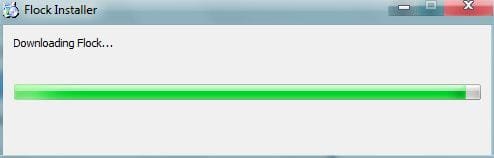
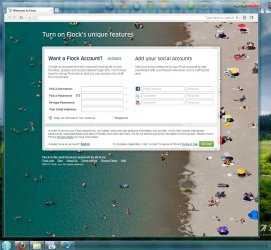
I went to that page ... now describing my realization .

The download from the Flock's page (524 KB only_) is a downloader . It connects to the flock's server, downloads it , so that you can install it . Double clicking the 524 kb file will connect to the flck's server ... all the instruction is in this page ... Flock Browser - Thank You For Download Flock .

Now I am to uninstall it ... dont mind :eek:
 

Attachments

  • Capture.JPG
    Capture.JPG
    13.3 KB · Views: 2
  • Capture2.JPG
    Capture2.JPG
    170.1 KB · Views: 8

My Computer

Computer type
PC/Desktop
Computer Manufacturer/Model Number
Self Assembled
OS
Microsoft Windows 10 Pro Insider Preview 64-bit
CPU
Intel(R) Core(TM) i3-4130 CPU @ 3.40GHz
Motherboard
Gigabyte Technology Co., Ltd. B85M-D3H
Memory
Corsair Vengence 4GB x2 (8.00GB Dual-Channel DDR3 @ 798MHz)
Graphics Card(s)
2047MB GeForce GTS 450 (ZOTAC International)
Sound Card
Onboard (Realtek High Definition Audio)
Monitor(s) Displays
LG Flatron E2040T
Screen Resolution
1600x900
Hard Drives
Western Digital 1 TB
Seagate 500 GB
PSU
Corsair VS550
Case
Cooler Master K380
Cooling
Cooler Master Seidon 120V Plus
Keyboard
Logitech MK260r
Mouse
Logitech MK260r
Internet Speed
PMPL Broadband
Antivirus
Windows Defender + MBAM
Browser
Firefox
Other Info
Dell Studio 15" Laptop
I went to that page ... now describing my realization .

The download from the Flock's page (524 KB only_) is a downloader . It connects to the flock's server, downloads it , so that you can install it . Double clicking the 524 kb file will connect to the flck's server ... all the instruction is in this page ... Flock Browser - Thank You For Download Flock .

Now I am to uninstall it ... dont mind :eek:

thank you ,it connecting to the server now, i did the same thing just like you many times before, it just didn't start working ,it was so weird.

thank you again
 

My Computer

OS
windows 7
Back
Top