I'm confused by your reference to
three elements and the
other three elements but suspect you only mean that you uninstalled 3 components at a time. There is an uninstall all in v2012 - was it not availalbe in v2011? It is possbile that MS added that option in v2012.
Well thanks for the route to follow - unfortunately after:
Uninstalling Windows Live Essentials twice - ticking the three elements listed, then again ticking the other three, until the Control Panel ceased to display Win Essentials in the list of installed programs.
These step weren't necessary, but caused no harm either.
I thought you already had the offline install program.
edit: Sorry I misread what you wrote. You said and running the downloaded wlsetup-all.exe
- I read you downloaded and ran the ...... my mistake.
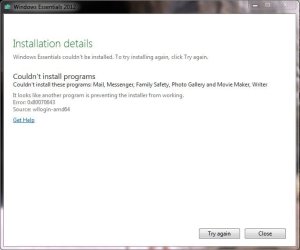
Then shutting the WiFi, shutting MBAM, shutting Avast, and running the downloaded wlsetup-all.exe (install all, recommended). This attached message was displayed.
The three elements thing: Uninstalling WLE Win7 displayed a list of three items to uninstall, each with a tick-box, if I mind right these were Writer, Messenger, and one other. After completing this uninstall WLE was still listed as uninstallable.
The second uninstall displayed another list of three items each with a tick-box, WLmail, and two others.
You can see my note taking is not up to much.
What file did you did by hand?
I searched for "
that file" on my system and couldn't find it. :sarc: (sarcasm alert!)
Then re-booting, confirming that WLE was listed again in installed programs, restarting WiFi & Avast. Trying to run wlmail.exe failed probably because it is a 2010 file from the earlier version which did not get uninstalled. I deleted that file by hand. Run through the above again and the same 'Could not install' message is displayed.
This wlmail.exe was dated 2010 and seemed to be an orphan, ie., not surrounded by 100 DLL's and other files. Searching the C:\ drive revealed no other wlmail.exe after the early, failed attempts to install WLE.
Good stay out of the registry.
I have not done a manual trawl through the Registry to see if references to wlmail remain, but I would hesitate to touch them anyway.
Could not resist looking through the registry - without making any alterations, just F3 searches for 'wlmail.exe'. There are quite a few keys and values with that text and with the folder location from which that file was deleted. I can restore the file, but we've been there before with no success in the un-install/install attempts to date.
Further hints welcomed.
It might be a previous stuck install - let's take this one step at a time.
I'll let you know the steps, don't do any more than what I request. OK?
I should note that evenutally your WE will work, but my steps only require one or two attempts to install. Doing more than requested.... well that might require 10 or 20 attempts.
Fair enough?


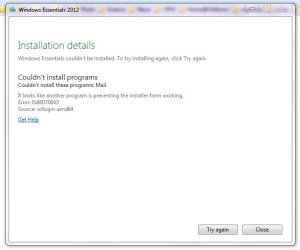


 ).
).