
Folder - Delete from Command Prompt

How to Delete a Folder in Windows from the Command Prompt


   Information
This will show you how to permanently delete a Folder in Vista, Windows 7, or Windows 8 using the RD or RMDIR command from within a command prompt.

This can be handy if you cannot delete the folder using the normal methods.

   Note
While you can run this command in a non-elevated or elevated command prompt, you would get the best results using a elevated command prompt.

   Warning
The folder will be deleted immediately and not placed in the Recycle Bin first. Deleting a folder using this command will also delete all of it's contents as well as the folder. Be sure to backup anything you want to keep in the folder first.


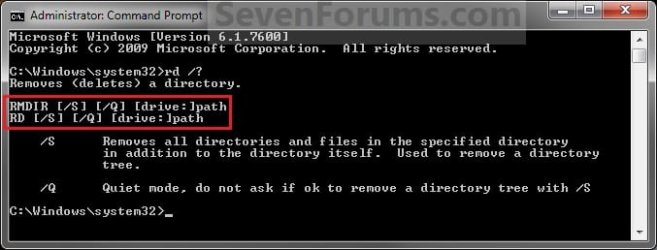
EXAMPLE: RD and RMDIR Command
NOTE: You can use either the RD or RMDIR command in the command prompt. They are the same command.
About_RD_RMDIR.jpg


Here's How:
1. Do step 2 or 3 below for where you would like to use a command prompt at.


2. To Use a Elevated Command Prompt in Windows
A) Open an Elevated command prompt in Vista/Windows 7 or Windows 8, and go to step 4 below.
3. To Use a Command Prompt at Boot
A) Open a command prompt at boot in Vista/Windows 7 or Windows 8, and go to step 4 below.

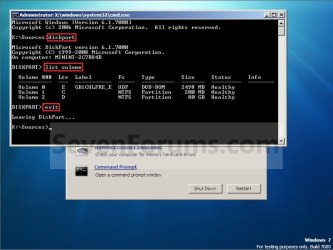
B) In the command prompt, type diskpart and press Enter. (see screenshot below)

C) In the command prompt, type list volume and press Enter. (see screenshot below)
NOTE: This will let you see what the drive letter is for the drive that you want to delete the folder in since it may not always be the same drive letter that it is in Windows.

D) After making note of the drive letter, type exit and press Enter. (see screenshot below)
Command-1.jpg
4. In the command prompt, type the command below and press enter.
NOTE: Substitute Full Path of Folder within quotes below with your folder's full path within quotes instead.

Code:
RD /S /Q "[COLOR=red][B]Full Path of Folder[/B][/COLOR]"

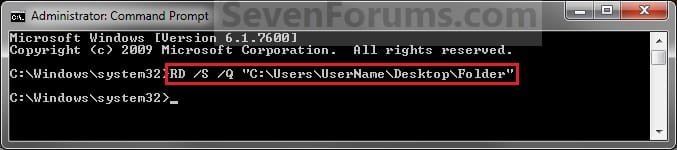
NOTE: For example, if I wanted to delete a folder named Folder on my desktop, I would type this command below.

Code:
RD /S /Q "C:\Users\UserName\Desktop\Folder"
Elevated_Command_Prompt.jpg
5. The folder should now be deleted.

6. Close the command prompt.
NOTE: If you used a command prompt at boot, then also close the System Recovery Options window and restart the computer.
That's it,
Shawn


Last edited:

My Computer

Computer type
PC/Desktop
Computer Manufacturer/Model Number
Self built custom
OS
64-bit Windows 11 Pro for Workstations
CPU
Intel i7-8700K OC'd to 5 GHz
Motherboard
ASUS ROG Maximus XI Formula Z390
Memory
64 GB (4x16GB) G.SKILL TridentZ RGB DDR4 3600 MHz
Graphics Card(s)
ASUS ROG-STRIX-GTX1080TI-O11G-GAMING
Sound Card
Integrated
Monitor(s) Displays
2 x Samsung Odyssey G7 27"
Screen Resolution
2560x1440
Hard Drives
1TB Samsung 990 PRO M.2,
4TB Samsung 990 PRO PRO M.2,
TerraMaster F8 SSD Plus NAS
PSU
Seasonic Prime Titanium 850W
Case
Thermaltake Core P3
Cooling
Corsair Hydro H115i
Keyboard
Logitech wireless K800
Mouse
Logitech MX Master 4
Internet Speed
2 Gb/s Download and 100 Mb/s Upload
Antivirus
Malwarebyte Anti-Malware Premium
Browser
Google Chrome
Other Info
Logitech Z625 speaker system,
Logitech BRIO 4K Pro webcam,
HP Color LaserJet Pro MFP M477fdn,
APC SMART-UPS RT 1000 XL - SURT1000XLI,
Galaxy S23 Plus phone
5 of those folders with the really long names that are left from Windows update. I have not been able to get directly to the command prompt from boot. How do you do that?
 

My Computer

Computer Manufacturer/Model Number
HP G60
OS
Windows 7 Home Premium
CPU
Dual Core T4200
Motherboard
HP
Memory
4 GB
The tutorial link in my post above can help show you how to.

If that fails to delete the folder, then you might see if you may be able to using the free program Unlocker.
 

My Computer

Computer type
PC/Desktop
Computer Manufacturer/Model Number
Self built custom
OS
64-bit Windows 11 Pro for Workstations
CPU
Intel i7-8700K OC'd to 5 GHz
Motherboard
ASUS ROG Maximus XI Formula Z390
Memory
64 GB (4x16GB) G.SKILL TridentZ RGB DDR4 3600 MHz
Graphics Card(s)
ASUS ROG-STRIX-GTX1080TI-O11G-GAMING
Sound Card
Integrated
Monitor(s) Displays
2 x Samsung Odyssey G7 27"
Screen Resolution
2560x1440
Hard Drives
1TB Samsung 990 PRO M.2,
4TB Samsung 990 PRO PRO M.2,
TerraMaster F8 SSD Plus NAS
PSU
Seasonic Prime Titanium 850W
Case
Thermaltake Core P3
Cooling
Corsair Hydro H115i
Keyboard
Logitech wireless K800
Mouse
Logitech MX Master 4
Internet Speed
2 Gb/s Download and 100 Mb/s Upload
Antivirus
Malwarebyte Anti-Malware Premium
Browser
Google Chrome
Other Info
Logitech Z625 speaker system,
Logitech BRIO 4K Pro webcam,
HP Color LaserJet Pro MFP M477fdn,
APC SMART-UPS RT 1000 XL - SURT1000XLI,
Galaxy S23 Plus phone
Thanks

I had to go to Option Three to get it done but it worked. I had previously tried Unlocker which I've used on another computer but it didn't do anything.
 

My Computer

Computer Manufacturer/Model Number
HP G60
OS
Windows 7 Home Premium
CPU
Dual Core T4200
Motherboard
HP
Memory
4 GB
You're welcome. I'm happy to hear that you were able to get it deleted. :)
 

My Computer

Computer type
PC/Desktop
Computer Manufacturer/Model Number
Self built custom
OS
64-bit Windows 11 Pro for Workstations
CPU
Intel i7-8700K OC'd to 5 GHz
Motherboard
ASUS ROG Maximus XI Formula Z390
Memory
64 GB (4x16GB) G.SKILL TridentZ RGB DDR4 3600 MHz
Graphics Card(s)
ASUS ROG-STRIX-GTX1080TI-O11G-GAMING
Sound Card
Integrated
Monitor(s) Displays
2 x Samsung Odyssey G7 27"
Screen Resolution
2560x1440
Hard Drives
1TB Samsung 990 PRO M.2,
4TB Samsung 990 PRO PRO M.2,
TerraMaster F8 SSD Plus NAS
PSU
Seasonic Prime Titanium 850W
Case
Thermaltake Core P3
Cooling
Corsair Hydro H115i
Keyboard
Logitech wireless K800
Mouse
Logitech MX Master 4
Internet Speed
2 Gb/s Download and 100 Mb/s Upload
Antivirus
Malwarebyte Anti-Malware Premium
Browser
Google Chrome
Other Info
Logitech Z625 speaker system,
Logitech BRIO 4K Pro webcam,
HP Color LaserJet Pro MFP M477fdn,
APC SMART-UPS RT 1000 XL - SURT1000XLI,
Galaxy S23 Plus phone
Thanks for this! I had created a symbolic link that only the command line could successfully delete.
 

My Computer

OS
Windows 7 64 bit Pro
You're most welcome mytouchoftech, and welcome to Seven Forums. :)
 

My Computer

Computer type
PC/Desktop
Computer Manufacturer/Model Number
Self built custom
OS
64-bit Windows 11 Pro for Workstations
CPU
Intel i7-8700K OC'd to 5 GHz
Motherboard
ASUS ROG Maximus XI Formula Z390
Memory
64 GB (4x16GB) G.SKILL TridentZ RGB DDR4 3600 MHz
Graphics Card(s)
ASUS ROG-STRIX-GTX1080TI-O11G-GAMING
Sound Card
Integrated
Monitor(s) Displays
2 x Samsung Odyssey G7 27"
Screen Resolution
2560x1440
Hard Drives
1TB Samsung 990 PRO M.2,
4TB Samsung 990 PRO PRO M.2,
TerraMaster F8 SSD Plus NAS
PSU
Seasonic Prime Titanium 850W
Case
Thermaltake Core P3
Cooling
Corsair Hydro H115i
Keyboard
Logitech wireless K800
Mouse
Logitech MX Master 4
Internet Speed
2 Gb/s Download and 100 Mb/s Upload
Antivirus
Malwarebyte Anti-Malware Premium
Browser
Google Chrome
Other Info
Logitech Z625 speaker system,
Logitech BRIO 4K Pro webcam,
HP Color LaserJet Pro MFP M477fdn,
APC SMART-UPS RT 1000 XL - SURT1000XLI,
Galaxy S23 Plus phone
Deleting using Command Prompt

I tried this technique to attempt to delete a folder on my Local Disk D:\ Drive and on every single file and folder, an error message came up with Access is Denied.... I don't know what to do to get rid of this folder. Can you help?
 

My Computer

OS
Windows 7 Home Premium 32bit
it won't allow me to take ownership the entire folder cannot be changed in anyway shape or form.
 

My Computer

OS
Windows 7 Home Premium 32bit
ok, so after clicking the ownership change button frantically it has done it, I am now the owner of that folder, however when I try and delete it, it still comes up with the message access is denied.
 

My Computer

OS
Windows 7 Home Premium 32bit
Ok, so it came up with the fact that one of my users was inheriting permissions, therefore I have been able to remove that and now thankfully it has started to work, I am now in control of that folder.

Thank you for your time, but you can consider this issue solved!
:D
 

My Computer

OS
Windows 7 Home Premium 32bit
I'm glad it all got worked out. I figured it was just a permission issue but I had to make sure it was a folder you could actually delete.
 

My Computer

OS
Windows 7 Ultimate x64
Okay so I have a laptop at work that the AV was popping up constantly this morning saying it had removed 30 or 40 trojans from C:\Program Files (x86)\Google\Desktop\Installer\... So I uninstalled the Google Bar for IE and also Google Chrome. Removed every other folder in that Google directory. But it will not let me delete the \Google\Desktop folder and everything inside it.

I have tried removing it in Command Line. I have tried Safe Mode with Command Line, I have even tried creating a registry key that moves that folder to another folder and renames it at next reboot. That last part worked. Now it sits in C:\temp\ and the folder is called simply "delete". But I still cannot get rid of that folder from CMD or anything else. It says access is denied at every sub-folder level.

I am using the administrator account for the computer. I wish I could connect the hard drive to a different PC but that's not really possible. I checked Properties of the offending folder and it says "0 files, 257 folders". Yikes!

Any other ideas what I might try?

*edit* downloaded the app Unlocker and that made quick work of it. Entire folder is gone now.
 
Last edited:

My Computer

Computer type
PC/Desktop
Computer Manufacturer/Model Number
Custom-built PC workstation
OS
Windows 7 Professional x64
CPU
Core i7-4790K Devil's Canyon Quad Core 4.0 GHz
Motherboard
ASUS Z97-E/USB3.1 ATX
Memory
G.SKILL Ripjaws X Series 32 GB DDR3-1866 (4x 8GB)
Graphics Card(s)
EVGA (nVIDIA) GTX 960 4 GB GDDR5
Sound Card
on-board
Monitor(s) Displays
2x Dell Ultrasharp 24" U2415
Screen Resolution
2x 1920x1200
Hard Drives
Crucial MX200 500GB 2.5" SSD SATA III 6 GB/sec
PSU
Rosewill Glacier 700M 700-watt
Case
Fractal Design Define R4 Silent PC mid-tower
Cooling
OEM PSU cooler, 3x 140mm case fans (2 intake, 1 exhaust)
Keyboard
Logitech
Mouse
Logitech
Internet Speed
100+ Mbps
Antivirus
BitDefender
Browser
Firefox/Chrome
I still have a problem, I'm trying to delete a corrupted folder off a external HDD, I go to CMD, Run as Admin, Type, "RD /S /Q "F:\G.I. Joe: Retaliation (2013) [1080p]" & it says "the system cannot find the specified file". The external is the "F:" & the folder I'm trying to delete is the root of the drive "F:\G.I. Joe: Retaliation (2013) [1080p]". I think that my problem has to do with the name of the folder cause there is a ":" in it, but that is just what I was thinking. Also I am in the F: directory when I do all this.
 

My Computer

Computer type
Laptop
OS
Windows 7
Hello fd, and welcome to Seven Forums.

In that case, you might see if using the free program Unlocker may be able to delete it for you.

Hope this helps, :)
Shawn
 

My Computer

Computer type
PC/Desktop
Computer Manufacturer/Model Number
Self built custom
OS
64-bit Windows 11 Pro for Workstations
CPU
Intel i7-8700K OC'd to 5 GHz
Motherboard
ASUS ROG Maximus XI Formula Z390
Memory
64 GB (4x16GB) G.SKILL TridentZ RGB DDR4 3600 MHz
Graphics Card(s)
ASUS ROG-STRIX-GTX1080TI-O11G-GAMING
Sound Card
Integrated
Monitor(s) Displays
2 x Samsung Odyssey G7 27"
Screen Resolution
2560x1440
Hard Drives
1TB Samsung 990 PRO M.2,
4TB Samsung 990 PRO PRO M.2,
TerraMaster F8 SSD Plus NAS
PSU
Seasonic Prime Titanium 850W
Case
Thermaltake Core P3
Cooling
Corsair Hydro H115i
Keyboard
Logitech wireless K800
Mouse
Logitech MX Master 4
Internet Speed
2 Gb/s Download and 100 Mb/s Upload
Antivirus
Malwarebyte Anti-Malware Premium
Browser
Google Chrome
Other Info
Logitech Z625 speaker system,
Logitech BRIO 4K Pro webcam,
HP Color LaserJet Pro MFP M477fdn,
APC SMART-UPS RT 1000 XL - SURT1000XLI,
Galaxy S23 Plus phone
I followed all the suggestions and after doing so I ended up with -Access is denied (!!!!major frustration!!!)
This has been something I've tried to resolve for more than a year and still NEED to resolve this as It continues to get copied ( inadvertently) on disks I burn.\
Please help?
JEQ
 

My Computer

Computer type
PC/Desktop
Computer Manufacturer/Model Number
Dell Custom
OS
W 7 Home Premium 64 b
Hello John, and welcome to Seven Forums.

Normally when you get an "Access is denied" message, you would need to take ownership (if not already) of the file , then set permissions of the file to "Allow" your account "Full control" of it.

If that doesn't help, then you could try the free program Unlocker to delete it with.

If this is a system file or folder of Windows, then you wouldn't want to delete it though.

Hope this helps, :)
Shawn
 

My Computer

Computer type
PC/Desktop
Computer Manufacturer/Model Number
Self built custom
OS
64-bit Windows 11 Pro for Workstations
CPU
Intel i7-8700K OC'd to 5 GHz
Motherboard
ASUS ROG Maximus XI Formula Z390
Memory
64 GB (4x16GB) G.SKILL TridentZ RGB DDR4 3600 MHz
Graphics Card(s)
ASUS ROG-STRIX-GTX1080TI-O11G-GAMING
Sound Card
Integrated
Monitor(s) Displays
2 x Samsung Odyssey G7 27"
Screen Resolution
2560x1440
Hard Drives
1TB Samsung 990 PRO M.2,
4TB Samsung 990 PRO PRO M.2,
TerraMaster F8 SSD Plus NAS
PSU
Seasonic Prime Titanium 850W
Case
Thermaltake Core P3
Cooling
Corsair Hydro H115i
Keyboard
Logitech wireless K800
Mouse
Logitech MX Master 4
Internet Speed
2 Gb/s Download and 100 Mb/s Upload
Antivirus
Malwarebyte Anti-Malware Premium
Browser
Google Chrome
Other Info
Logitech Z625 speaker system,
Logitech BRIO 4K Pro webcam,
HP Color LaserJet Pro MFP M477fdn,
APC SMART-UPS RT 1000 XL - SURT1000XLI,
Galaxy S23 Plus phone
Thank you that was a great tutorial. I was looking for some tutorial for this in the net.
Glad i found here.
 

My Computer

Computer type
PC/Desktop
Computer Manufacturer/Model Number
ECS: G31T-M7
OS
Dual boot: Win Xp and Win7 Pro
CPU
Intel
Motherboard
EliteGroup
Memory
2GB
Graphics Card(s)
Nvidia Geforece 210
Sound Card
Advik 6-Channel
Hard Drives
WD-320GB
Back
Top