
Folder - Delete from Command Prompt

How to Delete a Folder in Windows from the Command Prompt


   Information
This will show you how to permanently delete a Folder in Vista, Windows 7, or Windows 8 using the RD or RMDIR command from within a command prompt.

This can be handy if you cannot delete the folder using the normal methods.

   Note
While you can run this command in a non-elevated or elevated command prompt, you would get the best results using a elevated command prompt.

   Warning
The folder will be deleted immediately and not placed in the Recycle Bin first. Deleting a folder using this command will also delete all of it's contents as well as the folder. Be sure to backup anything you want to keep in the folder first.


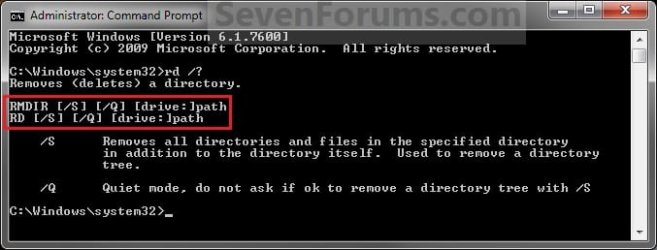
EXAMPLE: RD and RMDIR Command
NOTE: You can use either the RD or RMDIR command in the command prompt. They are the same command.
About_RD_RMDIR.jpg


Here's How:
1. Do step 2 or 3 below for where you would like to use a command prompt at.


2. To Use a Elevated Command Prompt in Windows
A) Open an Elevated command prompt in Vista/Windows 7 or Windows 8, and go to step 4 below.
3. To Use a Command Prompt at Boot
A) Open a command prompt at boot in Vista/Windows 7 or Windows 8, and go to step 4 below.

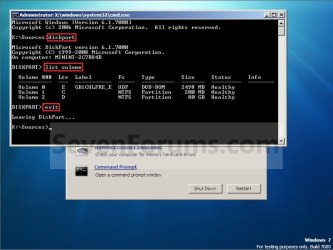
B) In the command prompt, type diskpart and press Enter. (see screenshot below)

C) In the command prompt, type list volume and press Enter. (see screenshot below)
NOTE: This will let you see what the drive letter is for the drive that you want to delete the folder in since it may not always be the same drive letter that it is in Windows.

D) After making note of the drive letter, type exit and press Enter. (see screenshot below)
Command-1.jpg
4. In the command prompt, type the command below and press enter.
NOTE: Substitute Full Path of Folder within quotes below with your folder's full path within quotes instead.

Code:
RD /S /Q "[COLOR=red][B]Full Path of Folder[/B][/COLOR]"

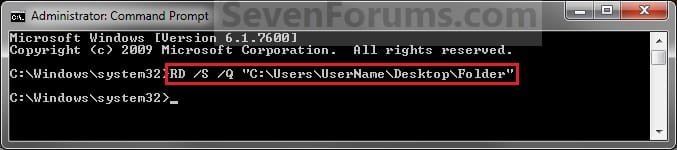
NOTE: For example, if I wanted to delete a folder named Folder on my desktop, I would type this command below.

Code:
RD /S /Q "C:\Users\UserName\Desktop\Folder"
Elevated_Command_Prompt.jpg
5. The folder should now be deleted.

6. Close the command prompt.
NOTE: If you used a command prompt at boot, then also close the System Recovery Options window and restart the computer.
That's it,
Shawn


Last edited:
I'm not sure what else to suggest either other than trying a system restore using a restore point dated before you downloaded that file.
 

My Computer

Computer type
PC/Desktop
Computer Manufacturer/Model Number
Self built custom
OS
64-bit Windows 11 Pro for Workstations
CPU
Intel i7-8700K OC'd to 5 GHz
Motherboard
ASUS ROG Maximus XI Formula Z390
Memory
64 GB (4x16GB) G.SKILL TridentZ RGB DDR4 3600 MHz
Graphics Card(s)
ASUS ROG-STRIX-GTX1080TI-O11G-GAMING
Sound Card
Integrated
Monitor(s) Displays
2 x Samsung Odyssey G7 27"
Screen Resolution
2560x1440
Hard Drives
1TB Samsung 990 PRO M.2,
4TB Samsung 990 PRO PRO M.2,
TerraMaster F8 SSD Plus NAS
PSU
Seasonic Prime Titanium 850W
Case
Thermaltake Core P3
Cooling
Corsair Hydro H115i
Keyboard
Logitech wireless K800
Mouse
Logitech MX Master 4
Internet Speed
2 Gb/s Download and 100 Mb/s Upload
Antivirus
Malwarebyte Anti-Malware Premium
Browser
Google Chrome
Other Info
Logitech Z625 speaker system,
Logitech BRIO 4K Pro webcam,
HP Color LaserJet Pro MFP M477fdn,
APC SMART-UPS RT 1000 XL - SURT1000XLI,
Galaxy S23 Plus phone
i went to the forum where i downloaded the file and others have said they cant delete it either...hmm

“Hmm” indeed. Englishbob, could you perhaps link to this undeletable item here, so we can have a more practical stab at deleting this item?

Also, is it a file or a folder that is being dealt with? Your post #46 suggests it's a file that cannot be deleted, while this tutorial is about deleting folders.
 

My Computer

Computer type
PC/Desktop
OS
Windows 10, Windows 8.1 Pro, Windows 7 Professional, OS X El Capitan
its a folder that has 3 folders inside it but nothing deletes, i tried the restore thing but that didnt work either, couldnt go back far enough
 

My Computer

Computer type
PC/Desktop
Computer Manufacturer/Model Number
HP
OS
windows 7 ultimate x64
Antivirus
Avast Premier 2015
Well I hope you know what a batch file is, Englishbob, because you are going to create the following batch file --
Code:
rd /s /q \\?\%1
Drag this undeletable folder of yours onto the batch file, then delete the batch file.
 

My Computer

Computer type
PC/Desktop
OS
Windows 10, Windows 8.1 Pro, Windows 7 Professional, OS X El Capitan
i dont know what a batch file is lol sorry
 

My Computer

Computer type
PC/Desktop
Computer Manufacturer/Model Number
HP
OS
windows 7 ultimate x64
Antivirus
Avast Premier 2015
It's a type of script.

Using your favourite text editor, enter the command line I've mentioned above into a text file, then rename the text file to have a .bat extension.

Finally, drag your undeletable folder onto the icon of this batch file.
 

My Computer

Computer type
PC/Desktop
OS
Windows 10, Windows 8.1 Pro, Windows 7 Professional, OS X El Capitan
ok done
 

My Computer

Computer type
PC/Desktop
Computer Manufacturer/Model Number
HP
OS
windows 7 ultimate x64
Antivirus
Avast Premier 2015
it just flashed real fast but nothing happened
 

My Computer

Computer type
PC/Desktop
Computer Manufacturer/Model Number
HP
OS
windows 7 ultimate x64
Antivirus
Avast Premier 2015
With that same batch file, tack the keyword pause on a new line.

Would you be able to take a screenshot or copy paste exactly what is displayed in the black window.
 

My Computer

Computer type
PC/Desktop
OS
Windows 10, Windows 8.1 Pro, Windows 7 Professional, OS X El Capitan
the black window flashes too fast to get a screenshot
 

My Computer

Computer type
PC/Desktop
Computer Manufacturer/Model Number
HP
OS
windows 7 ultimate x64
Antivirus
Avast Premier 2015
Add the pause command to the file. This is what your batch file should look like --
Code:
rd /s /q \\?\%1
pause
 

My Computer

Computer type
PC/Desktop
OS
Windows 10, Windows 8.1 Pro, Windows 7 Professional, OS X El Capitan
well that sorted it, thanks alot, i dont know what the bat file does but it took it off, i rebooted to make sure it was gone and its no more.
thanks so much to all that helped me.
Ill recommend this site to others from the forums im on having the same issue
 

My Computer

Computer type
PC/Desktop
Computer Manufacturer/Model Number
HP
OS
windows 7 ultimate x64
Antivirus
Avast Premier 2015
well that sorted it, thanks alot, i dont know what the bat file does but it took it off
Batch files work the devil. That's all you should know ...

i rebooted to make sure it was gone and its no more.
Yea, um, perhaps I should have directed you to "restart explorer" too, after executing the batch file.

thanks so much to all that helped me.
You're welcome, and welcome to Seven Forums.

Ill recommend this site to others from the forums im on having the same issue
Yes, about that ... you suggest others experience the same issue when downloading this certain file(/folder)? That's very odd and should never happen.

Englishbob, before you go, would you, by any chance, be able to kindly link us to this download so that the exact problem can be identified, and a solution to the very source of the problem can be made?
 

My Computer

Computer type
PC/Desktop
OS
Windows 10, Windows 8.1 Pro, Windows 7 Professional, OS X El Capitan
i just checked whoever uploaded it has now taken it down, but ill keep an eye out for anyone else with the issue
 

My Computer

Computer type
PC/Desktop
Computer Manufacturer/Model Number
HP
OS
windows 7 ultimate x64
Antivirus
Avast Premier 2015
i just checked whoever uploaded it has now taken it down
Strange.

but ill keep an eye out for anyone else with the issue
Great.

If you hand anyone the batch file, do make sure you instruct them to delete it after. You wouldn't want to be held responsible for any accidental deletions they make or giving them "malicious code".
 

My Computer

Computer type
PC/Desktop
OS
Windows 10, Windows 8.1 Pro, Windows 7 Professional, OS X El Capitan
ok will do
thanks again
 

My Computer

Computer type
PC/Desktop
Computer Manufacturer/Model Number
HP
OS
windows 7 ultimate x64
Antivirus
Avast Premier 2015
I seem to be having an issue with deleting a set of two empty folders I created. When I try to delete them, it tells me I need administrator permission. I tried using the batch file method, and it said "Access is denied". I found an administrator command prompt (Windows key + A + X on Windows 8). Should I try deleting it using that? Also, would you like screenshots of my problem? If so, just tell me the best way to do screenshots.
 

My Computer

Computer type
Laptop
Computer Manufacturer/Model Number
Toshiba
OS
Windows 8 64 bit
CPU
AMD E2-1800 APU 1.7GHz
Motherboard
Unknown
Memory
4 GB (3.59 GB usable)
Graphics Card(s)
Radeon HD graphics
Hard Drives
Unknown
Antivirus
Avast
Browser
Chrome

My Computer

Computer type
PC/Desktop
Computer Manufacturer/Model Number
Self built custom
OS
64-bit Windows 11 Pro for Workstations
CPU
Intel i7-8700K OC'd to 5 GHz
Motherboard
ASUS ROG Maximus XI Formula Z390
Memory
64 GB (4x16GB) G.SKILL TridentZ RGB DDR4 3600 MHz
Graphics Card(s)
ASUS ROG-STRIX-GTX1080TI-O11G-GAMING
Sound Card
Integrated
Monitor(s) Displays
2 x Samsung Odyssey G7 27"
Screen Resolution
2560x1440
Hard Drives
1TB Samsung 990 PRO M.2,
4TB Samsung 990 PRO PRO M.2,
TerraMaster F8 SSD Plus NAS
PSU
Seasonic Prime Titanium 850W
Case
Thermaltake Core P3
Cooling
Corsair Hydro H115i
Keyboard
Logitech wireless K800
Mouse
Logitech MX Master 4
Internet Speed
2 Gb/s Download and 100 Mb/s Upload
Antivirus
Malwarebyte Anti-Malware Premium
Browser
Google Chrome
Other Info
Logitech Z625 speaker system,
Logitech BRIO 4K Pro webcam,
HP Color LaserJet Pro MFP M477fdn,
APC SMART-UPS RT 1000 XL - SURT1000XLI,
Galaxy S23 Plus phone
Ok then. Should I document any of this or is it good?
 

My Computer

Computer type
Laptop
Computer Manufacturer/Model Number
Toshiba
OS
Windows 8 64 bit
CPU
AMD E2-1800 APU 1.7GHz
Motherboard
Unknown
Memory
4 GB (3.59 GB usable)
Graphics Card(s)
Radeon HD graphics
Hard Drives
Unknown
Antivirus
Avast
Browser
Chrome
Should all be the same other than using an elevated command prompt instead.
 

My Computer

Computer type
PC/Desktop
Computer Manufacturer/Model Number
Self built custom
OS
64-bit Windows 11 Pro for Workstations
CPU
Intel i7-8700K OC'd to 5 GHz
Motherboard
ASUS ROG Maximus XI Formula Z390
Memory
64 GB (4x16GB) G.SKILL TridentZ RGB DDR4 3600 MHz
Graphics Card(s)
ASUS ROG-STRIX-GTX1080TI-O11G-GAMING
Sound Card
Integrated
Monitor(s) Displays
2 x Samsung Odyssey G7 27"
Screen Resolution
2560x1440
Hard Drives
1TB Samsung 990 PRO M.2,
4TB Samsung 990 PRO PRO M.2,
TerraMaster F8 SSD Plus NAS
PSU
Seasonic Prime Titanium 850W
Case
Thermaltake Core P3
Cooling
Corsair Hydro H115i
Keyboard
Logitech wireless K800
Mouse
Logitech MX Master 4
Internet Speed
2 Gb/s Download and 100 Mb/s Upload
Antivirus
Malwarebyte Anti-Malware Premium
Browser
Google Chrome
Other Info
Logitech Z625 speaker system,
Logitech BRIO 4K Pro webcam,
HP Color LaserJet Pro MFP M477fdn,
APC SMART-UPS RT 1000 XL - SURT1000XLI,
Galaxy S23 Plus phone
Back
Top