Folder Size in Windows Explorer

Duckling

New member
Local time
10:03 PM
Messages
56
"Windows Explorer, by default, doesn’t show the size of the folder when you opt for the ‘Details’ view. This is one of the little things that users will find lacking in Windows Explorer."

I tried some 3rd party programs for this but, they didn't work with 7.

Anyone figure out how to display this information.
 

My Computer

Computer Manufacturer/Model Number
HP Pavillion dv7-2078ca
OS
Windows 7
CPU
2.00 GHz Intel Core2 Quad Processor Q9000
Memory
8192MB
Graphics Card(s)
ATI Mobility Radeon HD 4650
Sound Card
Altec Lansing with SRS Premium Sound and Sub-Woofer
Monitor(s) Displays
17.3”Diagonal HD+ HD HP LED BrightView Widescreen (1600x900)
Hard Drives
OS: (C:) 453 GB
Data: (D:) 465 GB
RECOVERY: (E:) 12.2 GB
Hello Duckling,

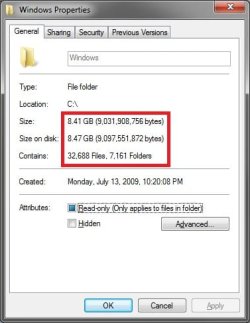
Yeah, this has been removed since Vista. It has to do with how long it would take to calculate all of the folder sizes and displaying them in Windows Explorer. To see an example of this, right click on the C:\Windows folder and click on Properties. Take note on how long it takes to calculate just this one folder and all of it's subfolders in the boxed in red area of the screenshot below. Now, imagine that multiplied by how many folders that may be in a Windows Explorer window. It could give you a minute delay after before you would be able to anything in that Windows Explorer window. :eek:
Windows.jpg
This tutorial will show you a workaround for this using the pop-up description.

Folder Size - Vista Forums

Hope this helps,
Shawn
 

My Computer

Computer type
PC/Desktop
Computer Manufacturer/Model Number
Self built custom
OS
64-bit Windows 11 Pro for Workstations
CPU
Intel i7-8700K OC'd to 5 GHz
Motherboard
ASUS ROG Maximus XI Formula Z390
Memory
64 GB (4x16GB) G.SKILL TridentZ RGB DDR4 3600 MHz
Graphics Card(s)
ASUS ROG-STRIX-GTX1080TI-O11G-GAMING
Sound Card
Integrated
Monitor(s) Displays
2 x Samsung Odyssey G7 27"
Screen Resolution
2560x1440
Hard Drives
1TB Samsung 990 PRO M.2,
4TB Samsung 990 PRO PRO M.2,
TerraMaster F8 SSD Plus NAS
PSU
Seasonic Prime Titanium 850W
Case
Thermaltake Core P3
Cooling
Corsair Hydro H115i
Keyboard
Logitech wireless K800
Mouse
Logitech MX Master 4
Internet Speed
2 Gb/s Download and 100 Mb/s Upload
Antivirus
Malwarebyte Anti-Malware Premium
Browser
Google Chrome
Other Info
Logitech Z625 speaker system,
Logitech BRIO 4K Pro webcam,
HP Color LaserJet Pro MFP M477fdn,
APC SMART-UPS RT 1000 XL - SURT1000XLI,
Galaxy S23 Plus phone

My Computer

Computer Manufacturer/Model Number
Hera
OS
Windows 7 Ultimate x64, Mint 9
CPU
Intel i5-2500k
Motherboard
ASUS P8P67 Pro
Memory
2x 4Gb Corsair VENGEANCE DDR3-1600
Graphics Card(s)
NVidia GeForce N260GTX Twin Frozr
Sound Card
Realtek HD OnBoard Audio
Monitor(s) Displays
ASUS 24" Monitor
Screen Resolution
1920x1080
Hard Drives
G.SKILL Phoenix Series 60GB SATA II MLC Internal Solid State Drive (SSD)
SAMSUNG Spinpoint F3R 1TB 7200 RPM 32MB Cache SATA II
PSU
Cooler Master Real Power Pro 750W
Case
Cooler Master Haf 932
Cooling
Fans
Keyboard
Razer Tarantula
Mouse
Razer Lachesis
Internet Speed
not fast enough
7 Windows Explorer Addons for Power Users

Here is a link to a site that has some programs you could try.

~Lordbob
Folder Size for Windows 2.4
Known issues

  • Doesn't work in 64-bit Windows, XP or Vista. I guess it needs to be built as a 64-bit DLL. But I don't have a 64-bit CPU yet. Anyone wanna donate me a 64-bit machine? :)
  • Doesn't work on a substituted drive (for example, subst m: c:\stuff).
  • Doesn't work with XDrive or WebDAV. Folder Size only works with files that can be accessed with a path name.
  • Doesn't work on a substituted drive (for example, subst m: c:\stuff).
  • Doesn't work with Vista.
  • Someone reported some kind of conflict with 3D Studio Max.
  • Someone reported that Explorer crashed after installing Folder Size.
  • The service can use a lot of memory. The path names are stored inefficiently in memory. This is on the list for the next version.
  • I think the automatic updating works for Windows shares, but not Linux Samba servers. There's no way to get it to manually update, so the cache becomes out-of-date. Need to do some debugging.
  • All local users will see the full sizes of all local folders, even if they are denied permission to view their contents. The folder size service does the caching, and it runs with SYSTEM permissions, which can typically view every folder. You can deny SYSTEM permission to a folder to stop Folder Size from scanning it. Ideally, it would display different numbers for different users, depending on their permissions. Note that this is not a problem for network folders – the server computer lets you know what folders you have permission to see.
  • It crashes when I log in with Remote Desktop and share folders.
 
7 Windows Explorer Addons for Power Users

Here is a link to a site that has some programs you could try.

~Lordbob
Folder Size for Windows 2.4
Known issues

  • Doesn't work in 64-bit Windows, XP or Vista. I guess it needs to be built as a 64-bit DLL. But I don't have a 64-bit CPU yet. Anyone wanna donate me a 64-bit machine? :)
  • Doesn't work on a substituted drive (for example, subst m: c:\stuff).
  • Doesn't work with XDrive or WebDAV. Folder Size only works with files that can be accessed with a path name.
  • Doesn't work on a substituted drive (for example, subst m: c:\stuff).
  • Doesn't work with Vista.
  • Someone reported some kind of conflict with 3D Studio Max.
  • Someone reported that Explorer crashed after installing Folder Size.
  • The service can use a lot of memory. The path names are stored inefficiently in memory. This is on the list for the next version.
  • I think the automatic updating works for Windows shares, but not Linux Samba servers. There's no way to get it to manually update, so the cache becomes out-of-date. Need to do some debugging.
  • All local users will see the full sizes of all local folders, even if they are denied permission to view their contents. The folder size service does the caching, and it runs with SYSTEM permissions, which can typically view every folder. You can deny SYSTEM permission to a folder to stop Folder Size from scanning it. Ideally, it would display different numbers for different users, depending on their permissions. Note that this is not a problem for network folders – the server computer lets you know what folders you have permission to see.
  • It crashes when I log in with Remote Desktop and share folders.
Ah well. I did not look at the site very carefully.

~Lordbob
 

My Computer

Computer Manufacturer/Model Number
Hera
OS
Windows 7 Ultimate x64, Mint 9
CPU
Intel i5-2500k
Motherboard
ASUS P8P67 Pro
Memory
2x 4Gb Corsair VENGEANCE DDR3-1600
Graphics Card(s)
NVidia GeForce N260GTX Twin Frozr
Sound Card
Realtek HD OnBoard Audio
Monitor(s) Displays
ASUS 24" Monitor
Screen Resolution
1920x1080
Hard Drives
G.SKILL Phoenix Series 60GB SATA II MLC Internal Solid State Drive (SSD)
SAMSUNG Spinpoint F3R 1TB 7200 RPM 32MB Cache SATA II
PSU
Cooler Master Real Power Pro 750W
Case
Cooler Master Haf 932
Cooling
Fans
Keyboard
Razer Tarantula
Mouse
Razer Lachesis
Internet Speed
not fast enough
Shoot
 

My Computer

Computer Manufacturer/Model Number
HP Pavillion dv7-2078ca
OS
Windows 7
CPU
2.00 GHz Intel Core2 Quad Processor Q9000
Memory
8192MB
Graphics Card(s)
ATI Mobility Radeon HD 4650
Sound Card
Altec Lansing with SRS Premium Sound and Sub-Woofer
Monitor(s) Displays
17.3”Diagonal HD+ HD HP LED BrightView Widescreen (1600x900)
Hard Drives
OS: (C:) 453 GB
Data: (D:) 465 GB
RECOVERY: (E:) 12.2 GB
Maybe I'm missing it, but what version of Windows calculated folder sizes in details view? I haven't used details view much until Vista, XP is not giving sizes for folders. Also...I'm too lazy to install any VMs (98, 2000) at the moment...

Anyways its better to be left ondemand (properties) and not constant (details view), otherwise performance would take a hit.
 

My Computer

Computer type
PC/Desktop
Computer Manufacturer/Model Number
Alienware Aurora ALX R4
OS
Windows 10 Pro (x64)
CPU
Intel Core i7-3930K (3.2GHz - 4.5GHz)
Motherboard
Alienware Aurora-R4 x79
Memory
4x Samsung 4GB PC3-12800 DDR3 (16GB 1600MHz)
Graphics Card(s)
Nvidia Geforce GTX 690
Sound Card
SteelSeries Siberia Elite
Monitor(s) Displays
Dell UltraSharp U3011
Screen Resolution
2560x1600
Hard Drives
Samsung 850 Pro 256 GB, Seagate 1TB Desktop Hybrid HDD, 2x Western Digital 4TB Green HDD
PSU
875W Some Dell PSU <.<
Case
Alienware Aurora ALX
Cooling
Custom Liquid Cooling (EK CPU & GPU blocks) dual EK 480RAD
Keyboard
Logitech G710+ Mechanical
Mouse
Logitech G700s
Internet Speed
Verizon Fios (50 mbps average)
Other Info
Server: Intel NUC D54250WYK: i5-4250U, 16GB, 256 GB mSATA, Windows Server 2012 R2
Redux alert! But is there a way to view the folder sizes (details view) in win7 64-bit? (not using the folder properties popup as that's singular and not practical when looking at 50+ folders, etc)

I've installed the latest folder size, service is running but doesn't seem to work.
 

My Computer

Computer Manufacturer/Model Number
Custom Build
OS
Windows 7 Ultimate x64
CPU
Intel Core 2 Quad Q6600
Motherboard
ASUS P5K-E
Memory
8GB DDR2
Graphics Card(s)
GeForce 8800 GTS 512

My Computer

Computer Manufacturer/Model Number
Lenovo X201
OS
Windows 7 Ultimate
CPU
i5 520M
Memory
4GB
Graphics Card(s)
Intel GMA
Another option would be to use the portable, or installed, version of WinDirStat. It will give you an overview of all folders on a drive, and the space the consume. You can even alter the view to show by file type.
 

My Computer

OS
Windows 7 Ultimate x64 SP1
CPU
Intel Core i7-2600
Motherboard
Gigabyte GA-P67A-UD3P-B3
Memory
12 GB Patriot Extreme DDR3-1333
Graphics Card(s)
Nvidia GTX 470
Monitor(s) Displays
Dell UltraSharp 2209WA
Hard Drives
OCZ Agility3 240 GB, WD5001AALS, WD7501AALS
PSU
OCZ ModStream 700W
Case
CoolerMaster HAF 912 Advanced
Cooling
CoolerMaster Hyper 212 Plus
Nice one Deacon! It's the most similar to foldersize me thinks! (loving the fact that you can click the graph and jump to the next largest file, etc)

The best one I found was the great and free "Scanner 2" (works great on win7 x32/x64)
Windows Freeware by Steffen Gerlach

It's very light and fast and you can see graphically what's taking up the most space and where...options to open/delete, etc.
 

My Computer

Computer Manufacturer/Model Number
Custom Build
OS
Windows 7 Ultimate x64
CPU
Intel Core 2 Quad Q6600
Motherboard
ASUS P5K-E
Memory
8GB DDR2
Graphics Card(s)
GeForce 8800 GTS 512

My Computer

Computer Manufacturer/Model Number
custom/Dell
OS
7
CPU
P4/C2D/I7/Xeon
Motherboard
Abit/Asus/EVGA
Memory
Corsair/Kingston/GSKILL
Graphics Card(s)
ATI/ATI/ATI/Nvidia
Sound Card
HT Omega
Monitor(s) Displays
20/24/46
Hard Drives
WD/Seagate
PSU
Antec/Corsair
Case
Antec/Dell
Cooling
Zalman/Zalman/Zalman/Zalman
ExplorerXP

I use it mainly for renaming batches of files linked to framemaker documents but it also displays folder sizes and allows for tabbed folder windows. It's working fine for me under win 7 pro 64bit.

...and the price is right =)

ExplorerXP - Freeware file manager for Win2K/XP

[FONT=arial,verdana,helvetica]ExplorerXP is a very fast, small, compact and innovative FREEWARE (for non - commercial use) file manager for Windows 2000/XP. Unlike the regular Windows Explorer, it displays the total size of each folder and allows you to browse multiple folders from a tabbed interface.[/FONT]
 

My Computer

OS
win 7 pro 64
i dont mean to bump but..

hear our pleas oh great microsoft .. add a folder size option

There already is one. Hover over the folder for the tooltip or go to properties.
 

My Computer

Computer type
PC/Desktop
Computer Manufacturer/Model Number
Alienware Aurora ALX R4
OS
Windows 10 Pro (x64)
CPU
Intel Core i7-3930K (3.2GHz - 4.5GHz)
Motherboard
Alienware Aurora-R4 x79
Memory
4x Samsung 4GB PC3-12800 DDR3 (16GB 1600MHz)
Graphics Card(s)
Nvidia Geforce GTX 690
Sound Card
SteelSeries Siberia Elite
Monitor(s) Displays
Dell UltraSharp U3011
Screen Resolution
2560x1600
Hard Drives
Samsung 850 Pro 256 GB, Seagate 1TB Desktop Hybrid HDD, 2x Western Digital 4TB Green HDD
PSU
875W Some Dell PSU <.<
Case
Alienware Aurora ALX
Cooling
Custom Liquid Cooling (EK CPU & GPU blocks) dual EK 480RAD
Keyboard
Logitech G710+ Mechanical
Mouse
Logitech G700s
Internet Speed
Verizon Fios (50 mbps average)
Other Info
Server: Intel NUC D54250WYK: i5-4250U, 16GB, 256 GB mSATA, Windows Server 2012 R2
FreeCommander

FreeCommander file manager can show folder sizes.

Click on thumbnail to see animation.
FC Folder Size 01.gif

Note:
Window shown in horizontal split mode.
Vertical split mode can also be used.
 

My Computer

Computer type
PC/Desktop
Computer Manufacturer/Model Number
n/a
OS
W7 Ultimate SP1, LM19.2 MATE, W10 Home 1703, W10 Pro 1703 VM, #All 64 bit
CPU
AMD Phenom II x6 1100T, 3.3 GHz
Motherboard
ASUS M4A88T-M/USB3 (AM3)
Memory
12GB DDR3 1333 G-Skill (4GB x 2), G-Skill (2GB x 2)
Graphics Card(s)
NVIDIA GeForce GTX 660
Sound Card
Realtek?
Monitor(s) Displays
Samsung S23B350
Screen Resolution
1920x1080
Hard Drives
WD Green 2TB (SATA), WD Green 3TB (SATA), WD Blue 4TB (SATA), WD Blue 6TB (SATA)
PSU
Cooler Master
Case
Antec GX300 Tower
Cooling
3x Antec TRICOOL 120mm Fans
Mouse
Wired Optical
Internet Speed
DSL
Antivirus
Avast
Browser
Pale Moon (64 bit)
Other Info
2018-12-27 Upgraded HDDs
2015-12-10 Upgraded case, graphics card, storage
2015-08-15 Upgraded motherboard & RAM
2015-07-15 Upgraded LM17.1 to LM17.2
have ether of you ever use a mac? well i want it to be like that. not some third party app or checking each folder...
 

My Computer

OS
windows 7 64
Windows 8 Beta

Anyways its better to be left ondemand (properties) and not constant (details view), otherwise performance would take a hit.

A possible option would be to put an entry in "Desktop.ini", when you open the folder or save a file to a folder.
It could easily update that info whilst it's indexing.

have ether of you ever use a mac? well i want it to be like that. not some third party app or checking each folder...

Not since the original B/W Macintosh. :)

You'll have to complain about it (or suggest it) to MS during the Windows 8 Beta tests.

IMO, Window Explorer has always only been "adequate" for file management.

I only use FreeCommander when I want to do something "tricky", like mass file renaming.
 

My Computer

Computer type
PC/Desktop
Computer Manufacturer/Model Number
n/a
OS
W7 Ultimate SP1, LM19.2 MATE, W10 Home 1703, W10 Pro 1703 VM, #All 64 bit
CPU
AMD Phenom II x6 1100T, 3.3 GHz
Motherboard
ASUS M4A88T-M/USB3 (AM3)
Memory
12GB DDR3 1333 G-Skill (4GB x 2), G-Skill (2GB x 2)
Graphics Card(s)
NVIDIA GeForce GTX 660
Sound Card
Realtek?
Monitor(s) Displays
Samsung S23B350
Screen Resolution
1920x1080
Hard Drives
WD Green 2TB (SATA), WD Green 3TB (SATA), WD Blue 4TB (SATA), WD Blue 6TB (SATA)
PSU
Cooler Master
Case
Antec GX300 Tower
Cooling
3x Antec TRICOOL 120mm Fans
Mouse
Wired Optical
Internet Speed
DSL
Antivirus
Avast
Browser
Pale Moon (64 bit)
Other Info
2018-12-27 Upgraded HDDs
2015-12-10 Upgraded case, graphics card, storage
2015-08-15 Upgraded motherboard & RAM
2015-07-15 Upgraded LM17.1 to LM17.2
When I need to check folder sizes, usually I'm thinking about what's using the most space. So a great utility I've been using for a long time now is "OverDisk" (it has a context menu option).

bigl.jpg


Great tool, and only when I need it.
 

My Computer

Computer Manufacturer/Model Number
Custom Build
OS
Windows 7 Ultimate x64
CPU
Intel Core 2 Quad Q6600
Motherboard
ASUS P5K-E
Memory
8GB DDR2
Graphics Card(s)
GeForce 8800 GTS 512
Shouldn't a modern OS be able to update in realtime the "index" of folder sizes and to resize icons in file manager accordingly?

If it did, then you would then be complaining how performance sucks. The file system only keeps track of information it needs. Folders are not files in Windows, merely entries in the MFT. Updating an entire tree of folders with "file size" every time it changes is COSTLY. Not to mention inaccurate.

See: http://blogs.msdn.com/b/oldnewthing/archive/2004/12/28/336219.aspx
See: http://blogs.msdn.com/b/oldnewthing/archive/2007/10/29/5750353.aspx
See: http://blogs.msdn.com/b/oldnewthing/archive/2009/02/17/9426787.aspx
 

My Computer

Computer type
PC/Desktop
Computer Manufacturer/Model Number
Alienware Aurora ALX R4
OS
Windows 10 Pro (x64)
CPU
Intel Core i7-3930K (3.2GHz - 4.5GHz)
Motherboard
Alienware Aurora-R4 x79
Memory
4x Samsung 4GB PC3-12800 DDR3 (16GB 1600MHz)
Graphics Card(s)
Nvidia Geforce GTX 690
Sound Card
SteelSeries Siberia Elite
Monitor(s) Displays
Dell UltraSharp U3011
Screen Resolution
2560x1600
Hard Drives
Samsung 850 Pro 256 GB, Seagate 1TB Desktop Hybrid HDD, 2x Western Digital 4TB Green HDD
PSU
875W Some Dell PSU <.<
Case
Alienware Aurora ALX
Cooling
Custom Liquid Cooling (EK CPU & GPU blocks) dual EK 480RAD
Keyboard
Logitech G710+ Mechanical
Mouse
Logitech G700s
Internet Speed
Verizon Fios (50 mbps average)
Other Info
Server: Intel NUC D54250WYK: i5-4250U, 16GB, 256 GB mSATA, Windows Server 2012 R2
Back
Top