Folder View - Apply to Folders

How to "Apply to Folders" a Specific Folder View to All Folders with the Same Folder Template in Windows 7

   Information
This will show you how to Apply to Folders a specific folder's folder view to all folders that have been optimized with the same folder template as it in Windows 7.
   Tip
If you would like to reset the changes applied to all folders back to the default folder view settings, then see: How to Reset the Folder View settings for All Folders in Windows 7
   Warning
The folder view of Computer, Favorites (not IE Favorites), and library folders cannot be applied to all folders.

The Apply to Folders button will be grayed out if Folder Options is opened in these folders.


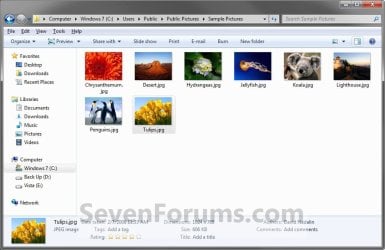
Here's How: 1. Navigate to the folder that you want to apply it's folder views to all folders with the same folder template as it. (see screenshots below)
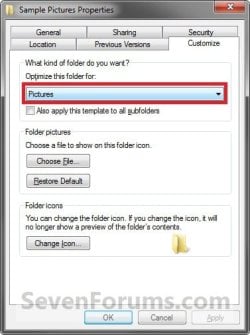
NOTE: For example, C:\Users\Public\Public Pictures\Sample Pictures that has the Pictures folder template by default. Before.jpg
Template.jpg

2. Make any changes to the Group by, Sort by, Arrange by arrangement , Icon Size, column width, add/remove columns, or View arrangement in this folder that you would like to have applied to all folders with the same folder template as it. (see screenshot below)
NOTE: For example, I changed the Icon Size to Medium Icons, and to be Grouped by Names. After.jpg
3. When done, open Folder Options from within this same folder (step 1) window and not through the Control Panel or from another folder. (See screenshot below)
NOTE: You would want to use either OPTION TWO or OPTION THREE at that link. Folder_Options.jpg
4. Click on the View tab, then click on the Apply to Folders button. (See sceenshot above)
NOTE: If the Apply to Folders button is grayed out, then you may have not opened Folder Options from within the same folder. See WARNING box at the top of the tutorial if you did for why it may still be grayed out.

5. Click on Yes to confirm. (See screenshot below) Confirm.jpg
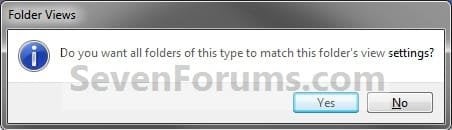
6. Click on OK. (See screenshot below step 3)

7. Whenever you open any folder with the same folder template as the folder from step 1, you will now see it have the same folder view.
NOTE: This would be for all folders with the Pictures folder template for the example C:\Users\Public\Public Pictures\Sample Pictures folder that I have used in step 1.
That's it,
Shawn


Last edited:
In fact, I just noticed that it is only when we do not change the type of a folder and sub-folders that Windows handles the display depending on the content.
I understand that you could not change the user libraries default view, right?
I would like in my music library, the folders containing other folders have a list view, and folders containing music files have a detailed view, with my column selection.

You could still change the folder view of a library, but all included folders in the library share the same folder view. The included folders in a library cannot have their own separate folder views. :(
 
Last edited:

My Computer

Computer type
PC/Desktop
Computer Manufacturer/Model Number
Self built custom
OS
64-bit Windows 11 Pro for Workstations
CPU
Intel i7-8700K OC'd to 5 GHz
Motherboard
ASUS ROG Maximus XI Formula Z390
Memory
64 GB (4x16GB) G.SKILL TridentZ RGB DDR4 3600 MHz
Graphics Card(s)
ASUS ROG-STRIX-GTX1080TI-O11G-GAMING
Sound Card
Integrated
Monitor(s) Displays
2 x Samsung Odyssey G7 27"
Screen Resolution
2560x1440
Hard Drives
1TB Samsung 990 PRO M.2,
4TB Samsung 990 PRO PRO M.2,
TerraMaster F8 SSD Plus NAS
PSU
Seasonic Prime Titanium 850W
Case
Thermaltake Core P3
Cooling
Corsair Hydro H115i
Keyboard
Logitech wireless K800
Mouse
Logitech MX Master 4
Internet Speed
2 Gb/s Download and 100 Mb/s Upload
Antivirus
Malwarebyte Anti-Malware Premium
Browser
Google Chrome
Other Info
Logitech Z625 speaker system,
Logitech BRIO 4K Pro webcam,
HP Color LaserJet Pro MFP M477fdn,
APC SMART-UPS RT 1000 XL - SURT1000XLI,
Galaxy S23 Plus phone
yes ok. Well, it's not a very serious problem. I think I just survive without it.
 

My Computer

OS
Windows 7 x64 Pro & Windows 7 x86 Pro
Yeah, that's the only downfall with libraries and all included folders sharing the same folder view.
 

My Computer

Computer type
PC/Desktop
Computer Manufacturer/Model Number
Self built custom
OS
64-bit Windows 11 Pro for Workstations
CPU
Intel i7-8700K OC'd to 5 GHz
Motherboard
ASUS ROG Maximus XI Formula Z390
Memory
64 GB (4x16GB) G.SKILL TridentZ RGB DDR4 3600 MHz
Graphics Card(s)
ASUS ROG-STRIX-GTX1080TI-O11G-GAMING
Sound Card
Integrated
Monitor(s) Displays
2 x Samsung Odyssey G7 27"
Screen Resolution
2560x1440
Hard Drives
1TB Samsung 990 PRO M.2,
4TB Samsung 990 PRO PRO M.2,
TerraMaster F8 SSD Plus NAS
PSU
Seasonic Prime Titanium 850W
Case
Thermaltake Core P3
Cooling
Corsair Hydro H115i
Keyboard
Logitech wireless K800
Mouse
Logitech MX Master 4
Internet Speed
2 Gb/s Download and 100 Mb/s Upload
Antivirus
Malwarebyte Anti-Malware Premium
Browser
Google Chrome
Other Info
Logitech Z625 speaker system,
Logitech BRIO 4K Pro webcam,
HP Color LaserJet Pro MFP M477fdn,
APC SMART-UPS RT 1000 XL - SURT1000XLI,
Galaxy S23 Plus phone
Windows non-Explorer

This is one of the most frustrating areas of Windows 7. Windows Explorer offers many possibilities to play with the way it shows things (and I'm using on purpose the most un-Microsoft and non-specific way of saying it), but when it comes to customizing it in a consistent way, all across one's folders, the logic of the beast is ridiculously complicated to grasp, and controls are all over the place.

To give an example of this user-hostile programming, here is what you had to write on a related thread :

If Apply to Folders was used to set folder views and templates, then this tutorial will not reset them to default since "Apply to Folders" makes what you set the new default. Instead, you will need to use Reset Folders to be able to reset each folder template back to default.

That's the sort of thing that drives me mad... :mad: I have been hopping from one related thread to another through links for quite a while now, and I still cannot get the big picture.

Do you think it might be possible to merge some of those tutorials into a larger one, in order to shed light on Microsoft's "logic" ? Maybe it has already been done and I haven't found it ?

One of my pet peeves is the way the option to hide or unhide file extensions is buried deep inside the menus. Now I know how to do that, but it should be brought back right in front. I find myself constantly needing to switch from one state to another. Changing from large icons to small icons, not so much.
 

My Computer

Computer type
PC/Desktop
Computer Manufacturer/Model Number
Custom build
OS
Windows 7 Home Premium 64-bit (OEM)
CPU
AMD Athlon II X4 640 (3 GHz, 4 cores)
Motherboard
Asus M4A 89 GTD Pro/USB3
Memory
Patriot 16Gb DDR3 1600 (2 kits of 2)
Graphics Card(s)
ATI Radeon HD 4290 (integrated)
Sound Card
AMD + Realtek HD Audio (integrated)
Monitor(s) Displays
Hewlett-Packard ZR2440w (24")
Screen Resolution
1920 x 1200
Hard Drives
Internal : Samsung SSD 860 EVO 250 Gb (system), Seagate Barrcuda 1 Tb (data), Western Digital Caviar Blue 500 Gb (archives).
External (USB) : 2 x 1 Tb 2,5" Seagate Barracuda (backups).
PSU
Corsair VX 450 W
Case
Antec Solo
Cooling
Cooler Master Hyper 212 Plus, 2 Nexus Real Silent Case fans
Keyboard
Cherry KC 1000
Mouse
Logitech M 90
Internet Speed
Fiber, 300 Mbit/s down, 200 Mbit/s up
Antivirus
Microsoft Security Essentials
Browser
Vivaldi, Tor
Other Info
BIOS Date: 07/18/11 Ver: 08.00.15.
Modem-router : provided by ISP
Hello Clairvaux, :)

Please explain what you are wanting to do, and we may be able to come up with a solution for you.
 

My Computer

Computer type
PC/Desktop
Computer Manufacturer/Model Number
Self built custom
OS
64-bit Windows 11 Pro for Workstations
CPU
Intel i7-8700K OC'd to 5 GHz
Motherboard
ASUS ROG Maximus XI Formula Z390
Memory
64 GB (4x16GB) G.SKILL TridentZ RGB DDR4 3600 MHz
Graphics Card(s)
ASUS ROG-STRIX-GTX1080TI-O11G-GAMING
Sound Card
Integrated
Monitor(s) Displays
2 x Samsung Odyssey G7 27"
Screen Resolution
2560x1440
Hard Drives
1TB Samsung 990 PRO M.2,
4TB Samsung 990 PRO PRO M.2,
TerraMaster F8 SSD Plus NAS
PSU
Seasonic Prime Titanium 850W
Case
Thermaltake Core P3
Cooling
Corsair Hydro H115i
Keyboard
Logitech wireless K800
Mouse
Logitech MX Master 4
Internet Speed
2 Gb/s Download and 100 Mb/s Upload
Antivirus
Malwarebyte Anti-Malware Premium
Browser
Google Chrome
Other Info
Logitech Z625 speaker system,
Logitech BRIO 4K Pro webcam,
HP Color LaserJet Pro MFP M477fdn,
APC SMART-UPS RT 1000 XL - SURT1000XLI,
Galaxy S23 Plus phone
HOW TO ADD BITRATE TO ALL FOLDER AT ONCE IN WIN 7;)

Hi there Sir;

uhhmm, i don't really know how this work or if im in the right direction, but i've a question;

Can anybody please be so kind to tell HOW DO I ADD THE BITRATE IN ONE GO TO ALL FOLDERS IN WINDOWS 7???
Ive a huge collection of music files for my hobby & work at the same time, but everytime i go into a folder of sub folders, ive to manually add the bit rate (its a pain):(, like i wanna see the track with 320 or 128 bit rate:D, but i can seems to find that out, been google it for awhile and google always send me to your forum, (sorry im kinda new to this)
 

My Computer

Computer type
Laptop
Computer Manufacturer/Model Number
HP
OS
windows 7 proffesional, 64 bit, service pack 1
CPU
intel core i5, 8 GB
Motherboard
?
Memory
8 GB
Graphics Card(s)
intel
Hard Drives
approxx 320 GB
Cooling
fan
Keyboard
yes
Mouse
yes
Internet Speed
like a jojo, up & down sometimes;(
Antivirus
microsoft essentials
Browser
chrome
Other Info
2nd laptop, HP Elitebook 2560p, robust like a Wolverine;)
'' 13'' Inch screen, dvd/ cdr burner, 3 port usb (2 inda back & 1 right side) sata (whatever that means), headphone & microphone output in one, thats all;)
Hello Malonibiza, and welcome to Seven Forums. :)

Double check using step 1 to make sure that the folder template is set to "Music" with the "Also apply this template to all subfolders".

Afterwards, do the rest of the steps in the tutorial to set the folder view how you want with the bit rate column, then use "Apply to folders" to have it applied to all folders using the "Music" template.
 

My Computer

Computer type
PC/Desktop
Computer Manufacturer/Model Number
Self built custom
OS
64-bit Windows 11 Pro for Workstations
CPU
Intel i7-8700K OC'd to 5 GHz
Motherboard
ASUS ROG Maximus XI Formula Z390
Memory
64 GB (4x16GB) G.SKILL TridentZ RGB DDR4 3600 MHz
Graphics Card(s)
ASUS ROG-STRIX-GTX1080TI-O11G-GAMING
Sound Card
Integrated
Monitor(s) Displays
2 x Samsung Odyssey G7 27"
Screen Resolution
2560x1440
Hard Drives
1TB Samsung 990 PRO M.2,
4TB Samsung 990 PRO PRO M.2,
TerraMaster F8 SSD Plus NAS
PSU
Seasonic Prime Titanium 850W
Case
Thermaltake Core P3
Cooling
Corsair Hydro H115i
Keyboard
Logitech wireless K800
Mouse
Logitech MX Master 4
Internet Speed
2 Gb/s Download and 100 Mb/s Upload
Antivirus
Malwarebyte Anti-Malware Premium
Browser
Google Chrome
Other Info
Logitech Z625 speaker system,
Logitech BRIO 4K Pro webcam,
HP Color LaserJet Pro MFP M477fdn,
APC SMART-UPS RT 1000 XL - SURT1000XLI,
Galaxy S23 Plus phone
Hi there mr. Brink, ok thnx U, im gona tried that and ill get back to You, whether it works yes or no:)

Thank you kindly for your time,,,

Marlon;)
 

My Computer

Computer type
Laptop
Computer Manufacturer/Model Number
HP
OS
windows 7 proffesional, 64 bit, service pack 1
CPU
intel core i5, 8 GB
Motherboard
?
Memory
8 GB
Graphics Card(s)
intel
Hard Drives
approxx 320 GB
Cooling
fan
Keyboard
yes
Mouse
yes
Internet Speed
like a jojo, up & down sometimes;(
Antivirus
microsoft essentials
Browser
chrome
Other Info
2nd laptop, HP Elitebook 2560p, robust like a Wolverine;)
'' 13'' Inch screen, dvd/ cdr burner, 3 port usb (2 inda back & 1 right side) sata (whatever that means), headphone & microphone output in one, thats all;)
You're most welcome Marlon. I hope it will help.
 

My Computer

Computer type
PC/Desktop
Computer Manufacturer/Model Number
Self built custom
OS
64-bit Windows 11 Pro for Workstations
CPU
Intel i7-8700K OC'd to 5 GHz
Motherboard
ASUS ROG Maximus XI Formula Z390
Memory
64 GB (4x16GB) G.SKILL TridentZ RGB DDR4 3600 MHz
Graphics Card(s)
ASUS ROG-STRIX-GTX1080TI-O11G-GAMING
Sound Card
Integrated
Monitor(s) Displays
2 x Samsung Odyssey G7 27"
Screen Resolution
2560x1440
Hard Drives
1TB Samsung 990 PRO M.2,
4TB Samsung 990 PRO PRO M.2,
TerraMaster F8 SSD Plus NAS
PSU
Seasonic Prime Titanium 850W
Case
Thermaltake Core P3
Cooling
Corsair Hydro H115i
Keyboard
Logitech wireless K800
Mouse
Logitech MX Master 4
Internet Speed
2 Gb/s Download and 100 Mb/s Upload
Antivirus
Malwarebyte Anti-Malware Premium
Browser
Google Chrome
Other Info
Logitech Z625 speaker system,
Logitech BRIO 4K Pro webcam,
HP Color LaserJet Pro MFP M477fdn,
APC SMART-UPS RT 1000 XL - SURT1000XLI,
Galaxy S23 Plus phone
Hahahahahah:D, Mr. Brink you're a genius,, i owe you BIG time,, if we ever come across, ill buy You 10 drinks, swear, BIG THANK YOU AND A LOT OF GOD BLESSING TO YOU;;;;)))))))

Ohh another thing, how do i change my profile pic??

Thank you kindly; i'm not gonna even sleep tonight;;)))
 

My Computer

Computer type
Laptop
Computer Manufacturer/Model Number
HP
OS
windows 7 proffesional, 64 bit, service pack 1
CPU
intel core i5, 8 GB
Motherboard
?
Memory
8 GB
Graphics Card(s)
intel
Hard Drives
approxx 320 GB
Cooling
fan
Keyboard
yes
Mouse
yes
Internet Speed
like a jojo, up & down sometimes;(
Antivirus
microsoft essentials
Browser
chrome
Other Info
2nd laptop, HP Elitebook 2560p, robust like a Wolverine;)
'' 13'' Inch screen, dvd/ cdr burner, 3 port usb (2 inda back & 1 right side) sata (whatever that means), headphone & microphone output in one, thats all;)

My Computer

Computer type
PC/Desktop
Computer Manufacturer/Model Number
Self built custom
OS
64-bit Windows 11 Pro for Workstations
CPU
Intel i7-8700K OC'd to 5 GHz
Motherboard
ASUS ROG Maximus XI Formula Z390
Memory
64 GB (4x16GB) G.SKILL TridentZ RGB DDR4 3600 MHz
Graphics Card(s)
ASUS ROG-STRIX-GTX1080TI-O11G-GAMING
Sound Card
Integrated
Monitor(s) Displays
2 x Samsung Odyssey G7 27"
Screen Resolution
2560x1440
Hard Drives
1TB Samsung 990 PRO M.2,
4TB Samsung 990 PRO PRO M.2,
TerraMaster F8 SSD Plus NAS
PSU
Seasonic Prime Titanium 850W
Case
Thermaltake Core P3
Cooling
Corsair Hydro H115i
Keyboard
Logitech wireless K800
Mouse
Logitech MX Master 4
Internet Speed
2 Gb/s Download and 100 Mb/s Upload
Antivirus
Malwarebyte Anti-Malware Premium
Browser
Google Chrome
Other Info
Logitech Z625 speaker system,
Logitech BRIO 4K Pro webcam,
HP Color LaserJet Pro MFP M477fdn,
APC SMART-UPS RT 1000 XL - SURT1000XLI,
Galaxy S23 Plus phone
Back
Top