Solved Format question

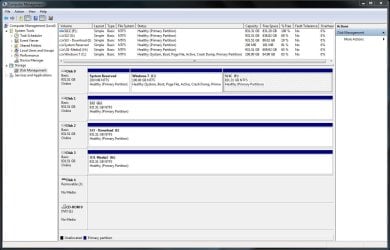
This is what I have now
Is it ok that the System Reserved is visible in Explorer
 

Attachments

  • cleanformatresult.JPG
    cleanformatresult.JPG
    151.1 KB · Views: 17

My Computer

Computer type
PC/Desktop
Computer Manufacturer/Model Number
Black Trooper Rampage
OS
Windows 7 Ultimate 64 Retail
CPU
I7-960
Motherboard
Asus Rampage III Extreme
Memory
4 X 4 GB Kingston DDR3-1600
Graphics Card(s)
Gigabyte GTX670
Sound Card
X-Fi Titanium Fatality Champion
Monitor(s) Displays
Dell U2412M
Screen Resolution
1920 X 1200
Hard Drives
2 X Samsung 830 256 GB
Velociraptor 1TB
2 x 2 TB WD Caviar Black
Seagate Barrcuda 2 TB
PSU
Cooler Master Silent Pro Gold 1000 W
Case
Cooler Master Trooper
Keyboard
Logitech G19
Mouse
Logitech G9x
Internet Speed
30 MBPS +/- VDSL
It's ok but it would be better if it had no drive letter so it can't be accessed unintentionally, did you give it the letter for some reason because the Windows 7 installation process will not letter it by default?

Before you make any changes a question if I may, are there bootable OSs on "Disk 1" and "Disk 3", or are they just data drives, the reason I ask is that they're marked "Active" and that can cause issues on data drives that aren't OS bootable?
 

My Computer

Computer Manufacturer/Model Number
* BFK Customs *
OS
W 7 64-bit Ultimate
CPU
Intel Q9550 Yorkfield
Motherboard
ASUS P5Q Pro
Memory
8GB Dominator 8500C5D
Graphics Card(s)
ATI : XFX 5870
Sound Card
Realtek HD Audio 7-1
Monitor(s) Displays
1x 47" LCD HDMI & 3x 26" LCD HDMI
Screen Resolution
1920x1080P & 1920x1200
Hard Drives
1x 80GB Intel X25-M G2 SSD : 1x 500GB & 1x 640GB WD Caviar Black(s)
PSU
Corsair 620HX
Case
Cooler Master RC-690
Cooling
Tuniq Tower 120, 2x 140mm and 3x 120mm case fans
Keyboard
Microsoft 500
Mouse
Razer Diamondback 3G
Internet Speed
14 Mb/s
Other Info
1x Koutech 3Gb/s SATA HDD Hot Swap Rack
About the letter Im not sure
But yea those others are supposed to be data disks
 

My Computer

Computer type
PC/Desktop
Computer Manufacturer/Model Number
Black Trooper Rampage
OS
Windows 7 Ultimate 64 Retail
CPU
I7-960
Motherboard
Asus Rampage III Extreme
Memory
4 X 4 GB Kingston DDR3-1600
Graphics Card(s)
Gigabyte GTX670
Sound Card
X-Fi Titanium Fatality Champion
Monitor(s) Displays
Dell U2412M
Screen Resolution
1920 X 1200
Hard Drives
2 X Samsung 830 256 GB
Velociraptor 1TB
2 x 2 TB WD Caviar Black
Seagate Barrcuda 2 TB
PSU
Cooler Master Silent Pro Gold 1000 W
Case
Cooler Master Trooper
Keyboard
Logitech G19
Mouse
Logitech G9x
Internet Speed
30 MBPS +/- VDSL
If you are going to do this you may as well do it the correct way so you don't have other related issues along the way.


If the Hard Disk Drive (HDD) at "Disk 2" is the one you're going to wipe and reinstall to, power down the machine and disconnect all the HDDs and connect that HDD to the #1 SATA port on the motherboard and set it as the second boot device after the CD/DVD drive in the BIOS; leave all the others disconnected for the entire process; do the wipe and the reinstall to that HDD.


When you have the new Windows 7 installed and booting good, then power down the machine and reconnect the other HDDs to the mobo, then use the information in the snip in Option Two #2 of this tutorial to mark the other HDDs " Inactive " so they don't cause future issues.

Startup Repair - Run 3 Separate Times
 

My Computer

Computer Manufacturer/Model Number
* BFK Customs *
OS
W 7 64-bit Ultimate
CPU
Intel Q9550 Yorkfield
Motherboard
ASUS P5Q Pro
Memory
8GB Dominator 8500C5D
Graphics Card(s)
ATI : XFX 5870
Sound Card
Realtek HD Audio 7-1
Monitor(s) Displays
1x 47" LCD HDMI & 3x 26" LCD HDMI
Screen Resolution
1920x1080P & 1920x1200
Hard Drives
1x 80GB Intel X25-M G2 SSD : 1x 500GB & 1x 640GB WD Caviar Black(s)
PSU
Corsair 620HX
Case
Cooler Master RC-690
Cooling
Tuniq Tower 120, 2x 140mm and 3x 120mm case fans
Keyboard
Microsoft 500
Mouse
Razer Diamondback 3G
Internet Speed
14 Mb/s
Other Info
1x Koutech 3Gb/s SATA HDD Hot Swap Rack
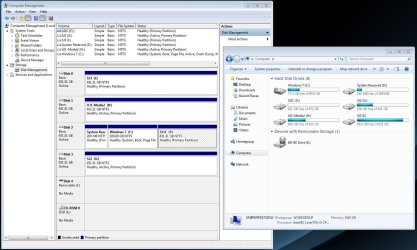
Actually that's what I did.. the disk2 you see I left conncted to the mobo as only HD and wiped and followed the tutorials, then afterwards I reconncted the 3 other disks
Btw, I have removed the driveletter on the 200 MB now
 

My Computer

Computer type
PC/Desktop
Computer Manufacturer/Model Number
Black Trooper Rampage
OS
Windows 7 Ultimate 64 Retail
CPU
I7-960
Motherboard
Asus Rampage III Extreme
Memory
4 X 4 GB Kingston DDR3-1600
Graphics Card(s)
Gigabyte GTX670
Sound Card
X-Fi Titanium Fatality Champion
Monitor(s) Displays
Dell U2412M
Screen Resolution
1920 X 1200
Hard Drives
2 X Samsung 830 256 GB
Velociraptor 1TB
2 x 2 TB WD Caviar Black
Seagate Barrcuda 2 TB
PSU
Cooler Master Silent Pro Gold 1000 W
Case
Cooler Master Trooper
Keyboard
Logitech G19
Mouse
Logitech G9x
Internet Speed
30 MBPS +/- VDSL
This looks right then
 

Attachments

  • disks.JPG
    disks.JPG
    134.9 KB · Views: 16

My Computer

Computer type
PC/Desktop
Computer Manufacturer/Model Number
Black Trooper Rampage
OS
Windows 7 Ultimate 64 Retail
CPU
I7-960
Motherboard
Asus Rampage III Extreme
Memory
4 X 4 GB Kingston DDR3-1600
Graphics Card(s)
Gigabyte GTX670
Sound Card
X-Fi Titanium Fatality Champion
Monitor(s) Displays
Dell U2412M
Screen Resolution
1920 X 1200
Hard Drives
2 X Samsung 830 256 GB
Velociraptor 1TB
2 x 2 TB WD Caviar Black
Seagate Barrcuda 2 TB
PSU
Cooler Master Silent Pro Gold 1000 W
Case
Cooler Master Trooper
Keyboard
Logitech G19
Mouse
Logitech G9x
Internet Speed
30 MBPS +/- VDSL
Yes that's excellent; now notice that the Windows C: is "System Active" there's now no need for the SysResv partition at all, Windows 7 is booting all on it's own now.
 

My Computer

Computer Manufacturer/Model Number
* BFK Customs *
OS
W 7 64-bit Ultimate
CPU
Intel Q9550 Yorkfield
Motherboard
ASUS P5Q Pro
Memory
8GB Dominator 8500C5D
Graphics Card(s)
ATI : XFX 5870
Sound Card
Realtek HD Audio 7-1
Monitor(s) Displays
1x 47" LCD HDMI & 3x 26" LCD HDMI
Screen Resolution
1920x1080P & 1920x1200
Hard Drives
1x 80GB Intel X25-M G2 SSD : 1x 500GB & 1x 640GB WD Caviar Black(s)
PSU
Corsair 620HX
Case
Cooler Master RC-690
Cooling
Tuniq Tower 120, 2x 140mm and 3x 120mm case fans
Keyboard
Microsoft 500
Mouse
Razer Diamondback 3G
Internet Speed
14 Mb/s
Other Info
1x Koutech 3Gb/s SATA HDD Hot Swap Rack
I have to say I picked up an OEM dvd with alot of versions and picked the Asus version then used my own OEM serial
So might be that the Asus setup adjusted some settings by itself
 

My Computer

Computer type
PC/Desktop
Computer Manufacturer/Model Number
Black Trooper Rampage
OS
Windows 7 Ultimate 64 Retail
CPU
I7-960
Motherboard
Asus Rampage III Extreme
Memory
4 X 4 GB Kingston DDR3-1600
Graphics Card(s)
Gigabyte GTX670
Sound Card
X-Fi Titanium Fatality Champion
Monitor(s) Displays
Dell U2412M
Screen Resolution
1920 X 1200
Hard Drives
2 X Samsung 830 256 GB
Velociraptor 1TB
2 x 2 TB WD Caviar Black
Seagate Barrcuda 2 TB
PSU
Cooler Master Silent Pro Gold 1000 W
Case
Cooler Master Trooper
Keyboard
Logitech G19
Mouse
Logitech G9x
Internet Speed
30 MBPS +/- VDSL
This worked great btw (jut have to figure out to format/clean on a new install but that's not immediate concern)
Only thing I wonder is well isn't 100 Gb a bit small for lets say someone who plays alot of games
I have the same concern towards SSDs seeing as I play alot of games and high capacity SSD is not a very affordable option for now
 

My Computer

Computer type
PC/Desktop
Computer Manufacturer/Model Number
Black Trooper Rampage
OS
Windows 7 Ultimate 64 Retail
CPU
I7-960
Motherboard
Asus Rampage III Extreme
Memory
4 X 4 GB Kingston DDR3-1600
Graphics Card(s)
Gigabyte GTX670
Sound Card
X-Fi Titanium Fatality Champion
Monitor(s) Displays
Dell U2412M
Screen Resolution
1920 X 1200
Hard Drives
2 X Samsung 830 256 GB
Velociraptor 1TB
2 x 2 TB WD Caviar Black
Seagate Barrcuda 2 TB
PSU
Cooler Master Silent Pro Gold 1000 W
Case
Cooler Master Trooper
Keyboard
Logitech G19
Mouse
Logitech G9x
Internet Speed
30 MBPS +/- VDSL
Hello again mate.


Only you know how much space you may need for C: if you feel you need more added to the C: partition you could use the free bootable Partition Wizard CD to shrink/resize the F: partition and that space could then be added to the C: partition; have a look at this tutorial at the link below for an outline of the process.

Clean Install Windows 7 : Ahead of Vista


Then have a look at Option Two of this tutorial to see how to recover the space from the old SysResv partition into the C: partition though of-course you won't need to do the startup repairs because the C: partition is already the "System" partition but the wipe would be a good idea.

Partition Wizard : Use the Bootable CD
 

My Computer

Computer Manufacturer/Model Number
* BFK Customs *
OS
W 7 64-bit Ultimate
CPU
Intel Q9550 Yorkfield
Motherboard
ASUS P5Q Pro
Memory
8GB Dominator 8500C5D
Graphics Card(s)
ATI : XFX 5870
Sound Card
Realtek HD Audio 7-1
Monitor(s) Displays
1x 47" LCD HDMI & 3x 26" LCD HDMI
Screen Resolution
1920x1080P & 1920x1200
Hard Drives
1x 80GB Intel X25-M G2 SSD : 1x 500GB & 1x 640GB WD Caviar Black(s)
PSU
Corsair 620HX
Case
Cooler Master RC-690
Cooling
Tuniq Tower 120, 2x 140mm and 3x 120mm case fans
Keyboard
Microsoft 500
Mouse
Razer Diamondback 3G
Internet Speed
14 Mb/s
Other Info
1x Koutech 3Gb/s SATA HDD Hot Swap Rack
Might put this on hold been building a couple pcs for my friend and maybe I'll be able to buy a raptor from the costs/parts I used
 

My Computer

Computer type
PC/Desktop
Computer Manufacturer/Model Number
Black Trooper Rampage
OS
Windows 7 Ultimate 64 Retail
CPU
I7-960
Motherboard
Asus Rampage III Extreme
Memory
4 X 4 GB Kingston DDR3-1600
Graphics Card(s)
Gigabyte GTX670
Sound Card
X-Fi Titanium Fatality Champion
Monitor(s) Displays
Dell U2412M
Screen Resolution
1920 X 1200
Hard Drives
2 X Samsung 830 256 GB
Velociraptor 1TB
2 x 2 TB WD Caviar Black
Seagate Barrcuda 2 TB
PSU
Cooler Master Silent Pro Gold 1000 W
Case
Cooler Master Trooper
Keyboard
Logitech G19
Mouse
Logitech G9x
Internet Speed
30 MBPS +/- VDSL
Be sure to post back with an update when you're able.
 

My Computer

Computer Manufacturer/Model Number
* BFK Customs *
OS
W 7 64-bit Ultimate
CPU
Intel Q9550 Yorkfield
Motherboard
ASUS P5Q Pro
Memory
8GB Dominator 8500C5D
Graphics Card(s)
ATI : XFX 5870
Sound Card
Realtek HD Audio 7-1
Monitor(s) Displays
1x 47" LCD HDMI & 3x 26" LCD HDMI
Screen Resolution
1920x1080P & 1920x1200
Hard Drives
1x 80GB Intel X25-M G2 SSD : 1x 500GB & 1x 640GB WD Caviar Black(s)
PSU
Corsair 620HX
Case
Cooler Master RC-690
Cooling
Tuniq Tower 120, 2x 140mm and 3x 120mm case fans
Keyboard
Microsoft 500
Mouse
Razer Diamondback 3G
Internet Speed
14 Mb/s
Other Info
1x Koutech 3Gb/s SATA HDD Hot Swap Rack
Ok I have my SSD meanwhile btw.. feels fast
 

My Computer

Computer type
PC/Desktop
Computer Manufacturer/Model Number
Black Trooper Rampage
OS
Windows 7 Ultimate 64 Retail
CPU
I7-960
Motherboard
Asus Rampage III Extreme
Memory
4 X 4 GB Kingston DDR3-1600
Graphics Card(s)
Gigabyte GTX670
Sound Card
X-Fi Titanium Fatality Champion
Monitor(s) Displays
Dell U2412M
Screen Resolution
1920 X 1200
Hard Drives
2 X Samsung 830 256 GB
Velociraptor 1TB
2 x 2 TB WD Caviar Black
Seagate Barrcuda 2 TB
PSU
Cooler Master Silent Pro Gold 1000 W
Case
Cooler Master Trooper
Keyboard
Logitech G19
Mouse
Logitech G9x
Internet Speed
30 MBPS +/- VDSL
Well done mate, makes a difference eh. ;)
 

My Computer

Computer Manufacturer/Model Number
* BFK Customs *
OS
W 7 64-bit Ultimate
CPU
Intel Q9550 Yorkfield
Motherboard
ASUS P5Q Pro
Memory
8GB Dominator 8500C5D
Graphics Card(s)
ATI : XFX 5870
Sound Card
Realtek HD Audio 7-1
Monitor(s) Displays
1x 47" LCD HDMI & 3x 26" LCD HDMI
Screen Resolution
1920x1080P & 1920x1200
Hard Drives
1x 80GB Intel X25-M G2 SSD : 1x 500GB & 1x 640GB WD Caviar Black(s)
PSU
Corsair 620HX
Case
Cooler Master RC-690
Cooling
Tuniq Tower 120, 2x 140mm and 3x 120mm case fans
Keyboard
Microsoft 500
Mouse
Razer Diamondback 3G
Internet Speed
14 Mb/s
Other Info
1x Koutech 3Gb/s SATA HDD Hot Swap Rack
Aye.. but I might do a decent reinstall again soon :lol: Plans to get a second of these.. and I have a Samsung G3 placed in order
 

My Computer

Computer type
PC/Desktop
Computer Manufacturer/Model Number
Black Trooper Rampage
OS
Windows 7 Ultimate 64 Retail
CPU
I7-960
Motherboard
Asus Rampage III Extreme
Memory
4 X 4 GB Kingston DDR3-1600
Graphics Card(s)
Gigabyte GTX670
Sound Card
X-Fi Titanium Fatality Champion
Monitor(s) Displays
Dell U2412M
Screen Resolution
1920 X 1200
Hard Drives
2 X Samsung 830 256 GB
Velociraptor 1TB
2 x 2 TB WD Caviar Black
Seagate Barrcuda 2 TB
PSU
Cooler Master Silent Pro Gold 1000 W
Case
Cooler Master Trooper
Keyboard
Logitech G19
Mouse
Logitech G9x
Internet Speed
30 MBPS +/- VDSL
   Note
Contrary to popular belief, formatting does not remove any data at all, it just checks for sector errors and marks the space to be over-written as needed, all the data is still there including all the code from previous/failed installation attempts.
That is a little bit outdated. Vista and later zero fill when you do a full format.
 

My Computer

OS
Windows
Hm on a disk IN windows then.. because when you install it won't give you the choice which kind of format
 

My Computer

Computer type
PC/Desktop
Computer Manufacturer/Model Number
Black Trooper Rampage
OS
Windows 7 Ultimate 64 Retail
CPU
I7-960
Motherboard
Asus Rampage III Extreme
Memory
4 X 4 GB Kingston DDR3-1600
Graphics Card(s)
Gigabyte GTX670
Sound Card
X-Fi Titanium Fatality Champion
Monitor(s) Displays
Dell U2412M
Screen Resolution
1920 X 1200
Hard Drives
2 X Samsung 830 256 GB
Velociraptor 1TB
2 x 2 TB WD Caviar Black
Seagate Barrcuda 2 TB
PSU
Cooler Master Silent Pro Gold 1000 W
Case
Cooler Master Trooper
Keyboard
Logitech G19
Mouse
Logitech G9x
Internet Speed
30 MBPS +/- VDSL
Simulate all you want. When you check with your disk editor when done, you will see only zeroes :)
 

My Computer

OS
Windows
Ok update..
This is what I have now and Ive been using diskpart/clean all the last times I reinstalled Windows 7
 

Attachments

  • computermanagement.JPG
    computermanagement.JPG
    125.4 KB · Views: 3

My Computer

Computer type
PC/Desktop
Computer Manufacturer/Model Number
Black Trooper Rampage
OS
Windows 7 Ultimate 64 Retail
CPU
I7-960
Motherboard
Asus Rampage III Extreme
Memory
4 X 4 GB Kingston DDR3-1600
Graphics Card(s)
Gigabyte GTX670
Sound Card
X-Fi Titanium Fatality Champion
Monitor(s) Displays
Dell U2412M
Screen Resolution
1920 X 1200
Hard Drives
2 X Samsung 830 256 GB
Velociraptor 1TB
2 x 2 TB WD Caviar Black
Seagate Barrcuda 2 TB
PSU
Cooler Master Silent Pro Gold 1000 W
Case
Cooler Master Trooper
Keyboard
Logitech G19
Mouse
Logitech G9x
Internet Speed
30 MBPS +/- VDSL
Back
Top