
Format Regional Language - Change

How to Change Regional Language Format in Windows 7 and Windows 8


   Information
This will show you how to change the format language Windows 7 and Windows 8 uses to display dates, times, currency, and numbers and measurements in your user account so that it matches the standards for the language used in the country or region you need them as or where you're currently located.


Here's How: 1. Open the Control Panel (icons view) in Windows 7 or Windows 8, and click/tap on the Region and Language (Windows 7) or Region (Windows 8) icon.


2. Under the Formats tab, select the format language from the drop down menu that you want to have the dates, times, currency, and measurements formats display with the default standards for that language. (see screenshot below) Format_Language.jpg
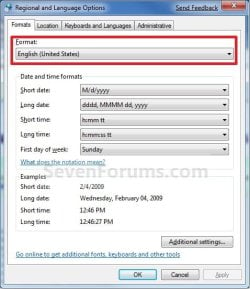
3. If you like, you can now change the date, time, currency, and numbers format settings to customize how you like.
NOTE: For Windows 8, see also: How to Change Date and Time Format in Windows 8 and 8.1

4. When finished, click/tap on OK. (See screenshot above)


That's it,
Shawn


Last edited:
Also, I've heard that you can change your OS language without having the Ultimate edition. I made a thread about it here.
 

My Computer

Computer Manufacturer/Model Number
Cyberpower, Inc.
OS
Windows 7 Professional (x64)
CPU
AMD Phenom II X4 955 Black Edition
Motherboard
Gigabyte AMD MA770T-UD3P AM3 DDR3 1666+/1333/1066
Memory
6GB (3 x 2GB) Kingston DDR3 1333 SDRAM
Graphics Card(s)
NVIDIA GeForce GTX 260
Sound Card
Onboard 7.1 Sound
Monitor(s) Displays
Samsung 24" SyncMaster 2422
Screen Resolution
1920 x 1200
Hard Drives
500GB Sata II 3.0GB 16MB 7200RPM,
Western Digital 1TB USB 2.0 External Hard Drive
PSU
Kingwin 700 Watt Power Supply
Case
Silver X-Cruiser 2 Mid No Power
Cooling
Asetek 120MM Watercooler
Keyboard
HTK-1001
Mouse
Razer Viper
Internet Speed
Incoming: 2496 kbps, Outgoing: 512 kbps
My windows 7 ultimate was installed in Spanish. It was subsequently changed to English.
Everything is in English now EXCEPT when it's booted up and powering down. When this happens I get messages in Spanish.
Booting up: Iniciando Windows ...espere ... iniciando.
Powering down: Apagando el equipo.
I understand what it means but I'd rather change it ALL to English.
 

My Computer

Computer Manufacturer/Model Number
Custom built
OS
Windows 7 Ultimate x64
CPU
AMD Athlon II X2 250 23 °C Regor 45nm Technology
Motherboard
Manufacturer ASUSTeK Computer INC. Model M4A78LT-M
Memory
4GB
Graphics Card(s)
SMB2220N (1920x1080@59Hz) AMD 760G (ASUStek Computer Inc)
Sound Card
VIA High Definition Audio
Monitor(s) Displays
21.5" LG
Screen Resolution
1920 x 1080
Hard Drives
977GB Seagate ST1000DL002-9TT153 ATA Device (SATA)
Case
Prior
Keyboard
Logitech
Mouse
Logitech
Internet Speed
10Mb
Hello Justin,

For that, changing the display language to English should change them. If you BIOS is in Spanish, then there may not be anything that can be done for that though.

Hope this helps,
Shawn
 
Last edited:

My Computer

Computer type
PC/Desktop
Computer Manufacturer/Model Number
Self built custom
OS
64-bit Windows 11 Pro for Workstations
CPU
Intel i7-8700K OC'd to 5 GHz
Motherboard
ASUS ROG Maximus XI Formula Z390
Memory
64 GB (4x16GB) G.SKILL TridentZ RGB DDR4 3600 MHz
Graphics Card(s)
ASUS ROG-STRIX-GTX1080TI-O11G-GAMING
Sound Card
Integrated
Monitor(s) Displays
2 x Samsung Odyssey G7 27"
Screen Resolution
2560x1440
Hard Drives
1TB Samsung 990 PRO M.2,
4TB Samsung 990 PRO PRO M.2,
TerraMaster F8 SSD Plus NAS
PSU
Seasonic Prime Titanium 850W
Case
Thermaltake Core P3
Cooling
Corsair Hydro H115i
Keyboard
Logitech wireless K800
Mouse
Logitech MX Master 4
Internet Speed
2 Gb/s Download and 100 Mb/s Upload
Antivirus
Malwarebyte Anti-Malware Premium
Browser
Google Chrome
Other Info
Logitech Z625 speaker system,
Logitech BRIO 4K Pro webcam,
HP Color LaserJet Pro MFP M477fdn,
APC SMART-UPS RT 1000 XL - SURT1000XLI,
Galaxy S23 Plus phone
Hello Justin,

For that, changing the display language to English should change them. If you BIOS is in Spanish, then there may not be anything that can be done for that though.

Hope this helps,
Shawn
Bios in Spanish. Thanks for reply.
 
Last edited by a moderator:

My Computer

Computer Manufacturer/Model Number
Custom built
OS
Windows 7 Ultimate x64
CPU
AMD Athlon II X2 250 23 °C Regor 45nm Technology
Motherboard
Manufacturer ASUSTeK Computer INC. Model M4A78LT-M
Memory
4GB
Graphics Card(s)
SMB2220N (1920x1080@59Hz) AMD 760G (ASUStek Computer Inc)
Sound Card
VIA High Definition Audio
Monitor(s) Displays
21.5" LG
Screen Resolution
1920 x 1080
Hard Drives
977GB Seagate ST1000DL002-9TT153 ATA Device (SATA)
Case
Prior
Keyboard
Logitech
Mouse
Logitech
Internet Speed
10Mb
You're welcome.

If you are comfortable with flashing your BIOS, then you might check with your motherboard manufacturer's website to see if they may just happen to have a English BIOS version for your specific motherboard model number that you could use to flash your BIOS with.
 

My Computer

Computer type
PC/Desktop
Computer Manufacturer/Model Number
Self built custom
OS
64-bit Windows 11 Pro for Workstations
CPU
Intel i7-8700K OC'd to 5 GHz
Motherboard
ASUS ROG Maximus XI Formula Z390
Memory
64 GB (4x16GB) G.SKILL TridentZ RGB DDR4 3600 MHz
Graphics Card(s)
ASUS ROG-STRIX-GTX1080TI-O11G-GAMING
Sound Card
Integrated
Monitor(s) Displays
2 x Samsung Odyssey G7 27"
Screen Resolution
2560x1440
Hard Drives
1TB Samsung 990 PRO M.2,
4TB Samsung 990 PRO PRO M.2,
TerraMaster F8 SSD Plus NAS
PSU
Seasonic Prime Titanium 850W
Case
Thermaltake Core P3
Cooling
Corsair Hydro H115i
Keyboard
Logitech wireless K800
Mouse
Logitech MX Master 4
Internet Speed
2 Gb/s Download and 100 Mb/s Upload
Antivirus
Malwarebyte Anti-Malware Premium
Browser
Google Chrome
Other Info
Logitech Z625 speaker system,
Logitech BRIO 4K Pro webcam,
HP Color LaserJet Pro MFP M477fdn,
APC SMART-UPS RT 1000 XL - SURT1000XLI,
Galaxy S23 Plus phone
The latest BIOS version is 0801. If the language is the only issue you have, I wouldn't be too worried about it. You already said that you can understand it, so I would leave it alone. Incorrect flashing of the BIOS can turn your system into an expensive paperweight. Should you choose to flash it, follow any instructions provided to the letter, and be aware that you do so AT YOUR OWN RISK.

ASUSTeK Computer Inc. - Motherboards- ASUS M4A78LT-M LE
 

My Computer

Computer type
PC/Desktop
Computer Manufacturer/Model Number
Dwarf Dwf/11/2012 r09/2013
OS
Windows 8.1 Pro RTM x64
CPU
Intel Core-i5-3570K 4-core @ 3.4GHz (Ivy Bridge) (OC 4.4GHz)
Motherboard
ASRock Z77 Extreme4-M
Memory
4 x 4GB DDR3-1600 Corsair Vengeance CMZ8GX3M2A1600C9B (16GB)
Graphics Card(s)
MSI GeForce GTX770 Gaming OC 2GB
Sound Card
Realtek High Definition on board solution (ALC 898)
Monitor(s) Displays
ViewSonic VA1912w Widescreen (VGA)
Screen Resolution
1440x900
Hard Drives
OCZ Agility 3 SSD 120GB SATA III x2 (RAID 0)
Samsung HD501LJ 500GB SATA II x2
Hitachi HDS721010CLA332 1TB SATA II
Iomega 1.5TB Ext USB 2.0
WD 2.0TB Ext USB 3.0
PSU
XFX Pro Series 850W Semi-Modular
Case
Gigabyte IF233
Cooling
1 x 120mm Front Inlet 1 x 120mm Rear Exhaust
Keyboard
Microsoft Comfort Curve Keyboard 3000 (USB)
Mouse
Microsoft Comfort Mouse 3000 for Business (USB)
Internet Speed
NetGear DG834Gv3 ADSL Modem/Router (Ethernet) ~4.0 Mb/s (O2)
Antivirus
Avast! 8.0.1497
Browser
IE 11
Other Info
Optical Drive: HL-DT-ST BD-RE BH10LS30 SATA Bluray
Lexmark S305 Printer/Scanner/Copier (USB)
WEI Score: 8.1/8.1/8.5/8.5/8.25
Asus Eee PC 1011PX Netbook (Windows 7 x86 Starter)
I wish to have the Regional and Language settings in Control Panel, specifically the date format, be applied to Internet Explorer and its display of time on web sites.
Does anyone know how to do this?
 

My Computer

OS
Windows XP SP3, 32-bit
Hello Scott, and welcome to Seven Forums.

It's really up to the website for how the date and time is displayed on their site instead.

Could you post an example screenshot?
 

My Computer

Computer type
PC/Desktop
Computer Manufacturer/Model Number
Self built custom
OS
64-bit Windows 11 Pro for Workstations
CPU
Intel i7-8700K OC'd to 5 GHz
Motherboard
ASUS ROG Maximus XI Formula Z390
Memory
64 GB (4x16GB) G.SKILL TridentZ RGB DDR4 3600 MHz
Graphics Card(s)
ASUS ROG-STRIX-GTX1080TI-O11G-GAMING
Sound Card
Integrated
Monitor(s) Displays
2 x Samsung Odyssey G7 27"
Screen Resolution
2560x1440
Hard Drives
1TB Samsung 990 PRO M.2,
4TB Samsung 990 PRO PRO M.2,
TerraMaster F8 SSD Plus NAS
PSU
Seasonic Prime Titanium 850W
Case
Thermaltake Core P3
Cooling
Corsair Hydro H115i
Keyboard
Logitech wireless K800
Mouse
Logitech MX Master 4
Internet Speed
2 Gb/s Download and 100 Mb/s Upload
Antivirus
Malwarebyte Anti-Malware Premium
Browser
Google Chrome
Other Info
Logitech Z625 speaker system,
Logitech BRIO 4K Pro webcam,
HP Color LaserJet Pro MFP M477fdn,
APC SMART-UPS RT 1000 XL - SURT1000XLI,
Galaxy S23 Plus phone
Hi,

I've spoken with the support manager at the web site in question. This is a browser-based document management system called CompliantPro. They insist they have no controls for this in their system, that they inherit it from the browser. Thanks. The dates involved are things like Creation date, Last date modified, Released Date that appear in the document screen or in search results.
 

My Computer

OS
Windows XP SP3, 32-bit
Scott,

From what I and John (z3r010) have seen, all web site software hard codes the date format. :(
 

My Computer

Computer type
PC/Desktop
Computer Manufacturer/Model Number
Self built custom
OS
64-bit Windows 11 Pro for Workstations
CPU
Intel i7-8700K OC'd to 5 GHz
Motherboard
ASUS ROG Maximus XI Formula Z390
Memory
64 GB (4x16GB) G.SKILL TridentZ RGB DDR4 3600 MHz
Graphics Card(s)
ASUS ROG-STRIX-GTX1080TI-O11G-GAMING
Sound Card
Integrated
Monitor(s) Displays
2 x Samsung Odyssey G7 27"
Screen Resolution
2560x1440
Hard Drives
1TB Samsung 990 PRO M.2,
4TB Samsung 990 PRO PRO M.2,
TerraMaster F8 SSD Plus NAS
PSU
Seasonic Prime Titanium 850W
Case
Thermaltake Core P3
Cooling
Corsair Hydro H115i
Keyboard
Logitech wireless K800
Mouse
Logitech MX Master 4
Internet Speed
2 Gb/s Download and 100 Mb/s Upload
Antivirus
Malwarebyte Anti-Malware Premium
Browser
Google Chrome
Other Info
Logitech Z625 speaker system,
Logitech BRIO 4K Pro webcam,
HP Color LaserJet Pro MFP M477fdn,
APC SMART-UPS RT 1000 XL - SURT1000XLI,
Galaxy S23 Plus phone
Back
Top