Solved Free RAM

Well just for starters, under MSCONFIG the maximum memory is not ticked. And i have BIOS settings all auto. What else can cause unusable RAM
 

My Computer

Computer type
PC/Desktop
OS
windows 7 home premium 64bit
CPU
Amd phenom ii 560 3.30ghz
Motherboard
Asus m4a785td-v evo
Memory
Corsair TwinX 8GB (4x2)
Graphics Card(s)
AMD radeon HD 5670 1GB
Sound Card
None
Monitor(s) Displays
Hp
Hard Drives
WD Black Caviar 1TB 7200rpm
PSU
Corsair 500W
Case
CM Enforcer
Cooling
Stock HS, 200mm Front fan + 120mm Exhaust
Keyboard
Cyborg v7
Mouse
Laser Microsoft 6000
Internet Speed
5mb/s
Antivirus
Norton
Browser
Chrome
Along side that, as my memory on this PC seems to go to 0 free sometimes. I assume that this will increase the amount of Page Filing too. While the PC feels quick still atm. Would i be recommended to install some extra RAM? Or wouldnt it matter.
Most of the time, the extra RAM would not matter.

If you ever get into creating/using Virtual Machines, then more more RAM the merrier.


My Computer

Computer type
Laptop
Computer Manufacturer/Model Number
Employer provided Dell Latitude
OS
W7 Pro SP1 64bit
CPU
i7
Memory
8GB
Graphics Card(s)
Intel HD Graphics
Hard Drives
crappy SSD
Antivirus
Employer mandated Symantec Endpoint Protection
Browser
Pale Moon 64bit, IE11 64bit & Chrome 64bit
Please dont make me read that.....:sleepy:
Then electronically search for this section...
32-bit Client Effective Memory Limits

...and stop reading when you get to this section:
Do You Have Enough Memory?

:-)
 

My Computer

Computer type
Laptop
Computer Manufacturer/Model Number
Employer provided Dell Latitude
OS
W7 Pro SP1 64bit
CPU
i7
Memory
8GB
Graphics Card(s)
Intel HD Graphics
Hard Drives
crappy SSD
Antivirus
Employer mandated Symantec Endpoint Protection
Browser
Pale Moon 64bit, IE11 64bit & Chrome 64bit
Well just for starters, under MSCONFIG the maximum memory is not ticked. And i have BIOS settings all auto. What else can cause unusable RAM
I really cannot explain it better than Mark R. does in that article that I linked to.
 

My Computer

Computer type
Laptop
Computer Manufacturer/Model Number
Employer provided Dell Latitude
OS
W7 Pro SP1 64bit
CPU
i7
Memory
8GB
Graphics Card(s)
Intel HD Graphics
Hard Drives
crappy SSD
Antivirus
Employer mandated Symantec Endpoint Protection
Browser
Pale Moon 64bit, IE11 64bit & Chrome 64bit
Im unsure what you have said. I search for that and it brings me to the same article as you showed me..

I am using 64-bit OS btw.
 

My Computer

Computer type
PC/Desktop
OS
windows 7 home premium 64bit
CPU
Amd phenom ii 560 3.30ghz
Motherboard
Asus m4a785td-v evo
Memory
Corsair TwinX 8GB (4x2)
Graphics Card(s)
AMD radeon HD 5670 1GB
Sound Card
None
Monitor(s) Displays
Hp
Hard Drives
WD Black Caviar 1TB 7200rpm
PSU
Corsair 500W
Case
CM Enforcer
Cooling
Stock HS, 200mm Front fan + 120mm Exhaust
Keyboard
Cyborg v7
Mouse
Laser Microsoft 6000
Internet Speed
5mb/s
Antivirus
Norton
Browser
Chrome
Sorry that I was not clear.

I did not mean for you to search the web (find on web)...
...I meant for you to search that one article (find on page).

Visit the long article
Press Ctrl-F
Copy/paste 32-bit Client Effective Memory Limits into the search field
Hit enter

That should take you to the section to read - so that you do not have to read it all.
 

My Computer

Computer type
Laptop
Computer Manufacturer/Model Number
Employer provided Dell Latitude
OS
W7 Pro SP1 64bit
CPU
i7
Memory
8GB
Graphics Card(s)
Intel HD Graphics
Hard Drives
crappy SSD
Antivirus
Employer mandated Symantec Endpoint Protection
Browser
Pale Moon 64bit, IE11 64bit & Chrome 64bit
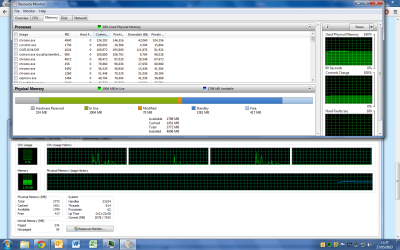
I have just noticed something in the Resource Monitor that you told me to open, on my works PC which has just 4GB RAM.

I have just a total of 800MB free after waiting for boot to finish. However i have Hardware Reserved using 324MB.

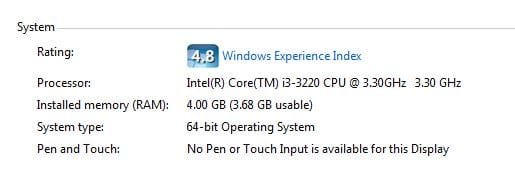
And if i right click Computer select Properties and look at my RAM, it shows 4.00GB (3.68GB Usable).

All my other PC's i built have never said a usable amount. Is that something wrong?

Im unsure what you have said. I search for that and it brings me to the same article as you showed me..

I am using 64-bit OS btw.

So - when you say, "I am using 64-bit OS btw." Are you talking about the computer at work or the one at your home.

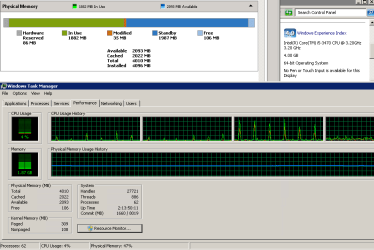
Please use this info to post a screenshot of the computer from work that shows at least the top two windows like this:

ram.png
 

My Computer

Computer type
Laptop
Computer Manufacturer/Model Number
Employer provided Dell Latitude
OS
W7 Pro SP1 64bit
CPU
i7
Memory
8GB
Graphics Card(s)
Intel HD Graphics
Hard Drives
crappy SSD
Antivirus
Employer mandated Symantec Endpoint Protection
Browser
Pale Moon 64bit, IE11 64bit & Chrome 64bit
Both. However i was reporting this issue on my works PC alone, which is 64-bit and has 4GB RAM installed.

Sorry il have a read of that article soon when i get time.

Is this the picture you requried?
 

Attachments

  • Untitled.png
    Untitled.png
    65.2 KB · Views: 10

My Computer

Computer type
PC/Desktop
OS
windows 7 home premium 64bit
CPU
Amd phenom ii 560 3.30ghz
Motherboard
Asus m4a785td-v evo
Memory
Corsair TwinX 8GB (4x2)
Graphics Card(s)
AMD radeon HD 5670 1GB
Sound Card
None
Monitor(s) Displays
Hp
Hard Drives
WD Black Caviar 1TB 7200rpm
PSU
Corsair 500W
Case
CM Enforcer
Cooling
Stock HS, 200mm Front fan + 120mm Exhaust
Keyboard
Cyborg v7
Mouse
Laser Microsoft 6000
Internet Speed
5mb/s
Antivirus
Norton
Browser
Chrome
I understand about needing time to read that section of the article.

Look at the screenshot that I posted. In the upper right corner is a shot of the computer properties. Can you please post that? Basically, I wanted to see what you are seeing when you wrote this: And if i right click Computer select Properties and look at my RAM, it shows 4.00GB (3.68GB Usable).
 

My Computer

Computer type
Laptop
Computer Manufacturer/Model Number
Employer provided Dell Latitude
OS
W7 Pro SP1 64bit
CPU
i7
Memory
8GB
Graphics Card(s)
Intel HD Graphics
Hard Drives
crappy SSD
Antivirus
Employer mandated Symantec Endpoint Protection
Browser
Pale Moon 64bit, IE11 64bit & Chrome 64bit
Both. However i was reporting this issue on my works PC alone, which is 64-bit and has 4GB RAM installed.

Sorry il have a read of that article soon when i get time.

Is this the picture you requried?
I don't see a problem here. Half of your RAM is available RAM, so you are in good shape. The 'In Use' is a bit high but that could be because of the programs you have running. The Hardware Reserved could be your on-board graphics or some other device that needs some real RAM.
 

My Computer

Computer Manufacturer/Model Number
HP, Dell, Gateway, Toshiba - 4 laptops and 2 desktops
OS
Vista, Windows7, Mint Mate, Zorin, Windows 8
CPU
from 1.6GHz Duo to i7
Monitor(s) Displays
2x HP w2207
Hard Drives
5x HDD, 7x SSD, 12x Externals
Keyboard
with trackball - no mices
Mouse
Trackball mice
Internet Speed
DSL 6000
This is what i am seeing.
 

Attachments

  • Capture.JPG
    Capture.JPG
    18.6 KB · Views: 14

My Computer

Computer type
PC/Desktop
OS
windows 7 home premium 64bit
CPU
Amd phenom ii 560 3.30ghz
Motherboard
Asus m4a785td-v evo
Memory
Corsair TwinX 8GB (4x2)
Graphics Card(s)
AMD radeon HD 5670 1GB
Sound Card
None
Monitor(s) Displays
Hp
Hard Drives
WD Black Caviar 1TB 7200rpm
PSU
Corsair 500W
Case
CM Enforcer
Cooling
Stock HS, 200mm Front fan + 120mm Exhaust
Keyboard
Cyborg v7
Mouse
Laser Microsoft 6000
Internet Speed
5mb/s
Antivirus
Norton
Browser
Chrome
I don't see a problem here. Half of your RAM is available RAM, so you are in good shape. The 'In Use' is a bit high but that could be because of the programs you have running. The Hardware Reserved could be your on-board graphics or some other device that needs some real RAM.

Ive never had this on any machine i built before, i wondered why just for future really.

I have a general interest in know about these things.
 

My Computer

Computer type
PC/Desktop
OS
windows 7 home premium 64bit
CPU
Amd phenom ii 560 3.30ghz
Motherboard
Asus m4a785td-v evo
Memory
Corsair TwinX 8GB (4x2)
Graphics Card(s)
AMD radeon HD 5670 1GB
Sound Card
None
Monitor(s) Displays
Hp
Hard Drives
WD Black Caviar 1TB 7200rpm
PSU
Corsair 500W
Case
CM Enforcer
Cooling
Stock HS, 200mm Front fan + 120mm Exhaust
Keyboard
Cyborg v7
Mouse
Laser Microsoft 6000
Internet Speed
5mb/s
Antivirus
Norton
Browser
Chrome
Along side that, as my memory on this PC seems to go to 0 free sometimes. I assume that this will increase the amount of Page Filing too. While the PC feels quick still atm. Would i be recommended to install some extra RAM? Or wouldnt it matter.

Having low or zero free memory is completely normal and will not impair performance. Windows was designed to work this way. The ideal would be for free memory to be zero at all times but we are not there yet. Free memory is wasted memory and Windows always tries to avoid waste.

The memory labeled as "Standby" should be high. It can be assigned to any process just like free memory but in the meantime it acts as a kind of cache. This is better than free memory.
 

My Computer

Computer type
PC/Desktop
Computer Manufacturer/Model Number
HP
OS
Windows 7 Pro 64 bit
CPU
Xeon W3520
Memory
8 GB
Graphics Card(s)
Nvidia Geforce 210
This is what i am seeing.

That is because some of your Hardware Video acceleration needs it to run smooth you are not going to have every mb of ram available it just doesn't work that way
No matter what you do your resources will use that little amount

There is nothing wrong with your setup adding more Ram will not make a difference as stated unless you are doing something intense I run 16gb and don't even get close to even using 3gb

I Video encode play games and have a multi network set up only way i'll get the full function out of my ram is to create Virtual machines with in my machine

Your set up will only allow so much look at my screen shot i'm using nothing pretty much and just wasting ram persay
 

Attachments

  • ram.PNG
    ram.PNG
    102.3 KB · Views: 11

My Computer

Computer type
PC/Desktop
Computer Manufacturer/Model Number
CoreI7-6700K MrFingerIII Special Builds
OS
Windows 10 Home Premium 64bit sp1
CPU
Intel I7-6700K @ 4.6 Ghz 1.344 volts everyday OC
Motherboard
Asrock Fatality K6 Z170 Socket 1151
Memory
32GB G-Skill TridentZ 3200mhz 16-18-18-38 DDR4
Graphics Card(s)
Sli Gigabyte Windforce GTX 980 G1
Sound Card
AC97 Creative Rage Tactic 3D Headphones Bluetooth
Monitor(s) Displays
27" Asus ROG Swift PG278Q G-Sync 48" Vizio Smart HD TV
Screen Resolution
2560x1440p 27"- 48" Currently Gaming at 2560x1440p Res 2K
Hard Drives
250GB Samsung Evo840SSD Seagate baracuda 500 GB WD Mybook 500Gb 1TB Seagate Barracuda
PSU
HX1050w Corsair Silver 80plus certified crosfire/sli
Case
Enthod Pro Full Tower
Cooling
Corsair H110i GT 280 mm High Performance WaterBlock
Keyboard
Logitech wireless keyboard
Mouse
Logitech wireless mouse
Internet Speed
Cox Cable 100+ mb
Antivirus
WebRoot Spysweeper with Antivirus
Browser
IE-10, Chrome, Opera
Other Info
My Other Rig is a AMD FX8320E @4.6Ghz 16GB Ballistic Sport Ram
Mobo Asrock Fatality 990FX 120GB OCZ SSD 1TB Seagate Barracuda Corsair H75 Cooling PSU Corsair CX750
GPU GTX Gigabyte 970G1
...........Ive never had this on any machine i built before, i wondered why just for future really.

I have a general interest in know about these things.
I've not seen* the "(x.xxGB Usable)" RAM thing either on a 64bit OS and an "i" series CPU with its built-in GPU. Does this computer have another video card added?

*not that I've been looking for it.
 

My Computer

Computer type
Laptop
Computer Manufacturer/Model Number
Employer provided Dell Latitude
OS
W7 Pro SP1 64bit
CPU
i7
Memory
8GB
Graphics Card(s)
Intel HD Graphics
Hard Drives
crappy SSD
Antivirus
Employer mandated Symantec Endpoint Protection
Browser
Pale Moon 64bit, IE11 64bit & Chrome 64bit
You can place there browser cache and temporary files, that does speed up the browser.

But yeah, get a SSD. Even a crappy one is better than the best HDD as far as response times go.

More ram is useful if you want to play with virtual machines though. That is, if you want to have Windows 7, Mac Osx, and Linux Ubuntu going at the same time.
Along side that, as my memory on this PC seems to go to 0 free sometimes. I assume that this will increase the amount of Page Filing too.
The number you should look at is the "Available".
Win7 does preload as much as possible into RAM, trying to guess what you will need more, to improve responsiveness.
In case more RAM is needed by something else, some of that preloaded stuff is deleted to make space.

So, even if you have 0 Free you can have more than 4 gigs Available.

All my other PC's i built have never said a usable amount. Is that something wrong?
The short version of the article above:
It is likely because that PC has a 32-bit version of Windows (Control Panel --> System to see if it is 32 bit or 64 bit). It cannot see more than 3.2-3.9 GB of RAM.
It's just a software limit (in the more distant past it was also a hardware limit), all ways to sidestep that without using a 64 bit windows version tend to suck.

Technically even 64-bit version does have a maximum amount of usable RAM, but it's a ridiculously huge number.

 

My Computer

Computer type
PC/Desktop
Computer Manufacturer/Model Number
custom built
OS
Win 7 Pro 64-bit 7601
CPU
AMD Phenom 9650 QuadCore, revision DR-B3
Motherboard
ASUS M4A78
Memory
5 GB yes I run 2x 2GB and 1x 1GB, different brand, spank me.
Graphics Card(s)
NVIDIA GeForce 9800 GT 512 Mb, unknown manufacturer.
Sound Card
Crappy Realtek Integrated Audio
Monitor(s) Displays
Fujitsu Siemens P19-3P
Screen Resolution
1280 x 1024 x 32 bits @ 60 Hz Oh yeah, 4:3 rocks!
Hard Drives
(1) MAXTOR S TM3320613AS SATA Disk Device (2) STM35004 18AS SATA Disk Device (3) TOSHIBA USB 2.5"-HDD
PSU
whatever, around 450w
Case
Scavenged from old company PC, 10+ years old
Cooling
CPU fan, GPU fan, case fan, nothing fancy
Keyboard
Microsoft, PS/2, white.
Mouse
Optical, logitec.
Internet Speed
effective max speeds: 70-ish kB/s down 30-ish kB/s up
Antivirus
Avira, free edition.
Browser
Firefox with FXChrome to make it look like Google Chrome :P
Other Info
Was discarded by previous owner due to "horrible performance".
Was running Win Xp from a IDE drive. Yeah. Was a pain.
SATA II drive and Win7 and it zips away! Yay!
Well just for starters, under MSCONFIG the maximum memory is not ticked. And i have BIOS settings all auto. What else can cause unusable RAM
Having more installed than you need.
 

My Computer

Computer type
PC/Desktop
Computer Manufacturer/Model Number
Home Built Desktop By DataTech
OS
Windows 7 Ultimate X64 SP1
CPU
Intel i5-2550K, Differing ~4.4-4.8GHz No built in GPU
Motherboard
ASUS P8Z68-V PRO/GEN3
Memory
16GB G.Skill Sniper 1866MHz @ 2133MHz 2x8GB
Graphics Card(s)
ASUS GTX650TIB-DC2OC-2GD5, (650TI Boost)
Sound Card
Onboard Realtek 5-1
Monitor(s) Displays
Samsung P2570HD
Screen Resolution
1920x1080
Hard Drives
Samsung 840 Pro 256GB SSD for OS, 500GB Seagate Constellation (Enterprise drive) for Data
PSU
Corsair HX650W
Case
Inwin Dragon Rider
Cooling
Hyper 212 EVO w/two Noctua fans, push-pull, @1300 RPM
Keyboard
E-Z Eyes, bright yellow keys with large characters
Mouse
steelseries SENSEI Laser Pro Gaming
Internet Speed
48-51Mbs Mbs down, 11 Mbs up Xfinity Cable
Antivirus
Norton Internet Security 2013
Browser
IE 10, Opera, Pale Moon if needed
Other Info
4 case fans, LG BluRay-RE, ASUS DVD-RW, Mr. Fusion power supply, 1.21 gigawatts.
~~~
short version of the article above:
It is likely because that PC has a 32-bit version of Windows (Control Panel --> System to see if it is 32 bit or 64 bit). It cannot see more than 3.2-3.9 GB of RAM.
It's just a software limit (in the more distant past it was also a hardware limit), all ways to sidestep that without using a 64 bit windows version tend to suck.

Technically even 64-bit version does have a maximum amount of usable RAM, but it's a ridiculously huge number.
Look at the screenshot in this post
http://www.sevenforums.com/performance-maintenance/289610-free-ram-6.html#post2401040
The OP is seeing this on a 64bit OS with i3 CPU.
Have you ever seen the "usable RAM" statement on a 64bit OS?
 

My Computer

Computer type
Laptop
Computer Manufacturer/Model Number
Employer provided Dell Latitude
OS
W7 Pro SP1 64bit
CPU
i7
Memory
8GB
Graphics Card(s)
Intel HD Graphics
Hard Drives
crappy SSD
Antivirus
Employer mandated Symantec Endpoint Protection
Browser
Pale Moon 64bit, IE11 64bit & Chrome 64bit
Utilizing an SSD to host the OS, then Superfetch is totally useless and serves no point (more than enough research has been done *legit sources all over the web* to back that up). Disable it on SSD, you're losing performance with it enabled.

If you're looking into RAMDrive, I'd suggest upgrading to 16GB of memory then RAMDrive would be a worthwhile investment, better yet 32GB would be better or even 64GB of memory.

Best thing I love about RAMDrive is installing an application or scratchdisk and after boot that information is still there and it's performance is beyond SSD. Hopefully, soon, HDD and SSD will be a thing of the past and everything is RAM!~ :D
 

My Computer

Computer type
PC/Desktop
OS
Windows 7 Pro x64
Just like to add. Hardware Reserved is just that, Hardware Reserved. There is nothing in Windows to change that, memory is reserved BEFORE Windows boots up. Windows has no control over that. That is why it is labeled Hardware Reserved.

I have a new system, 64 bit, i7 3930k with 16 GBs of RAM, 4GB of VRAM on my GTX 690. I have 84 MBs set as Hardware Reserved. You get the "(x.xx GB usable) bit when Hardware Reserved is over a certain limit.
 

My Computer

Computer type
PC/Desktop
Computer Manufacturer/Model Number
Alienware Aurora ALX R4
OS
Windows 10 Pro (x64)
CPU
Intel Core i7-3930K (3.2GHz - 4.5GHz)
Motherboard
Alienware Aurora-R4 x79
Memory
4x Samsung 4GB PC3-12800 DDR3 (16GB 1600MHz)
Graphics Card(s)
Nvidia Geforce GTX 690
Sound Card
SteelSeries Siberia Elite
Monitor(s) Displays
Dell UltraSharp U3011
Screen Resolution
2560x1600
Hard Drives
Samsung 850 Pro 256 GB, Seagate 1TB Desktop Hybrid HDD, 2x Western Digital 4TB Green HDD
PSU
875W Some Dell PSU <.<
Case
Alienware Aurora ALX
Cooling
Custom Liquid Cooling (EK CPU & GPU blocks) dual EK 480RAD
Keyboard
Logitech G710+ Mechanical
Mouse
Logitech G700s
Internet Speed
Verizon Fios (50 mbps average)
Other Info
Server: Intel NUC D54250WYK: i5-4250U, 16GB, 256 GB mSATA, Windows Server 2012 R2
Back
Top