Hi guys,
I really love Win 7 but it seems like it's time to finally update. I've dual booted Win 10 for a few days (this caused many problems which I was able to solve thankfully) and I think I'm going upgrade my Win 7 to Win 10 now.
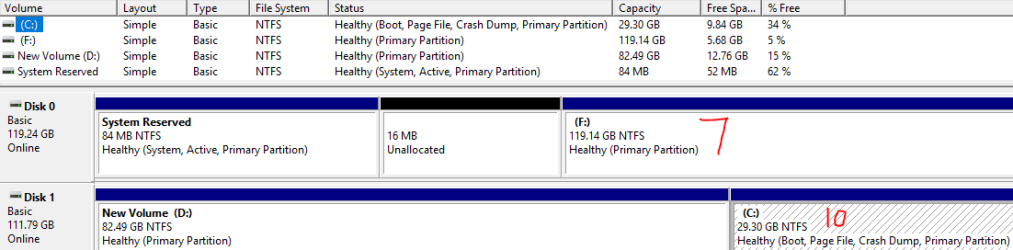
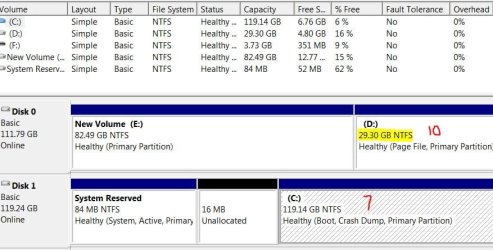
Only issue is that I've already created partitions for the dual boot. How do I undo all of that so that I only have one OS on my hard drive?
Screenshot of Disk Management in Win 7 https://www.sevenforums.com/attachments/installation-setup/399685d1499295607-dualboot-7-10-10-a-capture.jpg
I really love Win 7 but it seems like it's time to finally update. I've dual booted Win 10 for a few days (this caused many problems which I was able to solve thankfully) and I think I'm going upgrade my Win 7 to Win 10 now.
Only issue is that I've already created partitions for the dual boot. How do I undo all of that so that I only have one OS on my hard drive?
Screenshot of Disk Management in Win 7 https://www.sevenforums.com/attachments/installation-setup/399685d1499295607-dualboot-7-10-10-a-capture.jpg
Attachments
My Computer
At a glance
Windows 7 Home Premium 64 bitIntel Core i5-3570K8 GBMSI GTX 970
- Computer type
- PC/Desktop
- Computer Manufacturer/Model Number
- Custom Build
- OS
- Windows 7 Home Premium 64 bit
- CPU
- Intel Core i5-3570K
- Motherboard
- ASRock Z77 Extreme4
- Memory
- 8 GB
- Graphics Card(s)
- MSI GTX 970
- Hard Drives
- Samsung SSD 830 Series 128 GB & Samsung SSD 850 EVO 120 GB