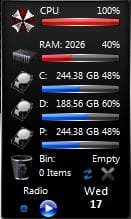
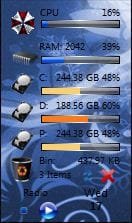
Gadgets - Customize

How to Customize Existing Windows 7 Gadgets

The question having been asked in the "post your seven desktop" thread, i thought it was maybe interesting to deepen that with a new and clear post...

So, the subject here is how to change icons and type/color of font in a windows gadget :orb: to make it match better with your own style...

IMPORTANT NOTE : If you wanna follow these steps, remember that it's for personal use ONLY, please never share a customized gadget without the owner/creator permission!!! Thanks... ;)
I could not be responsible for any exceed due to the use of this tutorial...

For the icons change, i choose the "BandwidthMeter" gadget, credits for this are for "RolRain".
For the font change, i used "PrestoHDMonitor_1.54" gadget, credits to "Preston Hunt" for the gadget and "SFKilla" for styles and graphics.

So here we go! First : how to change icon(s)...

Note : my system is in French but i'll explain with English terms, really easy to follow...

You need to have "7-zip" installed for these operations, Winrar doesn't show needed actions in the contextual menu...

So we're gonna make "up" become "down"

nxvwis.jpg


1- Create a new folder and name it as your original gadget.
To make it more distinctive, add something to the name...
My original is "BandwidthMeter" and i just added "2" :
jkde14.jpg

2- Copy your original gadget in this folder (always back up the original, of course...), then right clic the gadget file > 7-zip > extract here
1jrgb9.jpg

You obtain all the folders contained in your gadget.
You can delete the original now, we won't need it anymore.

3- Find the "images" folder and then the icon(s) you wanna change and check the size.
I made here a red selection of two icons, they are the icon of the gadget and the icon for the gadget management window (the one with all your installed gadgets)
51eebo.jpg

4- Choose now new icon(s), with the same size (! - if needed, cut & resize with any image editor you want) and rename them as the original ones
4u86bp.jpg

2liwzo4.jpg

As you can see, i had to copy my choosen icon twice...

5 - Replace the original icons by the new ones
28u30yb.jpg

6- To have the new name of the gadget after installation, you have to change it in the "xml" file, so right clic on it > modify
212bali.jpg

then change the name, close the windows and accept the modification
jrck6b.jpg

2vt1wnq.jpg

5vn444.jpg

7- We have now to re-pack all the files;
So, select all of them, right clic > 7-zip > add to "BandwidthMeter2.zip"
ojdxxe.jpg

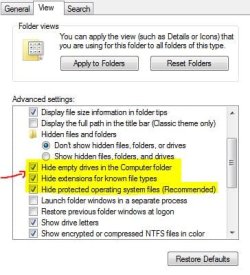
Finally, rename the extension "zip" to "gadget" (to make appear the extension, go to "folder options" and uncheck "Hide extensions for known file types")
5dqsyv.jpg

2zhided.jpg

And that's it; you have now a new personal custom ready-to-use gadget!
119cfhy.jpg


Last edited by a moderator:
I make a second post for the tuto be clearer...

Here is now how to change font style/color, much easier again...
Really useful if you want to use clear gadget theme, for exemple..

So, to make "up" become "down"

21cckee.jpg


Follow the steps described in the first post for extracting the gadget files, then find the "css" one and change font and colors where i've marked (note : you can write colors in words, "black", "red", orange" for exemple). You can also change "bold" to "italic", and so on... But i didn't here...

10enb4z.jpg


f9jrdx.jpg


Of course, according to the gadget you wanna customize, "css" file can be a bit different but i think it's easy to find what to change, and if it doesn't work at the first time, just try again...!

When it's done, re-pack as described above...

This is it! :D

I hope this is clear enough and it will help someone...!
In that case, i will be happy and motivated for, maybe, a new tuto, one day...

Enjoy and, please, let me know if you liked it and find it helpful... ;)

Thanks!!!
 
Last edited:

My Computer

Computer Manufacturer/Model Number
Home Made 00x
OS
7Home64
CPU
AMD Phenom II x4 965 - 3,4GHz
Motherboard
Gigabyte GA-880GMA-UD2H
Memory
DDR3 1333Mhz, 8Gb (Corsair xms3 : 9, 9, 9, 24)
Graphics Card(s)
GeForce GTX550Ti 1024mb GDDR5 (Gainward)
Sound Card
Creative X-Fi ExtremeGamer
Monitor(s) Displays
Acer 27", led, full hd
Screen Resolution
1920x1080
Hard Drives
G-Skill SSD 80Gb + Kingston SSD 64Gb + WD sata 500Mb + Hitachi sata 1Tb
PSU
CombatPower 750W, 12cm fan
Case
Antec "Three Hundred", 12 + 14 cm fans
Cooling
Noctua NH-U12P (CPU) + 2xNF-B9 (HDD's) + NF-P12 (case side)
Keyboard
Logitech + Saitek "Cyborg Command Unit"
Mouse
Logitech LS1 laser
Internet Speed
4Mb/s
Other Info
6-fan-&-temp controller Scythe Kase Master Pro 5.25
Really nice tutorial! I was wondering, among many other things, how to do this. :p

Moved my post down below your second. :)
 

My Computer

Computer type
PC/Desktop
Computer Manufacturer/Model Number
Custom built
OS
Windows 8 Pro 64-bit
CPU
Intel Core i7 950 @4.4GHz
Motherboard
EVGA 131-GT-E767
Memory
12GB DDR3 1333MHz @1400 (9-9-9-24)
Graphics Card(s)
2x AMD Radeon HD 6770
Sound Card
Sound Blaster Audigy
Monitor(s) Displays
Acer S231HL + Acer E19T5W
Screen Resolution
1920x1080 + 1440x900
Hard Drives
128GB Samsung 840 Pro
1TB Seagate Barracuda 7200RPM 64mb
500GB Seagate Barracuda 7200RPM 16mb
PSU
Corsair GS800
Case
Custom-made
Cooling
CM Hyper212+, lots of fans
Keyboard
NMB RT8255C+
Mouse
Func MS-3
Internet Speed
30/1.5
Antivirus
Microsoft Security Essentials/Spybot SD/Malwarebytes
Browser
Google Chrome
Other Info
Onkyo TX-27 receiver & two Realistic Optimus T100s.
Really nice tutorial! I was wondering, among many other things, how to do this. :p

Thanks for the rep!!! And the move too...!

Really happy you liked it...;)
 

My Computer

Computer Manufacturer/Model Number
Home Made 00x
OS
7Home64
CPU
AMD Phenom II x4 965 - 3,4GHz
Motherboard
Gigabyte GA-880GMA-UD2H
Memory
DDR3 1333Mhz, 8Gb (Corsair xms3 : 9, 9, 9, 24)
Graphics Card(s)
GeForce GTX550Ti 1024mb GDDR5 (Gainward)
Sound Card
Creative X-Fi ExtremeGamer
Monitor(s) Displays
Acer 27", led, full hd
Screen Resolution
1920x1080
Hard Drives
G-Skill SSD 80Gb + Kingston SSD 64Gb + WD sata 500Mb + Hitachi sata 1Tb
PSU
CombatPower 750W, 12cm fan
Case
Antec "Three Hundred", 12 + 14 cm fans
Cooling
Noctua NH-U12P (CPU) + 2xNF-B9 (HDD's) + NF-P12 (case side)
Keyboard
Logitech + Saitek "Cyborg Command Unit"
Mouse
Logitech LS1 laser
Internet Speed
4Mb/s
Other Info
6-fan-&-temp controller Scythe Kase Master Pro 5.25
Wow man.. you went all that far because i asked a simple question!! haha your a start! thank you so much...
Ill edit my gadget now and put a pic on here soon showing it to you!

Thanks again :D
 

My Computer

Computer Manufacturer/Model Number
Custom Built
OS
Windows 7 Pro 32bit
CPU
AMD Phenom 8650 Triple-Core
Motherboard
ASUS M3A78
Memory
Kingston 4gb DDR2
Graphics Card(s)
NVIDIA GeForce GTS 250 (512mb)
Monitor(s) Displays
Acer
Screen Resolution
1440 x 900
Hard Drives
X2 Seagate 7200RPM 500GB h/d
Cooling
Cooler Master
Keyboard
Merc Stealth Zboard
Mouse
LogitechG9 Gaming Mouse
Wow man.. you went all that far because i asked a simple question!! haha your a start! thank you so much...
Ill edit my gadget now and put a pic on here soon showing it to you!

Thanks again :D

No prob', Soul02!
I'm enjoying to see that!!!;)
 

My Computer

Computer Manufacturer/Model Number
Home Made 00x
OS
7Home64
CPU
AMD Phenom II x4 965 - 3,4GHz
Motherboard
Gigabyte GA-880GMA-UD2H
Memory
DDR3 1333Mhz, 8Gb (Corsair xms3 : 9, 9, 9, 24)
Graphics Card(s)
GeForce GTX550Ti 1024mb GDDR5 (Gainward)
Sound Card
Creative X-Fi ExtremeGamer
Monitor(s) Displays
Acer 27", led, full hd
Screen Resolution
1920x1080
Hard Drives
G-Skill SSD 80Gb + Kingston SSD 64Gb + WD sata 500Mb + Hitachi sata 1Tb
PSU
CombatPower 750W, 12cm fan
Case
Antec "Three Hundred", 12 + 14 cm fans
Cooling
Noctua NH-U12P (CPU) + 2xNF-B9 (HDD's) + NF-P12 (case side)
Keyboard
Logitech + Saitek "Cyborg Command Unit"
Mouse
Logitech LS1 laser
Internet Speed
4Mb/s
Other Info
6-fan-&-temp controller Scythe Kase Master Pro 5.25
No prob', Soul02!
I'm enjoying to see that!!!;)

Lol ok im stuck! haha... just trying this out but i dont get this part you said:

Finally, rename the extension "zip" to "gadget" (you need for this to uncheck "mask known extension" in the folder options)

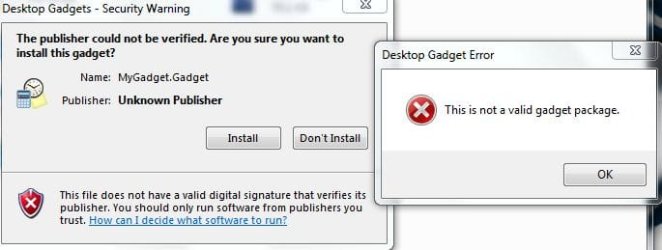
Ive looked and cant find 'mask known extension' though i saved it .Gadget and it saved! but when i try to install it it says 'this is not a valid package' lol ... Help! :eek:
 

My Computer

Computer Manufacturer/Model Number
Custom Built
OS
Windows 7 Pro 32bit
CPU
AMD Phenom 8650 Triple-Core
Motherboard
ASUS M3A78
Memory
Kingston 4gb DDR2
Graphics Card(s)
NVIDIA GeForce GTS 250 (512mb)
Monitor(s) Displays
Acer
Screen Resolution
1440 x 900
Hard Drives
X2 Seagate 7200RPM 500GB h/d
Cooling
Cooler Master
Keyboard
Merc Stealth Zboard
Mouse
LogitechG9 Gaming Mouse
Although i'm not a big fan of gadgets. This is a good tutorial. Very detailed. Good work scoopeeedoo. ;) +1 Rep.
 

My Computer

Computer Manufacturer/Model Number
D3f's Customs
OS
Win 7 Ultimate SP1 x64
CPU
Intel Pentium Dual Core E5300 OC'd @ 3GHz
Motherboard
Asus P5G41-M LE
Memory
Kingston 2x2GB DDR2-800 Dual Channel SDRAM
Graphics Card(s)
Integrated Intel GMA X4500
Sound Card
Realtek 5.1 HD Audio (ALC887)
Monitor(s) Displays
LG Flatron W1943S @ 60Hz
Screen Resolution
1360 x 768
Hard Drives
Internal - WD Caviar Blue 500GB, External - WD My Passport Essential 500GB
PSU
Headway 450w PSU
Case
Pixxo Slim Black mATX Case
Cooling
Stock Cpu Fan, 1 x Top Case Fan
Keyboard
Logitech K120
Mouse
Logitech LS1 Laser Mouse
Internet Speed
17.66Mb/s Down, 0.82Mb/s Up
Other Info
Creative SBS A300 2.1 Speaker System, LG GH22NS50 22x Internal Super-Multi DVD-RW, 2Wire 5012NV Wireless Modem Router
No prob', Soul02!
I'm enjoying to see that!!!;)
Lol ok im stuck! haha... just trying this out but i dont get this part you said:

Finally, rename the extension "zip" to "gadget" (you need for this to uncheck "mask known extension" in the folder options)
Ive looked and cant find 'mask known extension' though i saved it .Gadget and it saved! but when i try to install it it says 'this is not a valid package' lol ... Help! :eek:

If you did not uncheck the option, you will have a double extension... not good that!!!:confused:
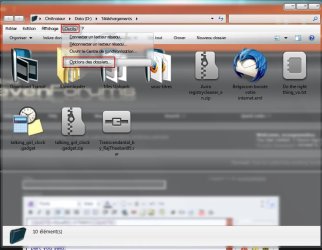
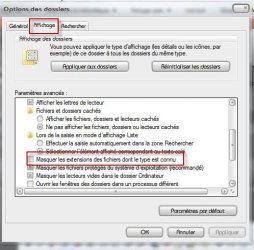
See this : (sorry for French, this must be, in your window explorer : options > folders options > display > mask the file type extension known, or something like that...). I hope it will fix your prob'...
 

Attachments

  • 1.jpg
    1.jpg
    56.3 KB · Views: 776
  • 2.jpg
    2.jpg
    42.8 KB · Views: 4,816

My Computer

Computer Manufacturer/Model Number
Home Made 00x
OS
7Home64
CPU
AMD Phenom II x4 965 - 3,4GHz
Motherboard
Gigabyte GA-880GMA-UD2H
Memory
DDR3 1333Mhz, 8Gb (Corsair xms3 : 9, 9, 9, 24)
Graphics Card(s)
GeForce GTX550Ti 1024mb GDDR5 (Gainward)
Sound Card
Creative X-Fi ExtremeGamer
Monitor(s) Displays
Acer 27", led, full hd
Screen Resolution
1920x1080
Hard Drives
G-Skill SSD 80Gb + Kingston SSD 64Gb + WD sata 500Mb + Hitachi sata 1Tb
PSU
CombatPower 750W, 12cm fan
Case
Antec "Three Hundred", 12 + 14 cm fans
Cooling
Noctua NH-U12P (CPU) + 2xNF-B9 (HDD's) + NF-P12 (case side)
Keyboard
Logitech + Saitek "Cyborg Command Unit"
Mouse
Logitech LS1 laser
Internet Speed
4Mb/s
Other Info
6-fan-&-temp controller Scythe Kase Master Pro 5.25
Soul02 :
I guess you did select well ALL the files before re-packing...?
 

My Computer

Computer Manufacturer/Model Number
Home Made 00x
OS
7Home64
CPU
AMD Phenom II x4 965 - 3,4GHz
Motherboard
Gigabyte GA-880GMA-UD2H
Memory
DDR3 1333Mhz, 8Gb (Corsair xms3 : 9, 9, 9, 24)
Graphics Card(s)
GeForce GTX550Ti 1024mb GDDR5 (Gainward)
Sound Card
Creative X-Fi ExtremeGamer
Monitor(s) Displays
Acer 27", led, full hd
Screen Resolution
1920x1080
Hard Drives
G-Skill SSD 80Gb + Kingston SSD 64Gb + WD sata 500Mb + Hitachi sata 1Tb
PSU
CombatPower 750W, 12cm fan
Case
Antec "Three Hundred", 12 + 14 cm fans
Cooling
Noctua NH-U12P (CPU) + 2xNF-B9 (HDD's) + NF-P12 (case side)
Keyboard
Logitech + Saitek "Cyborg Command Unit"
Mouse
Logitech LS1 laser
Internet Speed
4Mb/s
Other Info
6-fan-&-temp controller Scythe Kase Master Pro 5.25
Soul02 :
I guess you did select well ALL the files before re-packing...?

Ok... ive found what you mean, done what you said, and still its not working :o below is how i did it, just like you said! from pic 1 to 5.

Pic1: the folder itself.
Pic2: selected all files in the folder and went to folder options.
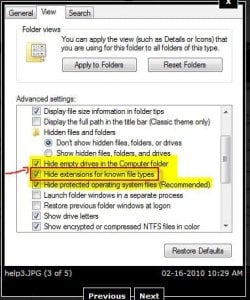
Pic3: i beleive the one you mean is the one which ive put the arrow there?
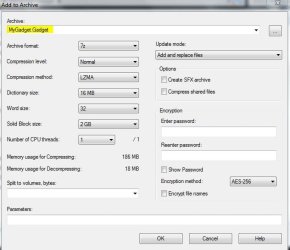
Pic4: renamed the file to .gadget in 7zip.
Pic5: pressed ok! it did it... but then pressed install and i get: 'this is not a valid gadget package'

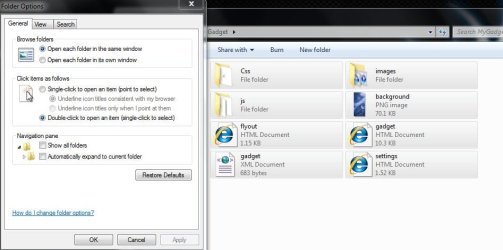
Now in Pic3: do i need to restart computer for this? i did uncheck the 1st box at the top like you have done, though that didnt work i tried the other 2 below it also! still nothing ...

Sorry for all this trouble! lol
 

Attachments

  • help1.JPG
    help1.JPG
    35 KB · Views: 329
  • help2.JPG
    help2.JPG
    57.3 KB · Views: 210
  • help3.JPG
    help3.JPG
    34.5 KB · Views: 294
  • help4.JPG
    help4.JPG
    42.3 KB · Views: 287
  • help5.JPG
    help5.JPG
    31.8 KB · Views: 279

My Computer

Computer Manufacturer/Model Number
Custom Built
OS
Windows 7 Pro 32bit
CPU
AMD Phenom 8650 Triple-Core
Motherboard
ASUS M3A78
Memory
Kingston 4gb DDR2
Graphics Card(s)
NVIDIA GeForce GTS 250 (512mb)
Monitor(s) Displays
Acer
Screen Resolution
1440 x 900
Hard Drives
X2 Seagate 7200RPM 500GB h/d
Cooling
Cooler Master
Keyboard
Merc Stealth Zboard
Mouse
LogitechG9 Gaming Mouse
Soul02 :
I guess you did select well ALL the files before re-packing...?

Ok... ive found what you mean, done what you said, and still its not working :o below is how i did it, just like you said! from pic 1 to 5.

Pic1: the folder itself.
Pic2: selected all files in the folder and went to folder options.
Pic3: i beleive the one you mean is the one which ive put the arrow there?
Pic4: renamed the file to .gadget in 7zip.
Pic5: pressed ok! it did it... but then pressed install and i get: 'this is not a valid gadget package'

Now in Pic3: do i need to restart computer for this? i did uncheck the 1st box at the top like you have done, though that didnt work i tried the other 2 below it also! still nothing ...

Sorry for all this trouble! lol

Really no problem!!! We are gonna fix that :geek:!!! Sorry for slow response, i just came back from work and i think we've just missed ourselves for a couple of minutes...:o
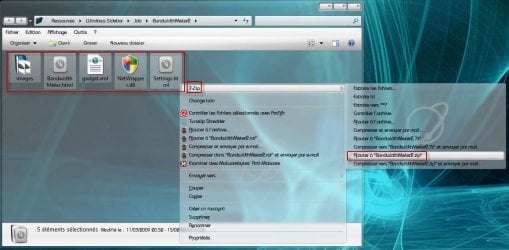
So, first, there's no need to select anything to go in the "folder options". They are general options, which means that if you do something in it, it's for all the files in your computer. Just open your explorer, go to the options and uncheck the options i've marked in the attached image below (i capt' your own image...), then you can leave the "folder options", next steps are out of it...

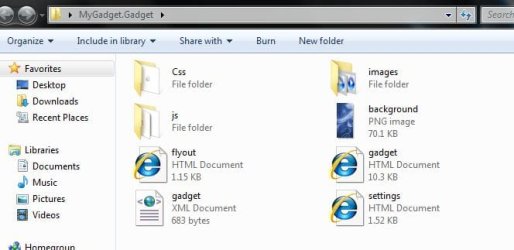
Second : i see that your folder (the one which contains all the files shown in pic 1) is called "MyGadget.gadget"; it must be named only "MyGadget" (see my capt')

Third : in your pic 4, i see a window which has not to be...:confused:, all you have to do is select all files of your pic 1, then right clic on one of the files (this will open the contextual menu), then slide your mouse on "7zip", this will open a new menu, then left clic on "add to MyGadget.zip" (i join the corresponding pic of my tuto). This will make a zip archive named "MyGadget.zip" (it will appears just between "gadget.xml" and "settings.html" in the files shown in your pic 1). This the file you have to rename, just select the "zip" and write "gadget"


Don't worry, i stay tuned for more info if needed...!;)

Good luck...

EDIT : thanks for your observations, they allow me to shape my tuto...
 

Attachments

  • 14.jpg
    14.jpg
    81.8 KB · Views: 220
  • 2.jpg
    2.jpg
    35.9 KB · Views: 307
  • 1.jpg
    1.jpg
    34.1 KB · Views: 311
Last edited:

My Computer

Computer Manufacturer/Model Number
Home Made 00x
OS
7Home64
CPU
AMD Phenom II x4 965 - 3,4GHz
Motherboard
Gigabyte GA-880GMA-UD2H
Memory
DDR3 1333Mhz, 8Gb (Corsair xms3 : 9, 9, 9, 24)
Graphics Card(s)
GeForce GTX550Ti 1024mb GDDR5 (Gainward)
Sound Card
Creative X-Fi ExtremeGamer
Monitor(s) Displays
Acer 27", led, full hd
Screen Resolution
1920x1080
Hard Drives
G-Skill SSD 80Gb + Kingston SSD 64Gb + WD sata 500Mb + Hitachi sata 1Tb
PSU
CombatPower 750W, 12cm fan
Case
Antec "Three Hundred", 12 + 14 cm fans
Cooling
Noctua NH-U12P (CPU) + 2xNF-B9 (HDD's) + NF-P12 (case side)
Keyboard
Logitech + Saitek "Cyborg Command Unit"
Mouse
Logitech LS1 laser
Internet Speed
4Mb/s
Other Info
6-fan-&-temp controller Scythe Kase Master Pro 5.25
hehe i done it! thanks so much... the problem i was doing was, i didnt know i had to make it to a .zip file first! THEN rename that one to a .gadget file! haha... ill post on here soon as ive made a new and better one! thanks again man! 5*
 

My Computer

Computer Manufacturer/Model Number
Custom Built
OS
Windows 7 Pro 32bit
CPU
AMD Phenom 8650 Triple-Core
Motherboard
ASUS M3A78
Memory
Kingston 4gb DDR2
Graphics Card(s)
NVIDIA GeForce GTS 250 (512mb)
Monitor(s) Displays
Acer
Screen Resolution
1440 x 900
Hard Drives
X2 Seagate 7200RPM 500GB h/d
Cooling
Cooler Master
Keyboard
Merc Stealth Zboard
Mouse
LogitechG9 Gaming Mouse
hehe i done it! thanks so much... the problem i was doing was, i didnt know i had to make it to a .zip file first! THEN rename that one to a .gadget file! haha... ill post on here soon as ive made a new and better one! thanks again man! 5*

My pleasure! Glad you solve the prob'... I hope to see that soon!!!;)
 

My Computer

Computer Manufacturer/Model Number
Home Made 00x
OS
7Home64
CPU
AMD Phenom II x4 965 - 3,4GHz
Motherboard
Gigabyte GA-880GMA-UD2H
Memory
DDR3 1333Mhz, 8Gb (Corsair xms3 : 9, 9, 9, 24)
Graphics Card(s)
GeForce GTX550Ti 1024mb GDDR5 (Gainward)
Sound Card
Creative X-Fi ExtremeGamer
Monitor(s) Displays
Acer 27", led, full hd
Screen Resolution
1920x1080
Hard Drives
G-Skill SSD 80Gb + Kingston SSD 64Gb + WD sata 500Mb + Hitachi sata 1Tb
PSU
CombatPower 750W, 12cm fan
Case
Antec "Three Hundred", 12 + 14 cm fans
Cooling
Noctua NH-U12P (CPU) + 2xNF-B9 (HDD's) + NF-P12 (case side)
Keyboard
Logitech + Saitek "Cyborg Command Unit"
Mouse
Logitech LS1 laser
Internet Speed
4Mb/s
Other Info
6-fan-&-temp controller Scythe Kase Master Pro 5.25
My pleasure! Glad you solve the prob'... I hope to see that soon!!!;)

Ok update! here is the first ... im really just testing but im thinking now to add my own touches, like some new fetures etc, ideas please everyone??? lol

Gonna add a few versions too, game, stars, cars, etc ...

Thx again, let me know what you think :huh:

Edit: released 2 versions of it ver1 is the all black with some tweaks! and ver2
is the blue tattoo design one with alot of tweaks!

Id love to know how to put in a core temp app on it! and also a backgroud change option if anyone got any ideas on how? thanks...
 

Attachments

Last edited:

My Computer

Computer Manufacturer/Model Number
Custom Built
OS
Windows 7 Pro 32bit
CPU
AMD Phenom 8650 Triple-Core
Motherboard
ASUS M3A78
Memory
Kingston 4gb DDR2
Graphics Card(s)
NVIDIA GeForce GTS 250 (512mb)
Monitor(s) Displays
Acer
Screen Resolution
1440 x 900
Hard Drives
X2 Seagate 7200RPM 500GB h/d
Cooling
Cooler Master
Keyboard
Merc Stealth Zboard
Mouse
LogitechG9 Gaming Mouse
My pleasure! Glad you solve the prob'... I hope to see that soon!!!;)
Ok update! here is the first ... im really just testing but im thinking now to add my own touches, like some new fetures etc, ideas please everyone??? lol

Gonna add a few versions too, game, stars, cars, etc ...

Thx again, let me know what you think :huh:

According to me, really much smarter!
Good work, Soul02!
 

My Computer

Computer Manufacturer/Model Number
Home Made 00x
OS
7Home64
CPU
AMD Phenom II x4 965 - 3,4GHz
Motherboard
Gigabyte GA-880GMA-UD2H
Memory
DDR3 1333Mhz, 8Gb (Corsair xms3 : 9, 9, 9, 24)
Graphics Card(s)
GeForce GTX550Ti 1024mb GDDR5 (Gainward)
Sound Card
Creative X-Fi ExtremeGamer
Monitor(s) Displays
Acer 27", led, full hd
Screen Resolution
1920x1080
Hard Drives
G-Skill SSD 80Gb + Kingston SSD 64Gb + WD sata 500Mb + Hitachi sata 1Tb
PSU
CombatPower 750W, 12cm fan
Case
Antec "Three Hundred", 12 + 14 cm fans
Cooling
Noctua NH-U12P (CPU) + 2xNF-B9 (HDD's) + NF-P12 (case side)
Keyboard
Logitech + Saitek "Cyborg Command Unit"
Mouse
Logitech LS1 laser
Internet Speed
4Mb/s
Other Info
6-fan-&-temp controller Scythe Kase Master Pro 5.25
My pleasure! Glad you solve the prob'... I hope to see that soon!!!;)
Ok update! here is the first ... im really just testing but im thinking now to add my own touches, like some new fetures etc, ideas please everyone??? lol

Gonna add a few versions too, game, stars, cars, etc ...

Thx again, let me know what you think :huh:

Edit: released 2 versions of it ver1 is the all black with some tweaks! and ver2
is the blue tattoo design one with alot of tweaks!

Id love to know how to put in a core temp app on it! and also a backgroud change option if anyone got any ideas on how? thanks...

Please remember what i said in the tuto :
You are not allowed to share customized gadget WITHOUT the owner's permission!!!

Adding more options means that you must be able to make programmation... The subject here is to make a gadget closer to your own style, for your own use, if you need more, than learn how to make a gadget (from a to z) by yourself...
Maybe this will help you : create your own windows gadget
As you will can see, this is not a simple job, so, PLEASE, respect the author's work!!!
Generaly, you can find links to the creator in the gadget's options or in the inside files (like a "read me" file, for exemple)
 

My Computer

Computer Manufacturer/Model Number
Home Made 00x
OS
7Home64
CPU
AMD Phenom II x4 965 - 3,4GHz
Motherboard
Gigabyte GA-880GMA-UD2H
Memory
DDR3 1333Mhz, 8Gb (Corsair xms3 : 9, 9, 9, 24)
Graphics Card(s)
GeForce GTX550Ti 1024mb GDDR5 (Gainward)
Sound Card
Creative X-Fi ExtremeGamer
Monitor(s) Displays
Acer 27", led, full hd
Screen Resolution
1920x1080
Hard Drives
G-Skill SSD 80Gb + Kingston SSD 64Gb + WD sata 500Mb + Hitachi sata 1Tb
PSU
CombatPower 750W, 12cm fan
Case
Antec "Three Hundred", 12 + 14 cm fans
Cooling
Noctua NH-U12P (CPU) + 2xNF-B9 (HDD's) + NF-P12 (case side)
Keyboard
Logitech + Saitek "Cyborg Command Unit"
Mouse
Logitech LS1 laser
Internet Speed
4Mb/s
Other Info
6-fan-&-temp controller Scythe Kase Master Pro 5.25
Please remember what i said in the tuto :
You are not allowed to share customized gadget WITHOUT the owner's permission!!!

Adding more options means that you must be able to make programmation... The subject here is to make a gadget closer to your own style, if you need more, than learn how to make a gadget (from a to z) by yourself...
Maybe this will help you : create your own windows gadget
Yep i know what you mean mate, ill not change anything untill ive spoken to the right guy whatever, though ive only changed the style its not the gadget itself!

I have sent an email asking about weather i can change stuff etc and waiting for a reply! ... for now only the style though! :)
 

My Computer

Computer Manufacturer/Model Number
Custom Built
OS
Windows 7 Pro 32bit
CPU
AMD Phenom 8650 Triple-Core
Motherboard
ASUS M3A78
Memory
Kingston 4gb DDR2
Graphics Card(s)
NVIDIA GeForce GTS 250 (512mb)
Monitor(s) Displays
Acer
Screen Resolution
1440 x 900
Hard Drives
X2 Seagate 7200RPM 500GB h/d
Cooling
Cooler Master
Keyboard
Merc Stealth Zboard
Mouse
LogitechG9 Gaming Mouse
Hey sir TS~
What is your theme?
I love the transparency lol
 

My Computer

Computer Manufacturer/Model Number
Satellite L305
OS
Windows 7
Graphics Card(s)
Mobile Intel(R) 4 Series Express Chipset Family
Sound Card
Realtek
Screen Resolution
1280x800
Hard Drives
250HD
Mouse
Logitech Mouse
Hey sir TS~
What is your theme?
I love the transparency lol

Hi!
If you're talkin' of the theme in the tuto, it is "Meridian" for Windowblinds7
 

My Computer

Computer Manufacturer/Model Number
Home Made 00x
OS
7Home64
CPU
AMD Phenom II x4 965 - 3,4GHz
Motherboard
Gigabyte GA-880GMA-UD2H
Memory
DDR3 1333Mhz, 8Gb (Corsair xms3 : 9, 9, 9, 24)
Graphics Card(s)
GeForce GTX550Ti 1024mb GDDR5 (Gainward)
Sound Card
Creative X-Fi ExtremeGamer
Monitor(s) Displays
Acer 27", led, full hd
Screen Resolution
1920x1080
Hard Drives
G-Skill SSD 80Gb + Kingston SSD 64Gb + WD sata 500Mb + Hitachi sata 1Tb
PSU
CombatPower 750W, 12cm fan
Case
Antec "Three Hundred", 12 + 14 cm fans
Cooling
Noctua NH-U12P (CPU) + 2xNF-B9 (HDD's) + NF-P12 (case side)
Keyboard
Logitech + Saitek "Cyborg Command Unit"
Mouse
Logitech LS1 laser
Internet Speed
4Mb/s
Other Info
6-fan-&-temp controller Scythe Kase Master Pro 5.25
Back
Top