Gadgets not Displaying Correctly in Windows 7 - Fix

How to Fix Gadgets not Displaying Correctly in Windows 7


   Information
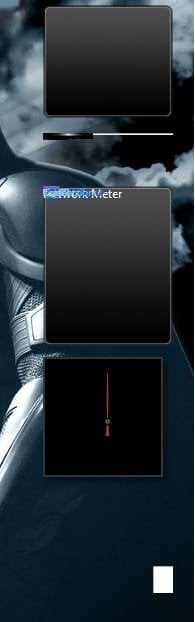
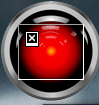
If you have gadgets that are displaying on your Windows 7 desktop improperly as black, white, blank, or just messed up, then this will show you how to fix them.

You must be logged in as an administrator to be able to do this tutorial.

   Note
If you have a 3rd party firewall program installed, then also check to make sure that the gadgets are allowed in the firewall and are not being blocked in that program's exception settings.

EXAMPLE: Gadgets not displaying correctly
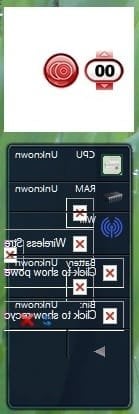
Gadget-1.jpgGadget-2.jpg


OPTION ONE

Automatically Using a BAT File Download


NOTE: This does the same thing as in OPTION TWO below, but automatically. 1. Click on the Download button below to download the file below. Reset_Gadgets.bat


Download


2. Click on Save (if prompted), and save the .bat file to your desktop.

3. Right click on the downloaded .bat file and click on Run as administrator.

4. If prompted by UAC, then click on Yes.

5. You will see a command prompt flash open and close as the .bat file runs.

6. When finished, restart the computer to apply.

7. Check to see if the gadgets on your desktop are displaying correctly now. If not, then try uninstalling and reinstalling any gadgets that are still not displaying properly, or do a System Restore using a restore point dated before the problem.


OPTION TWO

Manually in an Elevated Command Prompt


NOTE: This does the same thing as in OPTION ONE above, but manually. 1. Open an elevated command prompt (right click - Run as administrator)

2. In the elevated command prompt, copy and paste each command below and press Enter one t a time. After each time your press Enter, you will need to click on OK before doing the next command.
Code:
[LIST] 
[*]taskkill /im sidebar.exe /f
[*]regsvr32 msxml3.dll
[*]regsvr32 scrrun.dll
[*]regsvr32 jscript.dll
[*]regsvr32 atl.dll
[*]Regsvr32 "%ProgramFiles%\Windows Sidebar\sbdrop.dll"
[*]Regsvr32 "%ProgramFiles%\Windows Sidebar\wlsrvc.dll"
[*]reg delete "HKEY_CURRENT_USER\Software\Microsoft\Windows\CurrentVersion\Internet Settings\Zones" /f
[*]"%ProgramFiles%\Windows Sidebar\sidebar.exe"
[/LIST]
3. Restart the computer to apply.

4. Check to see if the gadgets on your desktop are displaying correctly now. If not, then try uninstalling and reinstalling the still bad gadget, or do a System Restore using a restore point dated before the problem.
That's it,
Shawn


Attachments

Last edited:
I just registered for the sole purpose of saying thank you, Brink. Worked like magic. I freaked out this morning when I turned on the pc and the gadgets were gone and seemed totally broken. Thank you so much :)
 

My Computer My Computer

At a glance

Windows 7 Home Premium 64bit
Computer type
PC/Desktop
Computer Manufacturer/Model Number
HP
OS
Windows 7 Home Premium 64bit
Browser
Chrome
Gadget Fix

This didn't help me. I ran the download and restarted but the clock will not stay on the desktop and the weather icon only shows the city name in a purple color, no little square with a half-sun. :confused:
 

My Computer My Computer

At a glance

Windows 7 64 bit
Computer type
PC/Desktop
Computer Manufacturer/Model Number
Acer
OS
Windows 7 64 bit
Hello Pixieloo, and welcome to Seven Forums.

Do you have any 3rd party AV or firewall program installed that may be blocking the gadgets?

For now, you might also run a sfc /scannow scan to see if it may help.

Hope this helps, :)
Shawn
 

My Computer My Computer

At a glance

64-bit Windows 11 Pro for WorkstationsIntel i7-8700K OC'd to 5 GHz64 GB (4x16GB) G.SKILL TridentZ RGB DDR4 3600...ASUS ROG-STRIX-GTX1080TI-O11G-GAMING
Computer type
PC/Desktop
Computer Manufacturer/Model Number
Self built custom
OS
64-bit Windows 11 Pro for Workstations
CPU
Intel i7-8700K OC'd to 5 GHz
Motherboard
ASUS ROG Maximus XI Formula Z390
Memory
64 GB (4x16GB) G.SKILL TridentZ RGB DDR4 3600 MHz
Graphics Card(s)
ASUS ROG-STRIX-GTX1080TI-O11G-GAMING
Sound Card
Integrated
Monitor(s) Displays
2 x Samsung Odyssey G7 27"
Screen Resolution
2560x1440
Hard Drives
1TB Samsung 990 PRO M.2,
4TB Samsung 990 PRO PRO M.2,
TerraMaster F8 SSD Plus NAS
PSU
Seasonic Prime Titanium 850W
Case
Thermaltake Core P3
Cooling
Corsair Hydro H115i
Keyboard
Logitech wireless K800
Mouse
Logitech MX Master 4
Internet Speed
2 Gb/s Download and 100 Mb/s Upload
Antivirus
Malwarebyte Anti-Malware Premium
Browser
Google Chrome
Other Info
Logitech Z625 speaker system,
Logitech BRIO 4K Pro webcam,
HP Color LaserJet Pro MFP M477fdn,
APC SMART-UPS RT 1000 XL - SURT1000XLI,
Galaxy S23 Plus phone
gadget fix

I ran the cfs /scannow and it didn't come up with any errors. I only have Avast running and set it to low. Guess my nice clock is gone for good.

:cry:
 

My Computer My Computer

At a glance

Windows 7 64 bit
Computer type
PC/Desktop
Computer Manufacturer/Model Number
Acer
OS
Windows 7 64 bit
As a test, temporarily uninstall Avast and restart the PC to see if your gadgets may work afterwards or not. This will help to see if Avast may be responsible.
 

My Computer My Computer

At a glance

64-bit Windows 11 Pro for WorkstationsIntel i7-8700K OC'd to 5 GHz64 GB (4x16GB) G.SKILL TridentZ RGB DDR4 3600...ASUS ROG-STRIX-GTX1080TI-O11G-GAMING
Computer type
PC/Desktop
Computer Manufacturer/Model Number
Self built custom
OS
64-bit Windows 11 Pro for Workstations
CPU
Intel i7-8700K OC'd to 5 GHz
Motherboard
ASUS ROG Maximus XI Formula Z390
Memory
64 GB (4x16GB) G.SKILL TridentZ RGB DDR4 3600 MHz
Graphics Card(s)
ASUS ROG-STRIX-GTX1080TI-O11G-GAMING
Sound Card
Integrated
Monitor(s) Displays
2 x Samsung Odyssey G7 27"
Screen Resolution
2560x1440
Hard Drives
1TB Samsung 990 PRO M.2,
4TB Samsung 990 PRO PRO M.2,
TerraMaster F8 SSD Plus NAS
PSU
Seasonic Prime Titanium 850W
Case
Thermaltake Core P3
Cooling
Corsair Hydro H115i
Keyboard
Logitech wireless K800
Mouse
Logitech MX Master 4
Internet Speed
2 Gb/s Download and 100 Mb/s Upload
Antivirus
Malwarebyte Anti-Malware Premium
Browser
Google Chrome
Other Info
Logitech Z625 speaker system,
Logitech BRIO 4K Pro webcam,
HP Color LaserJet Pro MFP M477fdn,
APC SMART-UPS RT 1000 XL - SURT1000XLI,
Galaxy S23 Plus phone
Like so many others have said, it worked perfectly. I know this is 2014 and this is an old thread, but it's still works great for Windows 7 Ultimate 64 bit. Thank you.
 

My Computer My Computer

At a glance

Windows 7 Ultimate x64Intel i7-960, 3.2GHz x 4 cores, QPI12GB Kingston HyperX TI, 6 x 2GB - DDR3 2000 ...2 x Asus GeForce GTX 460 (Fermi)
Computer type
PC/Desktop
Computer Manufacturer/Model Number
Custom: i7-960-ROG-SLI
OS
Windows 7 Ultimate x64
CPU
Intel i7-960, 3.2GHz x 4 cores, QPI
Motherboard
Asus Rampage III Formula - ROG
Memory
12GB Kingston HyperX TI, 6 x 2GB - DDR3 2000 (PC3 16000)
Graphics Card(s)
2 x Asus GeForce GTX 460 (Fermi)
Sound Card
SupremeFX X-Fi 2 On Motherboard
Monitor(s) Displays
3 x Asus VE228H 21.5" LCD BackLit
Screen Resolution
1920 x 1080
Hard Drives
1 - OCZ 40GB Vertex 2 SATA II SSD - Windows 7 Ultimate 64bit
1 - WD 2TB Caviar Black SATA III HDD
2 - WD 750GB Caviar Black SATA III HDDs
1 - WD 2TB Caviar Green SATA II HDD
1 - WD 250GB Caviar SE16 SATA II HDD
1 - Toshiba 80GB SATA II HDD
PSU
Rosewill 1000W PSU
Case
Cooler Master HAF X RC-942-KKN1
Cooling
Hyper 212 Heat Pipe and dual 120mm (push-pull) Fans
Keyboard
MS Wireless Keyboard 800
Mouse
MS Wireless Mouse 1000
Internet Speed
6MB BellSouth DSL
Antivirus
Microsoft Security Essentials
Browser
IE9 64-bit and 32-bit
Other Info
Logitech Z906 500W 5.1 Speakers

2 - Lite-On 24x DVD Burners
A great big THANK YOU

Thank you for making this so easy. I followed umpteen links and tried many cures, but your .bat file fixed the problem with no sweat.

Again. Thank you! :party:
 

My Computer My Computer

At a glance

Windows 7 Home Premium 64-bit
Computer type
PC/Desktop
Computer Manufacturer/Model Number
HP
OS
Windows 7 Home Premium 64-bit
Browser
Firefox
THANKS a million! I tried the right-click>View>Show desktop gadgets and it simply would not uncheck. Restarted just to see if that would help. Same problem(s). Ran the .bat file and **PRESTO!** My gadgets reappeared exactly as before, without needing to restart. I prefer the .bat file because of the sometimes strange things Win7 Pro/64 System Restore does (although it's not as horrible as Windows 8 System Restore, which should more accurately be named "System Messup".)
 

My Computer My Computer

At a glance

Windows 7 Pro 64bit SP1Intel® Core™ i7-4770 @ 3.40 GHz12.0GBAMD Radeon HD 7500 Series
Computer type
PC/Desktop
Computer Manufacturer/Model Number
DELL
OS
Windows 7 Pro 64bit SP1
CPU
Intel® Core™ i7-4770 @ 3.40 GHz
Memory
12.0GB
Graphics Card(s)
AMD Radeon HD 7500 Series
Hard Drives
2 1TB HDD RAID1 Array
Antivirus
AdAware Anti-Virus Free Edition
Browser
Firefox
It worked for me!
Gadgets showed up without need to reboot
Thanks a lot!
 

My Computer My Computer

At a glance

Windows 7 Home 32 bitsAMDAMD Radeon Graphics
Computer type
Laptop
Computer Manufacturer/Model Number
Sony
OS
Windows 7 Home 32 bits
CPU
AMD
Graphics Card(s)
AMD Radeon Graphics
Antivirus
AVG
Browser
Mozilla Firefox
Time to register to say:

Just a THANKS for this (and many other times SevenForums have helped me).

Still works great on Windows8.1 with 8GadgetPackSet.

Made manual changes to the settings.ini and the restart did implement the changes I made.

Thanks again, Ron
 

My Computer My Computer

At a glance

Windows 8.1 64bitCore i7-4790 3.60MHz8 GB DDR3Nvidia GTX 745 - 4GB
Computer type
PC/Desktop
Computer Manufacturer/Model Number
HP Envy 700-540d
OS
Windows 8.1 64bit
CPU
Core i7-4790 3.60MHz
Motherboard
Kaili2
Memory
8 GB DDR3
Graphics Card(s)
Nvidia GTX 745 - 4GB
Sound Card
Intergrated 7.1
Monitor(s) Displays
Samsung 24"
Screen Resolution
1920x1080
Hard Drives
Sata 2TB
Internet Speed
6Mbits - 1Mbits (Thailand is slow)
Antivirus
AVG 2015
Browser
FF
Other Info
Dutch guy, living in Thailand

http://support.hp.com/th-th/document/c04535723
Thank Ron for joining our forum.
 

My Computer My Computer

At a glance

Windows 10 Pro. 64/ version 1709 Windows 7 Pr...Intel i7-6800K @ 4.3Corsair Platinum 16 gig @2400EVGA GTX 1070 OC
Computer type
PC/Desktop
Computer Manufacturer/Model Number
Home made Desktop
OS
Windows 10 Pro. 64/ version 1709 Windows 7 Pro/64
CPU
Intel i7-6800K @ 4.3
Motherboard
ASUS X-99 Deluxe II
Memory
Corsair Platinum 16 gig @2400
Graphics Card(s)
EVGA GTX 1070 OC
Monitor(s) Displays
Asus 27" LED LCD/VE278Q
Screen Resolution
1920-1080 or 1280-720 HDMI
Hard Drives
INTEL SSD 730-240 Gb Sata 3.0/
PSU
EVGA Platium 1200W
Case
Phanteks Luxe Tempered Glass 8 fans/ one radiator
Cooling
XSPC/ Water Cooled CPU
Keyboard
Das 4 Professional
Mouse
Logitech M705/MX Anywhere 2-S
Internet Speed
100 mbits
Antivirus
Microsoft Security Essentials/ Malwarebytes Premium 3.0/ SAS
Browser
I.E. 11 default/Firefox/ ISP Time Warner Cable/Spectrum
Other Info
LG BluRay Burner/
Sound system-KLipsch-THX/
Icy Dock ssd Hot Swap bays.
Hello Ron, and welcome to Seven Forums. I'm glad this was able to help. :)
 

My Computer My Computer

At a glance

64-bit Windows 11 Pro for WorkstationsIntel i7-8700K OC'd to 5 GHz64 GB (4x16GB) G.SKILL TridentZ RGB DDR4 3600...ASUS ROG-STRIX-GTX1080TI-O11G-GAMING
Computer type
PC/Desktop
Computer Manufacturer/Model Number
Self built custom
OS
64-bit Windows 11 Pro for Workstations
CPU
Intel i7-8700K OC'd to 5 GHz
Motherboard
ASUS ROG Maximus XI Formula Z390
Memory
64 GB (4x16GB) G.SKILL TridentZ RGB DDR4 3600 MHz
Graphics Card(s)
ASUS ROG-STRIX-GTX1080TI-O11G-GAMING
Sound Card
Integrated
Monitor(s) Displays
2 x Samsung Odyssey G7 27"
Screen Resolution
2560x1440
Hard Drives
1TB Samsung 990 PRO M.2,
4TB Samsung 990 PRO PRO M.2,
TerraMaster F8 SSD Plus NAS
PSU
Seasonic Prime Titanium 850W
Case
Thermaltake Core P3
Cooling
Corsair Hydro H115i
Keyboard
Logitech wireless K800
Mouse
Logitech MX Master 4
Internet Speed
2 Gb/s Download and 100 Mb/s Upload
Antivirus
Malwarebyte Anti-Malware Premium
Browser
Google Chrome
Other Info
Logitech Z625 speaker system,
Logitech BRIO 4K Pro webcam,
HP Color LaserJet Pro MFP M477fdn,
APC SMART-UPS RT 1000 XL - SURT1000XLI,
Galaxy S23 Plus phone
it did work for me but the next time i restarted my computer they were gone again?
 

My Computer My Computer

At a glance

Windows 7 UltimateAMD Athlon II X4 630 (95W) Quad Core Socket AM3Patriot Viper Series DDR3 PC3-10666 1333MHz 4...Geforce GTX550 TI
OS
Windows 7 Ultimate
CPU
AMD Athlon II X4 630 (95W) Quad Core Socket AM3
Motherboard
GIGABYTE MA785GMT-UD2H
Memory
Patriot Viper Series DDR3 PC3-10666 1333MHz 4GB CL 7-7-7-20
Graphics Card(s)
Geforce GTX550 TI
Sound Card
built in realtech hd
gadgets black

No one helped me. After installing Kaspersky Internet Security 2013, my gadgets began to work.
 

My Computer My Computer

At a glance

Windows 7 Home Premium 64 bit
Computer type
PC/Desktop
OS
Windows 7 Home Premium 64 bit
I have a problem with my Hal9000 gadget and Earth Clock gadget not animating. What do I need to install to make them work? I'm using Windows 7 Ultimate 64bit and I cannot use Flash anymore, of course. Do I need Active X or Adobe AIR or something else to enable them on my desktop?
Hall900 Gadget not working.png
 

My Computer My Computer

At a glance

Windows 7 - 64bitIntel Core 2 Quad Q83008GB DDR3 Dual channel 534MHzNVidia GeForce GTX 650
Computer type
PC/Desktop
Computer Manufacturer/Model Number
Custom Build
OS
Windows 7 - 64bit
CPU
Intel Core 2 Quad Q8300
Motherboard
AsRock G41C-GS (Bios P1.20)
Memory
8GB DDR3 Dual channel 534MHz
Graphics Card(s)
NVidia GeForce GTX 650
Hard Drives
Seagate ST3500418AS 500 GB
Seagate ST31000524AS 1000 GB
Western Digital WDC WD20EZRX-00DC0B0 2000 GB
Toshiba External drive MQ01ABD100 1000 GB
DVD Writer LG Electronics HL-DT-ST DVDRAM GH24NSB0
Antivirus
Microsoft Security Essentials and Iolo System Care Pro
Browser
Frefox mostly. Sometimes Chrome
I finally found the solution and for Windows 10!

Desktop Gadgets were discontinued in Windows 10 onwards but you can get around this. Hal9000 and Earth Clock have been my favourite gizmos, and today I finally got them back! Whoop whoop. Firstly, download trhe discontinued Flashplayer here: CleanFlash / installer . GitLab from GitLab. They explain, "Clean Flash Player uses a modified version of this updated Flash Player version, keeping Flash Player clean from adware."

Next, head on over to Reputation-Based Protection fro your Search Menu in Window 10 and switch all of the options off temporarily so that the Windows system doesn't prevent you from loading it.

Then download desktop gadets for Windows 10 from here: How To Install Desktop Gadgets In Windows 10 and install it.

Here are the links to Hal9000 and Earth Clock: Hal 9000 - Windows Desktop Gadget Earth Clock - Windows Desktop Gadget

Return to Reputation-Based Protection and turn everything back on.

Hal9000 and Earth clock require Clean Flash Player to function.
 

My Computer My Computer

At a glance

Windows 7 - 64bitIntel Core 2 Quad Q83008GB DDR3 Dual channel 534MHzNVidia GeForce GTX 650
Computer type
PC/Desktop
Computer Manufacturer/Model Number
Custom Build
OS
Windows 7 - 64bit
CPU
Intel Core 2 Quad Q8300
Motherboard
AsRock G41C-GS (Bios P1.20)
Memory
8GB DDR3 Dual channel 534MHz
Graphics Card(s)
NVidia GeForce GTX 650
Hard Drives
Seagate ST3500418AS 500 GB
Seagate ST31000524AS 1000 GB
Western Digital WDC WD20EZRX-00DC0B0 2000 GB
Toshiba External drive MQ01ABD100 1000 GB
DVD Writer LG Electronics HL-DT-ST DVDRAM GH24NSB0
Antivirus
Microsoft Security Essentials and Iolo System Care Pro
Browser
Frefox mostly. Sometimes Chrome
Back
Top