
Games Explorer Folder - Delete a Game

How to Delete a Game in Games Explorer Folder in Vista, Windows 7, and Windows 8

   Information
This tutorial will show you how to delete a game that is displayed in the Games explorer folder in Vista, Windows 7, and Windows 8.

This can be handy if you had uninstalled the game, but it is still displayed in the Games folder.

   Note
The Games folder is central repository for games on your computer that also offers game updates, statistics, news feeds, WEI requirements, and more.

For more information about the Games Explorer folder, see: Games Explorer - Microsoft Windows

   Tip
You will need to have the default game checked in Windows Features before it will be displayed in the Games folder. By default they are checked. You can also uncheck one of the default games to remove it from the Games explorer folder. This does not apply to installed 3rd party games.
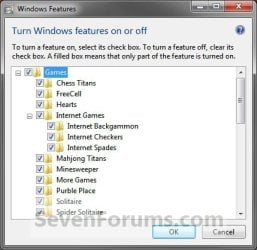
Windows_Features.jpg


EXAMPLE: Games explorer folder
NOTE: You can open the Games folder by clicking on the Games button on the dark right side of the Start Menu, typing shell:games in the Start Menu search box and pressing enter, or navigating to the hidden C:\ProgramData\Microsoft\Windows\Start Menu\Programs\Games folder.
Default_Games_Explorer.jpg

Here's How:
1. Press the Windows + R keys to open the Run dialog, type regedit.exe, and press Enter.

2. If prompted by UAC, then click/tap on Yes (Windows 7/8) or Continue (Vista).

3. Under the Games Registry Key
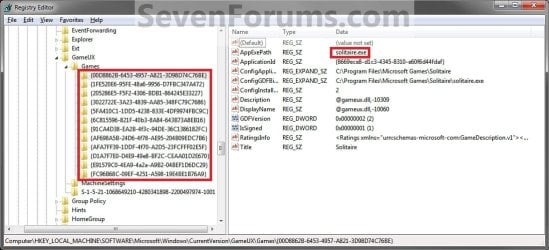
A) In regedit, navigate to the location below: (see screenshot below)
HKEY_LOCAL_MACHINE\SOFTWARE\Microsoft\Windows\CurrentVersion\GameUX\Games
Reg1.jpg
B) In the left pane under the Games key, select each long number subkey and look in the right pane for the AppExePath name data to see if that is the name of the game (ex: Solitaire) you want to delete. (see screenshot above)
   Warning
You should create a backup of this long number subkey to be able to restore it later if you ever wanted to. Once you delete it in step 3C below it will be permanently gone.


To create a backup:
  • In the left pane, right click on the long number subkey for the correct game name and click on Export.
  • Name the .reg file backup something to make it easy to remember what this is for.
  • Save the .reg file somewhere safe to have it later if needed.
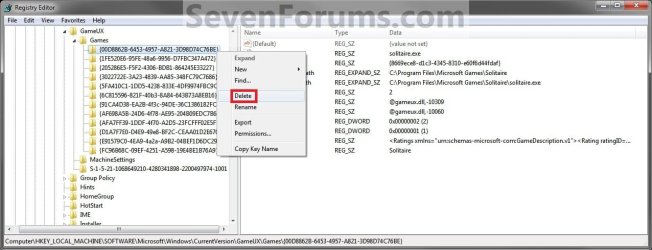
C) In the left pane, right click on the long number subkey for the correct game name and click on Delete. (See screenshot below)
Reg2.jpg
D) Click on Yes to confirm. (See screenshot below)
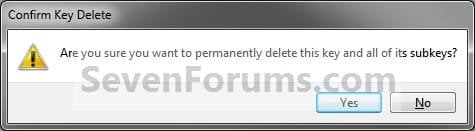
Confirm.jpg
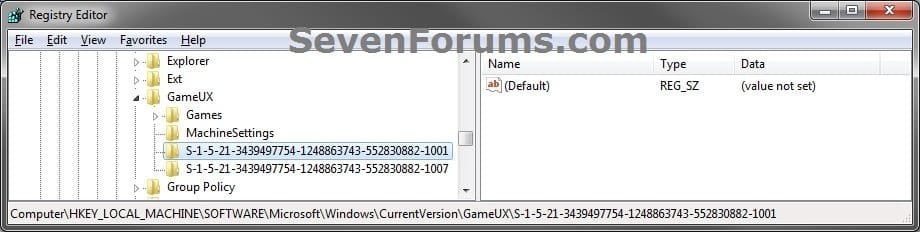
4. Under the S-1-5-21.... SID Registry Keys
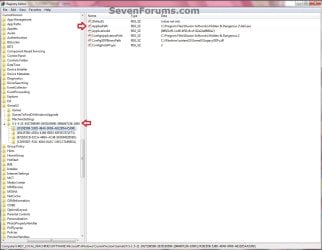
A) In regedit, go to the location below: (see screenshots below)
NOTE: Each S-1-5-21 key listed is a user account.

Code:
HKEY_LOCAL_MACHINE\SOFTWARE\Microsoft\Windows\CurrentVersion\GameUX\[B][COLOR=red](long S-1-5-21-#####...)[/COLOR][/B]
GameUX.jpg

GameUX2.jpg
B) In the left pane under each listed S-1-5-21 key, select each long number subkey and look in the right pane for the AppExePath name data to see if that is the name of the game (ex: Hidden & Dangerous 2) you want to delete. (see screenshot above)
   Warning
You should create a backup of this long number subkey to be able to restore it later if you ever wanted to. Once you delete it in step 4C below it will be permanently gone.


To create a backup:
  • In the left pane, right click on the long number subkey for the correct game name and click on Export.
  • Name the .reg file backup something to make it easy to remember what this is for.
  • Save the .reg file somewhere safe to have it later if needed.

C) In the left pane, right click on the long number subkey for the correct game name and click on Delete.

D) Click on Yes to confirm. (See screenshot below)
Confirm.jpg
5. Close regedit.

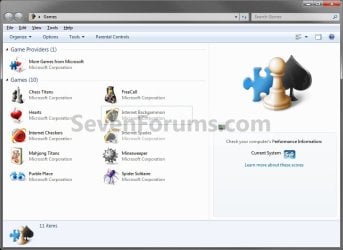
6. Close and reopen the Games explorer folder. The game (ex: Solitaire) has been deleted. (See screenshot below)
Removed.jpg
That's it,
Shawn


Last edited:
Another brilliant solution from SevenForums, worked perfectly! :cool:

Thanks.

P.S. The "games" i was trying to remove from the Games Explorer window were also Internet Shortcuts (IE) to an online game. I think that, although the system allows you to "Create a shortcut here" Internet shortcuts are incompatible with Games Explorer. They do not show the correct icon neither do they do anything - clicking on them does absolutely nothing. Windows should not let you copy them there, or should at least give you a warning message...

Thanks again,

Adam.

You're most welcome Adam, and welcome to Seven Forums. :)
 
Last edited:

My Computer

Computer type
PC/Desktop
Computer Manufacturer/Model Number
Self built custom
OS
64-bit Windows 11 Pro for Workstations
CPU
Intel i7-8700K OC'd to 5 GHz
Motherboard
ASUS ROG Maximus XI Formula Z390
Memory
64 GB (4x16GB) G.SKILL TridentZ RGB DDR4 3600 MHz
Graphics Card(s)
ASUS ROG-STRIX-GTX1080TI-O11G-GAMING
Sound Card
Integrated
Monitor(s) Displays
2 x Samsung Odyssey G7 27"
Screen Resolution
2560x1440
Hard Drives
1TB Samsung 990 PRO M.2,
4TB Samsung 990 PRO PRO M.2,
TerraMaster F8 SSD Plus NAS
PSU
Seasonic Prime Titanium 850W
Case
Thermaltake Core P3
Cooling
Corsair Hydro H115i
Keyboard
Logitech wireless K800
Mouse
Logitech MX Master 4
Internet Speed
2 Gb/s Download and 100 Mb/s Upload
Antivirus
Malwarebyte Anti-Malware Premium
Browser
Google Chrome
Other Info
Logitech Z625 speaker system,
Logitech BRIO 4K Pro webcam,
HP Color LaserJet Pro MFP M477fdn,
APC SMART-UPS RT 1000 XL - SURT1000XLI,
Galaxy S23 Plus phone
Thanks Brink.

I had found a number of good solutions and advice on Seven Forums so I just wanted to join to say so.

I regularly google for help on forums recently but have never been tempted to join, until now. (Mainly due to the experts like you rather than just the opinions of "stupid street" and not too technical like the MS Tech forums.)

Very user friendly :-)

Anyway....,

Thanks again.
 

My Computer

Computer Manufacturer/Model Number
Samsung RF712
OS
Windows 7 Ultimate 64-bit SP1
CPU
Intel Core i7-2630QM @ 2.0Ghz (Auto-overclocks to 2.9Ghz)
Motherboard
Intel Sandy Bridge/HM65 based Samsung Electronics Co., Ltd.
Memory
6GB of PC3-10700 (667 Mhz) DDR3 (1:5 9, 9, 9, 24, 34, 1T)
Graphics Card(s)
ATI (AMD) Radeon HD 6650M, 2GB, 600/900 Mhz, PCI-E 2.0x16
Sound Card
Realtek High Definition Audio / AMD High Definition Audio
Monitor(s) Displays
17.3" 3D 1080p Full HD SuperBright Plus LED (400nit)
Screen Resolution
1920x1080
Hard Drives
Hitachi HTS725050A9A 500 GB
External Seagate FreeAgent Go 320 GB
PSU
External Chicony Power Technology Co, Ltd. - 19V 4.74A
Case
Aluminium Laptop
Cooling
Two cooling-fans and two extractor vents (CPU and GPU)
Keyboard
Backlit, full
Mouse
Pinch & Zoom Touchpad and a Bluetooth Laser Mouse (1600cpi)
Internet Speed
20Mb Down, 2.4Mb up
finally found a thread that is just what I needed :cool:
I've been trying to delete the junk in that folder for a while but nothing worked until now,

Thank you
 

My Computer

OS
Windows 7 Home Premium 62bit
CPU
Intel Core i7 2600k 3.4GHz Quad Core
Motherboard
ASUS P8P67 Pro Rev3.1 ATX P67 LGA1155 DDR3
Memory
8GB 2x4GB DDR3 1600 Dual Channel
Graphics Card(s)
1x GTX 460 1GB
Sound Card
with mother board
Monitor(s) Displays
HP 25" Monitor
Hard Drives
WD Caviar Black 1TB SATA3 6GB/S 7200RPM 64MB Cache
PSU
650W Cooler Master Silent Pro 80+
Case
Cooler Master HAF-X EATX Tower Case Black
Cooling
regular fans
You're most welcome TDSM, and welcome to Seven Forums. :)
 

My Computer

Computer type
PC/Desktop
Computer Manufacturer/Model Number
Self built custom
OS
64-bit Windows 11 Pro for Workstations
CPU
Intel i7-8700K OC'd to 5 GHz
Motherboard
ASUS ROG Maximus XI Formula Z390
Memory
64 GB (4x16GB) G.SKILL TridentZ RGB DDR4 3600 MHz
Graphics Card(s)
ASUS ROG-STRIX-GTX1080TI-O11G-GAMING
Sound Card
Integrated
Monitor(s) Displays
2 x Samsung Odyssey G7 27"
Screen Resolution
2560x1440
Hard Drives
1TB Samsung 990 PRO M.2,
4TB Samsung 990 PRO PRO M.2,
TerraMaster F8 SSD Plus NAS
PSU
Seasonic Prime Titanium 850W
Case
Thermaltake Core P3
Cooling
Corsair Hydro H115i
Keyboard
Logitech wireless K800
Mouse
Logitech MX Master 4
Internet Speed
2 Gb/s Download and 100 Mb/s Upload
Antivirus
Malwarebyte Anti-Malware Premium
Browser
Google Chrome
Other Info
Logitech Z625 speaker system,
Logitech BRIO 4K Pro webcam,
HP Color LaserJet Pro MFP M477fdn,
APC SMART-UPS RT 1000 XL - SURT1000XLI,
Galaxy S23 Plus phone
THANK YOU so very much!

I had been so frustrated about not being able to delete 3 pseudo shorcuts to the game Civilization V from the Games folder. The "shorcut" was actually a URL. I have tried 3 times to make a shorcut for my game there but without success. I ended up with 3 unclickable (left or right click) generic files with the correct name for the name but zero functionality. This all thanks to the program STEAM, which I believe to be sent from the proverbial Dark Side of the Force, to put it in Lucas terms. It appears one MUST go through their godforsaken program to access Civ V. Anyhow, that's another story.

I did a Google search about my problem and found this thread with the EXACT, and I really do mean EXACT, solution. THANK YOU SO MUCH. What a relief! Kudos to brilliant minds such as yours! With my deepest gratitude.

:):):)

Araaraart
June 2012
 
Last edited:

My Computer

Computer Manufacturer/Model Number
ASUS N61J LAPTOP
OS
Windows 7 Home Premium 64-bit
CPU
Intel Core i5-430M
Memory
4GB RAM
Sound Card
none
Cooling
none
You're most welcome Araaraart, and welcome to Seven Forums.
smile.gif
 

My Computer

Computer type
PC/Desktop
Computer Manufacturer/Model Number
Self built custom
OS
64-bit Windows 11 Pro for Workstations
CPU
Intel i7-8700K OC'd to 5 GHz
Motherboard
ASUS ROG Maximus XI Formula Z390
Memory
64 GB (4x16GB) G.SKILL TridentZ RGB DDR4 3600 MHz
Graphics Card(s)
ASUS ROG-STRIX-GTX1080TI-O11G-GAMING
Sound Card
Integrated
Monitor(s) Displays
2 x Samsung Odyssey G7 27"
Screen Resolution
2560x1440
Hard Drives
1TB Samsung 990 PRO M.2,
4TB Samsung 990 PRO PRO M.2,
TerraMaster F8 SSD Plus NAS
PSU
Seasonic Prime Titanium 850W
Case
Thermaltake Core P3
Cooling
Corsair Hydro H115i
Keyboard
Logitech wireless K800
Mouse
Logitech MX Master 4
Internet Speed
2 Gb/s Download and 100 Mb/s Upload
Antivirus
Malwarebyte Anti-Malware Premium
Browser
Google Chrome
Other Info
Logitech Z625 speaker system,
Logitech BRIO 4K Pro webcam,
HP Color LaserJet Pro MFP M477fdn,
APC SMART-UPS RT 1000 XL - SURT1000XLI,
Galaxy S23 Plus phone
How about this one? This one has no name with generic icon. Can't click anything on it. Frustrated @@
 

My Computer

OS
Windows 7 Ultimate 32 Bit
Hello Rick, and welcome to Seven Forums.

While doing the tutorial, do you have a AppExePath registry entry without a name of a program for it's data?
 

My Computer

Computer type
PC/Desktop
Computer Manufacturer/Model Number
Self built custom
OS
64-bit Windows 11 Pro for Workstations
CPU
Intel i7-8700K OC'd to 5 GHz
Motherboard
ASUS ROG Maximus XI Formula Z390
Memory
64 GB (4x16GB) G.SKILL TridentZ RGB DDR4 3600 MHz
Graphics Card(s)
ASUS ROG-STRIX-GTX1080TI-O11G-GAMING
Sound Card
Integrated
Monitor(s) Displays
2 x Samsung Odyssey G7 27"
Screen Resolution
2560x1440
Hard Drives
1TB Samsung 990 PRO M.2,
4TB Samsung 990 PRO PRO M.2,
TerraMaster F8 SSD Plus NAS
PSU
Seasonic Prime Titanium 850W
Case
Thermaltake Core P3
Cooling
Corsair Hydro H115i
Keyboard
Logitech wireless K800
Mouse
Logitech MX Master 4
Internet Speed
2 Gb/s Download and 100 Mb/s Upload
Antivirus
Malwarebyte Anti-Malware Premium
Browser
Google Chrome
Other Info
Logitech Z625 speaker system,
Logitech BRIO 4K Pro webcam,
HP Color LaserJet Pro MFP M477fdn,
APC SMART-UPS RT 1000 XL - SURT1000XLI,
Galaxy S23 Plus phone
Yeah! The regedit trick worked for me.
Thanks
 

My Computer

OS
Win 7 Ultimate
CPU
Core i5 650
Motherboard
Asus P7P55D Pro
Memory
4Mb
Graphics Card(s)
radeon 5600
Monitor(s) Displays
24" ASUS Digital
Hard Drives
WD 1Tb WD 350Gb
PSU
550W
Internet Speed
8Mb ADSL1
thank you for this!
i'm using windows 8.1 and uninstalled all the wildtangent games
and found all their links to their websites were still in the games folder
and on the apps screen too with no way to get rid of them...

i deleted the entire GameUX key and rebooted
and the entire games folder was gone! :)
solved everything...
 
Last edited:

My Computer

Computer type
Laptop
Computer Manufacturer/Model Number
hp
OS
windows 8.1 64
This it's something I was looking for everytime I do clean restore, Now am ready to do it like a real PRO, Thank to you.
Got Corona?
 

My Computer

Computer type
Laptop
Computer Manufacturer/Model Number
Azure Blade 15.6
OS
Windows 10 Pro Version 22H2 64-bit Edition
CPU
Intel(R) Core(TM) i7-10875H CPU @ 2.30GHz 2.30 GHz
Memory
2.0 GB (31.8 GB usable)
Monitor(s) Displays
4K UHD OLED TOUCH
Screen Resolution
3840 x 2160
Hard Drives
1 TB
Mouse
Logitech MX Master 3S
Antivirus
Windows Security
Browser
Google Chrome
Other Info
______________________________________________


______________________________________________
A Corona sounds good.

:thumbsup:
 

My Computer

Computer type
PC/Desktop
Computer Manufacturer/Model Number
Self built custom
OS
64-bit Windows 11 Pro for Workstations
CPU
Intel i7-8700K OC'd to 5 GHz
Motherboard
ASUS ROG Maximus XI Formula Z390
Memory
64 GB (4x16GB) G.SKILL TridentZ RGB DDR4 3600 MHz
Graphics Card(s)
ASUS ROG-STRIX-GTX1080TI-O11G-GAMING
Sound Card
Integrated
Monitor(s) Displays
2 x Samsung Odyssey G7 27"
Screen Resolution
2560x1440
Hard Drives
1TB Samsung 990 PRO M.2,
4TB Samsung 990 PRO PRO M.2,
TerraMaster F8 SSD Plus NAS
PSU
Seasonic Prime Titanium 850W
Case
Thermaltake Core P3
Cooling
Corsair Hydro H115i
Keyboard
Logitech wireless K800
Mouse
Logitech MX Master 4
Internet Speed
2 Gb/s Download and 100 Mb/s Upload
Antivirus
Malwarebyte Anti-Malware Premium
Browser
Google Chrome
Other Info
Logitech Z625 speaker system,
Logitech BRIO 4K Pro webcam,
HP Color LaserJet Pro MFP M477fdn,
APC SMART-UPS RT 1000 XL - SURT1000XLI,
Galaxy S23 Plus phone
Yay!:cool:
 

My Computer

Computer type
Laptop
Computer Manufacturer/Model Number
Azure Blade 15.6
OS
Windows 10 Pro Version 22H2 64-bit Edition
CPU
Intel(R) Core(TM) i7-10875H CPU @ 2.30GHz 2.30 GHz
Memory
2.0 GB (31.8 GB usable)
Monitor(s) Displays
4K UHD OLED TOUCH
Screen Resolution
3840 x 2160
Hard Drives
1 TB
Mouse
Logitech MX Master 3S
Antivirus
Windows Security
Browser
Google Chrome
Other Info
______________________________________________


______________________________________________
OMG!!!! I have been looking all over the internet for a way to remove 2 dead icons from my games menu and found it here with easy, step by step instructions. It's almost embarrassing that I can build a rig from the case up but not handle something as simple as this was. This is the first help forum I felt compelled to actually join. THANKS BRINK!!!!! :D
 
Last edited:

My Computer

Computer type
PC/Desktop
Computer Manufacturer/Model Number
Custom build
OS
Windows 7 Pro 64 Bit
CPU
Intel Core2 Quad @ 2.66Ghz
Motherboard
Gigabyte EP45-UD3P
Memory
4G
Graphics Card(s)
NVIDIA GeForce GTX 550 Ti
Hard Drives
Hitachi HDS7 1Tb
Sansung SP25 500G
Antivirus
Trend
Browser
FireFox
Welcome to Seven Forums Posidius. I'm glad this was able to help. :)
 

My Computer

Computer type
PC/Desktop
Computer Manufacturer/Model Number
Self built custom
OS
64-bit Windows 11 Pro for Workstations
CPU
Intel i7-8700K OC'd to 5 GHz
Motherboard
ASUS ROG Maximus XI Formula Z390
Memory
64 GB (4x16GB) G.SKILL TridentZ RGB DDR4 3600 MHz
Graphics Card(s)
ASUS ROG-STRIX-GTX1080TI-O11G-GAMING
Sound Card
Integrated
Monitor(s) Displays
2 x Samsung Odyssey G7 27"
Screen Resolution
2560x1440
Hard Drives
1TB Samsung 990 PRO M.2,
4TB Samsung 990 PRO PRO M.2,
TerraMaster F8 SSD Plus NAS
PSU
Seasonic Prime Titanium 850W
Case
Thermaltake Core P3
Cooling
Corsair Hydro H115i
Keyboard
Logitech wireless K800
Mouse
Logitech MX Master 4
Internet Speed
2 Gb/s Download and 100 Mb/s Upload
Antivirus
Malwarebyte Anti-Malware Premium
Browser
Google Chrome
Other Info
Logitech Z625 speaker system,
Logitech BRIO 4K Pro webcam,
HP Color LaserJet Pro MFP M477fdn,
APC SMART-UPS RT 1000 XL - SURT1000XLI,
Galaxy S23 Plus phone
Back
Top