Solved Garry's Mod: Memory error

clubmimo123

New member
Local time
5:43 PM
Messages
46
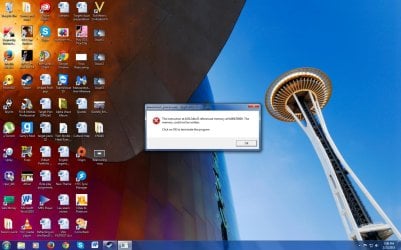
Hi so i purchased Garry's Mod and i managed to play 1 or 2 servers with ease. But now its always crashing and usually giving me this error (Look at image)

Another strange issue is that my computer always says that its low on memory even though i have 4 GB of memory and GMod requires just 2 GB of memory. I need help! Is one of my RAM memory stick's burnt out? Not sure what the issue is.
 

Attachments
  • Untitled.jpg
    Untitled.jpg
    171 KB · Views: 8

My Computer

Computer type
PC/Desktop
Computer Manufacturer/Model Number
custom build
OS
Windows 7 Ultimate 64-bit 7601 Multiprocessor Free Service Pack 1
CPU
Intel(R) Core(TM)2 Duo CPU E6550 @ 2.33GHz
Motherboard
ASUSTeK Computer INC. P5K
Memory
4 GB RAM
Graphics Card(s)
HD Raedon 5700
Sound Card
AMD High Definition Audio Device
Monitor(s) Displays
HP w2207 Wide LCD Monitor
Screen Resolution
1680x1050
Hard Drives
1. Hitachi HDE721064SLA360 ATA Device
2. ST3250620AS ATA Device
Antivirus
Kaspersky Anti-virus
Browser
Google Chrome
Have you got any/many addons installed, and what Source games do you have (garry's mod pulls resources from other source games on your account). Also, could you upload/post the contents of awesomium.log (located in C:\Program Files (x86)\Steam\steamapps\common\GarrysMod\bin).
 
Last edited by a moderator:

My Computer

Computer type
PC/Desktop
Computer Manufacturer/Model Number
Custom Build
OS
Windows 7 Ultimate x64
CPU
Intel Core i7-4771 @3.50GHz
Motherboard
Asus B85-Plus
Memory
Avexir Core Blue Series 8GB (2x4GB)
Graphics Card(s)
GTX 760 OC 4GB
Screen Resolution
1920x1080
Hard Drives
Seagate Barracuda 1TB
Keyboard
Corsair K70 RGB
Mouse
Razer DeathAdder 2014 (Chroma)
Antivirus
Microsoft Security Essentials
Browser
Google Chrome
Have you got any/many addons installed, and what Source games do you have (garry's mod pulls resources from other source games on your account). Also, could you upload/post the contents of awesomium.log (located in C:\Program Files (x86)\Steam\steamapps\common\GarrysMod\bin).

To be honest, i do not own any other source games, however i have directly installed game files from various source games like from CSS, Half-life 2, Half-life 2: Episode 2, Portal etc...

What i found from the awesomium.log (i believe) is the following:
[0222/193135:INFO:(0)] WebCore is now online.
[0222/193135:INFO:(0)] Running Awesomium 1.7.2
 

My Computer

Computer type
PC/Desktop
Computer Manufacturer/Model Number
custom build
OS
Windows 7 Ultimate 64-bit 7601 Multiprocessor Free Service Pack 1
CPU
Intel(R) Core(TM)2 Duo CPU E6550 @ 2.33GHz
Motherboard
ASUSTeK Computer INC. P5K
Memory
4 GB RAM
Graphics Card(s)
HD Raedon 5700
Sound Card
AMD High Definition Audio Device
Monitor(s) Displays
HP w2207 Wide LCD Monitor
Screen Resolution
1680x1050
Hard Drives
1. Hitachi HDE721064SLA360 ATA Device
2. ST3250620AS ATA Device
Antivirus
Kaspersky Anti-virus
Browser
Google Chrome
That log file doesn't prove to be very helpful, but thanks for posting it. I've never had an issue with awesomium before, in fact, I didn't know it even existed before today. You said you've managed to play before, so that makes me think maybe the files are corrupted.

You can try deleting them (Awesomium.dll, awesomium_process.exe and the folder Awesomium.framework) and replacing them with mine, or you can try re-downloading them from steam directly.

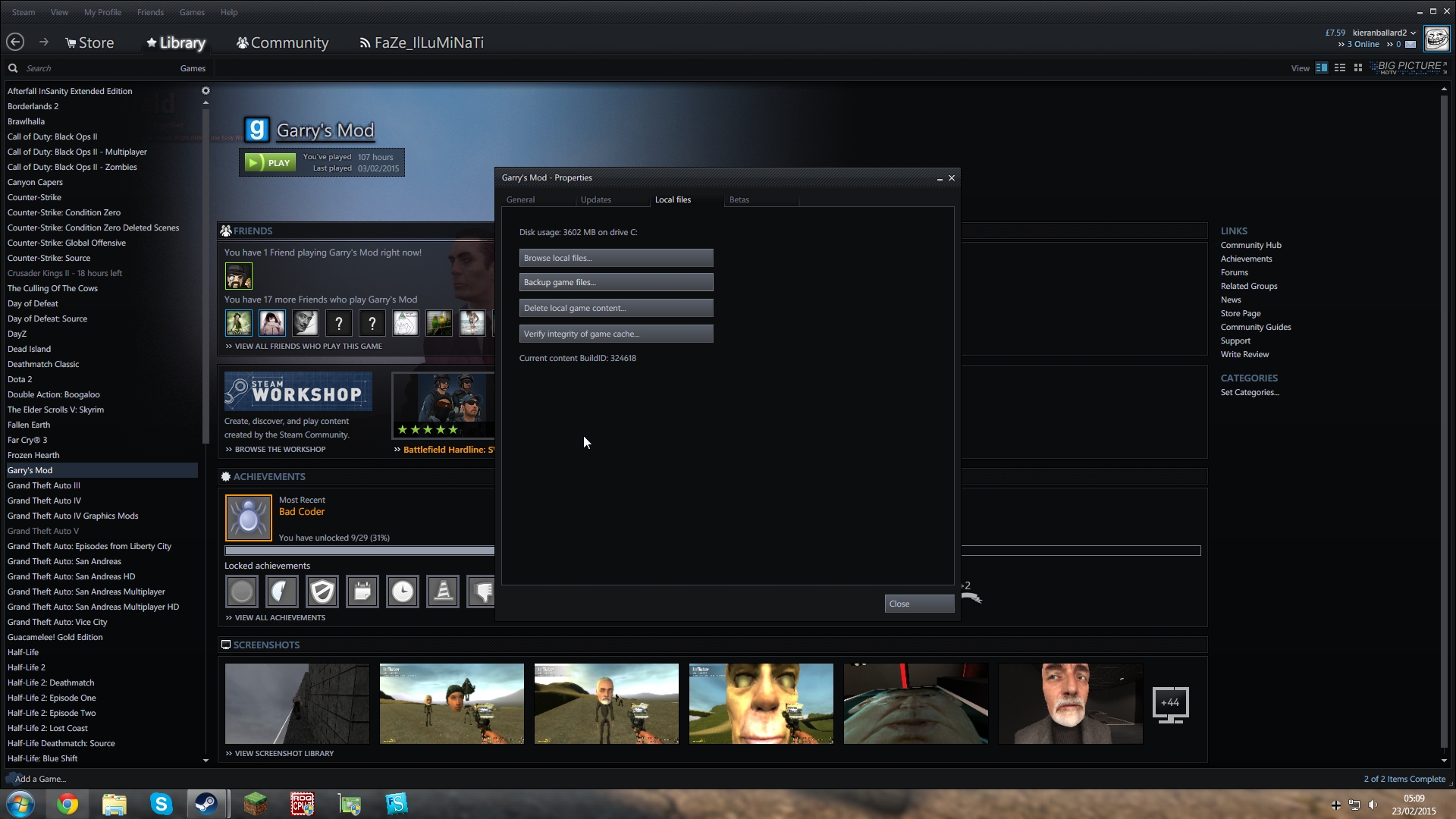
To replace them with the steam ones, just delete the ones you have and then go on steam, right click Garry's Mod, choose properties, click the local files tab, and then press "Verify integrity of game cache". This should check for missing files and will re-download them, but it doesn't always work.

Here's a screenshot of the button you have to press, just in case its hard to understand from my description
QIby6ep.jpg
 
Last edited by a moderator:

My Computer

Computer type
PC/Desktop
Computer Manufacturer/Model Number
Custom Build
OS
Windows 7 Ultimate x64
CPU
Intel Core i7-4771 @3.50GHz
Motherboard
Asus B85-Plus
Memory
Avexir Core Blue Series 8GB (2x4GB)
Graphics Card(s)
GTX 760 OC 4GB
Screen Resolution
1920x1080
Hard Drives
Seagate Barracuda 1TB
Keyboard
Corsair K70 RGB
Mouse
Razer DeathAdder 2014 (Chroma)
Antivirus
Microsoft Security Essentials
Browser
Google Chrome
Alright so it shows "All files validated" or something like that.

For now, i will see if the game is operating without the error. So please give me roughly a week and then i will mark it solved.

Thanks for the help!
 

My Computer

Computer type
PC/Desktop
Computer Manufacturer/Model Number
custom build
OS
Windows 7 Ultimate 64-bit 7601 Multiprocessor Free Service Pack 1
CPU
Intel(R) Core(TM)2 Duo CPU E6550 @ 2.33GHz
Motherboard
ASUSTeK Computer INC. P5K
Memory
4 GB RAM
Graphics Card(s)
HD Raedon 5700
Sound Card
AMD High Definition Audio Device
Monitor(s) Displays
HP w2207 Wide LCD Monitor
Screen Resolution
1680x1050
Hard Drives
1. Hitachi HDE721064SLA360 ATA Device
2. ST3250620AS ATA Device
Antivirus
Kaspersky Anti-virus
Browser
Google Chrome
Okay, no problem :D
 
Last edited by a moderator:

My Computer

Computer type
PC/Desktop
Computer Manufacturer/Model Number
Custom Build
OS
Windows 7 Ultimate x64
CPU
Intel Core i7-4771 @3.50GHz
Motherboard
Asus B85-Plus
Memory
Avexir Core Blue Series 8GB (2x4GB)
Graphics Card(s)
GTX 760 OC 4GB
Screen Resolution
1920x1080
Hard Drives
Seagate Barracuda 1TB
Keyboard
Corsair K70 RGB
Mouse
Razer DeathAdder 2014 (Chroma)
Antivirus
Microsoft Security Essentials
Browser
Google Chrome
Okay, no problem :D

Alright so there is another issue :(. When Garry's Mod is downloading the content for a server, a box would appear indicating that a lot of the computer's memory is being used. Then usually it would crash either without notice or with notice.

I do not understand whats taking up a lot of my memory or if its the fact that one of my RAM sticks has blown out even though the computer is not detecting it.

Should i post the issue in a separate forum or keep it to this one?
 

My Computer

Computer type
PC/Desktop
Computer Manufacturer/Model Number
custom build
OS
Windows 7 Ultimate 64-bit 7601 Multiprocessor Free Service Pack 1
CPU
Intel(R) Core(TM)2 Duo CPU E6550 @ 2.33GHz
Motherboard
ASUSTeK Computer INC. P5K
Memory
4 GB RAM
Graphics Card(s)
HD Raedon 5700
Sound Card
AMD High Definition Audio Device
Monitor(s) Displays
HP w2207 Wide LCD Monitor
Screen Resolution
1680x1050
Hard Drives
1. Hitachi HDE721064SLA360 ATA Device
2. ST3250620AS ATA Device
Antivirus
Kaspersky Anti-virus
Browser
Google Chrome
I guess as it's a different issue, you would have to start a new thread.

As a reply to your problem, you can check the amount of ram windows is detecting by clicking Start, right-clicking Computer, and then clicking Properties, it will say "Installed memory (RAM):" and then the amount that windows is detecting.

Garry's mod (and other games) sometimes stops responding while downloading custom content from a server, and when the game gets minimized it can crash (I'm assuming windows is making the box pop up, rather than Garry's mod), this may be the reason. To solve this, try running Garry's Mod with -windowed -noborder in the launch options, like I have. This will stop the game from fully minimizing, and will make it continue running in the background, hopefully this will prevent the crash.
NjmKRVe.jpg
 
Last edited by a moderator:

My Computer

Computer type
PC/Desktop
Computer Manufacturer/Model Number
Custom Build
OS
Windows 7 Ultimate x64
CPU
Intel Core i7-4771 @3.50GHz
Motherboard
Asus B85-Plus
Memory
Avexir Core Blue Series 8GB (2x4GB)
Graphics Card(s)
GTX 760 OC 4GB
Screen Resolution
1920x1080
Hard Drives
Seagate Barracuda 1TB
Keyboard
Corsair K70 RGB
Mouse
Razer DeathAdder 2014 (Chroma)
Antivirus
Microsoft Security Essentials
Browser
Google Chrome
I guess as it's a different issue, you would have to start a new thread.

As a reply to your problem, you can check the amount of ram windows is detecting by clicking Start, right-clicking Computer, and then clicking Properties, it will say "Installed memory (RAM):" and then the amount that windows is detecting.

Garry's mod (and other games) sometimes stops responding while downloading custom content from a server, and when the game gets minimized it can crash (I'm assuming windows is making the box pop up, rather than Garry's mod), this may be the reason. To solve this, try running Garry's Mod with -windowed -noborder in the launch options, like I have. This will stop the game from fully minimizing, and will make it continue running in the background, hopefully this will prevent the crash.
NjmKRVe.jpg

Thanks, will mark this as solved as the problem with garry's mod has been resolved.
 

My Computer

Computer type
PC/Desktop
Computer Manufacturer/Model Number
custom build
OS
Windows 7 Ultimate 64-bit 7601 Multiprocessor Free Service Pack 1
CPU
Intel(R) Core(TM)2 Duo CPU E6550 @ 2.33GHz
Motherboard
ASUSTeK Computer INC. P5K
Memory
4 GB RAM
Graphics Card(s)
HD Raedon 5700
Sound Card
AMD High Definition Audio Device
Monitor(s) Displays
HP w2207 Wide LCD Monitor
Screen Resolution
1680x1050
Hard Drives
1. Hitachi HDE721064SLA360 ATA Device
2. ST3250620AS ATA Device
Antivirus
Kaspersky Anti-virus
Browser
Google Chrome
If it's a RAM stick gone bad, oh you will know it, and it won't just be a game crashing.

Awesomium seems poorly named, I have heard of that being an issue causer before.

I usually start looking into the application for resolves way before the OS and hardware, this internet, people like to share their problems.

muhahaha!
 

My Computer

Computer type
PC/Desktop
Computer Manufacturer/Model Number
Self Built Custom
OS
Windows 7 Ultimate Retail Box (64-bit installed) + Service Pack 1
CPU
AMD FX-8350 CPU v1.15 (or 1.0F) BIOS was required!
Motherboard
MSI 890FXA-GD70
Memory
8G CAS-7 G-Skill DDR3 @1333 (2 fours) [mobo nonOC max rec'd]
Graphics Card(s)
Radeon HD 7950 [3 gigs of GDDR5] MSI Twin Frozr model
Sound Card
Realtek High Definition Audio (onboard mobo, ALC-889 chip)
Monitor(s) Displays
2 WS LED Monitors: One LG One Viewsonic
Screen Resolution
1920 by 1080
Hard Drives
SSD for OS: Samsung 840 Pro
SSD for VM and utilities: Adata SX900
7200 RPM SATA HDs for the rest: Hitachi and Seagate
PSU
Corsair TX850 - 850W max, in service since August 2010.
Case
Thermaltake Armor A90
Cooling
Thermaltake Spin Q CPU Cooler, in service since August 2010
Keyboard
Logitech G11
Mouse
Logitech M310 Wireless
Internet Speed
100 Megabit broadband supposedly upgraded from 50 (Cable)
Antivirus
Bitdefender Internet Security 2014 suite
Browser
Pale Moon 64-bit main, also IceDragon, Opera, and Maxthon.
Other Info
CompTIA A+ certified (220-800 series) in July 2013.
Back
Top