Solved get rid of vista, reclaim partition

crodgers

New member
Local time
5:20 AM
Messages
17
Location
Sunny Florida
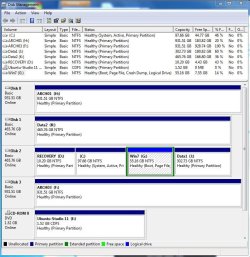
Hi! I have a Gateway PC that came with Vista installed on the C drive. The D drive (same disk different partition) contains the Recovery area from Gateway. I bought Win 7 Pro and installed into a new partition of the same drive (G drive). The rest of the disk was partitioned as a data volume (drive J).

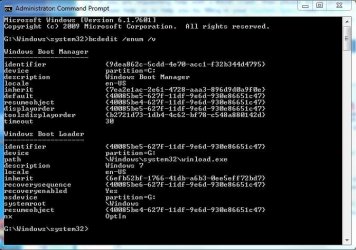
While I was moving from Vista to Win 7, I was using the dual boot feature from the Win 7 install. I have since deleted the Vista option in msconfig under the boot tab. (maybe that was not the first step I should have taken?)

So, now I want to get rid of Vista and maximize the use of the drive. What is the best way to get rid of the extra OS partition without reinstalling Win 7? Can I format C and run a Win 7 repair to recreate the MBR on G?

Is the Recovery volume that was delivered with Vista of any use? should I recover the space or would Win 7 take advantage of it?

Ultimately, I only want Windows 7 on here and the existing data partition on here. Can I combine the dead space(s) once vista is completely removed?

In the end, I want to make room on this disk to install (dual boot) Ubuntu Studio 64 bit. Would it be better to dualboot win 7 and ubuntu from ubuntu's dual boot process? Or Win 7's dual boot process (or is that not possible)?

Thanks!
 

Attachments
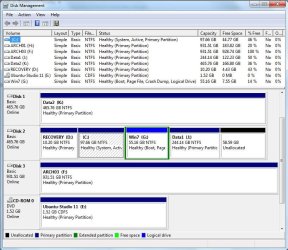
  • Disks.JPG
    Disks.JPG
    102.7 KB · Views: 27
  • bcdedit.JPG
    bcdedit.JPG
    56.8 KB · Views: 11

My Computer My Computer

At a glance

win 7 pro 32intel quad core
Computer Manufacturer/Model Number
gateway
OS
win 7 pro 32
CPU
intel quad core
I went ahead and added the unallocated space to the data volume.

I was reading another tutorial regarding changing the "active" partition from Win vista to Win 7. Looks similar to my setup - vista and 7 on the same drive, two different partitions, the vista partition having system and active attributes. If I right-click the Win 7 partition, I do not have the option to Mark as active. Not that it is greyed out (like when I right -click the vista partition that is already the active volume), but the option is not listed in the right-click menu...
 

Attachments

  • DisksV2.JPG
    DisksV2.JPG
    111.7 KB · Views: 19

My Computer My Computer

At a glance

win 7 pro 32intel quad core
Computer Manufacturer/Model Number
gateway
OS
win 7 pro 32
CPU
intel quad core
BTW, I am comfortable with running command line instructions.
 

My Computer My Computer

At a glance

win 7 pro 32intel quad core
Computer Manufacturer/Model Number
gateway
OS
win 7 pro 32
CPU
intel quad core
Hello crodgers, welcome to Seven Forums!


Geez mate do you have a mess.


The Windows "System" boot files will not function from the Extended partition / Logical drive that Windows 7 is no.

You are correct about having to (re)create the boot files to another location, also the fact that there can be no more than 4 partitions on a single HDD using the MBR system makes this more difficult.

The easiest way would be, so you don't have to disconnect any HDDs so this will work, is to create a Windows "System Reserved" partition to the first position on the HDD that is Disk 0 and make that the "System Active" partition.

Have a look at Option Three of this first tutorial linked below to see how to shrink the left side of the first partition on Disk 0 to create the unallocated space needed to create the partition, it only needs to be about 200MB to work.
Once you have unallocated space use Windows disk management to create the partition and mark it Active (do not give it a drive letter) then run the 3 separate startup repairs to (re)create the "System" boot files to the new "System Reserved" then you will be able to easily remove the Vista partition.
I'm sure you will get all sorts of suggestions here but I think this would be the easiest but you know what's said about opinions; ;) and be sure to post back with any further questions you may have and to keep us informed.
 

My Computer My Computer

At a glance

W 7 64-bit UltimateIntel Q9550 Yorkfield8GB Dominator 8500C5DATI : XFX 5870
Computer Manufacturer/Model Number
* BFK Customs *
OS
W 7 64-bit Ultimate
CPU
Intel Q9550 Yorkfield
Motherboard
ASUS P5Q Pro
Memory
8GB Dominator 8500C5D
Graphics Card(s)
ATI : XFX 5870
Sound Card
Realtek HD Audio 7-1
Monitor(s) Displays
1x 47" LCD HDMI & 3x 26" LCD HDMI
Screen Resolution
1920x1080P & 1920x1200
Hard Drives
1x 80GB Intel X25-M G2 SSD : 1x 500GB & 1x 640GB WD Caviar Black(s)
PSU
Corsair 620HX
Case
Cooler Master RC-690
Cooling
Tuniq Tower 120, 2x 140mm and 3x 120mm case fans
Keyboard
Microsoft 500
Mouse
Razer Diamondback 3G
Internet Speed
14 Mb/s
Other Info
1x Koutech 3Gb/s SATA HDD Hot Swap Rack
OK, so I started reading that Partition Wizard link before you posted and managed to change G to Primary, then set it to active. That got me to missing the mbr. I had PW rebuild mbr, then let the Win 7 CD repair - ended up repairing twice (disconnected other drive cables). It recovered the dual boot of vista and win 7. I removed the Vista boot option in the system config window, boot tab.

So, now I am closer to where I need to be, I believe. looking at my configs, it looks like I have the MBR on G with Win 7.

Now I can format the C partition and expand G to the left, correct?
Is there any need to have J as a primary? Should I change that to a logical?
 

Attachments

  • DisksV3.JPG
    DisksV3.JPG
    76 KB · Views: 18
  • bcgeditV2.JPG
    bcgeditV2.JPG
    44.5 KB · Views: 8

My Computer My Computer

At a glance

win 7 pro 32intel quad core
Computer Manufacturer/Model Number
gateway
OS
win 7 pro 32
CPU
intel quad core
crodgers,
Format the C.
Use Partition Wizard to extend the G to the left (disk management doesn't extend to the left).

Leave the J as a primary partition.
 

My Computer My Computer

At a glance

MS Windows 7 Ultimate SP1 64-bitAMD A10-4600M6.00 GB Dual-Channel DDR3 @ 798MHz (11-11-12-28)AMD Radeon HD 7660G
Computer Manufacturer/Model Number
Toshiba Satellite S875D-S7239 laptop
OS
MS Windows 7 Ultimate SP1 64-bit
CPU
AMD A10-4600M
Motherboard
AMD Pumori (Socket FT1)
Memory
6.00 GB Dual-Channel DDR3 @ 798MHz (11-11-12-28)
Graphics Card(s)
AMD Radeon HD 7660G
Sound Card
High Definition Audio Device
Monitor(s) Displays
Generic PnP Monitor (1600x900@60Hz)
Screen Resolution
1600x900@60Hz
Hard Drives
SSD 119GB Corsair CSSD-V128GB2 ATA Device
Keyboard
Standard PS/2 Keyboard
Mouse
HP Wireless Optical Mobile Mouse Model FHA-3410
Internet Speed
What the local pub, local coffee shop offers.
Other Info
Optical Drive:MATSHITA BD-CMB UJ160B ATA Device


Also have an Asus ha1002xp netbook with Win 7 Ultimate installed.
You did well. Was Rebuild MBR sufficient or did you also have to run Repair(s)?

It's too bad you didn't originally boot the Win7 installer so it would have claimed C whenever booted as Win7 is designed. Because you ran the installer from Vista it tied up C so Win7 couldn't use it at all even after hasta la vista.
 
Well done, you are doing a good job.
 

My Computer My Computer

At a glance

ME/XP/Vista/Win7
OS
ME/XP/Vista/Win7
Well done mate, I was very tired last night, hence the long-winded reply.


You could use Partition Wizard to convert J: to an Extended partition, then there could be as many Logical drives within the Extended as there are available drive letters, have look at Method One #2 of this tutorial for some ideas.


My Computer My Computer

At a glance

W 7 64-bit UltimateIntel Q9550 Yorkfield8GB Dominator 8500C5DATI : XFX 5870
Computer Manufacturer/Model Number
* BFK Customs *
OS
W 7 64-bit Ultimate
CPU
Intel Q9550 Yorkfield
Motherboard
ASUS P5Q Pro
Memory
8GB Dominator 8500C5D
Graphics Card(s)
ATI : XFX 5870
Sound Card
Realtek HD Audio 7-1
Monitor(s) Displays
1x 47" LCD HDMI & 3x 26" LCD HDMI
Screen Resolution
1920x1080P & 1920x1200
Hard Drives
1x 80GB Intel X25-M G2 SSD : 1x 500GB & 1x 640GB WD Caviar Black(s)
PSU
Corsair 620HX
Case
Cooler Master RC-690
Cooling
Tuniq Tower 120, 2x 140mm and 3x 120mm case fans
Keyboard
Microsoft 500
Mouse
Razer Diamondback 3G
Internet Speed
14 Mb/s
Other Info
1x Koutech 3Gb/s SATA HDD Hot Swap Rack
Thanks for all the advice - and a big thanks to the tutorials. That Partition Wizard is pretty simple to use. I figured it was safest to use from a boot CD, so I burned the ISO and booted from it.

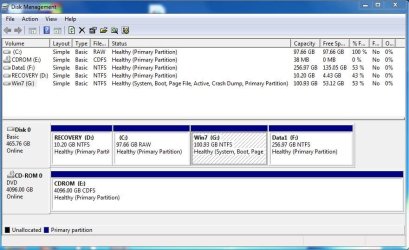
I used Partition Wizard to wipe the C drive (fell asleep at the keyboard, dragged my body to bed at 3:00 AM). I shrank the J drive from the left (that took a while for the files to be moved), and then extended the G to the right to make my Win 7 partition 100GB. That Partition Wizard is quite useful!

Now I think I am ready to install UbuntuStudio on the unformatted C partition.

BTW, rewriting the MBR did not fix my boot issue. Not sure if it really did anything. I tried to boot after that and got no boot. I used Win 7 dvd to start repair. Said it found things and repaired. Rebooted, still the same - no boot. Booted from Win 7 dvd again, started repair again, said it recovered things again. Rebooted again and this time it worked! I logged in and checked out a few things, everything seemed OK, rebooted (just to be sure) and everything is normal. So, 2 Start Repairs seemed to do it for me. Still not sure what affect the Partition Wizard's recreate MBR function had, if any.

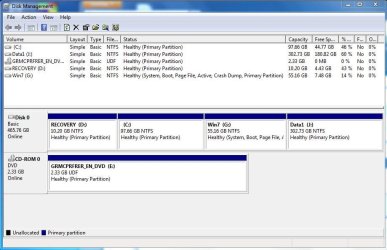
For those curious in the final disk screen, I have attached it. Thanks again to everyone for the help - this is a smart bunch of folks here! :geek::D

BTW, the bootloader section for Windows 7 now has the word (recovered) in the description. How can I change that? Or does it really matter?
 

Attachments

  • DiskFinal.JPG
    DiskFinal.JPG
    77 KB · Views: 11
  • bcdeditFinal.JPG
    bcdeditFinal.JPG
    41.2 KB · Views: 8

My Computer My Computer

At a glance

win 7 pro 32intel quad core
Computer Manufacturer/Model Number
gateway
OS
win 7 pro 32
CPU
intel quad core
Good to see you getting it sorted and thanks!


Have a look at this one to change the boot menu entry.


My Computer My Computer

At a glance

W 7 64-bit UltimateIntel Q9550 Yorkfield8GB Dominator 8500C5DATI : XFX 5870
Computer Manufacturer/Model Number
* BFK Customs *
OS
W 7 64-bit Ultimate
CPU
Intel Q9550 Yorkfield
Motherboard
ASUS P5Q Pro
Memory
8GB Dominator 8500C5D
Graphics Card(s)
ATI : XFX 5870
Sound Card
Realtek HD Audio 7-1
Monitor(s) Displays
1x 47" LCD HDMI & 3x 26" LCD HDMI
Screen Resolution
1920x1080P & 1920x1200
Hard Drives
1x 80GB Intel X25-M G2 SSD : 1x 500GB & 1x 640GB WD Caviar Black(s)
PSU
Corsair 620HX
Case
Cooler Master RC-690
Cooling
Tuniq Tower 120, 2x 140mm and 3x 120mm case fans
Keyboard
Microsoft 500
Mouse
Razer Diamondback 3G
Internet Speed
14 Mb/s
Other Info
1x Koutech 3Gb/s SATA HDD Hot Swap Rack
You did well. Was Rebuild MBR sufficient or did you also have to run Repair(s)?

It's too bad you didn't originally boot the Win7 installer so it would have claimed C whenever booted as Win7 is designed. Because you ran the installer from Vista it tied up C so Win7 couldn't use it at all even after hasta la vista.
I wanted to install Win 7 Pro 64 bit, but since I already had 32bit Vista, that meant a clean install - which was fine for me - but then I ran into the "I don't recognize the DVD drive)" - THAT IT IS RUNNING ON!!! i don't get that error. You are installing from the drive - how can you not let me install..... Anyway (this was last summer), I did not find a resolution for my drive at the time, so I was able to do a clean install of 32bit in a new partition. I did not understand the whole MBR until now (thanks to this site and you kind folks).
 
Last edited:

My Computer My Computer

At a glance

win 7 pro 32intel quad core
Computer Manufacturer/Model Number
gateway
OS
win 7 pro 32
CPU
intel quad core
Thanks, Bare Foot Kid! Easy Peasy Lemon Queezy!:D

Any suggestions before I install UbuntuStudio into C? Should I let Ubuntu do the boot managing (which makes half of this work all for not, but I am fine with that)? Or can I have UbuntuStudio use the Windows 7 boot manager? Is there an advantage either way? Should I ask this in a different forum?
 

My Computer My Computer

At a glance

win 7 pro 32intel quad core
Computer Manufacturer/Model Number
gateway
OS
win 7 pro 32
CPU
intel quad core
Hello mate.


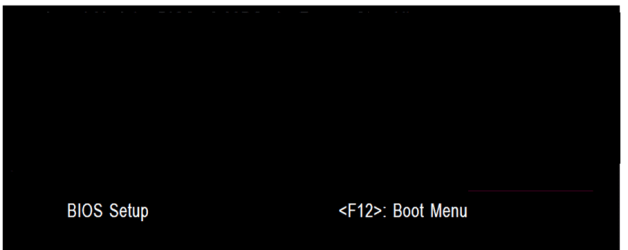
As you have several HDDs put Linux on a separate HDD from Windows and use the BIOS one-time boot menu specific to your motherboard so there will be no need for a Windows/Grub managed boot-loader at all.


  • Asus - F8
  • HP/Compaq - Esc
  • Sony - F2
  • Acer – F12
  • Gateway - F10
  • eMachnes - F10
  • Gigabyte – F12
  • Toshiba - F12
  • Dell - F12
  • IBM/Lenovo - the blue Thinkvantage button
 

My Computer My Computer

At a glance

W 7 64-bit UltimateIntel Q9550 Yorkfield8GB Dominator 8500C5DATI : XFX 5870
Computer Manufacturer/Model Number
* BFK Customs *
OS
W 7 64-bit Ultimate
CPU
Intel Q9550 Yorkfield
Motherboard
ASUS P5Q Pro
Memory
8GB Dominator 8500C5D
Graphics Card(s)
ATI : XFX 5870
Sound Card
Realtek HD Audio 7-1
Monitor(s) Displays
1x 47" LCD HDMI & 3x 26" LCD HDMI
Screen Resolution
1920x1080P & 1920x1200
Hard Drives
1x 80GB Intel X25-M G2 SSD : 1x 500GB & 1x 640GB WD Caviar Black(s)
PSU
Corsair 620HX
Case
Cooler Master RC-690
Cooling
Tuniq Tower 120, 2x 140mm and 3x 120mm case fans
Keyboard
Microsoft 500
Mouse
Razer Diamondback 3G
Internet Speed
14 Mb/s
Other Info
1x Koutech 3Gb/s SATA HDD Hot Swap Rack
Thanks for the suggestion. So, I have 2x1TB mirrored, 500GB with Win 7, 1TB empty (formatted for windows). I will add 1 more TB internal and 1TB external (swap off with an old 500GB external). So, internally, I will have two 1TB drives free. Do I need to do something to make one bootable prior to installing UbuntuStudio? Or do I just put in the new drive and UbuntuStudio install will take care of it?
 

My Computer My Computer

At a glance

win 7 pro 32intel quad core
Computer Manufacturer/Model Number
gateway
OS
win 7 pro 32
CPU
intel quad core
Hello mate.


As you have several HDDs put Linux on a separate HDD from Windows and use the BIOS one-time boot menu specific to your motherboard so there will be no need for a Windows/Grub managed boot-loader at all.


  • Asus - F8
  • HP/Compaq - Esc
  • Sony - F2
  • Acer – F12
  • Gateway - F10
  • eMachnes - F10
  • Gigabyte – F12
  • Toshiba - F12
  • Dell - F12
  • IBM/Lenovo - the blue Thinkvantage button

Use the BIOS boot menu.

GA BIOS2.PNG
 

My Computer My Computer

At a glance

ME/XP/Vista/Win7
OS
ME/XP/Vista/Win7
Back
Top