Getting your Nikon Coolscan to work on W7 x64

Sorry I didn't answer your question. It's a USB scanner.

I have double checked the process from page 1. I copied the NKScnUSD.dll file from the Nikon ScanUSB driver folder, although on my machine the file seems to be the same version in both the Scan1394 & the ScanUSB folders. Still the same result.

I downloaded and installed Vuescan just to see if it could recognise the scanner. It didn't, though it did recognise the scanner on my printer. Still not sure what's going on with the Nikon.
 

My Computer My Computer

At a glance

Windows 7 Home Premium 64bit
OS
Windows 7 Home Premium 64bit
I downloaded and installed Vuescan just to see if it could recognise the scanner. It didn't, though it did recognise the scanner on my printer. Still not sure what's going on with the Nikon.

I think this is an important clue. If Vuescan doesn't recognize your Nikon scanner, something is likely wrong with the USB connection. Maybe it's not getting enough power? I've had issues where a device wouldn't work or be recognized when it was plugged into the USB port on my monitor but then worked fine when plugged directly into a USB port on the back of my computer. So you might want to try temporarily unplugging some USB cables, or making sure the Nikon scanner is plugged directly into your computer. Keep trying until Vuescan sees your Nikon scanner. THEN I bet you'll have more success in getting the Nikon software working.
 

My Computer My Computer

At a glance

Windows 8 64bit
OS
Windows 8 64bit
I downloaded and installed Vuescan just to see if it could recognise the scanner. It didn't, though it did recognise the scanner on my printer. Still not sure what's going on with the Nikon.

If Vuescan isn't recognizing the scanner there's a problem. In fact I like to use Vuescan the way you did to help troubleshoot.

Bottom line, if Vuescan isn't working, the problem isn't with my procedures, but something else. It could be a problem with your computer since you say the scanner works on a different one.

BTW if you're using a USB hub, don't. Use the ones on the PC instead.
 

My Computer My Computer

At a glance

Windows 10 ProIntel Core i7-4770K (3.5Ghz)32 gig Corsair Dominator Platinum (4x8Gig)Sapphire Tri-X R9 Fury
Computer type
PC/Desktop
Computer Manufacturer/Model Number
Custom built by me.
OS
Windows 10 Pro
CPU
Intel Core i7-4770K (3.5Ghz)
Motherboard
Gigabyte G1 Sniper 5 (F10 Bios)
Memory
32 gig Corsair Dominator Platinum (4x8Gig)
Graphics Card(s)
Sapphire Tri-X R9 Fury
Sound Card
Soundblaster ZXR
Monitor(s) Displays
NEC PA242W 24" LCD Monitor
Screen Resolution
1920 x 1200
Hard Drives
Primary - Samsung 850 Pro (512gig), Samsung 840 Pro (256gig), 2TB WD Caviar Black.
PSU
EVGA Supernova 1000 G2
Case
Cooler Master HAF X
Cooling
Corsair H100i with Corsair Air Series SP120 Quiet Fans
Keyboard
Logitech Wireless Wave
Mouse
Logitech Performance MX
Internet Speed
High Speed Cable
Antivirus
Norton Security
Browser
IE11
Other Info
Memory Timings - 1866MHz @ 9-9-9-27-1T @ 1.5 volts
Where does Vuescan put the drivers? A search of my c-drive from the LS-40 "update driver" button in device manager failed to find a suitable driver.

I am not using a USB hub and I did remove a few of my USB devices to eliminate a potential power problem.

The LVUSBS64.sys file is described as a Logitech Statistic Driver. I found that removing it killed all my Audio devices on my PC, HP printer and Logitech Webcam. It seems to be to do with the microphone built into the webcam. I have no idea why it appeared in the driver details for the LS-40, despite it not being in my "Nikon Files" driver folder.

Vuescan finds my printer scanner but I am at a loss as to how to make it detect the Nikon.
 
Last edited:

My Computer My Computer

At a glance

Windows 7 Home Premium 64bit
OS
Windows 7 Home Premium 64bit
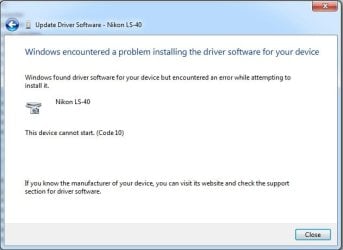
Short update - I decided to download Vuescan v9.1.21 instead of v9.2.02 and this time the drivers appeared. I pointed the driver update at the Vuescan folder and it found the driver. The driver started to install and then the usual message appeared -as per attachement. This is the same message regardless of whether I try to use the "scanners.inf" process or Vuescan.
I'm wondering if my scanner needs a firmware update. Seems like an incompatability between my PC and scanner. Can't think of anything else to do, except use my old XP PC for scanning!
Code10.jpg
 

My Computer My Computer

At a glance

Windows 7 Home Premium 64bit
OS
Windows 7 Home Premium 64bit
Well sorry to say but you have a problem with either the scanner, cable, or PC that's preventing the scanner from being recognized. And I say again, if Vuescan isn't even picking up the scanner, the issue is not with the procedures here.

These procedures simply allow you to run the scanner using Nikon's scan software, and eliminating the need to purchase Vuescan instead.

Good luck.
 

My Computer My Computer

At a glance

Windows 10 ProIntel Core i7-4770K (3.5Ghz)32 gig Corsair Dominator Platinum (4x8Gig)Sapphire Tri-X R9 Fury
Computer type
PC/Desktop
Computer Manufacturer/Model Number
Custom built by me.
OS
Windows 10 Pro
CPU
Intel Core i7-4770K (3.5Ghz)
Motherboard
Gigabyte G1 Sniper 5 (F10 Bios)
Memory
32 gig Corsair Dominator Platinum (4x8Gig)
Graphics Card(s)
Sapphire Tri-X R9 Fury
Sound Card
Soundblaster ZXR
Monitor(s) Displays
NEC PA242W 24" LCD Monitor
Screen Resolution
1920 x 1200
Hard Drives
Primary - Samsung 850 Pro (512gig), Samsung 840 Pro (256gig), 2TB WD Caviar Black.
PSU
EVGA Supernova 1000 G2
Case
Cooler Master HAF X
Cooling
Corsair H100i with Corsair Air Series SP120 Quiet Fans
Keyboard
Logitech Wireless Wave
Mouse
Logitech Performance MX
Internet Speed
High Speed Cable
Antivirus
Norton Security
Browser
IE11
Other Info
Memory Timings - 1866MHz @ 9-9-9-27-1T @ 1.5 volts
Problem Solved

Turned out that I needed to update my scanner firmware to a newer version (albeit, one that dates back to 2003). Had to bring out my old Windows XP PC and install Nikon Scan Version 3, otherwise the firmware updater doesn't work.

With firmware updated, I connected the scanner to my Windows 7 64-bit PC and it worked immediately, with both the scanners.inf and vuescan drivers.

This post might be useful for anyone else with a Coolscan IV who is experiencing the "code 10" problem.

Sygnus21 - Many thanks for the amended "scanners.inf" file and your support on this forum. :D:D:D
 

My Computer My Computer

At a glance

Windows 7 Home Premium 64bit
OS
Windows 7 Home Premium 64bit
Keep forgetting about that...

Turned out that I needed to update my scanner firmware to a newer version (albeit, one that dates back to 2003). Had to bring out my old Windows XP PC and install Nikon Scan Version 3, otherwise the firmware updater doesn't work.

Dang I keep forgetting about that! I'll place a note in the instructions. Anyway it is true that for these procedures, the scanner needs the latest firmware update.

And yes, unfortunately the only way to update the firmware is through XP or Mac OS 10.2.x - 10.4.11 :confused:

Thanks for the feedback.

Happy scanning.

Edit: Warning added about firmware update.
 
Last edited:

My Computer My Computer

At a glance

Windows 10 ProIntel Core i7-4770K (3.5Ghz)32 gig Corsair Dominator Platinum (4x8Gig)Sapphire Tri-X R9 Fury
Computer type
PC/Desktop
Computer Manufacturer/Model Number
Custom built by me.
OS
Windows 10 Pro
CPU
Intel Core i7-4770K (3.5Ghz)
Motherboard
Gigabyte G1 Sniper 5 (F10 Bios)
Memory
32 gig Corsair Dominator Platinum (4x8Gig)
Graphics Card(s)
Sapphire Tri-X R9 Fury
Sound Card
Soundblaster ZXR
Monitor(s) Displays
NEC PA242W 24" LCD Monitor
Screen Resolution
1920 x 1200
Hard Drives
Primary - Samsung 850 Pro (512gig), Samsung 840 Pro (256gig), 2TB WD Caviar Black.
PSU
EVGA Supernova 1000 G2
Case
Cooler Master HAF X
Cooling
Corsair H100i with Corsair Air Series SP120 Quiet Fans
Keyboard
Logitech Wireless Wave
Mouse
Logitech Performance MX
Internet Speed
High Speed Cable
Antivirus
Norton Security
Browser
IE11
Other Info
Memory Timings - 1866MHz @ 9-9-9-27-1T @ 1.5 volts
Just want to say a huge thanks for the advice on this thread. I got my Nikon Coolsan 9000 to work with Windows 8 after following post #416 which describes how to disable the device signing automatically turned on by Windows 8.
 

My Computer My Computer

At a glance

Windows 8
OS
Windows 8
Wow, I'm just another in a LONG list of folks you've helped solve a problem that Nikon should have solved long ago. I followed you MOST EXCELLENT instructions and got my Nikon CoolScan 4000 ED working in about 5 minutes. THANK YOU. THANK YOU. THANK YOU.

Cheers mate.
Griz :D
 

My Computer My Computer

At a glance

Win 7 x64 ultimate32 GBNvidia Quadro 4000
Computer type
PC/Desktop
Computer Manufacturer/Model Number
HP
OS
Win 7 x64 ultimate
Memory
32 GB
Graphics Card(s)
Nvidia Quadro 4000
Wow, I'm just another in a LONG list of folks you've helped solve a problem that Nikon should have solved long ago. I followed you MOST EXCELLENT instructions and got my Nikon CoolScan 4000 ED working in about 5 minutes. THANK YOU. THANK YOU. THANK YOU.

Cheers mate.
Griz :D

Thank you. Happy to hear I was able to help.

Happy scanning.

Peace :cool:
 

My Computer My Computer

At a glance

Windows 10 ProIntel Core i7-4770K (3.5Ghz)32 gig Corsair Dominator Platinum (4x8Gig)Sapphire Tri-X R9 Fury
Computer type
PC/Desktop
Computer Manufacturer/Model Number
Custom built by me.
OS
Windows 10 Pro
CPU
Intel Core i7-4770K (3.5Ghz)
Motherboard
Gigabyte G1 Sniper 5 (F10 Bios)
Memory
32 gig Corsair Dominator Platinum (4x8Gig)
Graphics Card(s)
Sapphire Tri-X R9 Fury
Sound Card
Soundblaster ZXR
Monitor(s) Displays
NEC PA242W 24" LCD Monitor
Screen Resolution
1920 x 1200
Hard Drives
Primary - Samsung 850 Pro (512gig), Samsung 840 Pro (256gig), 2TB WD Caviar Black.
PSU
EVGA Supernova 1000 G2
Case
Cooler Master HAF X
Cooling
Corsair H100i with Corsair Air Series SP120 Quiet Fans
Keyboard
Logitech Wireless Wave
Mouse
Logitech Performance MX
Internet Speed
High Speed Cable
Antivirus
Norton Security
Browser
IE11
Other Info
Memory Timings - 1866MHz @ 9-9-9-27-1T @ 1.5 volts
For those wishing to get their Nikon Coolscan film scanners working under either Vista or Windows 7 64-bit editions here’s a solution. Do pay attention to notes and warnings….

:warn: Warning: Scanners must have the latest Nikon firmware installed for these procedures to work. Currently the only OS capable of updating the scanner’s firmware is Windows XP or Mac OS 10.2.x - 10.4.11. This means you cannot update the firmware without access to either of these OS’s! Also note that even Vuescan may not work under Windows 7 if the latest firmware isn’t installed. In short, if your scanner isn’t working when trying these or Vuescan, check your check the firmware.

:note: Note: This fix applies to the 4000, 5000, 8000, and 9000 series scanners. I can't guarantee older scanners will work but it's worth a try. If not, check this post for help or tips on older scanners. And credit Steel Chn for the inf file. I'm just providing a modified file that includes the Nikon 5000. Now...

Before you get started: Remove Vuescan if installed. You can re-install it after these procedures.

1- Download this file Nikon Scan 4.0.3 from Nikon's site drivers for Windows Vista 32-bit. Yes, Vista 32-bit.

2- Then go my website and download this zip file - scanners.zip (includes 5000 fix) - EDIT: Since my site is currently down here's the file - View attachment 192016

3- Extract and save the scanners.inf file to a location or folder of your choosing...

Example: I created a folder called Nikon Files. After I install the Nikon Scan software, I'll then place the Nikon Files folder inside the NKScan4 folder located at...

C:\Program Files (x86)\Nikon\NkScan4 - Thus the NKScan4 folder now contains the Nikon Files folder and will look like this... C:\Program Files (x86)\Nikon\NkScan4\Nikon Files

4- Now install the Nikon Scan software you downloaded and after the installation, go to....

C:\Program Files (x86)\Common Files\Nikon\Driver\Scan1394 (see note) and copy this file NKScnUSD.dll to the same folder (Example: Nikon Files) that the scanners.inf file is in.

Thus the Nikon Files folder should now contain these two files... NKScnUSD.dll and scanners.inf

:note: NOTE: If your scanner is USB than the folder will be ScanUSB instead of Scan1394.

Once that’s done….

5- Power up the scanner and make sure the Firewire or USB cable is connected to the computer.

6- Cancel any dialogue boxes looking for drivers if they appear.

7- Go to Device Manager – Control Panel, Device Manager and look for the "Unknown Device" (your scanner) with the yellow triangle.

8- Right click on it and choose "Update Driver Software" then choose "Browse my computer for driver software"

9- Click "Browse" and find the location or folder where you put the scanners.inf file. Example: C:\Program Files (x86)\Nikon\NkScan4\Nikon Files and click "Next" This will/should install the driver (scanners.inf) you extracted from the zip file for your scanner.

10- That’s it – Your Nikon Scan software should now be fully functional.


Good luck :)
Much Thanks!!! I followed your instructions and my Coolscan 5000 now works on win 7 64 as before I lost my cd and my 32 bit win 7 computer crashed.
 

My Computer My Computer

At a glance

Win 7 Pro 64bitIntel Core 7-3770 3.5GHz12GB DDR3 DIMM2GB Nividia Ge Force GT 360
Computer type
PC/Desktop
Computer Manufacturer/Model Number
HP h8-1360t
OS
Win 7 Pro 64bit
CPU
Intel Core 7-3770 3.5GHz
Motherboard
Pegatron IPmmb-FM
Memory
12GB DDR3 DIMM
Graphics Card(s)
2GB Nividia Ge Force GT 360
Hard Drives
2TB 7200 rpm SATA
Antivirus
McAfee Secure (Verizon Security Suite)
Browser
Internet Explorer 9
Help please

Hello, I have a Nikon Super Coolscan 9000 ED and am operating with Windows 7. I have tried your fix several times with no results. In the device manager, it says I need a WIA driver for the scanner. Is there something I'm missing? Any help would be appreciated.
 

My Computer My Computer

At a glance

Windows 7 64 bit
Computer type
PC/Desktop
Computer Manufacturer/Model Number
dell
OS
Windows 7 64 bit
I have no idea because I don't know where you're having the issue.

That said, being that the Coolscan 9000 is USB you need to pay close attention to step #4, particularly the note below it.

You also need to be clicking the Scan software icon, as there are no WIA drivers for the scanner, thus this fix.

Lastly, make sure you have the latest firmware update for your scanner, which is discussed in the warning above the instructions.
 

My Computer My Computer

At a glance

Windows 10 ProIntel Core i7-4770K (3.5Ghz)32 gig Corsair Dominator Platinum (4x8Gig)Sapphire Tri-X R9 Fury
Computer type
PC/Desktop
Computer Manufacturer/Model Number
Custom built by me.
OS
Windows 10 Pro
CPU
Intel Core i7-4770K (3.5Ghz)
Motherboard
Gigabyte G1 Sniper 5 (F10 Bios)
Memory
32 gig Corsair Dominator Platinum (4x8Gig)
Graphics Card(s)
Sapphire Tri-X R9 Fury
Sound Card
Soundblaster ZXR
Monitor(s) Displays
NEC PA242W 24" LCD Monitor
Screen Resolution
1920 x 1200
Hard Drives
Primary - Samsung 850 Pro (512gig), Samsung 840 Pro (256gig), 2TB WD Caviar Black.
PSU
EVGA Supernova 1000 G2
Case
Cooler Master HAF X
Cooling
Corsair H100i with Corsair Air Series SP120 Quiet Fans
Keyboard
Logitech Wireless Wave
Mouse
Logitech Performance MX
Internet Speed
High Speed Cable
Antivirus
Norton Security
Browser
IE11
Other Info
Memory Timings - 1866MHz @ 9-9-9-27-1T @ 1.5 volts

My Computer My Computer

At a glance

Windows 7 Professional 64bitIntel® Core™ i5-760 2.8GHz8GB (2x4GB) Patriot DDR3 1333MHzATI® Radeon™ HD 5770 1GB GDDR5 DX11
Computer Manufacturer/Model Number
West Coast Custom Computer
OS
Windows 7 Professional 64bit
CPU
Intel® Core™ i5-760 2.8GHz
Motherboard
Asus P7P55D-E-LX
Memory
8GB (2x4GB) Patriot DDR3 1333MHz
Graphics Card(s)
ATI® Radeon™ HD 5770 1GB GDDR5 DX11
Sound Card
ATI + VIA
Monitor(s) Displays
#1) HP (LG) ZR22W #2) Optiquest Q1wb
Hard Drives
Kingston 128GB MLC SSD SATA II (C: boot)
1.0TB Western Digital Caviar Black SATA II
PSU
Corsair CMPSU-650TX
Case
Lian-Li PC-A06B
Cooling
XTS 100H Heatpipe Cooler

My Computer My Computer

At a glance

Windows 10 ProIntel Core i7-4770K (3.5Ghz)32 gig Corsair Dominator Platinum (4x8Gig)Sapphire Tri-X R9 Fury
Computer type
PC/Desktop
Computer Manufacturer/Model Number
Custom built by me.
OS
Windows 10 Pro
CPU
Intel Core i7-4770K (3.5Ghz)
Motherboard
Gigabyte G1 Sniper 5 (F10 Bios)
Memory
32 gig Corsair Dominator Platinum (4x8Gig)
Graphics Card(s)
Sapphire Tri-X R9 Fury
Sound Card
Soundblaster ZXR
Monitor(s) Displays
NEC PA242W 24" LCD Monitor
Screen Resolution
1920 x 1200
Hard Drives
Primary - Samsung 850 Pro (512gig), Samsung 840 Pro (256gig), 2TB WD Caviar Black.
PSU
EVGA Supernova 1000 G2
Case
Cooler Master HAF X
Cooling
Corsair H100i with Corsair Air Series SP120 Quiet Fans
Keyboard
Logitech Wireless Wave
Mouse
Logitech Performance MX
Internet Speed
High Speed Cable
Antivirus
Norton Security
Browser
IE11
Other Info
Memory Timings - 1866MHz @ 9-9-9-27-1T @ 1.5 volts
You might want to get an idea on what this thread is about before posting alternatives. In short, please read the first post first.

Thank you.

You're welcome. This is how I was able to work around the WIA issue by using TWAIN instead which IMHO is what the OP was challenged with. Using VueScan as a "bridge" between the scanner and PS is a small price to pay to enable the process. I too was never able to get WIA to work.
 

My Computer My Computer

At a glance

Windows 7 Professional 64bitIntel® Core™ i5-760 2.8GHz8GB (2x4GB) Patriot DDR3 1333MHzATI® Radeon™ HD 5770 1GB GDDR5 DX11
Computer Manufacturer/Model Number
West Coast Custom Computer
OS
Windows 7 Professional 64bit
CPU
Intel® Core™ i5-760 2.8GHz
Motherboard
Asus P7P55D-E-LX
Memory
8GB (2x4GB) Patriot DDR3 1333MHz
Graphics Card(s)
ATI® Radeon™ HD 5770 1GB GDDR5 DX11
Sound Card
ATI + VIA
Monitor(s) Displays
#1) HP (LG) ZR22W #2) Optiquest Q1wb
Hard Drives
Kingston 128GB MLC SSD SATA II (C: boot)
1.0TB Western Digital Caviar Black SATA II
PSU
Corsair CMPSU-650TX
Case
Lian-Li PC-A06B
Cooling
XTS 100H Heatpipe Cooler
You might want to get an idea on what this thread is about before posting alternatives. In short, please read the first post first.

Thank you.

You're welcome. This is how I was able to work around the WIA issue by using TWAIN instead which IMHO is what the OP was challenged with. Using VueScan as a "bridge" between the scanner and PS is a small price to pay to enable the process. I too was never able to get WIA to work.

That would be true if that were the only option, but it's not. The instructions I wrote here definitely works with the 9000. All you have to do is look at the myriad of posts telling me so. Additionally I have a Coolscan 4000, which these instructions are based on, and they work very well with the need for Vuescan.

You might also be aware that I have Vuescan, keep it up to date (though I don't use it), and have had it since early 2000. It's simply not needed, unless you wish to use it instead of the Nikon Scan software.

So yeah, you can spend $40 (basic) or $80 (pro - which I have) on it, or you can use the free scan software that comes with the scanner by following these procedures.

The sole point of the post/thread is to provide procedures on getting the Nikon scan software working since Nikon failed to provide a Win 7 driver themselves. The procedures work if you follow the instructions.

Also...

You're welcome. This is how I was able to work around the WIA issue by using TWAIN instead which IMHO is what the OP was challenged with. Using VueScan as a "bridge" between the scanner and PS is a small price to pay to enable the process. I too was never able to get WIA to work.

These procedures aren't going to provide a WIA driver, that's what Nikon was supposed to do, but didn't, thus the hacked drivers I provide. This is discussed throughout this thread.

And you might re-read the post you're referencing...

Hello, I have a Nikon Super Coolscan 9000 ED and am operating with Windows 7. I have tried your fix several times with no results. In the device manager, it says I need a WIA driver for the scanner. Is there something I'm missing? Any help would be appreciated.

He's saying he can't get the procedures to work, and figure it's because the WIA drivers are missing, which isn't the case. You don't need them for these to work!

But yes, if you want to access the scanner through Photoshop, than yes, Vuescan is the better way to go. I personally don't find that procedure anymore efficient than using Nikons software in standalone. And it's certainly not worth at least 40 bucks!!! I have it, and I don't even use it.

Peace :cool:
 

My Computer My Computer

At a glance

Windows 10 ProIntel Core i7-4770K (3.5Ghz)32 gig Corsair Dominator Platinum (4x8Gig)Sapphire Tri-X R9 Fury
Computer type
PC/Desktop
Computer Manufacturer/Model Number
Custom built by me.
OS
Windows 10 Pro
CPU
Intel Core i7-4770K (3.5Ghz)
Motherboard
Gigabyte G1 Sniper 5 (F10 Bios)
Memory
32 gig Corsair Dominator Platinum (4x8Gig)
Graphics Card(s)
Sapphire Tri-X R9 Fury
Sound Card
Soundblaster ZXR
Monitor(s) Displays
NEC PA242W 24" LCD Monitor
Screen Resolution
1920 x 1200
Hard Drives
Primary - Samsung 850 Pro (512gig), Samsung 840 Pro (256gig), 2TB WD Caviar Black.
PSU
EVGA Supernova 1000 G2
Case
Cooler Master HAF X
Cooling
Corsair H100i with Corsair Air Series SP120 Quiet Fans
Keyboard
Logitech Wireless Wave
Mouse
Logitech Performance MX
Internet Speed
High Speed Cable
Antivirus
Norton Security
Browser
IE11
Other Info
Memory Timings - 1866MHz @ 9-9-9-27-1T @ 1.5 volts
Muchas gratias, sygnus21. This will work for the Coolscan V ED by copying the line

"Nikon LS-50" = USBScanner,USB\Vid_04b0&Pid_4001

under [Models] to [Models.ntamd64]. And many thanks to vrb for the tip.

Ciao, al7kz
 

My Computer My Computer

At a glance

Windows 7 Professional 64 bitIntel i5-3570KCrucial Ballistix Sport 8GB 240-Pin DDR3 1600
Computer type
PC/Desktop
Computer Manufacturer/Model Number
custom build
OS
Windows 7 Professional 64 bit
CPU
Intel i5-3570K
Motherboard
Asus P8Z77-V
Memory
Crucial Ballistix Sport 8GB 240-Pin DDR3 1600
PSU
OCZ ModXStream Pro 600W
Case
Antec Super Lanboy
Muchas gratias, sygnus21. This will work for the Coolscan V ED by copying the line

"Nikon LS-50" = USBScanner,USB\Vid_04b0&Pid_4001

under [Models] to [Models.ntamd64]. And many thanks to vrb for the tip.

Ciao, al7kz

Thanks for the feedback. Glad it worked.

Gratias :)
 

My Computer My Computer

At a glance

Windows 10 ProIntel Core i7-4770K (3.5Ghz)32 gig Corsair Dominator Platinum (4x8Gig)Sapphire Tri-X R9 Fury
Computer type
PC/Desktop
Computer Manufacturer/Model Number
Custom built by me.
OS
Windows 10 Pro
CPU
Intel Core i7-4770K (3.5Ghz)
Motherboard
Gigabyte G1 Sniper 5 (F10 Bios)
Memory
32 gig Corsair Dominator Platinum (4x8Gig)
Graphics Card(s)
Sapphire Tri-X R9 Fury
Sound Card
Soundblaster ZXR
Monitor(s) Displays
NEC PA242W 24" LCD Monitor
Screen Resolution
1920 x 1200
Hard Drives
Primary - Samsung 850 Pro (512gig), Samsung 840 Pro (256gig), 2TB WD Caviar Black.
PSU
EVGA Supernova 1000 G2
Case
Cooler Master HAF X
Cooling
Corsair H100i with Corsair Air Series SP120 Quiet Fans
Keyboard
Logitech Wireless Wave
Mouse
Logitech Performance MX
Internet Speed
High Speed Cable
Antivirus
Norton Security
Browser
IE11
Other Info
Memory Timings - 1866MHz @ 9-9-9-27-1T @ 1.5 volts
Back
Top