Hi!
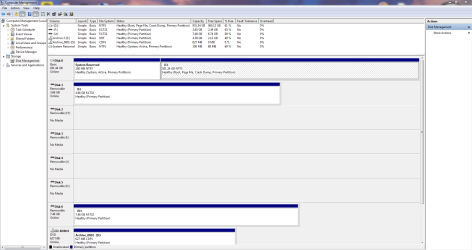
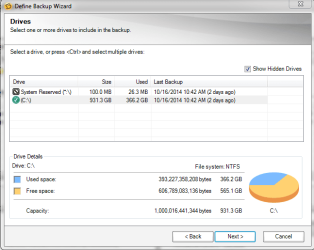
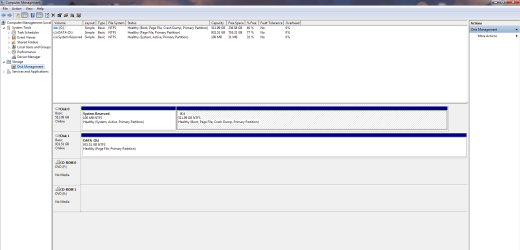
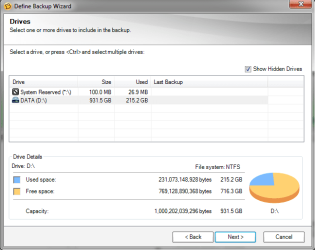
I have two almost identical computer setups. Computer #1 has a 1TB HD and Win7 Pro installed. The HD contains 2 partitions - a 100MB System Reserved partition (no drive letter assigned) and a Win7 partition (drive C: assigned). Ghost 15 sees and will back up both partitions. Computer #2 has a 512MB SSD with Win7 Pro installed and a 1TB HD for data. The SSD contains 2 partitions - a 100MB System Reserved partition (no drive letter assigned) and a Win7 partition (drive C:\ assigned). The 1TB HD has one partition - drive letter D:\ assigned. Ghost 15 sees drive D:\ and the System Reserved partition and will backup both. But it does not see the C:\ partition and any backup is useless without the Win7 system being backed up.
Any thoughts on why this happens and how to get Ghost 15 to see/backup the C:\ drive would be appreciated.
Thanks!
I have two almost identical computer setups. Computer #1 has a 1TB HD and Win7 Pro installed. The HD contains 2 partitions - a 100MB System Reserved partition (no drive letter assigned) and a Win7 partition (drive C: assigned). Ghost 15 sees and will back up both partitions. Computer #2 has a 512MB SSD with Win7 Pro installed and a 1TB HD for data. The SSD contains 2 partitions - a 100MB System Reserved partition (no drive letter assigned) and a Win7 partition (drive C:\ assigned). The 1TB HD has one partition - drive letter D:\ assigned. Ghost 15 sees drive D:\ and the System Reserved partition and will backup both. But it does not see the C:\ partition and any backup is useless without the Win7 system being backed up.
Any thoughts on why this happens and how to get Ghost 15 to see/backup the C:\ drive would be appreciated.
Thanks!
My Computer
- Computer type
- PC/Desktop
- Computer Manufacturer/Model Number
- Custom Build
- OS
- Windows 7 Pro 64bit
- CPU
- Intel i7
- Motherboard
- ASUS
- Memory
- 16GB
- Hard Drives
- WD 1TB Black
Crucial 512GB SSD
- Antivirus
- Norton Internet Security
- Browser
- IE 11