Giant System Volume Information Folder

maiki

New member
Member
Local time
5:21 PM
Messages
24
Win7 SP1
My System Volume folder is gigantic right now, almost 10GB.

I thought I could decrease that by deleting some older restore points with CrapCleaner.

When I looked at the SR points in CC, there is only one there, the most receont one, created today.

Is that possible---one restore point ten GB in size?

Or---has something gone wrong? If so, any way to fix it?

Anyone have an idea what could be going wrong with that--a 10 GB SV folder with only one restore point in it?

Of course, one solution would be to turn off system restore, so that everything in that folder is deleted, then start it again. However, if something goes wrong with the computer, that SR point could be a lifesaver, necessary to restore the system.

--------------
One other question--can the contents of the SVI folder be copied to an external HDD for backup (I have taken ownership of the folder, and given myself full permission on it and subfolders), before turning SR off and on? Then if necessary to use that saved SR point, copy those contents back to the SVI folder of the original drive?
 

My Computer

OS
Windows 7
Well, you can actually start system restore and then click "Choose a different restore point" to display the other available points, see this tut.

http://www.sevenforums.com/tutorials/700-system-restore.html

You can also a 3rd party tool like QRM Plus manager to take a look at the points.

How To Delete Individual Restore Points In Windows 7

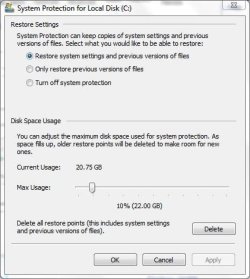
Its possible the previous restore points got deleted for some reason or theres insufficient space allotted to them. You can set that space this way.

http://www.sevenforums.com/tutorials/335-system-protection-change-disk-space-usage.html
 

My Computer

Computer Manufacturer/Model Number
Too many to describe...
OS
Windows 7 x64 pro/ Windows 7 x86 Pro/ XP SP3 x86
Delete it shirnk the available restore point size down to around 3-4 gigs turn it back on.

You can immediately create a new restore point then (create button is in the same window) so you have one from when the system was stable.
 

My Computer

Computer Manufacturer/Model Number
Insane hobo technologies. ;-)
OS
Windows 7 x64
CPU
Intel i7 2600k
Motherboard
Asrock z68 extreme 4 gen 3
Memory
G.skill Ripjaw 16gigs @ 1866
Graphics Card(s)
Nvidia gtx580 (evga)
Sound Card
Integrated HD audio + hdmi
Monitor(s) Displays
24" ASUS widescreen + 42" insignia
Screen Resolution
1080p (1920x1080)
Hard Drives
128 Samsung 830
256 Samsung 840
3 x 1tb storage drive (various)
1 western digital 1tb (eSATA)
1 Seagate 1tb (eSATA)
PSU
1 kilowatt SLI/Crossfire rated Silverstone modular
Case
NZXT Phantom + additional 220 fan
Cooling
Zalmann
Keyboard
Microsoft wireless 3000 (v2)
Mouse
MS - wireless 5000 (bluetrack)
Internet Speed
depends on if you ask me or my provider.
Other Info
The above information is provided as is, and the author assumes no responsibility for issues it may cause with your sanity or fanboyism.
I did that--"choose a different restore point". Yet it still only showed that one.

I explained in the OP, that I did use a 3rd party tool, CC, to look at (and perhaps delete) individual points. But it also only showed that one!

How can one restore point take up 10 GB???

By the way, would it work to backup the Sysvol folder to an external HDD, then delete it? Well, I mean if I ever needed that restore point, could I copy it back to its original place, and would SR recognize it?

Well, you can actually start system restore and then click "Choose a different restore point" to display the other available points, see this tut.

http://www.sevenforums.com/tutorials/700-system-restore.html

You can also a 3rd party tool like QRM Plus manager to take a look at the points.

How To Delete Individual Restore Points In Windows 7

Its possible the previous restore points got deleted for some reason or theres insufficient space allotted to them. You can set that space this way.

http://www.sevenforums.com/tutorials/335-system-protection-change-disk-space-usage.html
 

My Computer

OS
Windows 7
I dont know of any way to back up the sysvol folder. If this particular SR point is important to you, there're other ways of "preserving" it- you can create an image of the windows partition using excellent, free tools or even the builtin system backup utility.

Perhaps you've had a good experience with SR, but personally I always prefer an image.
 

My Computer

Computer Manufacturer/Model Number
Too many to describe...
OS
Windows 7 x64 pro/ Windows 7 x86 Pro/ XP SP3 x86
Don't fiddle with System Restore. It works, and you WILL need it. The more restore points you can store the better. Decide how much space you are willing to give it and set it there. 10GB is nothing.
 

My Computer

Computer Manufacturer/Model Number
Custom
OS
Windows 7 Ultimate RTM (Technet)
CPU
3.00 gigahertz Intel Core2 Duo E8400
Motherboard
ASUSTeK Computer INC. P5K/EPU Rev 1.xx
Memory
4GB
Graphics Card(s)
ATI Radeon X1950 Pro
Sound Card
Built in HD Audio
Monitor(s) Displays
22" Gateway LCD
Screen Resolution
1920 x 1200
Hard Drives
ST3160023A [Hard drive] (160.04 GB) -- drive 0, rev 8.01, ST3500630AS [Hard drive] (500.11 GB) -- drive 2, rev 3.AAK
ST3500630AS [Hard drive] (500.11 GB) -- drive 1, rev 3.AAK
Keyboard
Logitech G11
Mouse
Microsoft Wireless Laser Mouse 5000
Internet Speed
13.44 Mbps
Don't fiddle with SR. Even windows image backup leaves it alone and restore deletes all the old pints. This is to ensure consistency.
 

My Computer

Computer type
Laptop
Computer Manufacturer/Model Number
Hewlett-Packard/G62-107SA Notebook
OS
Microsoft Windows 7 Home Premium 64-bit Service Pack 1
CPU
Intel(R) Core(TM) i3 CPU M 330 @ 2.13GHz
Motherboard
Hewlett-Packard 1425
Memory
8 GB DDR3
Graphics Card(s)
Intel(R) HD Graphics
Sound Card
Realtek High Definition Audio
Monitor(s) Displays
Builtin
Screen Resolution
1366 x 768 x 32 bits (4294967296 colors) @ 60 Hz
Hard Drives
250 GB SATA Hard Disk Drive 7200 rpm
2TB Seagate GoFlex USB 2 Drive
1TB Iomega Prestige USB 2 Drive
1.5TB Iomega Prestige USB 2 Drive (Samsung)
2TB WD MyBook Live NAS.
Mouse
Logitech Anywhere MX
Internet Speed
152 Mbs download 10 Mbs upload
Antivirus
Norton 360
Browser
Chrome
10GB is nothing.

Please note--I was not talking about 10GB total size of System Volume, storing a lot of SR points.

My system only has one SR point stored, and sysvol takes up 10GBs.

Do you think that is normal, for only one restore point?
 

My Computer

OS
Windows 7
10GB is nothing.

Please note--I was not talking about 10GB total size of System Volume, storing a lot of SR points.

My system only has one SR point stored, and sysvol takes up 10GBs.

Do you think that is normal, for only one restore point?

You can find out the amount of storage occupied by RPs

1. Right click on Computer and select properties.
2. On the left of the properties screen press the System protection link.
2. On the System Protection dialog select yor system drive and press the configure button.

Near the bottom of the dialog it tells you how much is in use and how much is allocated.

Capture.JPG
 

My Computer

Computer type
Laptop
Computer Manufacturer/Model Number
Hewlett-Packard/G62-107SA Notebook
OS
Microsoft Windows 7 Home Premium 64-bit Service Pack 1
CPU
Intel(R) Core(TM) i3 CPU M 330 @ 2.13GHz
Motherboard
Hewlett-Packard 1425
Memory
8 GB DDR3
Graphics Card(s)
Intel(R) HD Graphics
Sound Card
Realtek High Definition Audio
Monitor(s) Displays
Builtin
Screen Resolution
1366 x 768 x 32 bits (4294967296 colors) @ 60 Hz
Hard Drives
250 GB SATA Hard Disk Drive 7200 rpm
2TB Seagate GoFlex USB 2 Drive
1TB Iomega Prestige USB 2 Drive
1.5TB Iomega Prestige USB 2 Drive (Samsung)
2TB WD MyBook Live NAS.
Mouse
Logitech Anywhere MX
Internet Speed
152 Mbs download 10 Mbs upload
Antivirus
Norton 360
Browser
Chrome
I dont know of any way to back up the sysvol folder. If this particular SR point is important to you, there're other ways of "preserving" it- you can create an image of the windows partition using excellent, free tools or even the builtin system backup utility.

Perhaps you've had a good experience with SR, but personally I always prefer an image.

I was able to do so with Windows XP. After giving myself full permissions to the sysvol folder, I would backup the contents of sysvol to an external hard drive. As I got more restore points, I would add those points.

If I then deleted them from the system drive to make room, but later needed one back for a restore, I could copy back whichever restore points I wanted from the external HDD to sysvol on the system drive, start System Restore, and I would see those points listed, that I added back, and I could restore them.

I found that very useful. For even if the user does not delete the restore points, the system often does, sometimes for no apparent reason! It really is a pain when one has a system crash, one goes to SR to restore a recent restore point, even one made an hour ago, and SR shows no restore points! (SR can really be a lifesaver, but it has major flaws like that.)

In Win7 that does not seem to work. Even giving myself all permissions to Sysvol, and being able to look inside the folder, it is impossible to copy them! I wish I could still back up my restore points, as I could in XP.

------------

One other change in sysvol in Win7, that I do not like. Contents of the sysvol folder cannot be defragmented, nor moved at all, not even on reboot. (I have Perfectdisk, and it can defragment system files--page file,. hibernate file, MFT, metadata, etc., on reboot.) Therefore, if one has a large sysvol folder, taking up a significant portion of one's drive, and it cannot be moved or defragmented at all, including on reboot, that can totally mess up the defragmentation of that drive. I did not have that problem in XP, as sysvol would defragment. What can one do in that situation? OK--turn off System Restore, so that all points are deleted, then defragment, then turn it back on. In the process though, one has lost restore points that one mgiht need. It would certainly be good to be able to back them up externally, defrag, then move them back.

In fact, I think that the ability to back up restore points to an external drive should be built into the Windows GUI, so one would not have to deal with permissions, ownership, etc.

But in Win 7 it seems impossible to back them up in any way!

Anyone know why they made the sysvol folder impossible to defragment in Win7, even on reboot?

Another change I would like to see, although the problem is not unique to Win7--Why should all restore points be deleted, if SR is turned off. Those are two different functions, turning SR on and off, and deleting restore points--and they should be kept separate.

If someone from Microsoft Windows development is reading this--please add the ability to backup restore points to the Windows GUI!
 

My Computer

OS
Windows 7
Back
Top