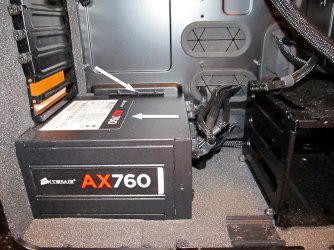
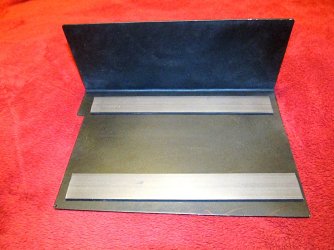
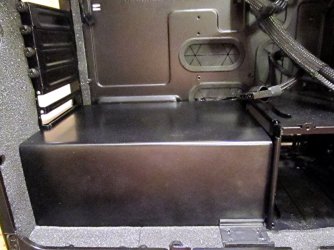
...Here is a reminder of what the gizmo looked like:
View attachment 322561
This is what it looks like after painting and replacing the PCB and with a 2.5" HDD in it (I'll be putting the SSD in it when I do the swap).
View attachment 322559
View attachment 322562
View attachment 322563
Ok, more on the gizmo and tray. In the post about it before the quoted one above, I mentioned that the only downside of the gizmo is one has to remove it from the tray to be able to install a 2.5" drive in it and also mentioned I thought that I could live with that. Well, it's been nagging at me ever since since it is a royal PITK (pain in the keister) to get the gizmo out of the tray. The obvious solution, of course, would be to drill some holes in the sides of the tray that I could poke a screwdriver through to get to the screws holding a drive in the gizmo (I hope the technical jargon isn't off-putting) but I was worried that any holes there would weaken the tray too much until it dawned on me that the little lugs that hold a 3.5" drive (and the gizmo) and the screw in the center of each side would be more than enough reinforcement to compensate for any added weakness. So, this morning I got a feral follicle shaft up my onager and went after it.
Here is a reminder of what the tray looks like. The arrows point to the mounting holes for 2.5" drives. Those are easy to get to from the bottom of the tray. The position of the mounting holes put the SATA power and data connectors in the same place a 3.5" drive's connectors would be. However, since a 2.5" drive doesn't go from side to side in the tray, like a 3.5" drive will, the tray can flex and will sag over time. So, when I saw the gizmo online, I saw it as a solution to the problem.
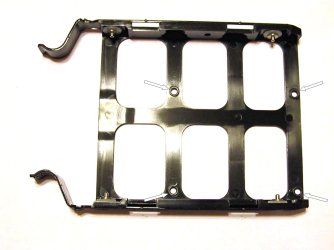
However, 2.5" drives mount from the side in the gizmo instead of the bottom (see arrows). The gizmo has openings in the side that a screwdriver can be poked through but the tray does not. Thus, the need to remove the gizmo from the tray to be able to get to the screws holding the gizmo in place.

The arrows show where holes would be needed to be able to get at the drive mounting screws in the gizmo. As I said, I was concerned holes there would weaken the tray too much until it dawned on me the gizmo would reinforce the tray.
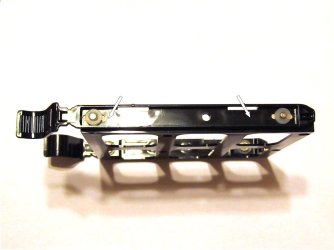
Figuring how to layout the holes (top arrows) was a bit of a bi...stinker but here is what I wound up with. The hole closest to the tray latches on each side had to go through a taper on the other side and are too close to the locating lug alongside it so the bit drifted a bit (mutter, mutter). I had to take a file to those holes to pull them back to where it belonged, hence the raggedy look. You can see the drive mounting holes through the holes in the tray (lower arrows). Perspective makes it appear the holes are misaligned but they actually lined up surprising well.
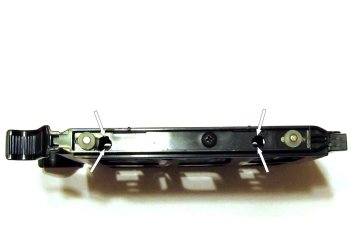
This shot shows that a screwdriver goes through the side of the tray and aligns up with the drive mounting holes just fine. The original holes were just going to clear a #1 Phillips head screwdriver (the appropriate size for the M3 screws 2.5" drives use) but, after filing out the two holes that drifted, those were able to accept a #2 Phillips so, being the anal old bi...broad I am, I drilled out the other two holes to also clear a #2 Phillips.
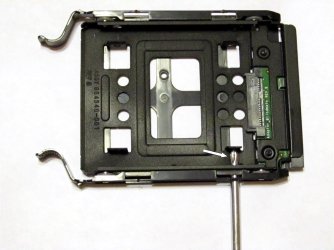
I'll now be able to easily R&R drives in the gizmo without having to remove it from the tray. 'Tis odd how being lazy can be so much work.
I may be moving the innards from my current rig to the new case this weekend, depending on how I feel. Our "monsoon" is finally arriving and humidity levels will be going up which will reduce the potential for problems from ESD.
I'm just going to temporarily use my present SATA data cables for now. One of the drives I'm currently using and up to 7 more in the future will be fed data from my HBA card that has to use SAS to SATA forward breakout cables. The remaining drives, present and future, get fed from the MOBO. Due to a lack of room to stuff the extra cable length of all those DATA data cables (14, including ODDs, swap bays, and e-SATA port), I will need to make custom length SATA cables I can then bundle and sleeve. I will cut down over length cables to the correct length and solder new connectors on the end (that gives me an excuse to buy a new soldering iron that can handle that fine of work; whoohoo, new tool!). I stumbled on a place that had the connectors last night and ordered some. That is going to be one SERIOUSLY TEDIOUS job! Yes, I am insane!





 Very tempted to get one myself for my new build..