Got a New Case!

Thanks, NoN. Expensive crimpers are nice if you do a lot of crimping. I've already done twice as much crimping as I had planned on when I started working on my first case and bought a cheap pair of crimpers like these (they were only $10 when I got them somewhere else that no longer carries them). They have built-in strippers but they were somewhat underwhelming and I got better results using a knife. If I ever loose what little sanity and remaining brain cells I have left and embark on another project like this, I will invest in a better pair of crimpers and strippers.

That's a good looking job. A spot of solder on a crimped pin will prevent slip out (it needs to be really tiny to avoid filling the pin or leaving a glob that will keep the pin from going into the connector body). I had to do that on one of the Corsair front panel connector pins that had the wire slip out on me. I didn't have another pin like that handy so I just stuffed the conductor into the part of the crimp that was supposed to hold the insulation, held a soldering gun to the pin, and melted a tiny bit of solder to the pin and wire.
 

My Computer

Computer type
PC/Desktop
Computer Manufacturer/Model Number
Custom Build
OS
Win 7 Ultimate 64 bit
CPU
Intel i7-3930K
Motherboard
ASUS P9X79 WS
Memory
Kingston HyperX Genesis 32GB Kit (8x4GB Modules) 1600MHz DDR
Graphics Card(s)
MSI R7850 Twin Frozr 2GD5/OC Radeon HD 7850 2GB 256-bit GDDR
Sound Card
Asus Xonar Essence STX
Monitor(s) Displays
3x Asus VG248QE 24", Vizio 32" TV
Screen Resolution
1920 x 1080, ?
Hard Drives
Samsung 128GB 840 Pro SSD (1),
Samsung 4TB 850 EVO SSDs (4)
Samsung 4TB 850 EVO SSDs (16) external backup drives used in 2.5" hot swap bays in the computer.
PSU
Corsair HX750w
Case
Antec Two Hundred v2 (modified)
Cooling
Cooler Master GeminII S524 120mm (fan replaced with a 140mm)
Keyboard
Logitech G510s
Mouse
Logitech M525 (two in use)
Internet Speed
=< 32Mbps down, 8Mbps up
Antivirus
AVAST!, MBAM, SAS, Spybot S&D (all but MBAM free) Glary Util
Browser
IE11
Other Info
LSI 9211-8i HBA card (8 SATA III ports), 2.5" & 3.5" Hot Swap Bays, HooToo HT-CR001 PCI-E to USB 3.0 Internal Hub + 6 Slot Card Reader, and LG Model CH12LS28 BD-ROM Optical Drive. Also, ScanSnap S1500 ADF duplexing scanner, Canon 9000F flat bed scanner, Corsair SP2500 2.1 speakers, Samsung CLP 415nw laser color printer, Cyberpower PP2200SW UPS
Yeah, i haven't yet done much of crimping, that's why i didn't look at an expensive one. I have to see around for a cheaper one and looks the one you mention is OK. Unfortunately seems the tool is a little more priced here as for electronic devices, but i'll find one.

I could do little soldering but i think it wasn't worth to do it for so tiny Awg wires + i know what you're talking about letting a globe around the crimp which is not very nice at looking and hardened the wires could break the crimp more easily. I'm doing soldering when i've no choice or ran out spare parts.

It will be needed if i decide to undo the actual braided sleeves of my PSU (nearly finish with warranty, and + i'll be only modding the cables!).

Unlike you did (but far prefer your black ones) i will keep the colored one that came with mine and put some heatshrink around each wires, near terminal before new sleeves.
 

My Computer

Computer type
PC/Desktop
Computer Manufacturer/Model Number
Custom Build
OS
Windows 7 Professional SP1 - x64 [Non-UEFI Boot]
CPU
Ivy Bridge Core i5 3570K (Delidded)
Motherboard
Asus P8Z77-V LE PLUS
Memory
G.Skill "Ares" DDR3 PC3-12800 - 1600MHz (16Gb)
Graphics Card(s)
Asus Dual-RX480-O4G
Sound Card
Creative Sound Blaster Z w/5.1 sound system
Monitor(s) Displays
Asus IPS 23"
Screen Resolution
16/9
Hard Drives
Internal:
500Go Sata 6Gb/s (x2)
500Go Sata 3Gb/s (x2)
SSD 60Go Sata 6Gb/s
PSU
In Win C 900W Series 80+ Platinum
Case
Thermaltake Chaser A71
Cooling
Custom Water Cooling Loop
Keyboard
Cooler Master QuickFire XTi
Mouse
Razer Imperator 2012 (4G)
Antivirus
MSE
Browser
IE 11.0.xxx Rtm
Other Info
"Raid0" with Intel Smart Response Technology (HDD/SSD)
...I could do little soldering but i think it wasn't worth to do it for so tiny Awg wires + i know what you're talking about letting a globe around the crimp which is not very nice at looking and hardened the wires could break the crimp more easily. I'm doing soldering when i've no choice or ran out spare parts...

If done correctly, the solder won't show once you poke the pin into the connector body. The idea is to have the solder wick into the joint instead of surrounding it with a glob. The solder should show on the surface but you should still see the individual strands through the solder. Also, the solder will wick up into the wire under the insulation and that helps to reinforce that week point. You just don't want it to wick more than 1/8" past the start of the insulation.

...It will be needed if i decide to undo the actual braided sleeves of my PSU (nearly finish with warranty, and + i'll be only modding the cables!)...

Actually, it may not be needed. If you will keep the same length, you can just remove the pins from the connector body, cover them with a layer or two of making tape so they won't snag sleeving, the slip the sleeving over them and onto the cable. The sleeving I linked earlier in this thread is good at expanding and stretching. If the wires are colored, it wouldn't hurt to cover them with black electrical tape first so the color won't show through the sleeving.

If you need to cut wires to shorten then, it's actually easier (not to mention more sanitary) to crimp on new pins than to do a splice and solder job.

...Unlike you did (but far prefer your black ones) i will keep the colored one that came with mine and put some heatshrink around each wires, near terminal before new sleeves.

I take a black felt pen (fine and ultrafine Sharpies) to any colored wires that show or will show.
 

My Computer

Computer type
PC/Desktop
Computer Manufacturer/Model Number
Custom Build
OS
Win 7 Ultimate 64 bit
CPU
Intel i7-3930K
Motherboard
ASUS P9X79 WS
Memory
Kingston HyperX Genesis 32GB Kit (8x4GB Modules) 1600MHz DDR
Graphics Card(s)
MSI R7850 Twin Frozr 2GD5/OC Radeon HD 7850 2GB 256-bit GDDR
Sound Card
Asus Xonar Essence STX
Monitor(s) Displays
3x Asus VG248QE 24", Vizio 32" TV
Screen Resolution
1920 x 1080, ?
Hard Drives
Samsung 128GB 840 Pro SSD (1),
Samsung 4TB 850 EVO SSDs (4)
Samsung 4TB 850 EVO SSDs (16) external backup drives used in 2.5" hot swap bays in the computer.
PSU
Corsair HX750w
Case
Antec Two Hundred v2 (modified)
Cooling
Cooler Master GeminII S524 120mm (fan replaced with a 140mm)
Keyboard
Logitech G510s
Mouse
Logitech M525 (two in use)
Internet Speed
=< 32Mbps down, 8Mbps up
Antivirus
AVAST!, MBAM, SAS, Spybot S&D (all but MBAM free) Glary Util
Browser
IE11
Other Info
LSI 9211-8i HBA card (8 SATA III ports), 2.5" & 3.5" Hot Swap Bays, HooToo HT-CR001 PCI-E to USB 3.0 Internal Hub + 6 Slot Card Reader, and LG Model CH12LS28 BD-ROM Optical Drive. Also, ScanSnap S1500 ADF duplexing scanner, Canon 9000F flat bed scanner, Corsair SP2500 2.1 speakers, Samsung CLP 415nw laser color printer, Cyberpower PP2200SW UPS
If done correctly, the solder won't show once you poke the pin into the connector body. The idea is to have the solder wick into the joint instead of surrounding it with a glob. The solder should show on the surface but you should still see the individual strands through the solder. Also, the solder will wick up into the wire under the insulation and that helps to reinforce that week point. You just don't want it to wick more than 1/8" past the start of the insulation.

I use a liquid soldering material since a while for little electronics as it permit to go deeper and in a thin layer on parts. But it still "globe" if i heat it up too much...a question of right temp!

As for the PSU re-sleeving, i'm not sure yet about the length to shorten but some modifications could be made for my needs. I also want to split the sleeves in two braided cables onto the same rail to make them more flat & less harder to bend (e.g: on Psu PCI-e cable, separate Yellow 12v from the Black ground), because if i do wrap them as they already are i'll have the feeling having done the same but with a different sleeved color!!!

I think i'll still be using heatshrink at terminal, but its true that the colored wires will be slightly visible under the sleeves and it will stiff the wires if i try to double the sleeving!

It is anyway cheaper to buy the connectors parts and the appropriate Awg wires than buying a set of new PSU cables, so if the result doesn't suits me i might do the all cut, crimp & sleeves to connectors to have a deep black color.
 

My Computer

Computer type
PC/Desktop
Computer Manufacturer/Model Number
Custom Build
OS
Windows 7 Professional SP1 - x64 [Non-UEFI Boot]
CPU
Ivy Bridge Core i5 3570K (Delidded)
Motherboard
Asus P8Z77-V LE PLUS
Memory
G.Skill "Ares" DDR3 PC3-12800 - 1600MHz (16Gb)
Graphics Card(s)
Asus Dual-RX480-O4G
Sound Card
Creative Sound Blaster Z w/5.1 sound system
Monitor(s) Displays
Asus IPS 23"
Screen Resolution
16/9
Hard Drives
Internal:
500Go Sata 6Gb/s (x2)
500Go Sata 3Gb/s (x2)
SSD 60Go Sata 6Gb/s
PSU
In Win C 900W Series 80+ Platinum
Case
Thermaltake Chaser A71
Cooling
Custom Water Cooling Loop
Keyboard
Cooler Master QuickFire XTi
Mouse
Razer Imperator 2012 (4G)
Antivirus
MSE
Browser
IE 11.0.xxx Rtm
Other Info
"Raid0" with Intel Smart Response Technology (HDD/SSD)
Liquid soldering material? I'm not familiar with that (or even heard of it, other than tinning compound). I use rosin core wire solder. I just hold the iron to the joint, touch the solder where the iron and the joint meet to help with heat transfer, then hold the solder to the side of the joint opposite the iron until the joint is hot enough to let the solder wick itself into the joint. How much solder that gets taken into the joint is determined by the size of the wire (smaller is better) and how long it is held to the joint. Once the correct amount of solder is applied Just enough to cover the strands but still leave them visible), I pull the solder wire and the iron away from the joint and let the joint cool undisturbed. The cooled solder should be bright and shiny.

I wasn't suggesting double sleeving (other than black tape to hide color; felt pens can be used for that with less bulk). A common way to resleeve a PSU is to strip off the old sleeving and replace it with new sleeving; that was the process I was describing. Doing a really good job on cables permanently attached to the PSU would require opening up the PSU, something I normally do not recommend because the capacitors inside can hold a lethal charge for quite some time.

Even when using a heat shrink by the connector (which is usually a good idea unless the cable has to make a sharp bend there), there will be a small bit of color showing, such as by the blue Molex connectors on the cable you pictured. If you had taken felt pens to those wires before putting on the shrink, there would be no color showing.

Using the original cables does have the advantage of less opportunity of making any mistakes. It's easy to make a wrong connection and it only takes one to fricassee something expensive. That's why I check my work multiple times to make sure I didn't screw up anything (and I have caught mistakes more than once).
 

My Computer

Computer type
PC/Desktop
Computer Manufacturer/Model Number
Custom Build
OS
Win 7 Ultimate 64 bit
CPU
Intel i7-3930K
Motherboard
ASUS P9X79 WS
Memory
Kingston HyperX Genesis 32GB Kit (8x4GB Modules) 1600MHz DDR
Graphics Card(s)
MSI R7850 Twin Frozr 2GD5/OC Radeon HD 7850 2GB 256-bit GDDR
Sound Card
Asus Xonar Essence STX
Monitor(s) Displays
3x Asus VG248QE 24", Vizio 32" TV
Screen Resolution
1920 x 1080, ?
Hard Drives
Samsung 128GB 840 Pro SSD (1),
Samsung 4TB 850 EVO SSDs (4)
Samsung 4TB 850 EVO SSDs (16) external backup drives used in 2.5" hot swap bays in the computer.
PSU
Corsair HX750w
Case
Antec Two Hundred v2 (modified)
Cooling
Cooler Master GeminII S524 120mm (fan replaced with a 140mm)
Keyboard
Logitech G510s
Mouse
Logitech M525 (two in use)
Internet Speed
=< 32Mbps down, 8Mbps up
Antivirus
AVAST!, MBAM, SAS, Spybot S&D (all but MBAM free) Glary Util
Browser
IE11
Other Info
LSI 9211-8i HBA card (8 SATA III ports), 2.5" & 3.5" Hot Swap Bays, HooToo HT-CR001 PCI-E to USB 3.0 Internal Hub + 6 Slot Card Reader, and LG Model CH12LS28 BD-ROM Optical Drive. Also, ScanSnap S1500 ADF duplexing scanner, Canon 9000F flat bed scanner, Corsair SP2500 2.1 speakers, Samsung CLP 415nw laser color printer, Cyberpower PP2200SW UPS
Hey Lady,

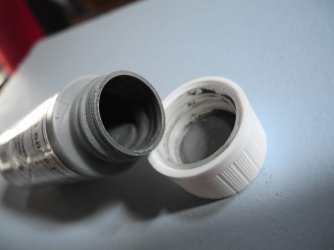
Here a picture of that "lead free pewter" in liquid state that i'm using. Its quite handy because when you do have to solder a wire, just soak in it or use a toothpick to fill the crimp/pin then heat it up with your iron.

It does exactly the same effect as rosin core wire solder but you can have a hand free to hold well the cable to the crimp or pin.

About sleeving the PSU main rail i will surely remove it from the connectors side then re-sleeve the same way back so i' will not touching the capacitors inside and put only a black plastic clamp to tight it on the PSU boxed side.

For the other cables, yes, it'll be easier to just follow the schema with or without little modifications.

You can put a heatshrink deep inside the connectors on each wires on the main sleeving and another bigger heatshrink to rub the all thing and finish the job proper. Just don't heat them too much on the first heatshrink because it might stiff the wires to bend.
 

Attachments

  • DSCN1538.JPG
    DSCN1538.JPG
    62 KB · Views: 3
  • Capture.PNG
    Capture.PNG
    50 KB · Views: 52

My Computer

Computer type
PC/Desktop
Computer Manufacturer/Model Number
Custom Build
OS
Windows 7 Professional SP1 - x64 [Non-UEFI Boot]
CPU
Ivy Bridge Core i5 3570K (Delidded)
Motherboard
Asus P8Z77-V LE PLUS
Memory
G.Skill "Ares" DDR3 PC3-12800 - 1600MHz (16Gb)
Graphics Card(s)
Asus Dual-RX480-O4G
Sound Card
Creative Sound Blaster Z w/5.1 sound system
Monitor(s) Displays
Asus IPS 23"
Screen Resolution
16/9
Hard Drives
Internal:
500Go Sata 6Gb/s (x2)
500Go Sata 3Gb/s (x2)
SSD 60Go Sata 6Gb/s
PSU
In Win C 900W Series 80+ Platinum
Case
Thermaltake Chaser A71
Cooling
Custom Water Cooling Loop
Keyboard
Cooler Master QuickFire XTi
Mouse
Razer Imperator 2012 (4G)
Antivirus
MSE
Browser
IE 11.0.xxx Rtm
Other Info
"Raid0" with Intel Smart Response Technology (HDD/SSD)
Hmmmm...I'll have to keep an eye out (ouch) for that stuff and check it out. I suspect it won't have the control of separate wire solder, though. It might be good for sweat soldering, though.

I rarely have a problem with holding the wire while soldering. I just position it so it will stay put and put the tip of the iron under it so it the wire rests on it; it usually stays put without any added help.

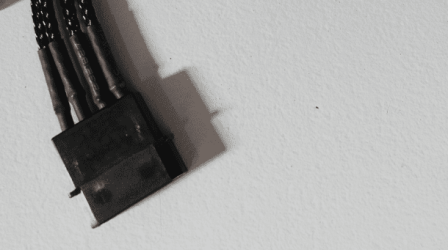
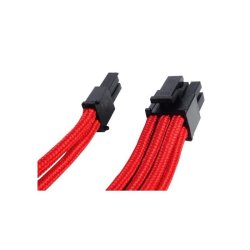
An alternative to using a small heat shrink sleeve to hid wire color at the end of sleeving and the larger heat shrink sleeve is to use individual sleeving like you show in the second picture and let it run directly into the connector, like this:
silverstone-pp07-extension-para-conector-pci-e-de-8-pines-de-30-cms-sleeving-rojo-pp07-pcir.jpg

The trick is to use a temporary shrink on the end of the sleeve and use a flame to heat it enough on the end to actually melt the end of the sleeve to the pin, the cut away the shrink afterward. What will be left is a sleeve fused to the end of the pin which can then be inserted into the connector body. I don't use it because I don't like how bulky individually sleeved wire cables look.
 

My Computer

Computer type
PC/Desktop
Computer Manufacturer/Model Number
Custom Build
OS
Win 7 Ultimate 64 bit
CPU
Intel i7-3930K
Motherboard
ASUS P9X79 WS
Memory
Kingston HyperX Genesis 32GB Kit (8x4GB Modules) 1600MHz DDR
Graphics Card(s)
MSI R7850 Twin Frozr 2GD5/OC Radeon HD 7850 2GB 256-bit GDDR
Sound Card
Asus Xonar Essence STX
Monitor(s) Displays
3x Asus VG248QE 24", Vizio 32" TV
Screen Resolution
1920 x 1080, ?
Hard Drives
Samsung 128GB 840 Pro SSD (1),
Samsung 4TB 850 EVO SSDs (4)
Samsung 4TB 850 EVO SSDs (16) external backup drives used in 2.5" hot swap bays in the computer.
PSU
Corsair HX750w
Case
Antec Two Hundred v2 (modified)
Cooling
Cooler Master GeminII S524 120mm (fan replaced with a 140mm)
Keyboard
Logitech G510s
Mouse
Logitech M525 (two in use)
Internet Speed
=< 32Mbps down, 8Mbps up
Antivirus
AVAST!, MBAM, SAS, Spybot S&D (all but MBAM free) Glary Util
Browser
IE11
Other Info
LSI 9211-8i HBA card (8 SATA III ports), 2.5" & 3.5" Hot Swap Bays, HooToo HT-CR001 PCI-E to USB 3.0 Internal Hub + 6 Slot Card Reader, and LG Model CH12LS28 BD-ROM Optical Drive. Also, ScanSnap S1500 ADF duplexing scanner, Canon 9000F flat bed scanner, Corsair SP2500 2.1 speakers, Samsung CLP 415nw laser color printer, Cyberpower PP2200SW UPS
The brand name is hidden NoN.
 

My Computer

Computer type
PC/Desktop
Computer Manufacturer/Model Number
Home Built Desktop By DataTech
OS
Windows 7 Ultimate X64 SP1
CPU
Intel i5-2550K, Differing ~4.4-4.8GHz No built in GPU
Motherboard
ASUS P8Z68-V PRO/GEN3
Memory
16GB G.Skill Sniper 1866MHz @ 2133MHz 2x8GB
Graphics Card(s)
ASUS GTX650TIB-DC2OC-2GD5, (650TI Boost)
Sound Card
Onboard Realtek 5-1
Monitor(s) Displays
Samsung P2570HD
Screen Resolution
1920x1080
Hard Drives
Samsung 840 Pro 256GB SSD for OS, 500GB Seagate Constellation (Enterprise drive) for Data
PSU
Corsair HX650W
Case
Inwin Dragon Rider
Cooling
Hyper 212 EVO w/two Noctua fans, push-pull, @1300 RPM
Keyboard
E-Z Eyes, bright yellow keys with large characters
Mouse
steelseries SENSEI Laser Pro Gaming
Internet Speed
48-51Mbs Mbs down, 11 Mbs up Xfinity Cable
Antivirus
Norton Internet Security 2013
Browser
IE 10, Opera, Pale Moon if needed
Other Info
4 case fans, LG BluRay-RE, ASUS DVD-RW, Mr. Fusion power supply, 1.21 gigawatts.
The brand name is hidden NoN.

That's a generic sub-branded by "Camping Gaz" corporation...not much infos apart cautions of way using it.

@Lady, i wasn't intend to sleeve PSU Rail wires one by one, that's why i thought about small piece of heatshrink on each. But this solution can do the trick!!
 

My Computer

Computer type
PC/Desktop
Computer Manufacturer/Model Number
Custom Build
OS
Windows 7 Professional SP1 - x64 [Non-UEFI Boot]
CPU
Ivy Bridge Core i5 3570K (Delidded)
Motherboard
Asus P8Z77-V LE PLUS
Memory
G.Skill "Ares" DDR3 PC3-12800 - 1600MHz (16Gb)
Graphics Card(s)
Asus Dual-RX480-O4G
Sound Card
Creative Sound Blaster Z w/5.1 sound system
Monitor(s) Displays
Asus IPS 23"
Screen Resolution
16/9
Hard Drives
Internal:
500Go Sata 6Gb/s (x2)
500Go Sata 3Gb/s (x2)
SSD 60Go Sata 6Gb/s
PSU
In Win C 900W Series 80+ Platinum
Case
Thermaltake Chaser A71
Cooling
Custom Water Cooling Loop
Keyboard
Cooler Master QuickFire XTi
Mouse
Razer Imperator 2012 (4G)
Antivirus
MSE
Browser
IE 11.0.xxx Rtm
Other Info
"Raid0" with Intel Smart Response Technology (HDD/SSD)
I finally got a combination of reasonably cool temperatures and reasonably well behaved allergies this morning so I got up early to paint the PSU shroud I've been working on. While I was at it, I also painted the gizmo I told you all about earlier. For some reason, rattle can paint and I don't get along very well. The self etching primer I used on the aluminum of the shroud and the zinc plate of the gizmo goes on fuzzy, even if I try to put a wet coat down. I was able to wet sand the shroud after putting down some regular primer and that took care of the fuzziness. I had to take some body glaze to the some minor pits and wet sand that before putting on the color coat. In the case of the gizmo, however, it would have been a nightmare to sand the regular primer after shooting it on so I just left it that way and hit with some color.

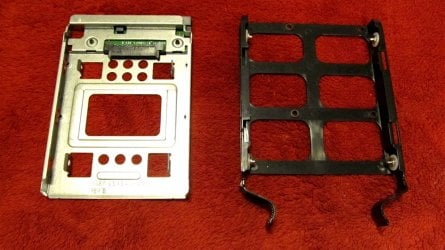
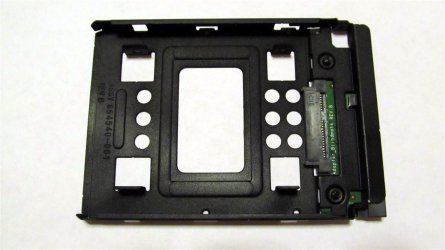
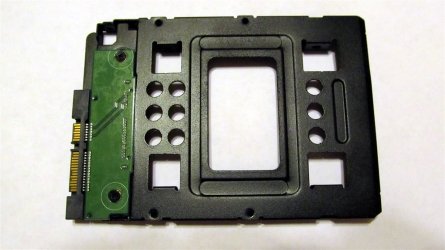
Here is a reminder of what the gizmo looked like:

IMG_0001.1.JPG

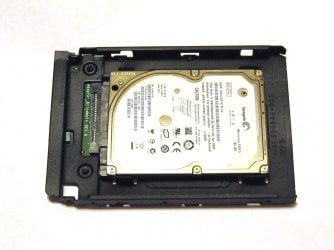
This is what it looks like after painting and replacing the PCB and with a 2.5" HDD in it (I'll be putting the SSD in it when I do the swap).

IMG_0001.JPG

IMG_0003.JPG

IMG_0008.JPG

Today, I picked up the extra gizmos I ordered in case I ever use more SSDs in the case (they came from a close out type vendor so they will become unavailable before long) and the extra 140mm filters since those are also apparently going to disappear and plastic will eventually break. I'm going to need a box the size of the case to store all the spare parts.

Later today, I'm going to put the front cover back on the case. I may need to take a rattail needle file to the bottom 5.25" bay mounting holes to slot them slightly so the drawer face will be flush with the front panel since I added that piece of aluminum to the front of the drawer. I want to wait a week or to for the paint on the PSU shroud to finish drying so I won't mess it up when I finish working on it. I want to put a custom sticker on the side. I have some magnetic tape I'm going to use to hold the shroud to the PSU but I don't want to stick anything to the paint until it is good and dry.
 

My Computer

Computer type
PC/Desktop
Computer Manufacturer/Model Number
Custom Build
OS
Win 7 Ultimate 64 bit
CPU
Intel i7-3930K
Motherboard
ASUS P9X79 WS
Memory
Kingston HyperX Genesis 32GB Kit (8x4GB Modules) 1600MHz DDR
Graphics Card(s)
MSI R7850 Twin Frozr 2GD5/OC Radeon HD 7850 2GB 256-bit GDDR
Sound Card
Asus Xonar Essence STX
Monitor(s) Displays
3x Asus VG248QE 24", Vizio 32" TV
Screen Resolution
1920 x 1080, ?
Hard Drives
Samsung 128GB 840 Pro SSD (1),
Samsung 4TB 850 EVO SSDs (4)
Samsung 4TB 850 EVO SSDs (16) external backup drives used in 2.5" hot swap bays in the computer.
PSU
Corsair HX750w
Case
Antec Two Hundred v2 (modified)
Cooling
Cooler Master GeminII S524 120mm (fan replaced with a 140mm)
Keyboard
Logitech G510s
Mouse
Logitech M525 (two in use)
Internet Speed
=< 32Mbps down, 8Mbps up
Antivirus
AVAST!, MBAM, SAS, Spybot S&D (all but MBAM free) Glary Util
Browser
IE11
Other Info
LSI 9211-8i HBA card (8 SATA III ports), 2.5" & 3.5" Hot Swap Bays, HooToo HT-CR001 PCI-E to USB 3.0 Internal Hub + 6 Slot Card Reader, and LG Model CH12LS28 BD-ROM Optical Drive. Also, ScanSnap S1500 ADF duplexing scanner, Canon 9000F flat bed scanner, Corsair SP2500 2.1 speakers, Samsung CLP 415nw laser color printer, Cyberpower PP2200SW UPS
I hate to sound passé, but that's a swell paint job Jeannie. :) Love the big pics too. ;)
 

My Computer

Computer type
PC/Desktop
Computer Manufacturer/Model Number
Home Built Desktop By DataTech
OS
Windows 7 Ultimate X64 SP1
CPU
Intel i5-2550K, Differing ~4.4-4.8GHz No built in GPU
Motherboard
ASUS P8Z68-V PRO/GEN3
Memory
16GB G.Skill Sniper 1866MHz @ 2133MHz 2x8GB
Graphics Card(s)
ASUS GTX650TIB-DC2OC-2GD5, (650TI Boost)
Sound Card
Onboard Realtek 5-1
Monitor(s) Displays
Samsung P2570HD
Screen Resolution
1920x1080
Hard Drives
Samsung 840 Pro 256GB SSD for OS, 500GB Seagate Constellation (Enterprise drive) for Data
PSU
Corsair HX650W
Case
Inwin Dragon Rider
Cooling
Hyper 212 EVO w/two Noctua fans, push-pull, @1300 RPM
Keyboard
E-Z Eyes, bright yellow keys with large characters
Mouse
steelseries SENSEI Laser Pro Gaming
Internet Speed
48-51Mbs Mbs down, 11 Mbs up Xfinity Cable
Antivirus
Norton Internet Security 2013
Browser
IE 10, Opera, Pale Moon if needed
Other Info
4 case fans, LG BluRay-RE, ASUS DVD-RW, Mr. Fusion power supply, 1.21 gigawatts.
Thanks, Gary. I'm paying for yesterday. My back was killing me this morning and my allergies are driving 'round the ben, up the way, and down the rabbit hole. Fortunately, things are starting to settle down a bit. Today is going to be as hot as...well, you know what I mean, so today might be a good day to kick back and watch some movies; I have all three Men in Black movies now.
 

My Computer

Computer type
PC/Desktop
Computer Manufacturer/Model Number
Custom Build
OS
Win 7 Ultimate 64 bit
CPU
Intel i7-3930K
Motherboard
ASUS P9X79 WS
Memory
Kingston HyperX Genesis 32GB Kit (8x4GB Modules) 1600MHz DDR
Graphics Card(s)
MSI R7850 Twin Frozr 2GD5/OC Radeon HD 7850 2GB 256-bit GDDR
Sound Card
Asus Xonar Essence STX
Monitor(s) Displays
3x Asus VG248QE 24", Vizio 32" TV
Screen Resolution
1920 x 1080, ?
Hard Drives
Samsung 128GB 840 Pro SSD (1),
Samsung 4TB 850 EVO SSDs (4)
Samsung 4TB 850 EVO SSDs (16) external backup drives used in 2.5" hot swap bays in the computer.
PSU
Corsair HX750w
Case
Antec Two Hundred v2 (modified)
Cooling
Cooler Master GeminII S524 120mm (fan replaced with a 140mm)
Keyboard
Logitech G510s
Mouse
Logitech M525 (two in use)
Internet Speed
=< 32Mbps down, 8Mbps up
Antivirus
AVAST!, MBAM, SAS, Spybot S&D (all but MBAM free) Glary Util
Browser
IE11
Other Info
LSI 9211-8i HBA card (8 SATA III ports), 2.5" & 3.5" Hot Swap Bays, HooToo HT-CR001 PCI-E to USB 3.0 Internal Hub + 6 Slot Card Reader, and LG Model CH12LS28 BD-ROM Optical Drive. Also, ScanSnap S1500 ADF duplexing scanner, Canon 9000F flat bed scanner, Corsair SP2500 2.1 speakers, Samsung CLP 415nw laser color printer, Cyberpower PP2200SW UPS
Good idea Jeannie. If you haven't seem all the MIB series yet, do watch them in order. Then there's 3 Matrix, 6 Star Wars, and 10 Star Trek movies to wade through. :p
Not to mention Spider Man and Batman.
 

My Computer

Computer type
PC/Desktop
Computer Manufacturer/Model Number
Home Built Desktop By DataTech
OS
Windows 7 Ultimate X64 SP1
CPU
Intel i5-2550K, Differing ~4.4-4.8GHz No built in GPU
Motherboard
ASUS P8Z68-V PRO/GEN3
Memory
16GB G.Skill Sniper 1866MHz @ 2133MHz 2x8GB
Graphics Card(s)
ASUS GTX650TIB-DC2OC-2GD5, (650TI Boost)
Sound Card
Onboard Realtek 5-1
Monitor(s) Displays
Samsung P2570HD
Screen Resolution
1920x1080
Hard Drives
Samsung 840 Pro 256GB SSD for OS, 500GB Seagate Constellation (Enterprise drive) for Data
PSU
Corsair HX650W
Case
Inwin Dragon Rider
Cooling
Hyper 212 EVO w/two Noctua fans, push-pull, @1300 RPM
Keyboard
E-Z Eyes, bright yellow keys with large characters
Mouse
steelseries SENSEI Laser Pro Gaming
Internet Speed
48-51Mbs Mbs down, 11 Mbs up Xfinity Cable
Antivirus
Norton Internet Security 2013
Browser
IE 10, Opera, Pale Moon if needed
Other Info
4 case fans, LG BluRay-RE, ASUS DVD-RW, Mr. Fusion power supply, 1.21 gigawatts.
OH yeah, I have most of those myself more than once (VHS, DVD and Blu Ray). Jeannie take it easy. I cannot do what you are doing except soldering connector, did that for a custom cable hack for my Dell Precession T3400 to feed an add on USB 3 board with 5V power. One end is a regular 4 pin molex and the other was a sata power connector. Nice machine for free. Has a quad core 2.66 and 4 Gb DDR2 for Windows 7 32 bit. I have a fax modem in it for the times I need to fax. Came from my Tammy's work minus hard drive, sound card and video card. Found the correct sound card on E Bay for less than $20 with the 10 pin proprietary connector and I seriously could not be bothered to research and build a cable. I also got a 160GB and a 2 TB data drive for the unit. I already had a Radeon 6670 and the USB3 card and the fax card was in it. Its my emergency back up machine if one of the other three breaks. I'll post some photos of that one and my other machine which had an Asrock motherboard in it that started suffering from missing SATA ports and after it refused to find the boot drive I bought an Asus to replace it. Gary know all about Asrock paperweight boards. I have soldered up the sata connectors on the MB as they were dry jointed and you could waggle the connector and see them move. Its out of warranty and in the junk pile but OK probably works. So like I said take it easy, I have been enjoying the adventure of Arizona's Lady case modder supreme.
 

My Computer

Computer type
PC/Desktop
Computer Manufacturer/Model Number
Bluethunder II
OS
Windows 7 x64 Ultimate and numerous virtual machines
CPU
AMD FX-8350 Vishera 32nm Technology @ 4.2 GHz default
Motherboard
ASUSTeK COMPUTER INC. SABERTOOTH 990FX R2.0 (Socket 942)
Memory
G Skill 32.0GB Dual-Channel DDR3 @ 1204MHz (11-13-13-31)
Graphics Card(s)
EVGA GeForce GTX 960 4GB Super SC ACX 2.0+ with Back Plate
Sound Card
Creative X-Fi Titanium HD Audiophile PCIe
Monitor(s) Displays
LG L227WTG x 3
Screen Resolution
1680 x 1050 16:10
Hard Drives
238GB Samsung850 PRO SATA Disk Device (SSD)
1863GB Seagate ST2000DM 001-1CH164 (SATA)
1397GB Seagate ST1500DL 003-9VT16L(SATA)
466GB Western Digital WDC WD50 03AZEX-00K1GA0 (SATA) x 2
932GB Seagate ST310005 28AS SATA Disk Device (SATA)
PSU
Enermax Revolution87+ 1000 Watts Gold Certified Power Supply
Case
Rocketfish Full Tower
Cooling
Cooler Master Hyper 212 EVO Push Pull 120mm Fans
Keyboard
Logitech K740
Mouse
Logitech G100S Laser LED + Logitech Gamepad F310
Internet Speed
500 mbs down and 30mbs up
Antivirus
Malwarebytes Pro & Avast and MSE on certain Virtual Machines
Browser
Firefox (Main) Chrome, Internet Explorer (Back Up)
Other Info
Logitech X 230 2.1 Stereo System and 5.1 Yamaha RX V2090
B&W DM6 Monitor Speakers + Center and Surround Speakers
Using Mouse Without Borders (Google it)
Thanks, Tony! I did take it easy today; too easy, in fact. I was going to watch a MIB marathon (I've seen them all but would like to see them again) but Good Neighbor Sam was on TV so I decided to watch it instead. Fell asleep midway. Watched a couple of Bones reruns after waking up. After I finish here, I'll probably watch an episode of Remington Steele (I have the entire series and I've been gradually working my way through them), read a little, then crash. Mayhap I'll watch the MIB's tomorrow.

I did put the front panel on the case and worked on the elongating the mounting holes slightly for the drawer and hot swap bay I added to the case so those are now pretty much flush. The aluminum insert I stole from a 5.25" bay cover and put onto the drawer front fits in very well. Fingerprints are going to be an issue so I need to locate a small, square, flat bottomed stick-on plastic or rubber foot to put on the front to use as a push point. I should have one knocking about here somewhere.

I can't think of anything else I need to do to this case other than finish up the PSU shroud and wait for the humidity levels to go up to reduce the chances of frying anything when I make the swap (it's really bone dry right now). The paint needs to dry for a week or two before I start sticking things to it (a custom label and magnetic tape to hold it to the PSU). One reason I decided to make the shroud was I was pretty P.O.ed (to put it mildly) at Corsair for sticking a large, ugly, tacky (pardon the pun) specifications sticker on top of the PSU and saying removing any sticker (not just the tiny one over a screw) on the PSU would void the seven year warranty. I could have easily made the shroud cover only the cables coming out of the end (and wouldn't have minded leaving the original on the case if I could have removed the ugly one on top) but, as I said, I was P.O.ed at Corsair so I decided to make the shroud cover the PSU and cables and make my own label to go on the shroud instead of using Corsair's (it would have been easy to duplicate). I liked the ship logo but didn't want to use the Corsair name (vindictive old bi...broad, aren't I?) so I decided to use the first name of the 16th century female Irish Chieftain and part time pirate (a corsair is a pirate, albeit from a different part of the world), Grania O'Malley aka Grace O'Malley (take that, Corsair, no free PSU advertising for you!). This is the design I settled on:

Grania.2.jpg

I'll print it on a 3 1/3" x 4" label, spray it with an art fixative (which I need to buy), trim it to size, then stick it to the side of the shroud.

If you guys want to see some really good modding that makes mine look sick (not hard to do), check out some of the ones in this forum. I got a lot of my inspiration and ideas from there.
 

My Computer

Computer type
PC/Desktop
Computer Manufacturer/Model Number
Custom Build
OS
Win 7 Ultimate 64 bit
CPU
Intel i7-3930K
Motherboard
ASUS P9X79 WS
Memory
Kingston HyperX Genesis 32GB Kit (8x4GB Modules) 1600MHz DDR
Graphics Card(s)
MSI R7850 Twin Frozr 2GD5/OC Radeon HD 7850 2GB 256-bit GDDR
Sound Card
Asus Xonar Essence STX
Monitor(s) Displays
3x Asus VG248QE 24", Vizio 32" TV
Screen Resolution
1920 x 1080, ?
Hard Drives
Samsung 128GB 840 Pro SSD (1),
Samsung 4TB 850 EVO SSDs (4)
Samsung 4TB 850 EVO SSDs (16) external backup drives used in 2.5" hot swap bays in the computer.
PSU
Corsair HX750w
Case
Antec Two Hundred v2 (modified)
Cooling
Cooler Master GeminII S524 120mm (fan replaced with a 140mm)
Keyboard
Logitech G510s
Mouse
Logitech M525 (two in use)
Internet Speed
=< 32Mbps down, 8Mbps up
Antivirus
AVAST!, MBAM, SAS, Spybot S&D (all but MBAM free) Glary Util
Browser
IE11
Other Info
LSI 9211-8i HBA card (8 SATA III ports), 2.5" & 3.5" Hot Swap Bays, HooToo HT-CR001 PCI-E to USB 3.0 Internal Hub + 6 Slot Card Reader, and LG Model CH12LS28 BD-ROM Optical Drive. Also, ScanSnap S1500 ADF duplexing scanner, Canon 9000F flat bed scanner, Corsair SP2500 2.1 speakers, Samsung CLP 415nw laser color printer, Cyberpower PP2200SW UPS
Good idea for the label, I took the liberty....


Grania.png

Grania1.png

Grania2.png
 

My Computer

Computer type
PC/Desktop
Computer Manufacturer/Model Number
Home Built Desktop By DataTech
OS
Windows 7 Ultimate X64 SP1
CPU
Intel i5-2550K, Differing ~4.4-4.8GHz No built in GPU
Motherboard
ASUS P8Z68-V PRO/GEN3
Memory
16GB G.Skill Sniper 1866MHz @ 2133MHz 2x8GB
Graphics Card(s)
ASUS GTX650TIB-DC2OC-2GD5, (650TI Boost)
Sound Card
Onboard Realtek 5-1
Monitor(s) Displays
Samsung P2570HD
Screen Resolution
1920x1080
Hard Drives
Samsung 840 Pro 256GB SSD for OS, 500GB Seagate Constellation (Enterprise drive) for Data
PSU
Corsair HX650W
Case
Inwin Dragon Rider
Cooling
Hyper 212 EVO w/two Noctua fans, push-pull, @1300 RPM
Keyboard
E-Z Eyes, bright yellow keys with large characters
Mouse
steelseries SENSEI Laser Pro Gaming
Internet Speed
48-51Mbs Mbs down, 11 Mbs up Xfinity Cable
Antivirus
Norton Internet Security 2013
Browser
IE 10, Opera, Pale Moon if needed
Other Info
4 case fans, LG BluRay-RE, ASUS DVD-RW, Mr. Fusion power supply, 1.21 gigawatts.
Thanks, Gary. The trimmed size of the label will be only 2.25" x 4" (the side of the shroud is only 3.5" high) so the sail over the name style won't work well and the shaded lettering would be too small show up well. One of the early versions I tried is pretty much identical to the last one you posted. Corsair uses both the side by side and over under style so I tried maybe one to two dozen variations until I hit upon a combination of position, size, and font that worked well for me. Not that suggestions aren't welcome, however. I haven't printed any actual labels yet, just samples printed on letter size paper and cut out so I could hold them up against the shroud to get an idea how it would look.

Here is the version like yours (this was one of the final two; I've deleted all the others):

Grania.jpg

And here is the sample of the version I settled on setting on the side of the shroud (I still want to try it with the shroud in the case before I settle on an exact location). Forgive the lousy photo but I had a huge problem with glare until I killed most of the lights.

IMG 0.5.JPG

If the label was any larger, it would be too much.
 

My Computer

Computer type
PC/Desktop
Computer Manufacturer/Model Number
Custom Build
OS
Win 7 Ultimate 64 bit
CPU
Intel i7-3930K
Motherboard
ASUS P9X79 WS
Memory
Kingston HyperX Genesis 32GB Kit (8x4GB Modules) 1600MHz DDR
Graphics Card(s)
MSI R7850 Twin Frozr 2GD5/OC Radeon HD 7850 2GB 256-bit GDDR
Sound Card
Asus Xonar Essence STX
Monitor(s) Displays
3x Asus VG248QE 24", Vizio 32" TV
Screen Resolution
1920 x 1080, ?
Hard Drives
Samsung 128GB 840 Pro SSD (1),
Samsung 4TB 850 EVO SSDs (4)
Samsung 4TB 850 EVO SSDs (16) external backup drives used in 2.5" hot swap bays in the computer.
PSU
Corsair HX750w
Case
Antec Two Hundred v2 (modified)
Cooling
Cooler Master GeminII S524 120mm (fan replaced with a 140mm)
Keyboard
Logitech G510s
Mouse
Logitech M525 (two in use)
Internet Speed
=< 32Mbps down, 8Mbps up
Antivirus
AVAST!, MBAM, SAS, Spybot S&D (all but MBAM free) Glary Util
Browser
IE11
Other Info
LSI 9211-8i HBA card (8 SATA III ports), 2.5" & 3.5" Hot Swap Bays, HooToo HT-CR001 PCI-E to USB 3.0 Internal Hub + 6 Slot Card Reader, and LG Model CH12LS28 BD-ROM Optical Drive. Also, ScanSnap S1500 ADF duplexing scanner, Canon 9000F flat bed scanner, Corsair SP2500 2.1 speakers, Samsung CLP 415nw laser color printer, Cyberpower PP2200SW UPS
No problem it's fun to fool around with logos, or any image for me. I figured if you liked any that I did the printer would scale it to fit the label size.

Yours looks good there. I think I would get some fridge magnet material and glue the label to that instead and it could be easily removed if need be.
 

My Computer

Computer type
PC/Desktop
Computer Manufacturer/Model Number
Home Built Desktop By DataTech
OS
Windows 7 Ultimate X64 SP1
CPU
Intel i5-2550K, Differing ~4.4-4.8GHz No built in GPU
Motherboard
ASUS P8Z68-V PRO/GEN3
Memory
16GB G.Skill Sniper 1866MHz @ 2133MHz 2x8GB
Graphics Card(s)
ASUS GTX650TIB-DC2OC-2GD5, (650TI Boost)
Sound Card
Onboard Realtek 5-1
Monitor(s) Displays
Samsung P2570HD
Screen Resolution
1920x1080
Hard Drives
Samsung 840 Pro 256GB SSD for OS, 500GB Seagate Constellation (Enterprise drive) for Data
PSU
Corsair HX650W
Case
Inwin Dragon Rider
Cooling
Hyper 212 EVO w/two Noctua fans, push-pull, @1300 RPM
Keyboard
E-Z Eyes, bright yellow keys with large characters
Mouse
steelseries SENSEI Laser Pro Gaming
Internet Speed
48-51Mbs Mbs down, 11 Mbs up Xfinity Cable
Antivirus
Norton Internet Security 2013
Browser
IE 10, Opera, Pale Moon if needed
Other Info
4 case fans, LG BluRay-RE, ASUS DVD-RW, Mr. Fusion power supply, 1.21 gigawatts.
Thanks but it won't work. The shroud is made of aluminum. Nice idea, though. I actually have an almost paper thin 4.75" x 6.75" piece of the stuff I salvaged from an advertising fridge magnet for a company I won't do business with and removed the label from just to see if I could.
 
Last edited:

My Computer

Computer type
PC/Desktop
Computer Manufacturer/Model Number
Custom Build
OS
Win 7 Ultimate 64 bit
CPU
Intel i7-3930K
Motherboard
ASUS P9X79 WS
Memory
Kingston HyperX Genesis 32GB Kit (8x4GB Modules) 1600MHz DDR
Graphics Card(s)
MSI R7850 Twin Frozr 2GD5/OC Radeon HD 7850 2GB 256-bit GDDR
Sound Card
Asus Xonar Essence STX
Monitor(s) Displays
3x Asus VG248QE 24", Vizio 32" TV
Screen Resolution
1920 x 1080, ?
Hard Drives
Samsung 128GB 840 Pro SSD (1),
Samsung 4TB 850 EVO SSDs (4)
Samsung 4TB 850 EVO SSDs (16) external backup drives used in 2.5" hot swap bays in the computer.
PSU
Corsair HX750w
Case
Antec Two Hundred v2 (modified)
Cooling
Cooler Master GeminII S524 120mm (fan replaced with a 140mm)
Keyboard
Logitech G510s
Mouse
Logitech M525 (two in use)
Internet Speed
=< 32Mbps down, 8Mbps up
Antivirus
AVAST!, MBAM, SAS, Spybot S&D (all but MBAM free) Glary Util
Browser
IE11
Other Info
LSI 9211-8i HBA card (8 SATA III ports), 2.5" & 3.5" Hot Swap Bays, HooToo HT-CR001 PCI-E to USB 3.0 Internal Hub + 6 Slot Card Reader, and LG Model CH12LS28 BD-ROM Optical Drive. Also, ScanSnap S1500 ADF duplexing scanner, Canon 9000F flat bed scanner, Corsair SP2500 2.1 speakers, Samsung CLP 415nw laser color printer, Cyberpower PP2200SW UPS
What, magnets don't attract aluminum? :p

My bad, now I recall your saying you made it from Al. Have you posted pics of the shroud? I'd like to see that, I'm going to be doing a rebuild on mine soon...I hope.
 

My Computer

Computer type
PC/Desktop
Computer Manufacturer/Model Number
Home Built Desktop By DataTech
OS
Windows 7 Ultimate X64 SP1
CPU
Intel i5-2550K, Differing ~4.4-4.8GHz No built in GPU
Motherboard
ASUS P8Z68-V PRO/GEN3
Memory
16GB G.Skill Sniper 1866MHz @ 2133MHz 2x8GB
Graphics Card(s)
ASUS GTX650TIB-DC2OC-2GD5, (650TI Boost)
Sound Card
Onboard Realtek 5-1
Monitor(s) Displays
Samsung P2570HD
Screen Resolution
1920x1080
Hard Drives
Samsung 840 Pro 256GB SSD for OS, 500GB Seagate Constellation (Enterprise drive) for Data
PSU
Corsair HX650W
Case
Inwin Dragon Rider
Cooling
Hyper 212 EVO w/two Noctua fans, push-pull, @1300 RPM
Keyboard
E-Z Eyes, bright yellow keys with large characters
Mouse
steelseries SENSEI Laser Pro Gaming
Internet Speed
48-51Mbs Mbs down, 11 Mbs up Xfinity Cable
Antivirus
Norton Internet Security 2013
Browser
IE 10, Opera, Pale Moon if needed
Other Info
4 case fans, LG BluRay-RE, ASUS DVD-RW, Mr. Fusion power supply, 1.21 gigawatts.
Back
Top