Grand Theft Auto 4 - Install Wont Start

My Computer My Computer

At a glance

Windows 7 Ultimate Vista Ultimate x64Core 2 Duo E8500 3.16Ghz @ 3.8Ghz2x2Gigs Patriot PC2-6400 LLInno3D GeForce GTX260 216 SP
Computer Manufacturer/Model Number
Home Brew
OS
Windows 7 Ultimate Vista Ultimate x64
CPU
Core 2 Duo E8500 3.16Ghz @ 3.8Ghz
Motherboard
eVGA 750i FTW
Memory
2x2Gigs Patriot PC2-6400 LL
Graphics Card(s)
Inno3D GeForce GTX260 216 SP
Monitor(s) Displays
ASUS VW222U 22" 2ms Response time
Screen Resolution
1680x1050
Hard Drives
SATA 150GB
SATA II 250GB
USB IDE 750GB Ext.
PSU
HYTEC 600W & Thermaltake 650W Toughpower Power Exp
Case
Thermaltake Armor LCS (Liquid Cooling System)
Cooling
Liquid Cooling System
Keyboard
Logitech G15 Gaming Keyboard
Mouse
Logitech G9 Gaming Mouse
Also use the liveless patch.
 

My Computer My Computer

At a glance

Windows 7 Build 7277Intel Pentium D @ 2.8/Intel Centrino @ 2.10GHz2GB DDR2GeForce 7300 LE / Intel Integrated Graphics 4...
Computer Manufacturer/Model Number
Dell XPS 400 / HP ProBook 4510s
OS
Windows 7 Build 7277
CPU
Intel Pentium D @ 2.8/Intel Centrino @ 2.10GHz
Motherboard
Dell DXP051
Memory
2GB DDR2
Graphics Card(s)
GeForce 7300 LE / Intel Integrated Graphics 4 Series
Sound Card
Realtek AC'97
Monitor(s) Displays
17" CRT (for now) / 15.6" LCD / 65" DLP Mitsubishi
Screen Resolution
1280 x 768 / 1920 x 1080i
Hard Drives
250GB WD IDE
160GB WD SATA
320GB Samsung SATA
500GB WD Caviar Green SATA
250GB WD SATA in HP ProBook
Case
Dell XPS 400
Cooling
2 fans (1 case, 1 CPU)
Keyboard
Dell Slim Standard Keyboard / Full Keypad w/ number pad
Mouse
Dell 3-Button Mouse / Logitech Wireless Mouse
Internet Speed
29mbps Down; 3.0mbps Up
Hey, I'm running on Vista but I saw this thread so thought I would ask here.

This is my problem.

The autorun looks like this:

autorungtaivjv7.jpg


First time I ran it, I clicked the big button to the left, even though I couldn't see what it said, assuming it would be install. And it installed the Rockstar Social club thing. After that nothing happened so I figured I should run the autorun again, I did, and the autorun looked the same as before. So I clicked the big button to the left again, asuming it would be the installing of the game, and I got this message:

autorungtaiv2lr8.jpg


And I can see some of you guys got the same message, so I tried downloading and installing the GFWL update and I tried running it in XP compatibility mode, but non of it worked, still got the same message! Help please!
 

My Computer My Computer

At a glance

Vista
OS
Vista
You need to go into the GTAIV folder and change the setup.exe to install with Xp compatibility mode and then it should work, you cant just change the main setup as that is mostly to install the Social club, also go into the redisdributable folder and install the 2 programs in there before your main install C++ and GFWL.
 

My Computer My Computer

At a glance

Windows 7 Ultimate Vista Ultimate x64Core 2 Duo E8500 3.16Ghz @ 3.8Ghz2x2Gigs Patriot PC2-6400 LLInno3D GeForce GTX260 216 SP
Computer Manufacturer/Model Number
Home Brew
OS
Windows 7 Ultimate Vista Ultimate x64
CPU
Core 2 Duo E8500 3.16Ghz @ 3.8Ghz
Motherboard
eVGA 750i FTW
Memory
2x2Gigs Patriot PC2-6400 LL
Graphics Card(s)
Inno3D GeForce GTX260 216 SP
Monitor(s) Displays
ASUS VW222U 22" 2ms Response time
Screen Resolution
1680x1050
Hard Drives
SATA 150GB
SATA II 250GB
USB IDE 750GB Ext.
PSU
HYTEC 600W & Thermaltake 650W Toughpower Power Exp
Case
Thermaltake Armor LCS (Liquid Cooling System)
Cooling
Liquid Cooling System
Keyboard
Logitech G15 Gaming Keyboard
Mouse
Logitech G9 Gaming Mouse
Thank you, that worked. I got it installed now.

New problem!

When I lauch the game I get this:

gtaivstarterrorwa2.jpg


EDIT: Oh, just read that it had something to do with the Service Pack 1.0 not being installed. But I remember reading that if you got updates along the way through Windows Update you would be equal to the ones having downloaded the full Service Pack, that's why I didn't do it, hmm...
 

My Computer My Computer

At a glance

Vista
OS
Vista
Here you go mate try replacing these files with the one off my working game and hopefully that will do the trick
GTAIV
 

My Computer My Computer

At a glance

Windows 7 Ultimate Vista Ultimate x64Core 2 Duo E8500 3.16Ghz @ 3.8Ghz2x2Gigs Patriot PC2-6400 LLInno3D GeForce GTX260 216 SP
Computer Manufacturer/Model Number
Home Brew
OS
Windows 7 Ultimate Vista Ultimate x64
CPU
Core 2 Duo E8500 3.16Ghz @ 3.8Ghz
Motherboard
eVGA 750i FTW
Memory
2x2Gigs Patriot PC2-6400 LL
Graphics Card(s)
Inno3D GeForce GTX260 216 SP
Monitor(s) Displays
ASUS VW222U 22" 2ms Response time
Screen Resolution
1680x1050
Hard Drives
SATA 150GB
SATA II 250GB
USB IDE 750GB Ext.
PSU
HYTEC 600W & Thermaltake 650W Toughpower Power Exp
Case
Thermaltake Armor LCS (Liquid Cooling System)
Cooling
Liquid Cooling System
Keyboard
Logitech G15 Gaming Keyboard
Mouse
Logitech G9 Gaming Mouse
I replaced them, now it gives me a little different message, still the same "RMN20" error, but it also says it's because I need Service Pack 1 or higher. So I'm going to try that tomorrow, thank you so far, I'll get back to you.

Since replacing those files obviously changed the message occouring when I tried launching the game, I'm a bit worried it could ruin something else or change something..? Or won't it hurt at all? Never tried replacing game files like that before.
 

My Computer My Computer

At a glance

Vista
OS
Vista
I had a problem after install and it would not run for me at all had some screen come up saying it was checking for something or other I don't remember what but after that it would just close and nothing else happened.

So my work around was to copy the whole folder from my Vista install and replace the folder in Windows 7 and that has worked for me without any problems, I was even able to launch the game directly from the Vista install, so I am fairly sure that it wont effect anything else.

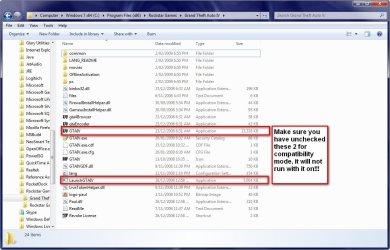
When you launch the game make sure all compatibility modes have been unchecked as it will not run with them on.

2009-02-05_024535.jpg
 

My Computer My Computer

At a glance

Windows 7 Ultimate Vista Ultimate x64Core 2 Duo E8500 3.16Ghz @ 3.8Ghz2x2Gigs Patriot PC2-6400 LLInno3D GeForce GTX260 216 SP
Computer Manufacturer/Model Number
Home Brew
OS
Windows 7 Ultimate Vista Ultimate x64
CPU
Core 2 Duo E8500 3.16Ghz @ 3.8Ghz
Motherboard
eVGA 750i FTW
Memory
2x2Gigs Patriot PC2-6400 LL
Graphics Card(s)
Inno3D GeForce GTX260 216 SP
Monitor(s) Displays
ASUS VW222U 22" 2ms Response time
Screen Resolution
1680x1050
Hard Drives
SATA 150GB
SATA II 250GB
USB IDE 750GB Ext.
PSU
HYTEC 600W & Thermaltake 650W Toughpower Power Exp
Case
Thermaltake Armor LCS (Liquid Cooling System)
Cooling
Liquid Cooling System
Keyboard
Logitech G15 Gaming Keyboard
Mouse
Logitech G9 Gaming Mouse
Hii~ I've been googling around for a fix for this and this seemed to be the most promising place.

But... I've tried all the fixes here, and none of them work--even installing the C++ and GFWL before setting the compatibility on the setup.exe (in the GTAIV folder) to Windows XP SP2 but no matter what, I keep getting what this guy got:


One thing I noticed, though; when trying to install the C++ (vcredist thing) the little green bar goes up about 9/10 of the way and then the window just disappears... So... I dunno what's going on.


Also:

Windows 7 Build 7000
AMD Athlon 64 X2 Dual Core 2.7GHz
2.5 GB DDR2 RAM
Nvidia 8400GS 512MB
 

My Computer My Computer

At a glance

Windows 7AMD Athlon 64 X2 Dual Core 2.7GHz2.5 GB DDR2 RAMNvidia 8400GS 512MB
OS
Windows 7
CPU
AMD Athlon 64 X2 Dual Core 2.7GHz
Memory
2.5 GB DDR2 RAM
Graphics Card(s)
Nvidia 8400GS 512MB
Screen Resolution
1024 x 768
1. Set registry to this:

[HKEY_LOCAL_MACHINE\SYSTEM\CurrentControlSet\Control\Windows]
"CSDVersion"=dword:00000300

2. Restart

3. Install (without any compatibility modes)

4. Set registry to this:

[HKEY_LOCAL_MACHINE\SYSTEM\CurrentControlSet\Control\Windows]
"CSDVersion"=dword:00000000


5. Restart

Enjoy! =)
 

My Computer My Computer

At a glance

Windows 7
OS
Windows 7
Hi all, I've already completed the game installed in WinXP? I'm dual booting Windows7 on another drive. Both are NTFS. Can I run the game installed on the WinXP on Windows7?
 

My Computer My Computer

At a glance

Windows 7Intel Core 2 Duo E7200 Dual [email protected]2 x Kingston 2GB DDR2-800PowerColor HD4580
OS
Windows 7
CPU
Intel Core 2 Duo E7200 Dual [email protected]
Motherboard
Gigabyte P45-DS3
Memory
2 x Kingston 2GB DDR2-800
Graphics Card(s)
PowerColor HD4580
Monitor(s) Displays
Dell 2407WFP
Hard Drives
Western Digital 640GB Black
PSU
Corsair HX620W
Yes you Probably can, but you would be better off installing it again and do a custom install and select the same location on XP, that way it saves you the space.
 

My Computer My Computer

At a glance

Windows 7 Ultimate Vista Ultimate x64Core 2 Duo E8500 3.16Ghz @ 3.8Ghz2x2Gigs Patriot PC2-6400 LLInno3D GeForce GTX260 216 SP
Computer Manufacturer/Model Number
Home Brew
OS
Windows 7 Ultimate Vista Ultimate x64
CPU
Core 2 Duo E8500 3.16Ghz @ 3.8Ghz
Motherboard
eVGA 750i FTW
Memory
2x2Gigs Patriot PC2-6400 LL
Graphics Card(s)
Inno3D GeForce GTX260 216 SP
Monitor(s) Displays
ASUS VW222U 22" 2ms Response time
Screen Resolution
1680x1050
Hard Drives
SATA 150GB
SATA II 250GB
USB IDE 750GB Ext.
PSU
HYTEC 600W & Thermaltake 650W Toughpower Power Exp
Case
Thermaltake Armor LCS (Liquid Cooling System)
Cooling
Liquid Cooling System
Keyboard
Logitech G15 Gaming Keyboard
Mouse
Logitech G9 Gaming Mouse
Yes you Probably can, but you would be better off installing it again and do a custom install and select the same location on XP, that way it saves you the space.

Any idea how to do that without doing a installation on Windows 7?
 

My Computer My Computer

At a glance

Windows 7Intel Core 2 Duo E7200 Dual [email protected]2 x Kingston 2GB DDR2-800PowerColor HD4580
OS
Windows 7
CPU
Intel Core 2 Duo E7200 Dual [email protected]
Motherboard
Gigabyte P45-DS3
Memory
2 x Kingston 2GB DDR2-800
Graphics Card(s)
PowerColor HD4580
Monitor(s) Displays
Dell 2407WFP
Hard Drives
Western Digital 640GB Black
PSU
Corsair HX620W
I did it yesterday, just install and select custom and change the drive letter to your XP partition and install it over your previous one, mine took about a minute to install because it is already there and it's only really adding registry values to Windows 7.
 

My Computer My Computer

At a glance

Windows 7 Ultimate Vista Ultimate x64Core 2 Duo E8500 3.16Ghz @ 3.8Ghz2x2Gigs Patriot PC2-6400 LLInno3D GeForce GTX260 216 SP
Computer Manufacturer/Model Number
Home Brew
OS
Windows 7 Ultimate Vista Ultimate x64
CPU
Core 2 Duo E8500 3.16Ghz @ 3.8Ghz
Motherboard
eVGA 750i FTW
Memory
2x2Gigs Patriot PC2-6400 LL
Graphics Card(s)
Inno3D GeForce GTX260 216 SP
Monitor(s) Displays
ASUS VW222U 22" 2ms Response time
Screen Resolution
1680x1050
Hard Drives
SATA 150GB
SATA II 250GB
USB IDE 750GB Ext.
PSU
HYTEC 600W & Thermaltake 650W Toughpower Power Exp
Case
Thermaltake Armor LCS (Liquid Cooling System)
Cooling
Liquid Cooling System
Keyboard
Logitech G15 Gaming Keyboard
Mouse
Logitech G9 Gaming Mouse
i installed it yesterday, no probs except ~3.2 fps
that and 'Social Club' was chewing on ram, like it was cool.

....quickly uninstalled :P
 

My Computer My Computer

At a glance

Windows 7 Ultimate x32Intel Celeron D 3.2 Ghz 533 fsb (LGA 775)1 GB (2x512MB) PC-3200 DDR @ 200MhzNvidia GeForce 9400GT- 1GB
Computer Manufacturer/Model Number
eMachines W3502
OS
Windows 7 Ultimate x32
CPU
Intel Celeron D 3.2 Ghz 533 fsb (LGA 775)
Motherboard
Intel D101GGC
Memory
1 GB (2x512MB) PC-3200 DDR @ 200Mhz
Graphics Card(s)
Nvidia GeForce 9400GT- 1GB
Sound Card
Sound Blaster X-Fi Xtreame Gamer
Monitor(s) Displays
19" LCD HDtv
Screen Resolution
1360x768 @ 60Htz
Hard Drives
SeaGate Barracuda 750GB
SeaGate Barracuda 100GB
Toshiba CD/DVDW/ TS-H552D [DVD+R, DL]
PSU
stock (idk)
Case
The busted remains of the stock case
Cooling
Dust cooled, waitwut?
Keyboard
Stock. Missing a few keys.
Mouse
Logitech LX8 5-btn mouse (wireless)
Internet Speed
TWC 10Mb
Other Info
Keeps going, and going, and going.......
OK I have now been able to find a way to play and this how I did it.

1. To install the game you have to do it with XP compatibility mode.
Note: you will have some issues at the end of the installation, just ignore and finalize the install.

2. Go to the disc and open and go to this file and install.

View attachment 2085

2. Now go to the disc and select this file and install it.

View attachment 2086

3. Download the Games for Windows Live Update http://go.microsoft.com/fwlink/?LinkId=98609

If you try to run the game before you install the update you should be prompted to install it before you are able to play.

4. Once you have installed the update you then have to turn off any compatibility modes that you may have on as I found out, with XP mode I was told that I needed service Pack 3 and in Vista Mode I was told I needed service pack 1 so I unchecked it and ran as Administrator anyway.

5. Start the game enter your live ID and your game key and then you should be able to play.

oh yeah tham man thats right i solved the problem in Win 7 thx...
 

My Computer My Computer

At a glance

Win 7 x64 Final 6200Phenom II x4 3.2GHz4GB Kingstom DDR2EAH 4850 1GB (HD 4859 from ASUS)
OS
Win 7 x64 Final 6200
CPU
Phenom II x4 3.2GHz
Motherboard
M3A78 chip 770 am3+
Memory
4GB Kingstom DDR2
Graphics Card(s)
EAH 4850 1GB (HD 4859 from ASUS)
Sound Card
Realtek
Monitor(s) Displays
Samsung SyncMaster T220HD 2HDMI DTVmonitor 10000:1
Screen Resolution
1680x1050
Hard Drives
2x500 GB Western Digital 32MB Cache
PSU
Corsair 650W
Case
MS
Cooling
SilenX iXtrema Pro Blue LED, 80x80x25, 1700rpm, 64.52m³/h, )
Keyboard
Microsoft (USB)
Mouse
Microsoft (USB)
Internet Speed
16000
I have installed windows 7 built 7000 32bit and I install gta4 with no problem.
The only problem that I have is when I am playing the game there is a glitch when you drive a car and hit a wall the camera starts to wobble.

One other major problem that i face when playing the game is the graphics settings are all set to the lowest point. and if i try to adjust i GET ERROR system doesn't have enough resources.
I have played gta4 on my current hardware with windows xp sp3 and I was able to play quite well on medium settings.

Nvidia 8600
2gig ram
2.5 intel pentium dual core

If anyone has the same problem or a possible solution please let me know
 

My Computer My Computer

At a glance

windows 7 built 7000Intel pentium d e5200 2.5 ghz2gig ramNvidia 8600
OS
windows 7 built 7000
CPU
Intel pentium d e5200 2.5 ghz
Motherboard
Biostar
Memory
2gig ram
Graphics Card(s)
Nvidia 8600
Sound Card
onboard
Monitor(s) Displays
lg studio works
Hard Drives
160 gig sata
I am having problems as well! I have the RC1 with 2.0 ghz, 4 GB ram and ATI Radeon 4570 512 mb. I get a (-5001 0xffffec75) error, and it will not go any further. I have installed the WLG update and RGSC as well, but with no luck. Any help?

Thank you!
 

My Computer My Computer

At a glance

Windows 7 Ultimate 32-bitT4200 2.04 GBATI Radeo 4570 512mb
Computer Manufacturer/Model Number
Dell Studio 1555
OS
Windows 7 Ultimate 32-bit
CPU
T4200 2.0
Memory
4 GB
Graphics Card(s)
ATI Radeo 4570 512mb
Hard Drives
320 GB
I had the compatibility mode enabled. I attempted Windows XP Compatibility and then Vista after that failed. They both ended up failing. What I have been reading is GTA4 install stopped working because of something to do with the Securom Protection since build 6956 I believe it was which makes me all the more pissed off.
 

My Computer My Computer

At a glance

OSlinux1GB1GB
Computer Manufacturer/Model Number
linux
OS
OS
CPU
linux
Motherboard
linux
Memory
1GB
Graphics Card(s)
1GB
Sound Card
1GB
Monitor(s) Displays
linux
Hard Drives
linux
PSU
none
Case
none
Cooling
none
Back
Top