Solved GUID Partition Table & MBR Mistake

Koda239

New member
Local time
9:42 AM
Messages
18
Evening Folks.

First off, I want to say how appreciative I am of having the SevenForums as a resource. You all are absolute heroes to many that come on here seeking help!


Down to the problem.

I recently received a new SSHD, and replaced my previous HDD with it. I did a fresh install of Windows 7 Enterprise (Same OS I had on my previous HDD), and got everything running as it should have been. I went to go pull my old user data (Docs, Pics, Music, Etc) off of the previous HDD, and when I loaded the disk with my drive bay, nothing showed up.

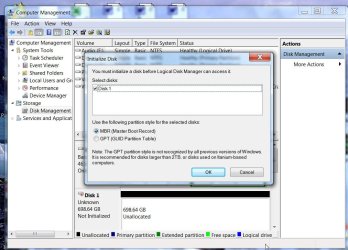
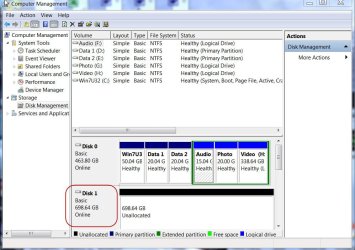
So, I went into Disk Management to see if it was there. It was. However, when I clicked on it, a window popped up saying GUID or MBR. Now, I'm new to the Enterprise realm of things, so I chose what I was used to using: MBR. WRONG CHOICE....

Long Story Short:
Is it possible to recover my data that is still on the drive by somehow switching it back to GUID Partition Table, without erasing the data? I'm currently running a program called TestDisk which I've had success with in the past, but it is taking an absolute eternity to run.

Also down a bit with the finances, so if there's any solution that doesn't break the bank, that's good too.


Thanks guys!
 

My Computer

Computer type
Laptop
Computer Manufacturer/Model Number
Toshiba Satellite P755-S5180
OS
Windows 7 Enterprise 64-Bit SP1
CPU
Intel Core i5 2450M 2.5GHz
Motherboard
Toshiba PEQAA
Memory
8GB RAM
Graphics Card(s)
NVIDIA GeForce GT540M
Sound Card
Integrated
Monitor(s) Displays
15.6" Widescreen TruBrite TFT LCD 16:9 Ratio
Screen Resolution
1366x768
Hard Drives
1TB Seagate Solid-State Hybrid
PSU
90W (19V x 4.74A) Auto-Sensing 100-240V/50-60Hz AC Adapter
Case
N/A
Cooling
N/A
Keyboard
N/A
Mouse
Trackpad
Internet Speed
15 Down/ 5 Up (on a good day)
Antivirus
Malwarebytes
Browser
Google Chrome
Questions:

1. Did you pull out the old HDD from your Toshiba laptop before replacing it with the SSD?

2. What is the make, model No. and capacity of the old HDD?

3. Was it partitioned as a GPT drive while it was in the laptop? How many partitions did it have?

4. How is your present SSD partitioned? Is it MBR or GPT?

5. Does your Toshiba Satellite sport UEFI?

6. What is the make and model number of your HDD dock? Is it compatible for use with GPT drives?

7. What exactly did you see in the Windows Disk Management? Was it seen as RAW or something else?

8. Were you asked to initialise the HDD and you selected MBR and completed the initialisation? Did you go ahead and format the drive thereafter? (Don't format it now just because I asked this question. Just answer.)

I think that should be sufficient information for any of the experts to work on your problem.( Right now everything is vague. :))

It would also help if you post a screenshot of your HDD in the dock in Windows Disk Management.

Please go through the questionnaire and answer each, point by point without missing anything.
 
Last edited:

My Computer

OS
Windows 7 Home Premium 32 bit
Questions:

1. Did you pull out the old HDD from your Toshiba laptop before replacing it with the SSD?
I removed the previous hard drive after shutting down the PC. Placed the new SSHD in the computer, and installed a new installation of Windows 7 Enterprise from scratch.

2. What is the make, model No. and capacity of the old HDD?
Toshiba MK6475GSX 640GB HDD.

3. Was it partitioned as a GPT drive while it was in the laptop? How many partitions did it have?
Yes. I am assuming it was done on installation, because I never specified intentionally for it to be a GPT drive.
It had two partitions, one with a Windows 7 Enterprise Installation, one with a Windows 8.1 Pro Installation.

4. How is your present SSD partitioned? Is it MBR or GPT?
I am unsure how to tell.

5. Does your Toshiba Satellite sport UEFI?
How would I find this out? I am willing to look.

6. What is the make and model number of your HDD dock? Is it compatible for use with GPT drives?

7. What exactly did you see in the Windows Disk Management? Was it seen as RAW or something else?
RAW at the moment.

8. Were you asked to initialise the HDD and you selected MBR and completed the initialisation? Did you go ahead and format the drive thereafter? (Don't format it now just because I asked this question. Just answer.)
I did not format the drive. I believe I initialized it as MBR, but did not format it afterwards. Have not formatted it now either.

It would also help if you post a screenshot of your HDD in the dock in Windows Disk Management.
As you requested. http://kodanet.com/images/HDD1.png

Thank you! Any way I can make this easier for you, let me know.
 

My Computer

Computer type
Laptop
Computer Manufacturer/Model Number
Toshiba Satellite P755-S5180
OS
Windows 7 Enterprise 64-Bit SP1
CPU
Intel Core i5 2450M 2.5GHz
Motherboard
Toshiba PEQAA
Memory
8GB RAM
Graphics Card(s)
NVIDIA GeForce GT540M
Sound Card
Integrated
Monitor(s) Displays
15.6" Widescreen TruBrite TFT LCD 16:9 Ratio
Screen Resolution
1366x768
Hard Drives
1TB Seagate Solid-State Hybrid
PSU
90W (19V x 4.74A) Auto-Sensing 100-240V/50-60Hz AC Adapter
Case
N/A
Cooling
N/A
Keyboard
N/A
Mouse
Trackpad
Internet Speed
15 Down/ 5 Up (on a good day)
Antivirus
Malwarebytes
Browser
Google Chrome
You said you made the wrong choice of MBR when you plugged in the disk and were asked to initialize it. What told you this?

Only if your PC supports UEFI can Win7/8 be installed to a GPT initialized disk. You should know whether you had to boot into a UEFI DVD or Flash stick to install as shown in UEFI (Unified Extensible Firmware Interface) - Install Windows 7 with - Windows 7 Forums.
If you did not then it's likely MBR. To check enter BIOS setup at boot to look for UEFI settings, Legacy BIOS (turns off) or Compatibility Support Module (CSM) which allows both modes to be bootable.

To determine which is presently being used check which conversion is offered when you rightclick on the disk in Disk Mgmt as shown here (but do not convert): Convert GPT Disk to MBR Disk - Windows 7 Forums. Rightclick on the Disk number as shown in red box. If it says Convert to MBR it means it is GPT, and vice versa:

29342d1379270289t-convert-gpt-disk-mbr-disk-step3.jpg


If your system is not UEFI and the HD was installed as MBR then it is the correct choice, but I'm wondering why it was asking you to initialize the HD since this normally only happens with a new HDD/SSD. It's possible that you had a UEFI SYstem previously which was changed to Legacy or CSM in BIOS, and which called into question GPT formatting for the old boot disk. In that case you might be able to convert it back to GPT to have it read. However this is not certain by any means. You may have lost your data by re-initializing without asking first.

Once you determine the format this HD was originally installed with, and the data still doesn't show up, you can try Partition Wizard Partition Recovery Wizard - Video Help. If the partitions have simply been deleted then it can undelete them.
 
Last edited:
....... You may have lost your data by re-initializing without asking first......

Just wanted to clear the air. Just initialising the disk does not result in any data loss. When one initialises what all it does is to write the MBR code into the first sector (sector 0) of the drive ( in the case of MBR drives) and prepares the drive to be partitioned and then formatted. As long as the drive is not reformatted the data remains put where it was.

OP may feel easy. :)
 

My Computer

OS
Windows 7 Home Premium 32 bit
If a drive needs to be initialized, doesn't that mean a format must follow?
 

My Computer

Computer type
PC/Desktop
Computer Manufacturer/Model Number
Home Built Desktop By DataTech
OS
Windows 7 Ultimate X64 SP1
CPU
Intel i5-2550K, Differing ~4.4-4.8GHz No built in GPU
Motherboard
ASUS P8Z68-V PRO/GEN3
Memory
16GB G.Skill Sniper 1866MHz @ 2133MHz 2x8GB
Graphics Card(s)
ASUS GTX650TIB-DC2OC-2GD5, (650TI Boost)
Sound Card
Onboard Realtek 5-1
Monitor(s) Displays
Samsung P2570HD
Screen Resolution
1920x1080
Hard Drives
Samsung 840 Pro 256GB SSD for OS, 500GB Seagate Constellation (Enterprise drive) for Data
PSU
Corsair HX650W
Case
Inwin Dragon Rider
Cooling
Hyper 212 EVO w/two Noctua fans, push-pull, @1300 RPM
Keyboard
E-Z Eyes, bright yellow keys with large characters
Mouse
steelseries SENSEI Laser Pro Gaming
Internet Speed
48-51Mbs Mbs down, 11 Mbs up Xfinity Cable
Antivirus
Norton Internet Security 2013
Browser
IE 10, Opera, Pale Moon if needed
Other Info
4 case fans, LG BluRay-RE, ASUS DVD-RW, Mr. Fusion power supply, 1.21 gigawatts.
Not necessarily.I can leave it hanging (as the OP seems to have done here. He did not format. My question No.8)).And when I do partitioning again I need not format. When that step is undertaken the partition table is written again to sector 0. Then I can choose one partition to be formatted NTFS and another FAT32 or what I may wish. And then when I hit format the file system gets written.In all these operations what is manipulated is only the very first sector (Sector 0) and the first sector of each partition.
 

My Computer

OS
Windows 7 Home Premium 32 bit
Every time I've had "This drive needs to be initialized" pop up, following through with the prompts, formatting is one of the steps, which of course, will wipe all data.
 

My Computer

Computer type
PC/Desktop
Computer Manufacturer/Model Number
Home Built Desktop By DataTech
OS
Windows 7 Ultimate X64 SP1
CPU
Intel i5-2550K, Differing ~4.4-4.8GHz No built in GPU
Motherboard
ASUS P8Z68-V PRO/GEN3
Memory
16GB G.Skill Sniper 1866MHz @ 2133MHz 2x8GB
Graphics Card(s)
ASUS GTX650TIB-DC2OC-2GD5, (650TI Boost)
Sound Card
Onboard Realtek 5-1
Monitor(s) Displays
Samsung P2570HD
Screen Resolution
1920x1080
Hard Drives
Samsung 840 Pro 256GB SSD for OS, 500GB Seagate Constellation (Enterprise drive) for Data
PSU
Corsair HX650W
Case
Inwin Dragon Rider
Cooling
Hyper 212 EVO w/two Noctua fans, push-pull, @1300 RPM
Keyboard
E-Z Eyes, bright yellow keys with large characters
Mouse
steelseries SENSEI Laser Pro Gaming
Internet Speed
48-51Mbs Mbs down, 11 Mbs up Xfinity Cable
Antivirus
Norton Internet Security 2013
Browser
IE 10, Opera, Pale Moon if needed
Other Info
4 case fans, LG BluRay-RE, ASUS DVD-RW, Mr. Fusion power supply, 1.21 gigawatts.
My disk 1 is not initialised, and Windows is asking me to initialise.

Not initialised.jpg

I say OK boss, do it.

And the boss takes the order :) . Initialised.

Initialised.jpg

The buck stops there. This is what happened in OP's case.

He merely initialised it. And initialising merely writes the MBR code into the first sector. Nothing more than that.
 

My Computer

OS
Windows 7 Home Premium 32 bit
:oYou're right, I just tried it on a SSD I had secure erased, but have never tried it on a drive with data. The bit I was thinking of was creating a new volume.
:focus:
 

My Computer

Computer type
PC/Desktop
Computer Manufacturer/Model Number
Home Built Desktop By DataTech
OS
Windows 7 Ultimate X64 SP1
CPU
Intel i5-2550K, Differing ~4.4-4.8GHz No built in GPU
Motherboard
ASUS P8Z68-V PRO/GEN3
Memory
16GB G.Skill Sniper 1866MHz @ 2133MHz 2x8GB
Graphics Card(s)
ASUS GTX650TIB-DC2OC-2GD5, (650TI Boost)
Sound Card
Onboard Realtek 5-1
Monitor(s) Displays
Samsung P2570HD
Screen Resolution
1920x1080
Hard Drives
Samsung 840 Pro 256GB SSD for OS, 500GB Seagate Constellation (Enterprise drive) for Data
PSU
Corsair HX650W
Case
Inwin Dragon Rider
Cooling
Hyper 212 EVO w/two Noctua fans, push-pull, @1300 RPM
Keyboard
E-Z Eyes, bright yellow keys with large characters
Mouse
steelseries SENSEI Laser Pro Gaming
Internet Speed
48-51Mbs Mbs down, 11 Mbs up Xfinity Cable
Antivirus
Norton Internet Security 2013
Browser
IE 10, Opera, Pale Moon if needed
Other Info
4 case fans, LG BluRay-RE, ASUS DVD-RW, Mr. Fusion power supply, 1.21 gigawatts.
My disk 1 is not initialised, and Windows is asking me to initialise.

I say OK boss, do it.

And the boss takes the order :) . Initialised.

The buck stops there. This is what happened in OP's case.

He merely initialised it. And initialising merely writes the MBR code into the first sector. Nothing more than that.
That first screenshot is exactly where I chose MBR.
 

My Computer

Computer type
Laptop
Computer Manufacturer/Model Number
Toshiba Satellite P755-S5180
OS
Windows 7 Enterprise 64-Bit SP1
CPU
Intel Core i5 2450M 2.5GHz
Motherboard
Toshiba PEQAA
Memory
8GB RAM
Graphics Card(s)
NVIDIA GeForce GT540M
Sound Card
Integrated
Monitor(s) Displays
15.6" Widescreen TruBrite TFT LCD 16:9 Ratio
Screen Resolution
1366x768
Hard Drives
1TB Seagate Solid-State Hybrid
PSU
90W (19V x 4.74A) Auto-Sensing 100-240V/50-60Hz AC Adapter
Case
N/A
Cooling
N/A
Keyboard
N/A
Mouse
Trackpad
Internet Speed
15 Down/ 5 Up (on a good day)
Antivirus
Malwarebytes
Browser
Google Chrome
So follow the steps I gave you in my last post to determine if you had that HD in a UEFI system, meaning it was most definitely GPT initialized, which you then changed to MBR. In that case change it back to GPT to see if you see the data and if you don't try the PW Partition Recovery undelete.

To double-check this look at the current format of the HD first, as I also showed you how to do.
 
Sorry, it was bedtime for me and so did not see greg's post seven hours ago.

I would advise the OP to desist making any changes to the HDD at the moment.

The fact is if it was indeed a GPT disk ( which we do not know yet but easy to find out) writing the MBR code again into the HDD as had been done by the OP, should not alter the GPT status of the disk. So in my opinion, it is not necessary to do anything to make it GPT again. I am only worried that it may turn counterproductive.

My suspicion at the moment squarely centers around the dock used by OP. Yes, suspicion at the moment based on many users who had reported problems with older docks that were not designed to take cognisance of GPT disks. Is OP's one? ( He hasn't answered my question on it because perhaps he does not know anything about his dock.)

I shall now await OP's confirmation that he hasn't attempted anything or stop him doing that if he is still awake. For that purpose, I will close this post and come back again after a while.
 

My Computer

OS
Windows 7 Home Premium 32 bit
I also have doubts about the dock so would do all operations with the HD plugged in internally if possible.

It's also critical to stay within the steps being posted and execute them fully and correctly - so if there's any doubt ask back before acting.

Let us know where you are in the steps given and detailed results.
 
Yep, it is always desirable, to put the HDD either in a good external casing or hook it up into a desktop as a second drive and do all the troubleshooting for then we will be operating in a known environment eliminating the unknown add-ons.

But then the OPs may not always be equipped to do that. But again if it comes to that he has to do it.

So in this case I would first examine whether there are any telltale signs of the HDD being a GPT one.

Because of the unknown interface, I would not rely on the conventional partitioning software like partition Wizard or AOMEI Partition Assistant or even Windows but would rather examine the contents in the physical sectors.

To the OP:

Install Bootice ( the correct bit version of your OS) and examine the partition information. Booooooooting ? View topic - [ BOOTICE: A poweful boot-related utility ] - v1.3.2.1

25-01-2014 09-41-23.jpg

Does it show the GPT header, GPT table, and the partition LBAs?

If yes, then take it out of the dock and put it in an external casing ( better still if you can hook it up as a second drive on a desktop). In all probability, you should be able to access the drive.

If no, then don't give up so easily.

Examine the last sector(nth sector), n-1 sector, n-2 sector, n-3 sector etc., upto about say n-10 sector. That is where the backup of the GPT data exists and if it is real GPT partition data even if it is missing in sector 1 to sector 62, the backup will always be taken and rewritten when you place it in an external drive(desktop) and you should be able to access the drive.

Note: All this only if it is really a GPT drive, and you have not manipulated the drive in any way on the dock ( save for the MBR write in sector 0 you had already done. For a GPT drive what is in sector 0 is irrelevant, in a sense, as long as the partition table in it -which will be read as a single unrecognised partition by GPT-unaware systems/programs - has not been overwritten. I believe your MBR write has only written the MBR code and not touched the partition table in sector 0)

For more information and acquaint yourself with Bootice http://www.sevenforums.com/hardware-devices/310295-lost-partitions.html#post2584426 (But you will do only what is indicated in this post - examine and report.)

EDIT: Take screenshots using Windows Snipping Tool and upload it.
 
Last edited:

My Computer

OS
Windows 7 Home Premium 32 bit
Sorry for the delay folks, I was having quite the time at work the past couple days. Just now touching base in this thread again. Gregrocker, Stand by... Taking a look at your previous post now & going to see if I can determine if my machine is UEFI or not. (Not even sure how to properly state that)...

UPDATE: Alright. I've done as you have requested. Here are the results I came up with.
I believe my computer my not support UEFI, however I might be wrong. The thread you provided was somewhat confusing to me. Attached are 4 images from my BIOS that might help you decide if it does or doesn't support UEFI. I did see that it has Legacy Something or other in it, I thought that might possibly be it but wasn't sure.

Attachments: Image 1, Image 2, Image 3, Image 4

When I load the disk in Disk Manager, I only have 4 options. Convert to Dynamic Disk, Offline, Properties, and Help. The option to convert to GPT Disk is "Grayed Out".

I have not tried the Partition Wizard option you suggested. Standing by for further suggestions on what I should do. Would you like for me to try the Partition Wizard option?

Thanks again!
 
Last edited:

My Computer

Computer type
Laptop
Computer Manufacturer/Model Number
Toshiba Satellite P755-S5180
OS
Windows 7 Enterprise 64-Bit SP1
CPU
Intel Core i5 2450M 2.5GHz
Motherboard
Toshiba PEQAA
Memory
8GB RAM
Graphics Card(s)
NVIDIA GeForce GT540M
Sound Card
Integrated
Monitor(s) Displays
15.6" Widescreen TruBrite TFT LCD 16:9 Ratio
Screen Resolution
1366x768
Hard Drives
1TB Seagate Solid-State Hybrid
PSU
90W (19V x 4.74A) Auto-Sensing 100-240V/50-60Hz AC Adapter
Case
N/A
Cooling
N/A
Keyboard
N/A
Mouse
Trackpad
Internet Speed
15 Down/ 5 Up (on a good day)
Antivirus
Malwarebytes
Browser
Google Chrome
Hi Koda239,

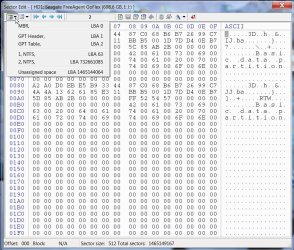
As I said in my previous post - which you seem to have ignored in toto - I would examine the physical structure of that HDD. If it is a GPT drive you will see the GPT header, GPT Table and the NTFS VBR sectors.(as shown in the screenshot in the previous post)

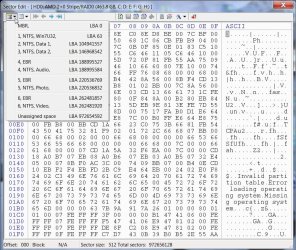
If it is an MBR disk, you will see only the MBR, and VBRs as in the following screenshot.( In my case I have extended partition and logical drives in it. So EBRs and VBRs in the extended partition are also shown.)

28-01-2014 12-40-24.jpg

And one more question: Did the HDD have any problems in the System because of which you removed it and replaced it with the SSD?

Note: Use Windows Snipping Tool to capture the shots and upload it.

EDIT: The presence or absence of the partition tables will tell us whether all is OK with the drive and the dock is standing in the way or something is radically wrong with the drive.
 
Last edited:

My Computer

OS
Windows 7 Home Premium 32 bit
To my knowledge, I don't think there was anything wrong with the drive itself. I just needed larger space, so I purchased another drive.

I'll try Bootice. And correct, I didn't see your post, I apologize. I was still back-tracked on Greg's post on the previous page. I'll be performing that today.

Just a bit of situational awareness, I'm performing all these tests on my Windows 7 Professional - 32-Bit Machine in my house, attaching the drive by an Internal SATA cable and power. It is currently the only functioning Windows OS Machine that I have in my home. I've taken the dock out of the equation.
 

My Computer

Computer type
Laptop
Computer Manufacturer/Model Number
Toshiba Satellite P755-S5180
OS
Windows 7 Enterprise 64-Bit SP1
CPU
Intel Core i5 2450M 2.5GHz
Motherboard
Toshiba PEQAA
Memory
8GB RAM
Graphics Card(s)
NVIDIA GeForce GT540M
Sound Card
Integrated
Monitor(s) Displays
15.6" Widescreen TruBrite TFT LCD 16:9 Ratio
Screen Resolution
1366x768
Hard Drives
1TB Seagate Solid-State Hybrid
PSU
90W (19V x 4.74A) Auto-Sensing 100-240V/50-60Hz AC Adapter
Case
N/A
Cooling
N/A
Keyboard
N/A
Mouse
Trackpad
Internet Speed
15 Down/ 5 Up (on a good day)
Antivirus
Malwarebytes
Browser
Google Chrome
That's good.

Post a screenshot of how the drive looks in Windows Disk Management in its new home even as you prepare yourself for the Bootice experiment. (Again with Windows Snipping Tool and uploading it to SevenForums server)
 

My Computer

OS
Windows 7 Home Premium 32 bit
Eager to see a screenshot of Disk Management - Post a Screen Capture Image
with the drive attached. Let us also see the choices available when you rightclick the Disk Number box.

Pending confirmation of this using Jumanji's process, I believe you had and have an MBR install on the drive, but wonder why the drive needed initialization if you had not wiped it.

Next I would run Partition Wizard Partition Recovery Wizard - Video Help. Report back what it finds.

Please also post another camera snap of the Boot tab from BIOS.
 
Back
Top