Solved GUID Partition Table & MBR Mistake

........ but wonder why the drive needed initialization if you had not wiped it. .....

Exactly. In fact my previous post had this:

1. Why did you remove the HDD from your system and installed an SSD? Was there any problem with the HDD? If there was what was it?

2. Who removed the HDD, installed the SSD and installed the OS? Did you do it yourself or was it done by someone else?

3. If it was some one else, is there a possibility that he could have wiped the HDD clean?


Before posting I cut out 2 and 3 thinking we will cross the river when we come to it.

When using Bootice, the OP can quickly scroll through various sectors ( I do it with the mouse wheel) and check whether there is any data present at all or everything reads 00 which would mean the disk has been wiped out.

I basically had this doubt but did not want to rush. :D
 

My Computer My Computer

OS
Windows 7 Home Premium 32 bit
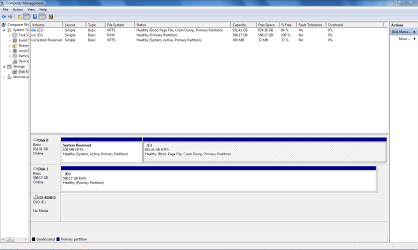
Attached is the drive while plugged into my desktop machine internally. When you mentioned you wanted a picture of the BIOS BOOT menu, which computer? The laptop, or the desktop it is currently plugged in to?

EDIT:
1. Why did you remove the HDD from your system and installed an SSD? Was there any problem with the HDD? If there was what was it?
No problem. Just wanted a larger drive. HDD was 640GB, SSHD is 1TB.


2. Who removed the HDD, installed the SSD and installed the OS? Did you do it yourself or was it done by someone else?
I did all the work myself. I have installed Windows 7 on this machine several times. Previous times didn't warrant a back up of files, this time, I thought I'd snag my files off the drive after I did the install, which is where we ran into this problem.


3. If it was some one else, is there a possibility that he could have wiped the HDD clean?
Due to the answer above, this is N/A. I did the move myself, and I am SURE I didn't format/wipe the old drive.
 

Attachments

  • 1.PNG
    1.PNG
    32.8 KB · Views: 0

My Computer My Computer

Computer type
Laptop
Computer Manufacturer/Model Number
Toshiba Satellite P755-S5180
OS
Windows 7 Enterprise 64-Bit SP1
CPU
Intel Core i5 2450M 2.5GHz
Motherboard
Toshiba PEQAA
Memory
8GB RAM
Graphics Card(s)
NVIDIA GeForce GT540M
Sound Card
Integrated
Monitor(s) Displays
15.6" Widescreen TruBrite TFT LCD 16:9 Ratio
Screen Resolution
1366x768
Hard Drives
1TB Seagate Solid-State Hybrid
PSU
90W (19V x 4.74A) Auto-Sensing 100-240V/50-60Hz AC Adapter
Case
N/A
Cooling
N/A
Keyboard
N/A
Mouse
Trackpad
Internet Speed
15 Down/ 5 Up (on a good day)
Antivirus
Malwarebytes
Browser
Google Chrome
Attached is the drive while plugged into my desktop machine internally. When you mentioned you wanted a picture of the BIOS BOOT menu, which computer? The laptop, or the desktop it is currently plugged in to?
The machine you are having the problem with.
 

My Computer My Computer

Computer type
PC/Desktop
Computer Manufacturer/Model Number
Home Built Desktop By DataTech
OS
Windows 7 Ultimate X64 SP1
CPU
Intel i5-2550K, Differing ~4.4-4.8GHz No built in GPU
Motherboard
ASUS P8Z68-V PRO/GEN3
Memory
16GB G.Skill Sniper 1866MHz @ 2133MHz 2x8GB
Graphics Card(s)
ASUS GTX650TIB-DC2OC-2GD5, (650TI Boost)
Sound Card
Onboard Realtek 5-1
Monitor(s) Displays
Samsung P2570HD
Screen Resolution
1920x1080
Hard Drives
Samsung 840 Pro 256GB SSD for OS, 500GB Seagate Constellation (Enterprise drive) for Data
PSU
Corsair HX650W
Case
Inwin Dragon Rider
Cooling
Hyper 212 EVO w/two Noctua fans, push-pull, @1300 RPM
Keyboard
E-Z Eyes, bright yellow keys with large characters
Mouse
steelseries SENSEI Laser Pro Gaming
Internet Speed
48-51Mbs Mbs down, 11 Mbs up Xfinity Cable
Antivirus
Norton Internet Security 2013
Browser
IE 10, Opera, Pale Moon if needed
Other Info
4 case fans, LG BluRay-RE, ASUS DVD-RW, Mr. Fusion power supply, 1.21 gigawatts.
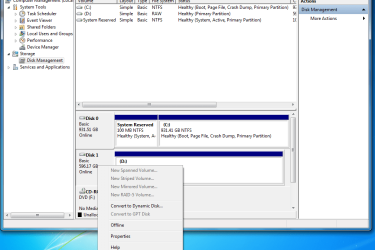
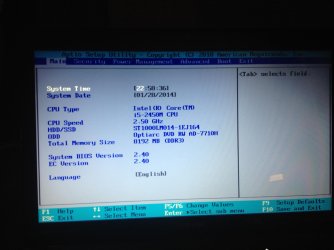
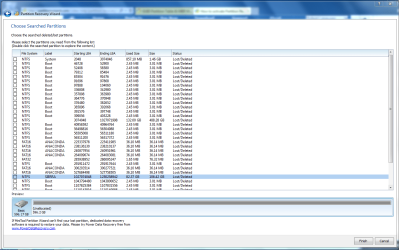
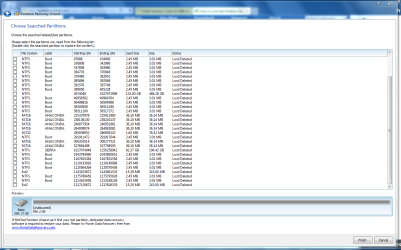
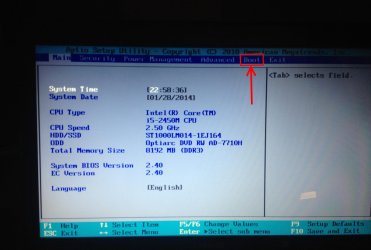
Attached are 4 images as requested.

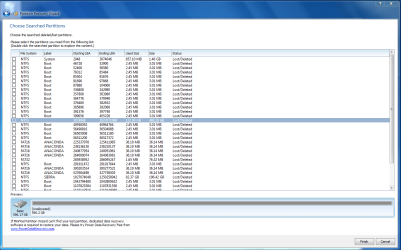
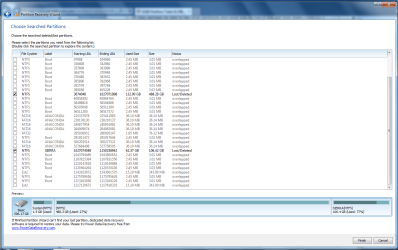
There is an image of the BIOS Boot Menu of the affected machine, There are two images of the Partition Wizard, there is also a new image of the Disk Management screen too. Sorry about the size issue before. What else can I do to help you gentlemen? :)
 

Attachments

  • image.jpg
    image.jpg
    450.3 KB · Views: 2
  • 2.PNG
    2.PNG
    56.7 KB · Views: 3
  • 3.PNG
    3.PNG
    58.7 KB · Views: 3
  • 5.PNG
    5.PNG
    29.4 KB · Views: 3

My Computer My Computer

Computer type
Laptop
Computer Manufacturer/Model Number
Toshiba Satellite P755-S5180
OS
Windows 7 Enterprise 64-Bit SP1
CPU
Intel Core i5 2450M 2.5GHz
Motherboard
Toshiba PEQAA
Memory
8GB RAM
Graphics Card(s)
NVIDIA GeForce GT540M
Sound Card
Integrated
Monitor(s) Displays
15.6" Widescreen TruBrite TFT LCD 16:9 Ratio
Screen Resolution
1366x768
Hard Drives
1TB Seagate Solid-State Hybrid
PSU
90W (19V x 4.74A) Auto-Sensing 100-240V/50-60Hz AC Adapter
Case
N/A
Cooling
N/A
Keyboard
N/A
Mouse
Trackpad
Internet Speed
15 Down/ 5 Up (on a good day)
Antivirus
Malwarebytes
Browser
Google Chrome
I believe Greg wanted a snap of the boot tab from BIOS, maybe snaps of sub-menus open as well.

image.jpg
 

My Computer My Computer

Computer type
PC/Desktop
Computer Manufacturer/Model Number
Home Built Desktop By DataTech
OS
Windows 7 Ultimate X64 SP1
CPU
Intel i5-2550K, Differing ~4.4-4.8GHz No built in GPU
Motherboard
ASUS P8Z68-V PRO/GEN3
Memory
16GB G.Skill Sniper 1866MHz @ 2133MHz 2x8GB
Graphics Card(s)
ASUS GTX650TIB-DC2OC-2GD5, (650TI Boost)
Sound Card
Onboard Realtek 5-1
Monitor(s) Displays
Samsung P2570HD
Screen Resolution
1920x1080
Hard Drives
Samsung 840 Pro 256GB SSD for OS, 500GB Seagate Constellation (Enterprise drive) for Data
PSU
Corsair HX650W
Case
Inwin Dragon Rider
Cooling
Hyper 212 EVO w/two Noctua fans, push-pull, @1300 RPM
Keyboard
E-Z Eyes, bright yellow keys with large characters
Mouse
steelseries SENSEI Laser Pro Gaming
Internet Speed
48-51Mbs Mbs down, 11 Mbs up Xfinity Cable
Antivirus
Norton Internet Security 2013
Browser
IE 10, Opera, Pale Moon if needed
Other Info
4 case fans, LG BluRay-RE, ASUS DVD-RW, Mr. Fusion power supply, 1.21 gigawatts.
1. There are a total of 36 partitions of all colours :) shown by Partition Wizard indicating the HDD has been subjected to a lot of partitioning efforts in the past. It is one too many. That makes it pretty difficult for an outsider.

a) NTFS system 1X1.46GB; (b) NTFS untitled 1X488.28GB; (c) NTFS Sierra 1X 106.42GB; ( d ) NTFS Boot 24X3.01MB; (e) FAT16 Anaconda 6X36.14MB; (f) FAT32 untitled 1X76.32 MB (g) Ext2 2X243MB

Now what constitutes the last boot state of the HDD? As per OP he had a dual boot Windows Enterprise and Windows 8.1. OP may please confirm.

My guess is (a) (b) (c) which totals to 596.16GB. Yep, its only a guess, I am not certain. (read I don't want to take the blame or name :))

OP may perhaps be able to tell what partitions and what size he had in the last boot state.

Before attempting to select and rewrite the partition table - of course after exploring the files in the selected partitions in Partition Wizard, I would again call upon Bootice, and check what it shows as the partition table. If it can throw some more light well and good. If it doesn't we are none the worse.

I shall wait for what greg says or for that matter anyone interested to plunge in here.
 
Last edited:

My Computer My Computer

OS
Windows 7 Home Premium 32 bit
I believe Greg wanted a snap of the boot tab from BIOS, maybe snaps of sub-menus open as well.
Attached.

Now what constitutes the last boot state of the HDD? As per OP he had a dual boot Windows Enterprise and Windows 8.1. OP may please confirm.
That is correct.

EDIT:

OP may perhaps be able to tell what partitions and what size he had in the last boot state.
I have attached an additional photo highlighting my Windows 7 partition with all my data on it. I explored it and confirmed that is the partition with my system files, music, videos, pictures, etc.

The partition a few below that titled "SIERRA" would be the Windows 8.1 Partition. Also confirmed. There is one at the very top titled "System", I don't quite know what it is, but that completes the rest of the drive as shown in the third attachment.
 

Attachments

  • image (1).jpg
    image (1).jpg
    922.8 KB · Views: 0
  • 4.PNG
    4.PNG
    53.1 KB · Views: 3
  • 6.PNG
    6.PNG
    61.6 KB · Views: 4

My Computer My Computer

Computer type
Laptop
Computer Manufacturer/Model Number
Toshiba Satellite P755-S5180
OS
Windows 7 Enterprise 64-Bit SP1
CPU
Intel Core i5 2450M 2.5GHz
Motherboard
Toshiba PEQAA
Memory
8GB RAM
Graphics Card(s)
NVIDIA GeForce GT540M
Sound Card
Integrated
Monitor(s) Displays
15.6" Widescreen TruBrite TFT LCD 16:9 Ratio
Screen Resolution
1366x768
Hard Drives
1TB Seagate Solid-State Hybrid
PSU
90W (19V x 4.74A) Auto-Sensing 100-240V/50-60Hz AC Adapter
Case
N/A
Cooling
N/A
Keyboard
N/A
Mouse
Trackpad
Internet Speed
15 Down/ 5 Up (on a good day)
Antivirus
Malwarebytes
Browser
Google Chrome
Just dipping my toes in, not taking the plunge.

I have not been following this thread closely and have not reead al the posts since I first visited. So this post is for notation only.

1.5 GB seems large for your system part, I can't see how much is used.
A "normal" system part is 100-200 MB, and on 30% is used on my system.

That's all, I'm back to watching.

jumanji is very good at this - but there's a lot of partition history on the drive.

In the end Koda, it will be your decison to commit the change. Take the time to be as certain as possible.
It sounds as though you're doing due diligence (you saw the files on the part and confirmed it)
Good luck getting the drive back.

Bill
 

My Computer My Computer

Computer type
Laptop
Computer Manufacturer/Model Number
HP Pavilion dv6-6c10us
OS
x64 (6.3.9600) Win8.1 Pro & soon dual boot x64 (6.1.7601) Win7_SP1 HomePrem
CPU
AMD A6-3420M APU with Radeon(tm) HD Graphics
Motherboard
Hewlett-Packard 1805
Memory
6.00 GB
Graphics Card(s)
AMD Radeon(TM) HD 6520G
Sound Card
(1) AMD High Definition Audio Device (2) IDT High Definiti
Monitor(s) Displays
HP W2072a 20" LCD (1600 x 900) @ 60 Hz
Screen Resolution
1366 x 768 x 32 bits (4294967296 colors) @ 60 Hz
Hard Drives
ST640LM0 00 HM641JI SATA Disk Device
Keyboard
Logitech k520 wireless KB
Mouse
Logitech m320 wireless mouse (bundled with KB)
Internet Speed
15/5 | 54 MB Wireless 'n'
Antivirus
Realtime: Defender or Avast | On-demand: Malwarebytes, ESET
Browser
IE 11 on Win8, IE 10 on win 7
Other Info
Media: [Gimp, Audacity, VLC] || Comm: [WEmail 2012, Skype] || Productivity: [OpenOffice,| Textpad] || Utils: [Sysinternals, cCleaner, Speccy, Defraggler]
I think you are good to go for a go ahead to write the partition table.

Anyway wait for a nod from greg.

(While I think we are coming to a near close in this thread, I would still be curious to know what Bootice shows before rewriting the partition table and after. Wouldn't matter if you cannot or still not prepared to do it.)
 

My Computer My Computer

OS
Windows 7 Home Premium 32 bit
Just dipping my toes in, not taking the plunge.

I have not been following this thread closely and have not reead al the posts since I first visited. So this post is for notation only.

1.5 GB seems large for your system part, I can't see how much is used.
A "normal" system part is 100-200 MB, and on 30% is used on my system.

That's all, I'm back to watching.

jumanji is very good at this - but there's a lot of partition history on the drive.

In the end Koda, it will be your decison to commit the change. Take the time to be as certain as possible.
It sounds as though you're doing due diligence (you saw the files on the part and confirmed it)
Good luck getting the drive back.

Bill

And for all parties, I don't need the drive in working order, I just need to be able to pull the small bit of data/documents off the two partitions I noted. Then, after I can retrieve my data... I'll be glad to format the entire thing. :P


EDIT: Here is an attached image of Bootice, as requested by Jumanji.
 

Attachments

  • 7.PNG
    7.PNG
    25.6 KB · Views: 0

My Computer My Computer

Computer type
Laptop
Computer Manufacturer/Model Number
Toshiba Satellite P755-S5180
OS
Windows 7 Enterprise 64-Bit SP1
CPU
Intel Core i5 2450M 2.5GHz
Motherboard
Toshiba PEQAA
Memory
8GB RAM
Graphics Card(s)
NVIDIA GeForce GT540M
Sound Card
Integrated
Monitor(s) Displays
15.6" Widescreen TruBrite TFT LCD 16:9 Ratio
Screen Resolution
1366x768
Hard Drives
1TB Seagate Solid-State Hybrid
PSU
90W (19V x 4.74A) Auto-Sensing 100-240V/50-60Hz AC Adapter
Case
N/A
Cooling
N/A
Keyboard
N/A
Mouse
Trackpad
Internet Speed
15 Down/ 5 Up (on a good day)
Antivirus
Malwarebytes
Browser
Google Chrome
OK I have seen it.

Just click on MBR to select sector 0 and save it. By default it will save it in the same folder where Bootice is there.

{My comments: Sector 0 is jumbled up. MBR, LBA 0 Next 1,-, is also LBA 0. I cannot say what it is and what it means. I haven't seen one such before. :) .Partition Table portion of the sector 0 shows four partitions in that all fields are filled up.. But no VBRs shown in the partition table.}

We shall compare it after you write the new partition table if greg gives you the go ahead. Let us see if he has any other action plan.
 

My Computer My Computer

OS
Windows 7 Home Premium 32 bit
Does the Partition Table need to be rewritten if OP can browse in to see his data already and it appears correctly and not scrambled?

I don't know enough about rewriting the Partition Table to suggest it. Someone who's actually done it and knows for sure it would help in this case would need to weigh in on that.

What does to me look promising is that Partition Wizard appears to have found the missing partitions and shows the data intact on them, so might be able to reinstate them. The overlapping sectors might interfere but it should prompt you if so. Read the Help on this closely if it occurs.

If Win7 will not start after reinstating the deleted partitions then browse in using the host system to rescue your files. You can also browse in to rescue data with a boot disk following Copy & Paste - in Windows Recovery Console and Paragon Rescue Kit Free Edition 11.0 Free bootable CD.
 
And for all parties, I don't need the drive in working order,
I just need to be able to pull the small bit of data/documents off the two partitions I noted.
Then, after I can retrieve my data... I'll be glad to format the entire thing.

Dipping my toes in again.

I think Koda makes an important point above.

You have two of the best follks working with you, I'm out of the pool again.

Bill

edit: It's not the boot drive.
 

My Computer My Computer

Computer type
Laptop
Computer Manufacturer/Model Number
HP Pavilion dv6-6c10us
OS
x64 (6.3.9600) Win8.1 Pro & soon dual boot x64 (6.1.7601) Win7_SP1 HomePrem
CPU
AMD A6-3420M APU with Radeon(tm) HD Graphics
Motherboard
Hewlett-Packard 1805
Memory
6.00 GB
Graphics Card(s)
AMD Radeon(TM) HD 6520G
Sound Card
(1) AMD High Definition Audio Device (2) IDT High Definiti
Monitor(s) Displays
HP W2072a 20" LCD (1600 x 900) @ 60 Hz
Screen Resolution
1366 x 768 x 32 bits (4294967296 colors) @ 60 Hz
Hard Drives
ST640LM0 00 HM641JI SATA Disk Device
Keyboard
Logitech k520 wireless KB
Mouse
Logitech m320 wireless mouse (bundled with KB)
Internet Speed
15/5 | 54 MB Wireless 'n'
Antivirus
Realtime: Defender or Avast | On-demand: Malwarebytes, ESET
Browser
IE 11 on Win8, IE 10 on win 7
Other Info
Media: [Gimp, Audacity, VLC] || Comm: [WEmail 2012, Skype] || Productivity: [OpenOffice,| Textpad] || Utils: [Sysinternals, cCleaner, Speccy, Defraggler]
The disadvantage with Partition Recovery Wizard is that one can only explore and see the files, cannot access it unless the partition table is rewritten. The point you have brought is a valid one but I would tend to think the last written ones will be in order. In this case we have only selected the partitions known in the last boot state which the OP also concurs. (Right now it is not the boot drive and the OP is not interested in making it bootable again but only recover the data in it- not system files.) It will only be the previous ones that had been overwritten by the later that would appear corrupted if any part of it is still left over and shows up.

The advantage with Test Disk is that if one can see the folders/files in the partitions shown and selected , one can straight away copy those to another drive even without rewriting the partition table. The OP will have a choice to select only the files/folders he wants and copy them. Again if some files are corrupted nothing can be done about it.

So, IMO, the OP should go ahead and rewrite the partition table pertaining to those selected partitions which all add up to the full capacity of the drive and last known state. If still the drive is not accessible, he should get on to Test Disk. Rewritng the partition table is only an operation done in Sector 0, and it in no way affects the data in the partitions.

I don't think one can find a similar case with so many past history where one has dealt with it and succeeded.

So there are only two options.

1.Bite the bullet, let PW write the partition table with the three selected partitions and see whether the drive becomes accessible. Check in PW and assign drive letters if those do not have one. If accessible - no guarantee anyway, we can only hope for the best - good. If some files are corrupt, that had already happened and so nothing to cry about.

2. Leave it as it is, get on to TestDisk. I am sure it will also show the same partitions, he can select the desired partitions, see the files and copy the files to another drive. The scanning will take a lot of time. He has to plugin the destination drive before running TestDisk so that it is recognised when it is run and ready to host the files. ( The OP had already tried TestDisk. I don't know what happened. Most probably he aborted it since it was taking a long time.) Again whether the files are good or corrupted we will know only after copying all the desired files.

Either way, the process itself is not going to corrupt the files.

So folks, a decision is upto you. I am going to bed now. :)
 
Last edited:

My Computer My Computer

OS
Windows 7 Home Premium 32 bit
I am back at my desk and will peep in once in a while. I see the OP online and I would like to hear what happened when he ran TestDisk as indicated by him in his post #1.

EDIT: I have made some slight changes (shown in italics) to the previous post, amplifying it. Keep us posted on what you are doing and not to hesitate to call for help even if you have a slightest doubt in the procedures. Especially TestDisk has to be handled with caution without any wrong move.
 
Last edited:

My Computer My Computer

OS
Windows 7 Home Premium 32 bit
There is good chance of success with PW partition recovery.

Worth running a data recovery program first, just in case.

Unless you want to shell out seventy bucks for a paid version, there are some good free ones to try. TestDisk has already been suggested, but is not especially easy to use.

Puran seems effective, as I recently discovered Data Recovery Puran works Great
 

My Computers My Computers

System One System Two

  • Computer type
    PC/Desktop
    OS
    7 X64
    CPU
    i5 8400
    Motherboard
    gigabyte b365m ds3h
    Memory
    2x8gb 3200mhz
    Hard Drives
    various
    PSU
    pure power 11 400w cm
    Case
    Coolermaster
    Cooling
    cryorig m9i
  • Computer type
    PC/Desktop
    OS
    7x64
    CPU
    g5400
    Motherboard
    ga b365m ds3h
    Memory
    8gb ddr4 2400
    PSU
    xfx pro 450w
I am back at my desk and will peep in once in a while. I see the OP online and I would like to hear what happened when he ran TestDisk as indicated by him in his post #1.

EDIT: I have made some slight changes (shown in italics) to the previous post, amplifying it. Keep us posted on what you are doing and not to hesitate to call for help even if you have a slightest doubt in the procedures. Especially TestDisk has to be handled with caution without any wrong move.

SUCCESS! The data from the noted partitions was recovered last night with TestDisk. I appreciate all your help guys! Thanks!!

Thread marked as solved.
 

My Computer My Computer

Computer type
Laptop
Computer Manufacturer/Model Number
Toshiba Satellite P755-S5180
OS
Windows 7 Enterprise 64-Bit SP1
CPU
Intel Core i5 2450M 2.5GHz
Motherboard
Toshiba PEQAA
Memory
8GB RAM
Graphics Card(s)
NVIDIA GeForce GT540M
Sound Card
Integrated
Monitor(s) Displays
15.6" Widescreen TruBrite TFT LCD 16:9 Ratio
Screen Resolution
1366x768
Hard Drives
1TB Seagate Solid-State Hybrid
PSU
90W (19V x 4.74A) Auto-Sensing 100-240V/50-60Hz AC Adapter
Case
N/A
Cooling
N/A
Keyboard
N/A
Mouse
Trackpad
Internet Speed
15 Down/ 5 Up (on a good day)
Antivirus
Malwarebytes
Browser
Google Chrome
When you selected the three out of the whopping 32 partitions shown by Partition Wizard as constituting the last boot state of the HDD and were able to see all your files, I commented in my post#30 that this thread is coming to a close soon.:) For at that stage I was confident that the data was all there and can be recovered one way or the other TestDisk if not PW.

I am glad my prophecy came true and you did a great job.:thumbsup:
Now what?

If you are happy and sure that all your data has been recovered, complete the Partition Recovery Wizard by selecting the three partitions and Apply the changes. Give the partitions a drive letter each ( if those don't have one) and see whether you are able to access the data in that HDD itself. Let us see whether PW also could succeed in this not-so-normal case. We learn quite a lot from user experiences and I wouldn't let that chance go.:)

After you format and partition the drive and start putting it to use, save the MBR (sector 0) and also the VBRs with Bootice and save to another location.. Apart from the MBR code sector 0 also contains the partition table. In case the partition table gets corrupted and your drive turns RAW, using the same Bootice restore sector 0 with the backup. And in most cases, you will be instantly back in action without going through the cumbersome data recovery process.

If you partition it as a GPT drive, save sector 0, 1,and 2 plus all the VBR sectors shown in the partition by Bootice.

:party:

I thank greg, Britton30 and Slartybart for their involvement, contributions and discussions in this thread. SIW2 brought in a new puran file recovery software. I read some of the reviews and it has been good. May be we will try it in some new cases in future.

All said and done, it will still remain a mystery why the HDD wanted to be initialised. If you had just taken it out of the old system and put it onto another system, it should have straight away worked. How did it lose the MBR code and the partition information?
 
Last edited:

My Computer My Computer

OS
Windows 7 Home Premium 32 bit
All said and done, it will still remain a mystery why the HDD wanted to be initialised. If you had just taken it out of the old system and put it onto another system, it should have straight away worked. How did it lose the MBR code and the partition information?

Let's say it was the nature of the beast.... I'm probably leaning towards a crappy dock, and my inexperience. Live & Learn I guess.
 

My Computer My Computer

Computer type
Laptop
Computer Manufacturer/Model Number
Toshiba Satellite P755-S5180
OS
Windows 7 Enterprise 64-Bit SP1
CPU
Intel Core i5 2450M 2.5GHz
Motherboard
Toshiba PEQAA
Memory
8GB RAM
Graphics Card(s)
NVIDIA GeForce GT540M
Sound Card
Integrated
Monitor(s) Displays
15.6" Widescreen TruBrite TFT LCD 16:9 Ratio
Screen Resolution
1366x768
Hard Drives
1TB Seagate Solid-State Hybrid
PSU
90W (19V x 4.74A) Auto-Sensing 100-240V/50-60Hz AC Adapter
Case
N/A
Cooling
N/A
Keyboard
N/A
Mouse
Trackpad
Internet Speed
15 Down/ 5 Up (on a good day)
Antivirus
Malwarebytes
Browser
Google Chrome
Back
Top