
That memory usage looks pretty good.
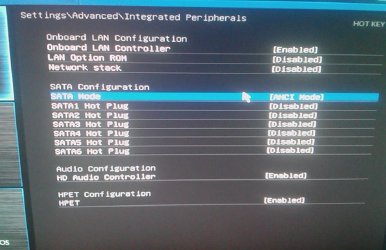
Actually, I think it's a combination of the large disk being used for system files and the possibility that you may be using IDE mode instead of AHCI mode. I didn't look up the specs on your HDD but large disks aren't known for speed. Typically, they're used for data storage. Windows will use much of whatever you assign to virtual memory even though it may not be necessary from a physical memory standpoint. And having a pagefile on a slow disk takes time and I/O from other tasks as the pagefile is filled and re-read.
That's where Solid State Drives (SSD) really shine. They can make an otherwise slow system blazing fast. Many use a smaller SSD for system and programs and leave the HDD to data storage. The difference is like night and day.
Keep an eye on your system load for a while and if it stays low, you can add back any startups you disabled during the Clean Start. It's better to add only ONE at a time so you can see the effect it has on the system and decide if it's worth the load it puts on the system when you're not actually using it.
Ah i've always heard good about SSDs but never knew completely what they actually do. So far no problems and been gaming since my post earlier today.
It's funny how all the performance guides on the web say "increase page file size" (although I didn't bother or touch the page file before now) but reducing it was the way forward here.
Thanks so much for the help by the way, I really do appreciate it. You've helped me fix a problem that I struggled with for a while with no help.
My Computer
- Computer type
- PC/Desktop
- Computer Manufacturer/Model Number
- Custom build
- OS
- windows 7 Home premium x64
- Motherboard
- MSI A78M-E35 M-ATX Motherboard
- Graphics Card(s)
- AMD Radeon HD 8570D
- Browser
- Chrome




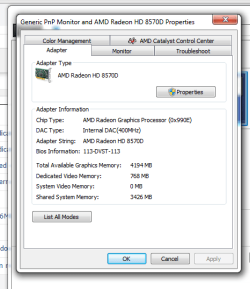
 I don't know how AMD defines the memory allocation. It sure looks like that "Dedicated" memory is part of the Reserved Memory shown in your graph though. The other is probably the video on-board memory.