Hal.dll high interrupts CPU usage

That memory usage looks pretty good.

Actually, I think it's a combination of the large disk being used for system files and the possibility that you may be using IDE mode instead of AHCI mode. I didn't look up the specs on your HDD but large disks aren't known for speed. Typically, they're used for data storage. Windows will use much of whatever you assign to virtual memory even though it may not be necessary from a physical memory standpoint. And having a pagefile on a slow disk takes time and I/O from other tasks as the pagefile is filled and re-read.

That's where Solid State Drives (SSD) really shine. They can make an otherwise slow system blazing fast. Many use a smaller SSD for system and programs and leave the HDD to data storage. The difference is like night and day.

Keep an eye on your system load for a while and if it stays low, you can add back any startups you disabled during the Clean Start. It's better to add only ONE at a time so you can see the effect it has on the system and decide if it's worth the load it puts on the system when you're not actually using it.

Ah i've always heard good about SSDs but never knew completely what they actually do. So far no problems and been gaming since my post earlier today.
It's funny how all the performance guides on the web say "increase page file size" (although I didn't bother or touch the page file before now) but reducing it was the way forward here.

Thanks so much for the help by the way, I really do appreciate it. You've helped me fix a problem that I struggled with for a while with no help.
 

My Computer

Computer type
PC/Desktop
Computer Manufacturer/Model Number
Custom build
OS
windows 7 Home premium x64
Motherboard
MSI A78M-E35 M-ATX Motherboard
Graphics Card(s)
AMD Radeon HD 8570D
Browser
Chrome
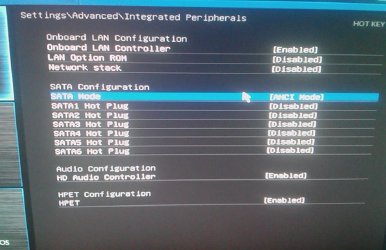
You might also check in your BIOS and see if your disk mode is set to IDE or AHCI. DO NOT change anything! Just look. If you change it, the PC won't boot.

Added: If it is set to IDE, there's a specific sequence you need to follow to change it to AHCI. This will also speed up access to the drive and help. AHCI mode has a few side benefits but most importantly, it allows Native Command Queuing (NCQ).
 
Last edited:

My Computer

Computer type
PC/Desktop
Computer Manufacturer/Model Number
Built 2/11/2011
OS
Windows 7 Pro-x64
CPU
i7-2600 3.4GHz - 3.8GHz Turbo
Motherboard
Intel DH67BL-B3
Memory
8Gb - 2x4GB, Muskin 991770 PC3-1333
Graphics Card(s)
Integrated Intel HD 2000
Sound Card
Integrated Intel 10.1 HD, RealTek ALC892
Monitor(s) Displays
Asus LCD VH222H, Haier HL24XSL2a
Screen Resolution
1920x1080, 1920x1080
Hard Drives
Crucial SSD C300-128Gb,
Western Digital WD5002AALX - 500Gb,
Western Digital WD7501AALS - 750Gb
PSU
Seasonic 650W 80+ Gold Modular
Case
Rosewill Defender
Cooling
Stock CPU, Four 120mm case fans, PCH fan added
Keyboard
Logitech EX100 Y-RBH94 Wireless
Mouse
Logitech EX100 M-RCE95 Wireless
Internet Speed
3.0/1.5 Mbs
Antivirus
Microsoft Security Essentials
Browser
Microsoft Internet Explorer 11
Other Info
Antec Veris Premier-Multimedia IR Station,
Cyber Accoustics-3602 Speakers,
AFT XM-5U Card Reader,
Hauppauge TV-HVR-2250,
Sony LX300 USB Turntable
You might also check in your BIOS and see if your disk mode is set to IDE or AHCI. DO NOT change anything! Just look. If you change it, the PC won't boot.

Added: If it is set to IDE, there's a specific sequence you need to follow to change it to AHCI. This will also speed up access to the drive and help. AHCI mode has a few side benefits but most importantly, it allows Native Command Queuing (NCQ).

Indeed it is set to IDE, with the other 2 options being AHCI and RAID
 

My Computer

Computer type
PC/Desktop
Computer Manufacturer/Model Number
Custom build
OS
windows 7 Home premium x64
Motherboard
MSI A78M-E35 M-ATX Motherboard
Graphics Card(s)
AMD Radeon HD 8570D
Browser
Chrome

My Computer

Computer type
PC/Desktop
Computer Manufacturer/Model Number
Custom Build
OS
Windows 7 Ultimate x64 SP1
CPU
AMD Phenom 2 1090T
Motherboard
Gigabyte GA-890FXA-UD5
Memory
2x8GB Kingston HyperX Fury Black 1600Mhz Unganged
Graphics Card(s)
MSI GTX 970 Gaming 4G
Sound Card
Realtek On-Board HD 7.1 Audio / Logitech G35
Monitor(s) Displays
3xAcer GD245HQ
Screen Resolution
1920x1080
Hard Drives
Samsung 850 Pro 512GB SSD - OS /
WD Caviar Black SATA 3 - 1 TBx2 - Dynamic RAID 0 /
WD Caviar Green SATA 2 - 640GBx2 - Dynamic RAID 0 /
WD Caviar Green SATA 2 - 640GB - Internal Backup /
Seagate Barracude SATA 3 - 3TB - External Backup/ Sync
PSU
HighPower 1000W
Case
Cooler Master HAF 932
Cooling
Noctua NH-D14
Keyboard
Logitech G19
Mouse
Logitech G500
Internet Speed
100/4 Mbit Cable (100GB quota)
Antivirus
ZoneAlarm Extreme Security / MBAM Pro / MBAE Free / SAS Free
Browser
IE 11 - Firefox - Chrome
Other Info
Logitech F710/ G27/ G940/ Z5500 // TrackIR 5 // Nvidia 3D Surround Vision

My Computer

Computer type
PC/Desktop
Computer Manufacturer/Model Number
Custom build
OS
windows 7 Home premium x64
Motherboard
MSI A78M-E35 M-ATX Motherboard
Graphics Card(s)
AMD Radeon HD 8570D
Browser
Chrome
For internal ones you can leave disabled. HotPlug is an AHCI feature, probably why they show up now.
 

My Computer

Computer type
PC/Desktop
Computer Manufacturer/Model Number
Custom Build
OS
Windows 7 Ultimate x64 SP1
CPU
AMD Phenom 2 1090T
Motherboard
Gigabyte GA-890FXA-UD5
Memory
2x8GB Kingston HyperX Fury Black 1600Mhz Unganged
Graphics Card(s)
MSI GTX 970 Gaming 4G
Sound Card
Realtek On-Board HD 7.1 Audio / Logitech G35
Monitor(s) Displays
3xAcer GD245HQ
Screen Resolution
1920x1080
Hard Drives
Samsung 850 Pro 512GB SSD - OS /
WD Caviar Black SATA 3 - 1 TBx2 - Dynamic RAID 0 /
WD Caviar Green SATA 2 - 640GBx2 - Dynamic RAID 0 /
WD Caviar Green SATA 2 - 640GB - Internal Backup /
Seagate Barracude SATA 3 - 3TB - External Backup/ Sync
PSU
HighPower 1000W
Case
Cooler Master HAF 932
Cooling
Noctua NH-D14
Keyboard
Logitech G19
Mouse
Logitech G500
Internet Speed
100/4 Mbit Cable (100GB quota)
Antivirus
ZoneAlarm Extreme Security / MBAM Pro / MBAE Free / SAS Free
Browser
IE 11 - Firefox - Chrome
Other Info
Logitech F710/ G27/ G940/ Z5500 // TrackIR 5 // Nvidia 3D Surround Vision
You might also check in your BIOS and see if your disk mode is set to IDE or AHCI. DO NOT change anything! Just look. If you change it, the PC won't boot.

Added: If it is set to IDE, there's a specific sequence you need to follow to change it to AHCI. This will also speed up access to the drive and help. AHCI mode has a few side benefits but most importantly, it allows Native Command Queuing (NCQ).


Btw after making the change, NT kernel & system is avg constant 7-10 CPU again. I'm not even sure if it was because of the change or something else.
 

My Computer

Computer type
PC/Desktop
Computer Manufacturer/Model Number
Custom build
OS
windows 7 Home premium x64
Motherboard
MSI A78M-E35 M-ATX Motherboard
Graphics Card(s)
AMD Radeon HD 8570D
Browser
Chrome
you have already enabled AHCI in registry, you can switch back to IDE and see if it will correct.
 

My Computer

Computer type
PC/Desktop
Computer Manufacturer/Model Number
Custom Build
OS
Windows 7 Ultimate x64 SP1
CPU
AMD Phenom 2 1090T
Motherboard
Gigabyte GA-890FXA-UD5
Memory
2x8GB Kingston HyperX Fury Black 1600Mhz Unganged
Graphics Card(s)
MSI GTX 970 Gaming 4G
Sound Card
Realtek On-Board HD 7.1 Audio / Logitech G35
Monitor(s) Displays
3xAcer GD245HQ
Screen Resolution
1920x1080
Hard Drives
Samsung 850 Pro 512GB SSD - OS /
WD Caviar Black SATA 3 - 1 TBx2 - Dynamic RAID 0 /
WD Caviar Green SATA 2 - 640GBx2 - Dynamic RAID 0 /
WD Caviar Green SATA 2 - 640GB - Internal Backup /
Seagate Barracude SATA 3 - 3TB - External Backup/ Sync
PSU
HighPower 1000W
Case
Cooler Master HAF 932
Cooling
Noctua NH-D14
Keyboard
Logitech G19
Mouse
Logitech G500
Internet Speed
100/4 Mbit Cable (100GB quota)
Antivirus
ZoneAlarm Extreme Security / MBAM Pro / MBAE Free / SAS Free
Browser
IE 11 - Firefox - Chrome
Other Info
Logitech F710/ G27/ G940/ Z5500 // TrackIR 5 // Nvidia 3D Surround Vision
you have already enabled AHCI in registry, you can switch back to IDE and see if it will correct.

I have to switch the registry values back or can I just switch back to IDE anyway?
 

My Computer

Computer type
PC/Desktop
Computer Manufacturer/Model Number
Custom build
OS
windows 7 Home premium x64
Motherboard
MSI A78M-E35 M-ATX Motherboard
Graphics Card(s)
AMD Radeon HD 8570D
Browser
Chrome
Keep it like this, so then you can switch back to AHCI later again. You know it maybe possible the two are totally unrelated. No need to mess with registry every time. As it is now, only a driver or two are loaded (which aren't used).

I will not interfere with Carwiz's work in this aspect, as I have very little experience.
 

My Computer

Computer type
PC/Desktop
Computer Manufacturer/Model Number
Custom Build
OS
Windows 7 Ultimate x64 SP1
CPU
AMD Phenom 2 1090T
Motherboard
Gigabyte GA-890FXA-UD5
Memory
2x8GB Kingston HyperX Fury Black 1600Mhz Unganged
Graphics Card(s)
MSI GTX 970 Gaming 4G
Sound Card
Realtek On-Board HD 7.1 Audio / Logitech G35
Monitor(s) Displays
3xAcer GD245HQ
Screen Resolution
1920x1080
Hard Drives
Samsung 850 Pro 512GB SSD - OS /
WD Caviar Black SATA 3 - 1 TBx2 - Dynamic RAID 0 /
WD Caviar Green SATA 2 - 640GBx2 - Dynamic RAID 0 /
WD Caviar Green SATA 2 - 640GB - Internal Backup /
Seagate Barracude SATA 3 - 3TB - External Backup/ Sync
PSU
HighPower 1000W
Case
Cooler Master HAF 932
Cooling
Noctua NH-D14
Keyboard
Logitech G19
Mouse
Logitech G500
Internet Speed
100/4 Mbit Cable (100GB quota)
Antivirus
ZoneAlarm Extreme Security / MBAM Pro / MBAE Free / SAS Free
Browser
IE 11 - Firefox - Chrome
Other Info
Logitech F710/ G27/ G940/ Z5500 // TrackIR 5 // Nvidia 3D Surround Vision
Sorry for getting back late. Had to shutdown for a while during some "thunderboomers". Last week was a soaker for the entire region. This was another short round.

It could be that because of the AHCI change, it's allowing more I/O to happen and the CPU isn't waiting as much for the drive. I would leave it at AHCI for the time being and keep monitoring stability and speed. Your image in Post #13 was beneficial in determining the backup.

Next up:
What AV products are you using?
 

My Computer

Computer type
PC/Desktop
Computer Manufacturer/Model Number
Built 2/11/2011
OS
Windows 7 Pro-x64
CPU
i7-2600 3.4GHz - 3.8GHz Turbo
Motherboard
Intel DH67BL-B3
Memory
8Gb - 2x4GB, Muskin 991770 PC3-1333
Graphics Card(s)
Integrated Intel HD 2000
Sound Card
Integrated Intel 10.1 HD, RealTek ALC892
Monitor(s) Displays
Asus LCD VH222H, Haier HL24XSL2a
Screen Resolution
1920x1080, 1920x1080
Hard Drives
Crucial SSD C300-128Gb,
Western Digital WD5002AALX - 500Gb,
Western Digital WD7501AALS - 750Gb
PSU
Seasonic 650W 80+ Gold Modular
Case
Rosewill Defender
Cooling
Stock CPU, Four 120mm case fans, PCH fan added
Keyboard
Logitech EX100 Y-RBH94 Wireless
Mouse
Logitech EX100 M-RCE95 Wireless
Internet Speed
3.0/1.5 Mbs
Antivirus
Microsoft Security Essentials
Browser
Microsoft Internet Explorer 11
Other Info
Antec Veris Premier-Multimedia IR Station,
Cyber Accoustics-3602 Speakers,
AFT XM-5U Card Reader,
Hauppauge TV-HVR-2250,
Sony LX300 USB Turntable
Sorry for getting back late. Had to shutdown for a while during some "thunderboomers". Last week was a soaker for the entire region. This was another short round.

It could be that because of the AHCI change, it's allowing more I/O to happen and the CPU isn't waiting as much for the drive. I would leave it at AHCI for the time being and keep monitoring stability and speed. Your image in Post #13 was beneficial in determining the backup.

Next up:
What AV products are you using?

Windows firewall & defender. Very basic. I just scan with malwarebytes regularly but I don't do anything on this other than game which is why I'm comfortable with having just that, and I'm pretty knowledgeable/educated with malware than the average joe enough to know how to avoid common malware. Just have windows firewall running and windows defender
 

My Computer

Computer type
PC/Desktop
Computer Manufacturer/Model Number
Custom build
OS
windows 7 Home premium x64
Motherboard
MSI A78M-E35 M-ATX Motherboard
Graphics Card(s)
AMD Radeon HD 8570D
Browser
Chrome
Ok, that's good. Some of the AVs can be a real burden on the system. I probably could have looked at your upload but I deleted it already and I'm lazy. :)
 

My Computer

Computer type
PC/Desktop
Computer Manufacturer/Model Number
Built 2/11/2011
OS
Windows 7 Pro-x64
CPU
i7-2600 3.4GHz - 3.8GHz Turbo
Motherboard
Intel DH67BL-B3
Memory
8Gb - 2x4GB, Muskin 991770 PC3-1333
Graphics Card(s)
Integrated Intel HD 2000
Sound Card
Integrated Intel 10.1 HD, RealTek ALC892
Monitor(s) Displays
Asus LCD VH222H, Haier HL24XSL2a
Screen Resolution
1920x1080, 1920x1080
Hard Drives
Crucial SSD C300-128Gb,
Western Digital WD5002AALX - 500Gb,
Western Digital WD7501AALS - 750Gb
PSU
Seasonic 650W 80+ Gold Modular
Case
Rosewill Defender
Cooling
Stock CPU, Four 120mm case fans, PCH fan added
Keyboard
Logitech EX100 Y-RBH94 Wireless
Mouse
Logitech EX100 M-RCE95 Wireless
Internet Speed
3.0/1.5 Mbs
Antivirus
Microsoft Security Essentials
Browser
Microsoft Internet Explorer 11
Other Info
Antec Veris Premier-Multimedia IR Station,
Cyber Accoustics-3602 Speakers,
AFT XM-5U Card Reader,
Hauppauge TV-HVR-2250,
Sony LX300 USB Turntable
Yeah, get a bigger CPU. :)
I don't know enough about the AMD stuff to help in that regard. There may be some tweaking available but I'm just not up on it. And I'm not a proponent of overclocking. I wouldn't just look at CPU usage as a gauge. You certainly don't want it sitting idle. If it's busy, it's busy doing something. You simply can't stuff 10 pounds into a five pound bag. ;)
 

My Computer

Computer type
PC/Desktop
Computer Manufacturer/Model Number
Built 2/11/2011
OS
Windows 7 Pro-x64
CPU
i7-2600 3.4GHz - 3.8GHz Turbo
Motherboard
Intel DH67BL-B3
Memory
8Gb - 2x4GB, Muskin 991770 PC3-1333
Graphics Card(s)
Integrated Intel HD 2000
Sound Card
Integrated Intel 10.1 HD, RealTek ALC892
Monitor(s) Displays
Asus LCD VH222H, Haier HL24XSL2a
Screen Resolution
1920x1080, 1920x1080
Hard Drives
Crucial SSD C300-128Gb,
Western Digital WD5002AALX - 500Gb,
Western Digital WD7501AALS - 750Gb
PSU
Seasonic 650W 80+ Gold Modular
Case
Rosewill Defender
Cooling
Stock CPU, Four 120mm case fans, PCH fan added
Keyboard
Logitech EX100 Y-RBH94 Wireless
Mouse
Logitech EX100 M-RCE95 Wireless
Internet Speed
3.0/1.5 Mbs
Antivirus
Microsoft Security Essentials
Browser
Microsoft Internet Explorer 11
Other Info
Antec Veris Premier-Multimedia IR Station,
Cyber Accoustics-3602 Speakers,
AFT XM-5U Card Reader,
Hauppauge TV-HVR-2250,
Sony LX300 USB Turntable
I was looking at that OBS. It's doing video encoding so it may be hitting the disk and CPU pretty hard with it's own buffering. You might look at it and see if there's any options to keep more in memory or reduce the streaming from HD. With 8G, the more you use of it and less disk, the better off you'll be.
 

My Computer

Computer type
PC/Desktop
Computer Manufacturer/Model Number
Built 2/11/2011
OS
Windows 7 Pro-x64
CPU
i7-2600 3.4GHz - 3.8GHz Turbo
Motherboard
Intel DH67BL-B3
Memory
8Gb - 2x4GB, Muskin 991770 PC3-1333
Graphics Card(s)
Integrated Intel HD 2000
Sound Card
Integrated Intel 10.1 HD, RealTek ALC892
Monitor(s) Displays
Asus LCD VH222H, Haier HL24XSL2a
Screen Resolution
1920x1080, 1920x1080
Hard Drives
Crucial SSD C300-128Gb,
Western Digital WD5002AALX - 500Gb,
Western Digital WD7501AALS - 750Gb
PSU
Seasonic 650W 80+ Gold Modular
Case
Rosewill Defender
Cooling
Stock CPU, Four 120mm case fans, PCH fan added
Keyboard
Logitech EX100 Y-RBH94 Wireless
Mouse
Logitech EX100 M-RCE95 Wireless
Internet Speed
3.0/1.5 Mbs
Antivirus
Microsoft Security Essentials
Browser
Microsoft Internet Explorer 11
Other Info
Antec Veris Premier-Multimedia IR Station,
Cyber Accoustics-3602 Speakers,
AFT XM-5U Card Reader,
Hauppauge TV-HVR-2250,
Sony LX300 USB Turntable
I was looking at that OBS. It's doing video encoding so it may be hitting the disk and CPU pretty hard with it's own buffering. You might look at it and see if there's any options to keep more in memory or reduce the streaming from HD. With 8G, the more you use of it and less disk, the better off you'll be.

Ah thanks, i'll try tweaking with the settings more. One last question xD My ram in my Computer --> Properties says 8gb (7.19 Usable). How come? :o
 

My Computer

Computer type
PC/Desktop
Computer Manufacturer/Model Number
Custom build
OS
windows 7 Home premium x64
Motherboard
MSI A78M-E35 M-ATX Motherboard
Graphics Card(s)
AMD Radeon HD 8570D
Browser
Chrome
If you look back at your Physical Memory usage, it shows 827MB reserved for hardware. This is most likely for the graphics card but it could be reserved by the BIOS for chipsets. That leaves the 7.19GB usable.

I'll have to look up your video card but there may be a video memory option in BIOS. This BIOS setting is normally not needed with a video card--Only for on-board video. If you use both, leave at least 256MB for the on-board video otherwise; disable the on-board video.
 

My Computer

Computer type
PC/Desktop
Computer Manufacturer/Model Number
Built 2/11/2011
OS
Windows 7 Pro-x64
CPU
i7-2600 3.4GHz - 3.8GHz Turbo
Motherboard
Intel DH67BL-B3
Memory
8Gb - 2x4GB, Muskin 991770 PC3-1333
Graphics Card(s)
Integrated Intel HD 2000
Sound Card
Integrated Intel 10.1 HD, RealTek ALC892
Monitor(s) Displays
Asus LCD VH222H, Haier HL24XSL2a
Screen Resolution
1920x1080, 1920x1080
Hard Drives
Crucial SSD C300-128Gb,
Western Digital WD5002AALX - 500Gb,
Western Digital WD7501AALS - 750Gb
PSU
Seasonic 650W 80+ Gold Modular
Case
Rosewill Defender
Cooling
Stock CPU, Four 120mm case fans, PCH fan added
Keyboard
Logitech EX100 Y-RBH94 Wireless
Mouse
Logitech EX100 M-RCE95 Wireless
Internet Speed
3.0/1.5 Mbs
Antivirus
Microsoft Security Essentials
Browser
Microsoft Internet Explorer 11
Other Info
Antec Veris Premier-Multimedia IR Station,
Cyber Accoustics-3602 Speakers,
AFT XM-5U Card Reader,
Hauppauge TV-HVR-2250,
Sony LX300 USB Turntable
If you look back at your Physical Memory usage, it shows 827MB reserved for hardware. This is most likely for the graphics card but it could be reserved by the BIOS for chipsets. That leaves the 7.19GB usable.

I'll have to look up your video card but there may be a video memory option in BIOS. This BIOS setting is normally not needed with a video card--Only for on-board video. If you use both, leave at least 256MB for the on-board video otherwise; disable the on-board video.

I'll have a look in the BIOS now.

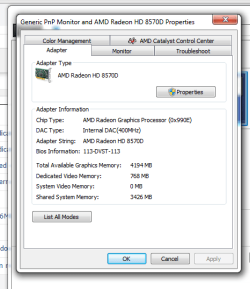
Does this seem right to you though? How come my system video memory is 0MB :O

graphics.png
 

My Computer

Computer type
PC/Desktop
Computer Manufacturer/Model Number
Custom build
OS
windows 7 Home premium x64
Motherboard
MSI A78M-E35 M-ATX Motherboard
Graphics Card(s)
AMD Radeon HD 8570D
Browser
Chrome
I'm not sure. :confused: I don't know how AMD defines the memory allocation. It sure looks like that "Dedicated" memory is part of the Reserved Memory shown in your graph though. The other is probably the video on-board memory.
 

My Computer

Computer type
PC/Desktop
Computer Manufacturer/Model Number
Built 2/11/2011
OS
Windows 7 Pro-x64
CPU
i7-2600 3.4GHz - 3.8GHz Turbo
Motherboard
Intel DH67BL-B3
Memory
8Gb - 2x4GB, Muskin 991770 PC3-1333
Graphics Card(s)
Integrated Intel HD 2000
Sound Card
Integrated Intel 10.1 HD, RealTek ALC892
Monitor(s) Displays
Asus LCD VH222H, Haier HL24XSL2a
Screen Resolution
1920x1080, 1920x1080
Hard Drives
Crucial SSD C300-128Gb,
Western Digital WD5002AALX - 500Gb,
Western Digital WD7501AALS - 750Gb
PSU
Seasonic 650W 80+ Gold Modular
Case
Rosewill Defender
Cooling
Stock CPU, Four 120mm case fans, PCH fan added
Keyboard
Logitech EX100 Y-RBH94 Wireless
Mouse
Logitech EX100 M-RCE95 Wireless
Internet Speed
3.0/1.5 Mbs
Antivirus
Microsoft Security Essentials
Browser
Microsoft Internet Explorer 11
Other Info
Antec Veris Premier-Multimedia IR Station,
Cyber Accoustics-3602 Speakers,
AFT XM-5U Card Reader,
Hauppauge TV-HVR-2250,
Sony LX300 USB Turntable
I'm not sure. :confused: I don't know how AMD defines the memory allocation. It sure looks like that "Dedicated" memory is part of the Reserved Memory shown in your graph though. The other is probably the video on-board memory.

So is it okay that the system video memory is 0MB? Obs streams using my GPU and i get non-smooth FPS ingame when people who use AMD cards and the OBS fork version that I use that streams uses GPU encoding get buttery smooth FPS. I'm not sure why and the people on the help forums there don't really know much about it either.
 

My Computer

Computer type
PC/Desktop
Computer Manufacturer/Model Number
Custom build
OS
windows 7 Home premium x64
Motherboard
MSI A78M-E35 M-ATX Motherboard
Graphics Card(s)
AMD Radeon HD 8570D
Browser
Chrome
Back
Top