Half the RAM from installing Win 7 X64

cn314

New member
Local time
12:09 AM
Messages
13
Hey guys so first, I'm not too computer literate so please bare with me. So i just re-installed Windows 7 Ultimate 64 Bit and everything went fine. It boots right up and is still a fast machine. But I have 8GB of RAM and it only says 3.99 usable. I have been told that a 32 bit version can make it run at half the RAM but I am 100% sure that i am running a 64 bit version. So does anyone know what is wrong?
Thanks
 

My Computer My Computer

OS
Windows 7 Ultimate X64
CPU
Intel Core i& 860 @ 2.8-GHz
Motherboard
Gayresy FX6840
Memory
* GB Songle-CHannel DDR3 @ 664MHz (9-9-9-24)
Graphics Card(s)
1032MB GeForce GTX 560 Ti
Sound Card
Creative X-Fi Audio Processor
Monitor(s) Displays
Syncmaster
Screen Resolution
1920x1080@60Hz
Hard Drives
932GB Seagate ST31000528AS ATA Device
466GB SAMSUNG HN-M500MBB ATA Device
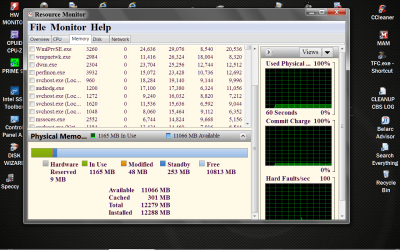
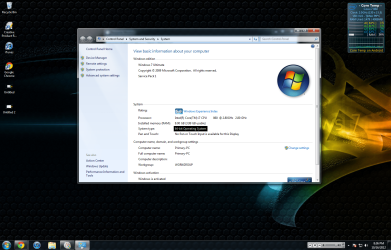
First on your keyboard tick the Windows Flag Key and the Pause key. System type will let you know whether you are 64 or 32. Next go to Resource Monitor them memory and you should have this. I will show you how Windows is using your ram.
Resource Monitor RAM.PNG
 

My Computer My Computer

Computer type
PC/Desktop
Computer Manufacturer/Model Number
Home made Desktop
OS
Windows 10 Pro. 64/ version 1709 Windows 7 Pro/64
CPU
Intel i7-6800K @ 4.3
Motherboard
ASUS X-99 Deluxe II
Memory
Corsair Platinum 16 gig @2400
Graphics Card(s)
EVGA GTX 1070 OC
Monitor(s) Displays
Asus 27" LED LCD/VE278Q
Screen Resolution
1920-1080 or 1280-720 HDMI
Hard Drives
INTEL SSD 730-240 Gb Sata 3.0/
PSU
EVGA Platium 1200W
Case
Phanteks Luxe Tempered Glass 8 fans/ one radiator
Cooling
XSPC/ Water Cooled CPU
Keyboard
Das 4 Professional
Mouse
Logitech M705/MX Anywhere 2-S
Internet Speed
100 mbits
Antivirus
Microsoft Security Essentials/ Malwarebytes Premium 3.0/ SAS
Browser
I.E. 11 default/Firefox/ ISP Time Warner Cable/Spectrum
Other Info
LG BluRay Burner/
Sound system-KLipsch-THX/
Icy Dock ssd Hot Swap bays.
So thats what i got, looks like half of it is reserved for hardware. I don't know what that really means because isn't that the purpose of RAM? Why is it like that and how do I fix it?
 

Attachments

  • Untitled 2.png
    Untitled 2.png
    454.6 KB · Views: 22
  • Untitled.png
    Untitled.png
    505.8 KB · Views: 19
Last edited:

My Computer My Computer

OS
Windows 7 Ultimate X64
CPU
Intel Core i& 860 @ 2.8-GHz
Motherboard
Gayresy FX6840
Memory
* GB Songle-CHannel DDR3 @ 664MHz (9-9-9-24)
Graphics Card(s)
1032MB GeForce GTX 560 Ti
Sound Card
Creative X-Fi Audio Processor
Monitor(s) Displays
Syncmaster
Screen Resolution
1920x1080@60Hz
Hard Drives
932GB Seagate ST31000528AS ATA Device
466GB SAMSUNG HN-M500MBB ATA Device
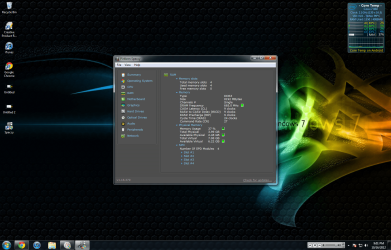
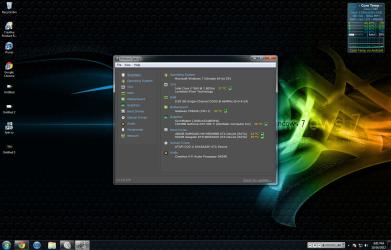
And here is proof I am running 64 bit.
 

Attachments

  • Untitled 2.png
    Untitled 2.png
    454.6 KB · Views: 10
  • Untitled.png
    Untitled.png
    505.8 KB · Views: 3

My Computer My Computer

OS
Windows 7 Ultimate X64
CPU
Intel Core i& 860 @ 2.8-GHz
Motherboard
Gayresy FX6840
Memory
* GB Songle-CHannel DDR3 @ 664MHz (9-9-9-24)
Graphics Card(s)
1032MB GeForce GTX 560 Ti
Sound Card
Creative X-Fi Audio Processor
Monitor(s) Displays
Syncmaster
Screen Resolution
1920x1080@60Hz
Hard Drives
932GB Seagate ST31000528AS ATA Device
466GB SAMSUNG HN-M500MBB ATA Device
My Computer My Computer

Computer type
PC/Desktop
Computer Manufacturer/Model Number
Home made Desktop
OS
Windows 10 Pro. 64/ version 1709 Windows 7 Pro/64
CPU
Intel i7-6800K @ 4.3
Motherboard
ASUS X-99 Deluxe II
Memory
Corsair Platinum 16 gig @2400
Graphics Card(s)
EVGA GTX 1070 OC
Monitor(s) Displays
Asus 27" LED LCD/VE278Q
Screen Resolution
1920-1080 or 1280-720 HDMI
Hard Drives
INTEL SSD 730-240 Gb Sata 3.0/
PSU
EVGA Platium 1200W
Case
Phanteks Luxe Tempered Glass 8 fans/ one radiator
Cooling
XSPC/ Water Cooled CPU
Keyboard
Das 4 Professional
Mouse
Logitech M705/MX Anywhere 2-S
Internet Speed
100 mbits
Antivirus
Microsoft Security Essentials/ Malwarebytes Premium 3.0/ SAS
Browser
I.E. 11 default/Firefox/ ISP Time Warner Cable/Spectrum
Other Info
LG BluRay Burner/
Sound system-KLipsch-THX/
Icy Dock ssd Hot Swap bays.
I attached them both to the first and second post, they are only 1.74 and 1.56 MB png files.
 

My Computer My Computer

OS
Windows 7 Ultimate X64
CPU
Intel Core i& 860 @ 2.8-GHz
Motherboard
Gayresy FX6840
Memory
* GB Songle-CHannel DDR3 @ 664MHz (9-9-9-24)
Graphics Card(s)
1032MB GeForce GTX 560 Ti
Sound Card
Creative X-Fi Audio Processor
Monitor(s) Displays
Syncmaster
Screen Resolution
1920x1080@60Hz
Hard Drives
932GB Seagate ST31000528AS ATA Device
466GB SAMSUNG HN-M500MBB ATA Device
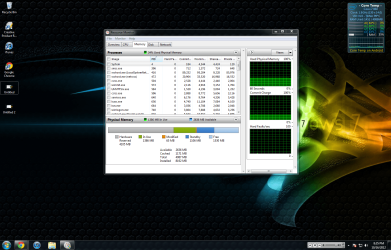
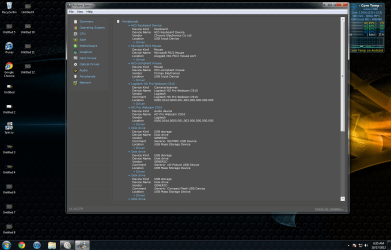
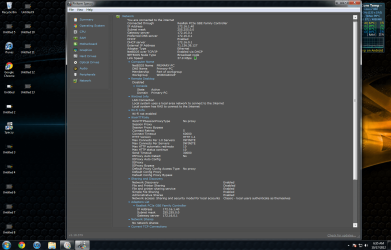
Okay your pictures came through. I have seen that a few times and it has normally been mismatched ram or it is installed in the wrong slot in the motherboard.
So the next thing we need is your ((My System Specs)) completely filled in using the
User CP at the top of the page using this little program.
Speccy - System Information - Free Download

You should also look in your motherboard manual for the proper position of ram according to the number of stick of ram you are using. Different motherboard require different locations.
 

My Computer My Computer

Computer type
PC/Desktop
Computer Manufacturer/Model Number
Home made Desktop
OS
Windows 10 Pro. 64/ version 1709 Windows 7 Pro/64
CPU
Intel i7-6800K @ 4.3
Motherboard
ASUS X-99 Deluxe II
Memory
Corsair Platinum 16 gig @2400
Graphics Card(s)
EVGA GTX 1070 OC
Monitor(s) Displays
Asus 27" LED LCD/VE278Q
Screen Resolution
1920-1080 or 1280-720 HDMI
Hard Drives
INTEL SSD 730-240 Gb Sata 3.0/
PSU
EVGA Platium 1200W
Case
Phanteks Luxe Tempered Glass 8 fans/ one radiator
Cooling
XSPC/ Water Cooled CPU
Keyboard
Das 4 Professional
Mouse
Logitech M705/MX Anywhere 2-S
Internet Speed
100 mbits
Antivirus
Microsoft Security Essentials/ Malwarebytes Premium 3.0/ SAS
Browser
I.E. 11 default/Firefox/ ISP Time Warner Cable/Spectrum
Other Info
LG BluRay Burner/
Sound system-KLipsch-THX/
Icy Dock ssd Hot Swap bays.
Okay I'll do that in a sec, I have two sicks of RAM and both 4GB, obviously :P. But last weekend i did pull them out is it possible to put two sticks of ram in wrong or is that only for 4 channels? That is what they are called right?
 

My Computer My Computer

OS
Windows 7 Ultimate X64
CPU
Intel Core i& 860 @ 2.8-GHz
Motherboard
Gayresy FX6840
Memory
* GB Songle-CHannel DDR3 @ 664MHz (9-9-9-24)
Graphics Card(s)
1032MB GeForce GTX 560 Ti
Sound Card
Creative X-Fi Audio Processor
Monitor(s) Displays
Syncmaster
Screen Resolution
1920x1080@60Hz
Hard Drives
932GB Seagate ST31000528AS ATA Device
466GB SAMSUNG HN-M500MBB ATA Device
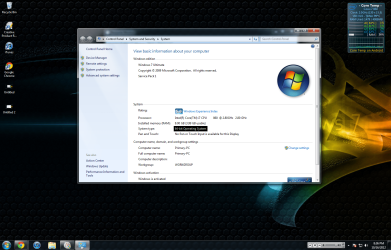
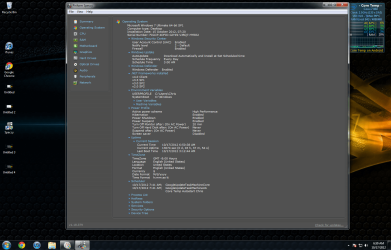
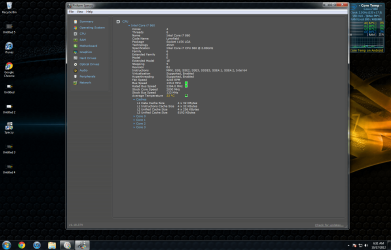
Okay I do have 4 sticks of RAM I thought I had 2 haha.
 

Attachments

  • Untitled 3.png
    Untitled 3.png
    597 KB · Views: 15
  • Untitled 4.png
    Untitled 4.png
    603.7 KB · Views: 9

My Computer My Computer

OS
Windows 7 Ultimate X64
CPU
Intel Core i& 860 @ 2.8-GHz
Motherboard
Gayresy FX6840
Memory
* GB Songle-CHannel DDR3 @ 664MHz (9-9-9-24)
Graphics Card(s)
1032MB GeForce GTX 560 Ti
Sound Card
Creative X-Fi Audio Processor
Monitor(s) Displays
Syncmaster
Screen Resolution
1920x1080@60Hz
Hard Drives
932GB Seagate ST31000528AS ATA Device
466GB SAMSUNG HN-M500MBB ATA Device
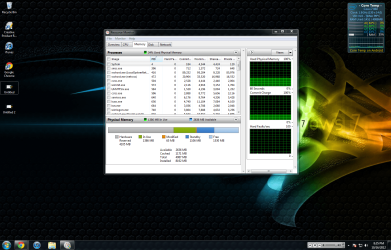
Yes you can install them wrong channels. Your picture shows you have them installed in single channel. You should be at least be running in dual channel with four slots to install ram. We still need your specs filled in, it helps us help you. Do what ever it takes to get a copy of your motherboard manual and install the ram as per manual instructions. A clue.
1. Both sticks of ram should be in the same color slots. Which color slots is wheir/where the manual comes in handy.
 

My Computer My Computer

Computer type
PC/Desktop
Computer Manufacturer/Model Number
Home made Desktop
OS
Windows 10 Pro. 64/ version 1709 Windows 7 Pro/64
CPU
Intel i7-6800K @ 4.3
Motherboard
ASUS X-99 Deluxe II
Memory
Corsair Platinum 16 gig @2400
Graphics Card(s)
EVGA GTX 1070 OC
Monitor(s) Displays
Asus 27" LED LCD/VE278Q
Screen Resolution
1920-1080 or 1280-720 HDMI
Hard Drives
INTEL SSD 730-240 Gb Sata 3.0/
PSU
EVGA Platium 1200W
Case
Phanteks Luxe Tempered Glass 8 fans/ one radiator
Cooling
XSPC/ Water Cooled CPU
Keyboard
Das 4 Professional
Mouse
Logitech M705/MX Anywhere 2-S
Internet Speed
100 mbits
Antivirus
Microsoft Security Essentials/ Malwarebytes Premium 3.0/ SAS
Browser
I.E. 11 default/Firefox/ ISP Time Warner Cable/Spectrum
Other Info
LG BluRay Burner/
Sound system-KLipsch-THX/
Icy Dock ssd Hot Swap bays.
I dont know what you mean by specs
 

My Computer My Computer

OS
Windows 7 Ultimate X64
CPU
Intel Core i& 860 @ 2.8-GHz
Motherboard
Gayresy FX6840
Memory
* GB Songle-CHannel DDR3 @ 664MHz (9-9-9-24)
Graphics Card(s)
1032MB GeForce GTX 560 Ti
Sound Card
Creative X-Fi Audio Processor
Monitor(s) Displays
Syncmaster
Screen Resolution
1920x1080@60Hz
Hard Drives
932GB Seagate ST31000528AS ATA Device
466GB SAMSUNG HN-M500MBB ATA Device

My Computer My Computer

Computer type
PC/Desktop
Computer Manufacturer/Model Number
Home made Desktop
OS
Windows 10 Pro. 64/ version 1709 Windows 7 Pro/64
CPU
Intel i7-6800K @ 4.3
Motherboard
ASUS X-99 Deluxe II
Memory
Corsair Platinum 16 gig @2400
Graphics Card(s)
EVGA GTX 1070 OC
Monitor(s) Displays
Asus 27" LED LCD/VE278Q
Screen Resolution
1920-1080 or 1280-720 HDMI
Hard Drives
INTEL SSD 730-240 Gb Sata 3.0/
PSU
EVGA Platium 1200W
Case
Phanteks Luxe Tempered Glass 8 fans/ one radiator
Cooling
XSPC/ Water Cooled CPU
Keyboard
Das 4 Professional
Mouse
Logitech M705/MX Anywhere 2-S
Internet Speed
100 mbits
Antivirus
Microsoft Security Essentials/ Malwarebytes Premium 3.0/ SAS
Browser
I.E. 11 default/Firefox/ ISP Time Warner Cable/Spectrum
Other Info
LG BluRay Burner/
Sound system-KLipsch-THX/
Icy Dock ssd Hot Swap bays.
How do i get you more info?
 

My Computer My Computer

OS
Windows 7 Ultimate X64
CPU
Intel Core i& 860 @ 2.8-GHz
Motherboard
Gayresy FX6840
Memory
* GB Songle-CHannel DDR3 @ 664MHz (9-9-9-24)
Graphics Card(s)
1032MB GeForce GTX 560 Ti
Sound Card
Creative X-Fi Audio Processor
Monitor(s) Displays
Syncmaster
Screen Resolution
1920x1080@60Hz
Hard Drives
932GB Seagate ST31000528AS ATA Device
466GB SAMSUNG HN-M500MBB ATA Device
use a tool called speccy or cpu id
 

My Computer My Computer

Computer Manufacturer/Model Number
Packard Bell iMedia 2218 -- Has Been Running For Almost 7 Years!
OS
Windows 7 Ultimate x86
CPU
Intel Pentium D 925 @ 3.00GHz
Motherboard
Socket 775 MCP73VT-PM
Memory
1GB DDR2 667MHz
Graphics Card(s)
Overclocked Asus ATI Radeon X1600 Pro 512MB
Sound Card
Sound Blaster Audigy 570
Monitor(s) Displays
19" LCD Monitor; MW19E-AAA
Screen Resolution
1440 x 900
Hard Drives
500gb 7200rpm (Windows 7) ---
160gb 7200rpm (Backup) ---
1TB Iomega External Drive (7200rpm)
PSU
250w Packard Bell Standard
Case
Packard Bell standard
Cooling
Intel Socket 775 Air Cooler
Keyboard
Wired PS/2 Keyboard
Mouse
Dell Wireless USB Mouse
Internet Speed
Wireles --- Download - 6.63 Mbps Upload - 0.38 Mbps
Other Info
Currently Planning To Build New Computer --- Also Got A Samsung Galaxy Ace II (Plays All Games You Throw At It)
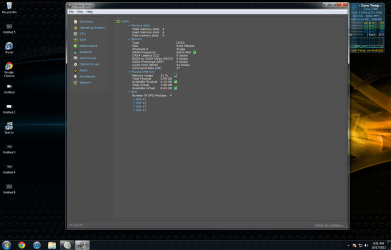
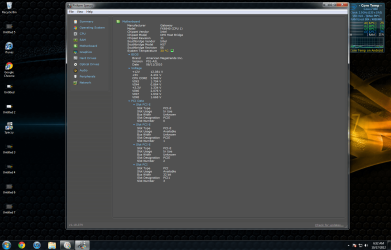
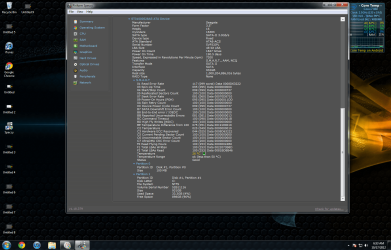
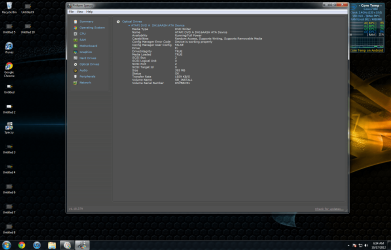
i used speccy and posted pics, do you need everything?
 

My Computer My Computer

OS
Windows 7 Ultimate X64
CPU
Intel Core i& 860 @ 2.8-GHz
Motherboard
Gayresy FX6840
Memory
* GB Songle-CHannel DDR3 @ 664MHz (9-9-9-24)
Graphics Card(s)
1032MB GeForce GTX 560 Ti
Sound Card
Creative X-Fi Audio Processor
Monitor(s) Displays
Syncmaster
Screen Resolution
1920x1080@60Hz
Hard Drives
932GB Seagate ST31000528AS ATA Device
466GB SAMSUNG HN-M500MBB ATA Device
Copy the information from the Speccy program onto your System Specifications (type it) via;

Edit System Spec

Then scroll down to the bottom of the page, after typing up the information from Speccy into the correct fields within the Edit System Spec page, and click Save Changes.

Hope this helps,

Harry
 

My Computer My Computer

Computer type
Laptop
Untitled 5.png

Untitled 6.png

Untitled 7.png

Untitled 8.png

Untitled 9.png

Untitled 10.png

Untitled 11.png

Untitled 12.png

Untitled 13.png

Untitled 14.png
 

My Computer My Computer

OS
Windows 7 Ultimate X64
CPU
Intel Core i& 860 @ 2.8-GHz
Motherboard
Gayresy FX6840
Memory
* GB Songle-CHannel DDR3 @ 664MHz (9-9-9-24)
Graphics Card(s)
1032MB GeForce GTX 560 Ti
Sound Card
Creative X-Fi Audio Processor
Monitor(s) Displays
Syncmaster
Screen Resolution
1920x1080@60Hz
Hard Drives
932GB Seagate ST31000528AS ATA Device
466GB SAMSUNG HN-M500MBB ATA Device
Please copy that information using post #16.
 

My Computer My Computer

Computer type
Laptop
K i think i did it right
 

My Computer My Computer

OS
Windows 7 Ultimate X64
CPU
Intel Core i& 860 @ 2.8-GHz
Motherboard
Gayresy FX6840
Memory
* GB Songle-CHannel DDR3 @ 664MHz (9-9-9-24)
Graphics Card(s)
1032MB GeForce GTX 560 Ti
Sound Card
Creative X-Fi Audio Processor
Monitor(s) Displays
Syncmaster
Screen Resolution
1920x1080@60Hz
Hard Drives
932GB Seagate ST31000528AS ATA Device
466GB SAMSUNG HN-M500MBB ATA Device
Back
Top