Solved hard disk changed to dynamic type after using disk management

c:\windows\system32\autochk.exe is still there?
 

My Computer

Computer type
Laptop
Computer Manufacturer/Model Number
ACER ASPIRE 5742G
OS
Microsoft Windows 7 Home Premium 64-bits 7601 Multiprocessor Free Service Pack 1
CPU
Intel(R) Core(TM) i3 CPU M 370 @ 2.40GHz
Motherboard
Acer Aspire 5742G
Memory
4,00 GB
Graphics Card(s)
ATI Mobility Radeon HD 5400 Series
Sound Card
(1) AMD High Definition Audio Device (2) Realtek High Defi
Screen Resolution
1366 x 768 x 32 bits (4294967296 colors) @ 60 Hz
Hard Drives
WDC WD5000BEVT-22ZAT0

My Computer

Computer type
Laptop
Computer Manufacturer/Model Number
ACER ASPIRE 5742G
OS
Microsoft Windows 7 Home Premium 64-bits 7601 Multiprocessor Free Service Pack 1
CPU
Intel(R) Core(TM) i3 CPU M 370 @ 2.40GHz
Motherboard
Acer Aspire 5742G
Memory
4,00 GB
Graphics Card(s)
ATI Mobility Radeon HD 5400 Series
Sound Card
(1) AMD High Definition Audio Device (2) Realtek High Defi
Screen Resolution
1366 x 768 x 32 bits (4294967296 colors) @ 60 Hz
Hard Drives
WDC WD5000BEVT-22ZAT0

My Computer

Computer Manufacturer/Model Number
hp pavilion dv6-7012tx
OS
windows 7 home premium 64-bit
CPU
2nd generation i5
Memory
6GB
Graphics Card(s)
Nvidia Geforce GT630M(2GB)
Monitor(s) Displays
LED
Screen Resolution
1366*768
Hard Drives
Hitachi 640GB Hard Disk

My Computer

Computer type
Laptop
Computer Manufacturer/Model Number
ACER ASPIRE 5742G
OS
Microsoft Windows 7 Home Premium 64-bits 7601 Multiprocessor Free Service Pack 1
CPU
Intel(R) Core(TM) i3 CPU M 370 @ 2.40GHz
Motherboard
Acer Aspire 5742G
Memory
4,00 GB
Graphics Card(s)
ATI Mobility Radeon HD 5400 Series
Sound Card
(1) AMD High Definition Audio Device (2) Realtek High Defi
Screen Resolution
1366 x 768 x 32 bits (4294967296 colors) @ 60 Hz
Hard Drives
WDC WD5000BEVT-22ZAT0
Your PW screenshot looks perfect! And win7 is actually booting! It just can't find autchk.exe
So it skips it (it should perform an automatic chkdsk).

Can you right click C in PW and do "explore" (or something like that)? windows folders and files are still there?

yes I can explore C drive & I can see every folder there.
Here's the screenshot:
View attachment 223183

What to do now?

Already done this?
Greg: If Windows 7 won't start then boot into Windows 7 DVD System Recovery Options or System Repair Disk to run Startup Repair - Run 3 Separate Times until Windows 7 starts.
Do that!

Dude that means I have to reinstall windows?
because I don't have OS DVD.Since I made recovery of my OS & drivers using HP Recovery Manager & out of the 5 recovery DVD's I don't know which one is windows.
 

My Computer

Computer Manufacturer/Model Number
hp pavilion dv6-7012tx
OS
windows 7 home premium 64-bit
CPU
2nd generation i5
Memory
6GB
Graphics Card(s)
Nvidia Geforce GT630M(2GB)
Monitor(s) Displays
LED
Screen Resolution
1366*768
Hard Drives
Hitachi 640GB Hard Disk

My Computer

Computer type
PC/Desktop
Computer Manufacturer/Model Number
Self Assembled
OS
Microsoft Windows 10 Pro Insider Preview 64-bit
CPU
Intel(R) Core(TM) i3-4130 CPU @ 3.40GHz
Motherboard
Gigabyte Technology Co., Ltd. B85M-D3H
Memory
Corsair Vengence 4GB x2 (8.00GB Dual-Channel DDR3 @ 798MHz)
Graphics Card(s)
2047MB GeForce GTS 450 (ZOTAC International)
Sound Card
Onboard (Realtek High Definition Audio)
Monitor(s) Displays
LG Flatron E2040T
Screen Resolution
1600x900
Hard Drives
Western Digital 1 TB
Seagate 500 GB
PSU
Corsair VS550
Case
Cooler Master K380
Cooling
Cooler Master Seidon 120V Plus
Keyboard
Logitech MK260r
Mouse
Logitech MK260r
Internet Speed
PMPL Broadband
Antivirus
Windows Defender + MBAM
Browser
Firefox
Other Info
Dell Studio 15" Laptop
Your PW screenshot looks perfect! And win7 is actually booting! It just can't find autchk.exe
So it skips it (it should perform an automatic chkdsk).

Can you right click C in PW and do "explore" (or something like that)? windows folders and files are still there?

yes I can explore C drive & I can see every folder there.
Here's the screenshot:
View attachment 223183

What to do now?

Already done this?
Greg: If Windows 7 won't start then boot into Windows 7 DVD System Recovery Options or System Repair Disk to run Startup Repair - Run 3 Separate Times until Windows 7 starts.
Do that!

Dude that means I have to reinstall windows?
because I don't have OS DVD.Since I made recovery of my OS & drivers using HP Recovery Manager & out of the 5 recovery DVD's I don't know which one is windows.
No resinstall!! Just "startup repair"
And from recovery environment ->command prompt
chkdsk/f c:
chkdsk/f d:

check for disk errors!
 

My Computer

Computer type
Laptop
Computer Manufacturer/Model Number
ACER ASPIRE 5742G
OS
Microsoft Windows 7 Home Premium 64-bits 7601 Multiprocessor Free Service Pack 1
CPU
Intel(R) Core(TM) i3 CPU M 370 @ 2.40GHz
Motherboard
Acer Aspire 5742G
Memory
4,00 GB
Graphics Card(s)
ATI Mobility Radeon HD 5400 Series
Sound Card
(1) AMD High Definition Audio Device (2) Realtek High Defi
Screen Resolution
1366 x 768 x 32 bits (4294967296 colors) @ 60 Hz
Hard Drives
WDC WD5000BEVT-22ZAT0
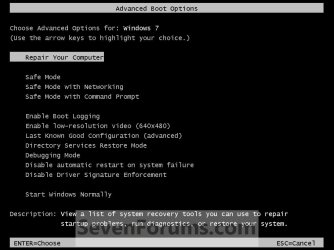
When booting press F8 every half second. Does a menu appear with options like "safe mode" and "repair your computer"?
 

My Computer

Computer type
Laptop
Computer Manufacturer/Model Number
ACER ASPIRE 5742G
OS
Microsoft Windows 7 Home Premium 64-bits 7601 Multiprocessor Free Service Pack 1
CPU
Intel(R) Core(TM) i3 CPU M 370 @ 2.40GHz
Motherboard
Acer Aspire 5742G
Memory
4,00 GB
Graphics Card(s)
ATI Mobility Radeon HD 5400 Series
Sound Card
(1) AMD High Definition Audio Device (2) Realtek High Defi
Screen Resolution
1366 x 768 x 32 bits (4294967296 colors) @ 60 Hz
Hard Drives
WDC WD5000BEVT-22ZAT0
Kaktussoft I think the Rebuild MBR using the PW boot CD will be as good as the Startup repair using the installation or repair disk , as the system reserved is already active ?

If needed, system repair disks may be downloaded from this location : http://maximumpcguides.com/windows-7/create-a-windows-7-system-repair-disc/

Using it, the startup repair may be done, for three separate times, with restarts after every single run.

But, the rebuild MBR will do the same thing there, IMO.
 

My Computer

Computer type
PC/Desktop
Computer Manufacturer/Model Number
Self Assembled
OS
Microsoft Windows 10 Pro Insider Preview 64-bit
CPU
Intel(R) Core(TM) i3-4130 CPU @ 3.40GHz
Motherboard
Gigabyte Technology Co., Ltd. B85M-D3H
Memory
Corsair Vengence 4GB x2 (8.00GB Dual-Channel DDR3 @ 798MHz)
Graphics Card(s)
2047MB GeForce GTS 450 (ZOTAC International)
Sound Card
Onboard (Realtek High Definition Audio)
Monitor(s) Displays
LG Flatron E2040T
Screen Resolution
1600x900
Hard Drives
Western Digital 1 TB
Seagate 500 GB
PSU
Corsair VS550
Case
Cooler Master K380
Cooling
Cooler Master Seidon 120V Plus
Keyboard
Logitech MK260r
Mouse
Logitech MK260r
Internet Speed
PMPL Broadband
Antivirus
Windows Defender + MBAM
Browser
Firefox
Other Info
Dell Studio 15" Laptop
Kaktussoft I think the Rebuild MBR using the PW boot CD will be as good as the Startup repair using the installation or repair disk , as the system reserved is already active ?

If needed, system repair disks may be downloaded from this location : Create a Windows 7 System Repair Disc — MAXIMUMpcguides – Windows 7 tips, tricks, help, and how-to guides

Using it, the startup repair may be done, for three separate times, with restarts after every single run.

But, the rebuild MBR will do the same thing there, IMO.
MBR and volume bootsector is most likely perfect..you're right. But startup repair does more! System is booting btw it displays a autochk error within windows.

Using repair disk he can do a chkdsk as well
 

My Computer

Computer type
Laptop
Computer Manufacturer/Model Number
ACER ASPIRE 5742G
OS
Microsoft Windows 7 Home Premium 64-bits 7601 Multiprocessor Free Service Pack 1
CPU
Intel(R) Core(TM) i3 CPU M 370 @ 2.40GHz
Motherboard
Acer Aspire 5742G
Memory
4,00 GB
Graphics Card(s)
ATI Mobility Radeon HD 5400 Series
Sound Card
(1) AMD High Definition Audio Device (2) Realtek High Defi
Screen Resolution
1366 x 768 x 32 bits (4294967296 colors) @ 60 Hz
Hard Drives
WDC WD5000BEVT-22ZAT0
As Christin dont have a OS disk, and not sure which one is the system repair disk, I hope the downloaded ISO will work there ?

Create a Windows 7 System Repair Disc — MAXIMUMpcguides – Windows 7 tips, tricks, help, and how-to guides

Christin, if needed, you download the iso (matching your os is 32 bit or 64 bit; the links are in the middle of the links page), burn it in a blank disk, boot into it, and run http://www.sevenforums.com/tutorials/681-startup-repair.html , for three times, with restarts after every single run.

But before that, you try rebuilding MBR using the PW boot cd.
 

My Computer

Computer type
PC/Desktop
Computer Manufacturer/Model Number
Self Assembled
OS
Microsoft Windows 10 Pro Insider Preview 64-bit
CPU
Intel(R) Core(TM) i3-4130 CPU @ 3.40GHz
Motherboard
Gigabyte Technology Co., Ltd. B85M-D3H
Memory
Corsair Vengence 4GB x2 (8.00GB Dual-Channel DDR3 @ 798MHz)
Graphics Card(s)
2047MB GeForce GTS 450 (ZOTAC International)
Sound Card
Onboard (Realtek High Definition Audio)
Monitor(s) Displays
LG Flatron E2040T
Screen Resolution
1600x900
Hard Drives
Western Digital 1 TB
Seagate 500 GB
PSU
Corsair VS550
Case
Cooler Master K380
Cooling
Cooler Master Seidon 120V Plus
Keyboard
Logitech MK260r
Mouse
Logitech MK260r
Internet Speed
PMPL Broadband
Antivirus
Windows Defender + MBAM
Browser
Firefox
Other Info
Dell Studio 15" Laptop

My Computer

Computer Manufacturer/Model Number
hp pavilion dv6-7012tx
OS
windows 7 home premium 64-bit
CPU
2nd generation i5
Memory
6GB
Graphics Card(s)
Nvidia Geforce GT630M(2GB)
Monitor(s) Displays
LED
Screen Resolution
1366*768
Hard Drives
Hitachi 640GB Hard Disk
Boot into PW boot cd, select the disk (not any partition, but the disk). Go to Disk> Rebuild MBR . Apply , Yes, and restart.

It should be able to boot into windows now.

If now, we are to take the other way.

Select the disk means that what you have shown in your camera snip ... the blue selection over Disk 1.
 

My Computer

Computer type
PC/Desktop
Computer Manufacturer/Model Number
Self Assembled
OS
Microsoft Windows 10 Pro Insider Preview 64-bit
CPU
Intel(R) Core(TM) i3-4130 CPU @ 3.40GHz
Motherboard
Gigabyte Technology Co., Ltd. B85M-D3H
Memory
Corsair Vengence 4GB x2 (8.00GB Dual-Channel DDR3 @ 798MHz)
Graphics Card(s)
2047MB GeForce GTS 450 (ZOTAC International)
Sound Card
Onboard (Realtek High Definition Audio)
Monitor(s) Displays
LG Flatron E2040T
Screen Resolution
1600x900
Hard Drives
Western Digital 1 TB
Seagate 500 GB
PSU
Corsair VS550
Case
Cooler Master K380
Cooling
Cooler Master Seidon 120V Plus
Keyboard
Logitech MK260r
Mouse
Logitech MK260r
Internet Speed
PMPL Broadband
Antivirus
Windows Defender + MBAM
Browser
Firefox
Other Info
Dell Studio 15" Laptop
Tap F8 on boot. Then a menu appears. Select "repair your computer" there
 

My Computer

Computer type
Laptop
Computer Manufacturer/Model Number
ACER ASPIRE 5742G
OS
Microsoft Windows 7 Home Premium 64-bits 7601 Multiprocessor Free Service Pack 1
CPU
Intel(R) Core(TM) i3 CPU M 370 @ 2.40GHz
Motherboard
Acer Aspire 5742G
Memory
4,00 GB
Graphics Card(s)
ATI Mobility Radeon HD 5400 Series
Sound Card
(1) AMD High Definition Audio Device (2) Realtek High Defi
Screen Resolution
1366 x 768 x 32 bits (4294967296 colors) @ 60 Hz
Hard Drives
WDC WD5000BEVT-22ZAT0
Boot into PW boot cd, select the disk (not any partition, but the disk). Go to Disk> Rebuild MBR . Apply , Yes, and restart.

It should be able to boot into windows now.

If now, we are to take the other way.

Select the disk means that what you have shown in your camera snip ... the blue selection over Disk 1.

Hey arc Rebuild MBR also not working.
Now I'm going to download the ISO file you said.
Are you sure it will work?
 

My Computer

Computer Manufacturer/Model Number
hp pavilion dv6-7012tx
OS
windows 7 home premium 64-bit
CPU
2nd generation i5
Memory
6GB
Graphics Card(s)
Nvidia Geforce GT630M(2GB)
Monitor(s) Displays
LED
Screen Resolution
1366*768
Hard Drives
Hitachi 640GB Hard Disk
Boot into PW boot cd, select the disk (not any partition, but the disk). Go to Disk> Rebuild MBR . Apply , Yes, and restart.

It should be able to boot into windows now.

If now, we are to take the other way.

Select the disk means that what you have shown in your camera snip ... the blue selection over Disk 1.

Hey arc Rebuild MBR also not working.
Now I'm going to download the ISO file you said.
Are you sure it will work?
Why not working??? Post error message
 

My Computer

Computer type
Laptop
Computer Manufacturer/Model Number
ACER ASPIRE 5742G
OS
Microsoft Windows 7 Home Premium 64-bits 7601 Multiprocessor Free Service Pack 1
CPU
Intel(R) Core(TM) i3 CPU M 370 @ 2.40GHz
Motherboard
Acer Aspire 5742G
Memory
4,00 GB
Graphics Card(s)
ATI Mobility Radeon HD 5400 Series
Sound Card
(1) AMD High Definition Audio Device (2) Realtek High Defi
Screen Resolution
1366 x 768 x 32 bits (4294967296 colors) @ 60 Hz
Hard Drives
WDC WD5000BEVT-22ZAT0
Almost. Go for it.

Even it also not work, there are still ways to boot the computer up. Dont Worry. :)
 

My Computer

Computer type
PC/Desktop
Computer Manufacturer/Model Number
Self Assembled
OS
Microsoft Windows 10 Pro Insider Preview 64-bit
CPU
Intel(R) Core(TM) i3-4130 CPU @ 3.40GHz
Motherboard
Gigabyte Technology Co., Ltd. B85M-D3H
Memory
Corsair Vengence 4GB x2 (8.00GB Dual-Channel DDR3 @ 798MHz)
Graphics Card(s)
2047MB GeForce GTS 450 (ZOTAC International)
Sound Card
Onboard (Realtek High Definition Audio)
Monitor(s) Displays
LG Flatron E2040T
Screen Resolution
1600x900
Hard Drives
Western Digital 1 TB
Seagate 500 GB
PSU
Corsair VS550
Case
Cooler Master K380
Cooling
Cooler Master Seidon 120V Plus
Keyboard
Logitech MK260r
Mouse
Logitech MK260r
Internet Speed
PMPL Broadband
Antivirus
Windows Defender + MBAM
Browser
Firefox
Other Info
Dell Studio 15" Laptop

My Computer

Computer type
Laptop
Computer Manufacturer/Model Number
ACER ASPIRE 5742G
OS
Microsoft Windows 7 Home Premium 64-bits 7601 Multiprocessor Free Service Pack 1
CPU
Intel(R) Core(TM) i3 CPU M 370 @ 2.40GHz
Motherboard
Acer Aspire 5742G
Memory
4,00 GB
Graphics Card(s)
ATI Mobility Radeon HD 5400 Series
Sound Card
(1) AMD High Definition Audio Device (2) Realtek High Defi
Screen Resolution
1366 x 768 x 32 bits (4294967296 colors) @ 60 Hz
Hard Drives
WDC WD5000BEVT-22ZAT0

My Computer

Computer type
PC/Desktop
Computer Manufacturer/Model Number
Self Assembled
OS
Microsoft Windows 10 Pro Insider Preview 64-bit
CPU
Intel(R) Core(TM) i3-4130 CPU @ 3.40GHz
Motherboard
Gigabyte Technology Co., Ltd. B85M-D3H
Memory
Corsair Vengence 4GB x2 (8.00GB Dual-Channel DDR3 @ 798MHz)
Graphics Card(s)
2047MB GeForce GTS 450 (ZOTAC International)
Sound Card
Onboard (Realtek High Definition Audio)
Monitor(s) Displays
LG Flatron E2040T
Screen Resolution
1600x900
Hard Drives
Western Digital 1 TB
Seagate 500 GB
PSU
Corsair VS550
Case
Cooler Master K380
Cooling
Cooler Master Seidon 120V Plus
Keyboard
Logitech MK260r
Mouse
Logitech MK260r
Internet Speed
PMPL Broadband
Antivirus
Windows Defender + MBAM
Browser
Firefox
Other Info
Dell Studio 15" Laptop

My Computer

Computer Manufacturer/Model Number
hp pavilion dv6-7012tx
OS
windows 7 home premium 64-bit
CPU
2nd generation i5
Memory
6GB
Graphics Card(s)
Nvidia Geforce GT630M(2GB)
Monitor(s) Displays
LED
Screen Resolution
1366*768
Hard Drives
Hitachi 640GB Hard Disk
Back
Top