Solved Hard drive not found

ADeV

New member
Local time
8:12 PM
Messages
21
Hello all, I have just finished assembling my first computer. I am trying to use the Windows 7 upgrade disk to install on my new hard drive as per the set of instructions I found here. I am having trouble though, when I get to the point where I select custom install them pick a drive to put the install on; there is no drive select. I tried to use the refresh option to no avail. I am pretty sure my hard drive isn't DOA because my cmos setup recognizes it as it should. Any help is appreciated, Thanks in advance.

Edit: This is the one I'm going by, I found it in a Google search
 

My Computer

OS
64 bit Win 7
CPU
AMD Athlon II X4
Motherboard
Gigabyte GA-790XTA-UD4
Memory
G-Skill ripjaw 4GB
Graphics Card(s)
Sapphire 100292DDR3L Radeon HD 5450
Sound Card
On board
Hard Drives
Seagate 500 GB
PSU
Rosewill Stallion Series RD450-2-SB 450W ATX V2.2
Keyboard
Logitech EX100
Mouse
Logitech EX100
Internet Speed
3MB/s
Hello ADeV, welcome to Seven Forums!


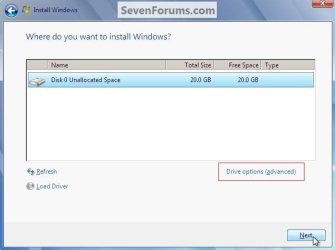
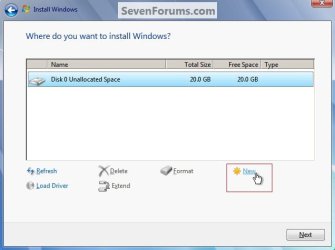
You are not getting the "Where do you want to ... " like in the snips below and in step 7 of the tutorial during install, is that what you're saying?


click to enlarge
New Partition.jpgNewPartition2.jpg
 

My Computer

Computer Manufacturer/Model Number
* BFK Customs *
OS
W 7 64-bit Ultimate
CPU
Intel Q9550 Yorkfield
Motherboard
ASUS P5Q Pro
Memory
8GB Dominator 8500C5D
Graphics Card(s)
ATI : XFX 5870
Sound Card
Realtek HD Audio 7-1
Monitor(s) Displays
1x 47" LCD HDMI & 3x 26" LCD HDMI
Screen Resolution
1920x1080P & 1920x1200
Hard Drives
1x 80GB Intel X25-M G2 SSD : 1x 500GB & 1x 640GB WD Caviar Black(s)
PSU
Corsair 620HX
Case
Cooler Master RC-690
Cooling
Tuniq Tower 120, 2x 140mm and 3x 120mm case fans
Keyboard
Microsoft 500
Mouse
Razer Diamondback 3G
Internet Speed
14 Mb/s
Other Info
1x Koutech 3Gb/s SATA HDD Hot Swap Rack

My Computer

OS
64 bit Win 7
CPU
AMD Athlon II X4
Motherboard
Gigabyte GA-790XTA-UD4
Memory
G-Skill ripjaw 4GB
Graphics Card(s)
Sapphire 100292DDR3L Radeon HD 5450
Sound Card
On board
Hard Drives
Seagate 500 GB
PSU
Rosewill Stallion Series RD450-2-SB 450W ATX V2.2
Keyboard
Logitech EX100
Mouse
Logitech EX100
Internet Speed
3MB/s
If nothing is showing in the selection window, try Loading your SATA controller driver or mobo drivers at the link to insert drivers there.
 
^ I'll try that as well THX
 

My Computer

OS
64 bit Win 7
CPU
AMD Athlon II X4
Motherboard
Gigabyte GA-790XTA-UD4
Memory
G-Skill ripjaw 4GB
Graphics Card(s)
Sapphire 100292DDR3L Radeon HD 5450
Sound Card
On board
Hard Drives
Seagate 500 GB
PSU
Rosewill Stallion Series RD450-2-SB 450W ATX V2.2
Keyboard
Logitech EX100
Mouse
Logitech EX100
Internet Speed
3MB/s
Hello all, I have just finished assembling my first computer. I am trying to use the Windows 7 upgrade disk to install on my new hard drive as per the set of instructions I found here. I am having trouble though, when I get to the point where I select custom install them pick a drive to put the install on; there is no drive select. I tried to use the refresh option to no avail. I am pretty sure my hard drive isn't DOA because my cmos setup recognizes it as it should. Any help is appreciated, Thanks in advance.

Edit: This is the one I'm going by, I found it in a Google search


I just re-read the OP, have a look at this tutorial at the link below.

Do a Clean Install with a Upgrade Windows 7 Version
 

My Computer

Computer Manufacturer/Model Number
* BFK Customs *
OS
W 7 64-bit Ultimate
CPU
Intel Q9550 Yorkfield
Motherboard
ASUS P5Q Pro
Memory
8GB Dominator 8500C5D
Graphics Card(s)
ATI : XFX 5870
Sound Card
Realtek HD Audio 7-1
Monitor(s) Displays
1x 47" LCD HDMI & 3x 26" LCD HDMI
Screen Resolution
1920x1080P & 1920x1200
Hard Drives
1x 80GB Intel X25-M G2 SSD : 1x 500GB & 1x 640GB WD Caviar Black(s)
PSU
Corsair 620HX
Case
Cooler Master RC-690
Cooling
Tuniq Tower 120, 2x 140mm and 3x 120mm case fans
Keyboard
Microsoft 500
Mouse
Razer Diamondback 3G
Internet Speed
14 Mb/s
Other Info
1x Koutech 3Gb/s SATA HDD Hot Swap Rack
OK so using gregrockers idea I put the MOBO disk in and found a list of drivers to install is this now a matter of finding the right one? I've never done this sort of thing before.
 

My Computer

OS
64 bit Win 7
CPU
AMD Athlon II X4
Motherboard
Gigabyte GA-790XTA-UD4
Memory
G-Skill ripjaw 4GB
Graphics Card(s)
Sapphire 100292DDR3L Radeon HD 5450
Sound Card
On board
Hard Drives
Seagate 500 GB
PSU
Rosewill Stallion Series RD450-2-SB 450W ATX V2.2
Keyboard
Logitech EX100
Mouse
Logitech EX100
Internet Speed
3MB/s
Do I need to format this hard drive prior to being able to put windows 7 on it?
 

My Computer

OS
64 bit Win 7
CPU
AMD Athlon II X4
Motherboard
Gigabyte GA-790XTA-UD4
Memory
G-Skill ripjaw 4GB
Graphics Card(s)
Sapphire 100292DDR3L Radeon HD 5450
Sound Card
On board
Hard Drives
Seagate 500 GB
PSU
Rosewill Stallion Series RD450-2-SB 450W ATX V2.2
Keyboard
Logitech EX100
Mouse
Logitech EX100
Internet Speed
3MB/s
Not really, Windows will do everything needed automatically during the install.
 

My Computer

Computer Manufacturer/Model Number
* BFK Customs *
OS
W 7 64-bit Ultimate
CPU
Intel Q9550 Yorkfield
Motherboard
ASUS P5Q Pro
Memory
8GB Dominator 8500C5D
Graphics Card(s)
ATI : XFX 5870
Sound Card
Realtek HD Audio 7-1
Monitor(s) Displays
1x 47" LCD HDMI & 3x 26" LCD HDMI
Screen Resolution
1920x1080P & 1920x1200
Hard Drives
1x 80GB Intel X25-M G2 SSD : 1x 500GB & 1x 640GB WD Caviar Black(s)
PSU
Corsair 620HX
Case
Cooler Master RC-690
Cooling
Tuniq Tower 120, 2x 140mm and 3x 120mm case fans
Keyboard
Microsoft 500
Mouse
Razer Diamondback 3G
Internet Speed
14 Mb/s
Other Info
1x Koutech 3Gb/s SATA HDD Hot Swap Rack
Well I tried to put the driver(s) from my MOBO disk into the said window and nothing worked. I Am really stumped now. :/
 

My Computer

OS
64 bit Win 7
CPU
AMD Athlon II X4
Motherboard
Gigabyte GA-790XTA-UD4
Memory
G-Skill ripjaw 4GB
Graphics Card(s)
Sapphire 100292DDR3L Radeon HD 5450
Sound Card
On board
Hard Drives
Seagate 500 GB
PSU
Rosewill Stallion Series RD450-2-SB 450W ATX V2.2
Keyboard
Logitech EX100
Mouse
Logitech EX100
Internet Speed
3MB/s
You don't need to add any drivers during the install, Windows will do all that, just start the install and keep clicking next/ok; just be sure to create a password when prompted, Windows 7 does not like when a password is not created.
 

My Computer

Computer Manufacturer/Model Number
* BFK Customs *
OS
W 7 64-bit Ultimate
CPU
Intel Q9550 Yorkfield
Motherboard
ASUS P5Q Pro
Memory
8GB Dominator 8500C5D
Graphics Card(s)
ATI : XFX 5870
Sound Card
Realtek HD Audio 7-1
Monitor(s) Displays
1x 47" LCD HDMI & 3x 26" LCD HDMI
Screen Resolution
1920x1080P & 1920x1200
Hard Drives
1x 80GB Intel X25-M G2 SSD : 1x 500GB & 1x 640GB WD Caviar Black(s)
PSU
Corsair 620HX
Case
Cooler Master RC-690
Cooling
Tuniq Tower 120, 2x 140mm and 3x 120mm case fans
Keyboard
Microsoft 500
Mouse
Razer Diamondback 3G
Internet Speed
14 Mb/s
Other Info
1x Koutech 3Gb/s SATA HDD Hot Swap Rack
When I select browse I get a list of :Floppy, local :C, CD drive and Boot. Logically I select local, I am then told I need to format the disk in drive C before I can use it. I select format disk, and I am told windows can't format disk C. I need to check to see that the disk and drive are connected, make sure the disk is not read only then try again
 

My Computer

OS
64 bit Win 7
CPU
AMD Athlon II X4
Motherboard
Gigabyte GA-790XTA-UD4
Memory
G-Skill ripjaw 4GB
Graphics Card(s)
Sapphire 100292DDR3L Radeon HD 5450
Sound Card
On board
Hard Drives
Seagate 500 GB
PSU
Rosewill Stallion Series RD450-2-SB 450W ATX V2.2
Keyboard
Logitech EX100
Mouse
Logitech EX100
Internet Speed
3MB/s
You don't need to add any drivers during the install, Windows will do all that, just start the install and keep clicking next/ok; just be sure to create a password when prompted, Windows 7 does not like when a password is not created.

I am not being presented with those options though.
 

My Computer

OS
64 bit Win 7
CPU
AMD Athlon II X4
Motherboard
Gigabyte GA-790XTA-UD4
Memory
G-Skill ripjaw 4GB
Graphics Card(s)
Sapphire 100292DDR3L Radeon HD 5450
Sound Card
On board
Hard Drives
Seagate 500 GB
PSU
Rosewill Stallion Series RD450-2-SB 450W ATX V2.2
Keyboard
Logitech EX100
Mouse
Logitech EX100
Internet Speed
3MB/s
What exactly appears in the drive window where you choose where to install Win7?

 
What exactly appears in the drive window where you choose where to install Win7?


Nothing appears in that box. That's what doesn't make sense, CMOS sees it but windows doesn't.
 

My Computer

OS
64 bit Win 7
CPU
AMD Athlon II X4
Motherboard
Gigabyte GA-790XTA-UD4
Memory
G-Skill ripjaw 4GB
Graphics Card(s)
Sapphire 100292DDR3L Radeon HD 5450
Sound Card
On board
Hard Drives
Seagate 500 GB
PSU
Rosewill Stallion Series RD450-2-SB 450W ATX V2.2
Keyboard
Logitech EX100
Mouse
Logitech EX100
Internet Speed
3MB/s
The SATA controller driver for that board should be in installer, but insert it to be sure.

Try setting SATA controller in BIOS setup to AHCI mode first, then IDE mode if necessary.

Try wiping the HD if it is used. SSD - HDD Optimize for Windows Reinstallation

Do you have a Dynamic Disk?

The mobo disk right? I'll try those methods too. The drive is brand new purchased from newegg last week
 

My Computer

OS
64 bit Win 7
CPU
AMD Athlon II X4
Motherboard
Gigabyte GA-790XTA-UD4
Memory
G-Skill ripjaw 4GB
Graphics Card(s)
Sapphire 100292DDR3L Radeon HD 5450
Sound Card
On board
Hard Drives
Seagate 500 GB
PSU
Rosewill Stallion Series RD450-2-SB 450W ATX V2.2
Keyboard
Logitech EX100
Mouse
Logitech EX100
Internet Speed
3MB/s
I dont really understand how to run this tutorial when all I can do now is turn the computer on and play with bois settings. Sorry for my extreme noobness.
 

My Computer

OS
64 bit Win 7
CPU
AMD Athlon II X4
Motherboard
Gigabyte GA-790XTA-UD4
Memory
G-Skill ripjaw 4GB
Graphics Card(s)
Sapphire 100292DDR3L Radeon HD 5450
Sound Card
On board
Hard Drives
Seagate 500 GB
PSU
Rosewill Stallion Series RD450-2-SB 450W ATX V2.2
Keyboard
Logitech EX100
Mouse
Logitech EX100
Internet Speed
3MB/s
Boot the Win7 DVD, press Shift F10, then use the DISKPART commands given in Step Two of first tutorial to create and format a partition, and in second tutorial to mark Win7 Active.

See if installer then sees partition.
 
Back
Top