Solved Hard drive partition

ndex477

New member
Member
Local time
9:37 PM
Messages
81
Location
North Carolina
O.K. here goes. I'm currently running Home Premium and looking @ dual booting with Linux and I have no clue how to partition my hard drive to boot both systems. A couple of my friends have both on their notebooks and I'm just wondering if anyone can help me with this.

Thanks in advance.
 

My Computer

Computer Manufacturer/Model Number
Compaq Presario CQ62
OS
Windows 7 Home Premium 64bit
CPU
Intel Celeron 900 2.2GHz
Memory
2GB
if you can shrink your C partion by 20GB, that would be ample for Linux - even 10GB will work if you do not load too much into your Linux partition. But best is you post a picture of yout disk management, then we can have a closer look what your options are.

I run Ubuntu in Virtual Box. Works great and has a lot of advantages over a double boot scenario. You may want to look into that alternative.
 

My Computer

Computer Manufacturer/Model Number
HP, Dell, Gateway, Toshiba - 4 laptops and 2 desktops
OS
Vista, Windows7, Mint Mate, Zorin, Windows 8
CPU
from 1.6GHz Duo to i7
Monitor(s) Displays
2x HP w2207
Hard Drives
5x HDD, 7x SSD, 12x Externals
Keyboard
with trackball - no mices
Mouse
Trackball mice
Internet Speed
DSL 6000
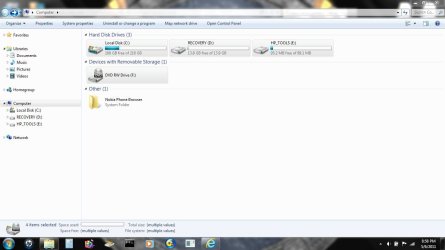
Here's my disc space.
 

Attachments

  • Computer Disc.JPG
    Computer Disc.JPG
    68.1 KB · Views: 42

My Computer

Computer Manufacturer/Model Number
Compaq Presario CQ62
OS
Windows 7 Home Premium 64bit
CPU
Intel Celeron 900 2.2GHz
Memory
2GB
I think whs meant disk management screenshot - type diskmgmt.msc in start search box to find it.

You may have unlettered partitions not showing in that pic.
 

My Computers

System One System Two

  • Computer type
    PC/Desktop
    OS
    7 X64
    CPU
    i5 8400
    Motherboard
    gigabyte b365m ds3h
    Memory
    2x8gb 3200mhz
    Hard Drives
    various
    PSU
    pure power 11 400w cm
    Case
    Coolermaster
    Cooling
    cryorig m9i
  • Computer type
    PC/Desktop
    OS
    7x64
    CPU
    g5400
    Motherboard
    ga b365m ds3h
    Memory
    8gb ddr4 2400
    PSU
    xfx pro 450w
Yeah, SIW is right. You posted a pic of Computer - not very telling. You could have a 4th hidden primary in which case you could not easily create an additional partition.

Also, what happened to your recovery partition. Why is it empty. That could be a candidate for Linux.
 

My Computer

Computer Manufacturer/Model Number
HP, Dell, Gateway, Toshiba - 4 laptops and 2 desktops
OS
Vista, Windows7, Mint Mate, Zorin, Windows 8
CPU
from 1.6GHz Duo to i7
Monitor(s) Displays
2x HP w2207
Hard Drives
5x HDD, 7x SSD, 12x Externals
Keyboard
with trackball - no mices
Mouse
Trackball mice
Internet Speed
DSL 6000
Hi There ndex477,

In Windows 7: Click " START" > Click "Control Panel" > In upper left corner of window hover cursor over control panel and click on control panel arrow to open "All Control Panel Items" Click on "All Control Panel Items " in order to see all your "Control Panel Items".

Click on "Administrative Tools" > Scroll down to the second choice " Computer Management" and Double-Click on that.

This opens your "Computer Management" window

Now look all the way left under your "File-Action-View-Help" Toolbar and scroll your cursor down to "Disk Management" and Click to Open your "Disk Management Window"

Now make a screenshot of that open window and post that in your thread.

This is what will help everyone help you further.

ranger72:)
 

My Computer

Computer type
PC/Desktop
Computer Manufacturer/Model Number
Home Built
OS
Win 7 Ultimate-64 Bit, Vista Home Premium-32 Bit, LinuxMint 17, Qiana 64 Bit
CPU
Intel Core i7 950 Bloomfield Extreme Quadcore 3.06GHz
Motherboard
ASUS Sabertooth X58 LGA 1366 socket
Memory
12 GIGS Corsair Dominator-GT DDR3 PC3-15000 (1866MHz) Triple
Graphics Card(s)
Single Nvidia Powered EVGA GeForce GTX 460 1024Mbs DDR5 memo
Sound Card
Creative Soundblaster X-FI Titanium Fatality Pro Series 7.1
Monitor(s) Displays
Dual AOC 23" LCD- LED Backlit 5MS response-DCR 30,000:1 cont
Screen Resolution
1920 X 1080 resolution
Hard Drives
C:\ Hitachi 1 Terabyte- Serial ATA 300 @ 7200rpm

E:\ Hitachi 320 GB- Serial ATA @ 7200 rpm

F:\ Hitachi 320 GB- Serial ATA @ 7200rpm
PSU
Corsair Modular Pro Series AX 850 80 Plus Gold certified PSU
Case
CoolerMaster Haf X 942 Full Tower with Mod Lighting
Cooling
CoolerMaster V-8 180 Watt CPU/Heatsink Cooler
Keyboard
Logitech MX 3200 lazer wireless board and mouse
Internet Speed
Fairpoint DSL 15MB per second download/ 2MB upload
Other Info
1 230mm case fan Front
3 200mm case fans, sidetop and rear all with Green Led Mod lights

Double Cooler Fans over the 12Gigs of Corsair DDR3 ram

Wicked powerful Machine! :>)
Shrink C in Disk Mgmt: Partition or Volume - Shrink

It will create a Logical Extended partition which is fine for your dual boot. Do not accept if offered conversion to Dynamic Disk.

After installing Linux, boot back into Win7 to add the Linux distro using EasyBCD 2.02 Add OS tab, Linux sub-tab. This will help avoid corruption of Win7 from GRUB boot manager which we see a lot here. EasyBCD 2.0.2 - NeoSmart Technologies
 
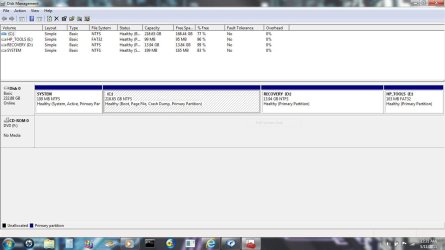
Hey thanks you all. Sorry for the delay.
 

Attachments

  • diskmgmt.JPG
    diskmgmt.JPG
    92.4 KB · Views: 27

My Computer

Computer Manufacturer/Model Number
Compaq Presario CQ62
OS
Windows 7 Home Premium 64bit
CPU
Intel Celeron 900 2.2GHz
Memory
2GB
Just downloaded Ubuntu 11.04. The entire disc image file is 150.2 MB now how do I partion my C: drive to dual boot the two? Whs, explain a virtual box. ??
 

My Computer

Computer Manufacturer/Model Number
Compaq Presario CQ62
OS
Windows 7 Home Premium 64bit
CPU
Intel Celeron 900 2.2GHz
Memory
2GB
Virtual Box, Virtual Player or VMWare are freeware you can use to install and run Linux in a virtual environment within Win7. http://www.vmware.com/products/player/

To Dual Boot: Dual-Boot Windows 7 and Ubuntu in Perfect Harmony

Since you already have four primary partitions, in order to add another you will need to convert C to Logical.

This is done using free Partition Wizard bootable CD:

Boot PW CD, rightclick on C to Modify>Convert to Logical, click OK.

Now rightclick C again, choose Resize, slide right grey border to the left to make your space to install Linux, click OK.

Finally rightclick on empty space you created, Create New NTFS Logical partition, OK. Apply all steps.

Now you can boot the Linux CD, follow the tutorial above to install to new partition you created.
 

My Computer

Computer Manufacturer/Model Number
HP, Dell, Gateway, Toshiba - 4 laptops and 2 desktops
OS
Vista, Windows7, Mint Mate, Zorin, Windows 8
CPU
from 1.6GHz Duo to i7
Monitor(s) Displays
2x HP w2207
Hard Drives
5x HDD, 7x SSD, 12x Externals
Keyboard
with trackball - no mices
Mouse
Trackball mice
Internet Speed
DSL 6000
gregrocker, I created a 50GB Partition and idid not choose the dynamic disk option. So how do I install Linux into the 50G partition now? The partition is showing as unallocated with no drive letter.
 

My Computer

Computer Manufacturer/Model Number
Compaq Presario CQ62
OS
Windows 7 Home Premium 64bit
CPU
Intel Celeron 900 2.2GHz
Memory
2GB
Last edited:

My Computers

System One System Two

  • Computer type
    PC/Desktop
    OS
    7 X64
    CPU
    i5 8400
    Motherboard
    gigabyte b365m ds3h
    Memory
    2x8gb 3200mhz
    Hard Drives
    various
    PSU
    pure power 11 400w cm
    Case
    Coolermaster
    Cooling
    cryorig m9i
  • Computer type
    PC/Desktop
    OS
    7x64
    CPU
    g5400
    Motherboard
    ga b365m ds3h
    Memory
    8gb ddr4 2400
    PSU
    xfx pro 450w
gregrocker, I created a 50GB Partition and idid not choose the dynamic disk option. So how do I install Linux into the 50G partition now? The partition is showing as unallocated with no drive letter.

Need to see another Disk Mgmt screenshot to advise with confidence, since no mention is made of Extended Logical in the mix yet.

Did you convert convert C to Logical Extended, shrink to add a Logical subpartition?
 
Back
Top