Hard Drive Replacement for PC

I hope you are not going to put Windows on a WD Black when you now have an SSD.

You don't need a dock if you intend to have 3 internal drives: SSD for Windows; WD Black for data; WD Black for data backup.

If you intend to have an external drive, then yes, you'd probably use a dock.

None of them are what I'd call durable or heavy duty, so don't expect them to last 10 years.

Some connect by USB 2; some by USB 3, some by eSATA, some by a combination. You'd need one that matched whatever ports you happen to have on your case.

I use a Rosewill RX-DUS 100 that has USB 2 and eSATA ports.

Other brands include Thermaltake and Sabrent. Make sure you get one that will accept standard 3.5 inch hard drives.

You might consider getting Blues instead of Blacks. They are cheaper and don't have as long a warranty, but you aren't likely to notice the speed difference if you put Windows and apps on the SSD.

I'm thinking he is intending to use the SSD he just received for his OS and programs, one of the WDs for his internal data drive, and an external dock for his backup drive. I personally like the WD Blacks for their longer warranty but I agree a Black is overkill for a backup drive. I would suggest getting two Greens instead of a Black for the backups. It is much safer to have two identical backups so, if one backup drive should fail (it happens), he will have another one to fall back on.

@ OP. Orico makes some nice docks. Just peruse Newegg's or Amazon's selections and choose one you like the looks of that gets good reviews.
 

My Computer

Computer type
PC/Desktop
Computer Manufacturer/Model Number
Custom Build
OS
Win 7 Ultimate 64 bit
CPU
Intel i7-3930K
Motherboard
ASUS P9X79 WS
Memory
Kingston HyperX Genesis 32GB Kit (8x4GB Modules) 1600MHz DDR
Graphics Card(s)
MSI R7850 Twin Frozr 2GD5/OC Radeon HD 7850 2GB 256-bit GDDR
Sound Card
Asus Xonar Essence STX
Monitor(s) Displays
3x Asus VG248QE 24", Vizio 32" TV
Screen Resolution
1920 x 1080, ?
Hard Drives
Samsung 128GB 840 Pro SSD (1),
Samsung 4TB 850 EVO SSDs (4)
Samsung 4TB 850 EVO SSDs (16) external backup drives used in 2.5" hot swap bays in the computer.
PSU
Corsair HX750w
Case
Antec Two Hundred v2 (modified)
Cooling
Cooler Master GeminII S524 120mm (fan replaced with a 140mm)
Keyboard
Logitech G510s
Mouse
Logitech M525 (two in use)
Internet Speed
=< 32Mbps down, 8Mbps up
Antivirus
AVAST!, MBAM, SAS, Spybot S&D (all but MBAM free) Glary Util
Browser
IE11
Other Info
LSI 9211-8i HBA card (8 SATA III ports), 2.5" & 3.5" Hot Swap Bays, HooToo HT-CR001 PCI-E to USB 3.0 Internal Hub + 6 Slot Card Reader, and LG Model CH12LS28 BD-ROM Optical Drive. Also, ScanSnap S1500 ADF duplexing scanner, Canon 9000F flat bed scanner, Corsair SP2500 2.1 speakers, Samsung CLP 415nw laser color printer, Cyberpower PP2200SW UPS
I agree with LF - I'm using 2TB WD Greens for backup. If you buy a dock I'd get a name brand and definitely USB 3. I can image ~50 GB on my SSD to a 2TB Green in ~7-8 Minutes. I'd agree they aren't meant to last forever and at ~$30 each I'd have a couple.
 

My Computer

Computer type
PC/Desktop
Computer Manufacturer/Model Number
Own build
OS
Windows 7x64 Home Premium SP1
CPU
Intel i7 2600k
Motherboard
ASUS P8Z68 Deluxe
Memory
G.Skill Ripjaws (DDR3-1600) 2x4GB
Graphics Card(s)
Nvidia GeForce GTS 450; Intel HD Graphics 3000(GT2+)
Monitor(s) Displays
Dell Ultrasharp IPS panel U2311H, Samsung SyncMaster P2350
Screen Resolution
1920x1080
Hard Drives
Samsung 850 Pro SSD 256GB, Samsung SSD 840 120GB, Seagates 1TB Barracuda ST31000528AS x2
PSU
Seasonic M12II 520W
Case
Lian Li Lancool PC-K60
Cooling
Case: 1x120mm, 3x140mm CPU: Hyper 212+
Keyboard
Logitech MK520 (wireless)
Mouse
Logitech MK520
Internet Speed
6-7 Mbps
Antivirus
Norton Security Premium, Malwarebytes on 2 (MSE on 3rd PC)
Browser
FireFox
Other Info
Audio: Logitech Z523 2.1
I am back! Sorry to leave the thread so abruptly but I got sick, was hospitalized for 6 days, rested at home for what has seemed like forever - and am now ready to get my PC running again!

I ordered the WD BLACK SERIES WD1003FZEX 1TB 7200 RPM 64MB Cache SATA 6.0Gb/s 3.5" Internal Hard Drive this morning. Should arrive by Friday.

For now, I need someone to give me a link to a docking station to purchase for backups. Or, can I just purchase another one (or 2???) of the WD 1TB Blue or Green Hard Drives & put them inside my PC along with the new SSD (still in package/haven't opened it yet) & the WD 1TB Black Drive on order? I am finding the the WD Blue & WD Green Hard Drives are very close in price, so I should order the Blue, correct?

Do I need to make sure that the backup drives are also 7200 RPM 64MB Cache SATA 6.0Gb/s?

Thanks for all the posts. I am deeply grateful!
 
Last edited:

My Computer

Computer type
PC/Desktop
Computer Manufacturer/Model Number
Custom Build
OS
Windows 7 Home Premium 64bit
CPU
AMD A8-3850
Motherboard
MSI A75MA-G55 (MS-7696
Memory
Type: DDR3 Size: 8192 MBytes
Graphics Card(s)
ATI AMD Radeon HD 6550D & ATI AMD Radeon HD 6670
Hard Drives
932GB Seagate ST310005 24AS SATA Disk Device (SATA)
Antivirus
Microsoft Security Essentials
Browser
Chrome
Get a green for backups and use the black inside PC. If your mobo has E-SATA ports and you can find an E-SATA/USB 3.0 external dock that would be golden. Otherwise get one with USB 3.0 at least.
 

My Computer

Computer type
PC/Desktop
Computer Manufacturer/Model Number
Custom Build
OS
Windows 7 Ultimate x64 SP1
CPU
AMD Phenom 2 1090T
Motherboard
Gigabyte GA-890FXA-UD5
Memory
2x8GB Kingston HyperX Fury Black 1600Mhz Unganged
Graphics Card(s)
MSI GTX 970 Gaming 4G
Sound Card
Realtek On-Board HD 7.1 Audio / Logitech G35
Monitor(s) Displays
3xAcer GD245HQ
Screen Resolution
1920x1080
Hard Drives
Samsung 850 Pro 512GB SSD - OS /
WD Caviar Black SATA 3 - 1 TBx2 - Dynamic RAID 0 /
WD Caviar Green SATA 2 - 640GBx2 - Dynamic RAID 0 /
WD Caviar Green SATA 2 - 640GB - Internal Backup /
Seagate Barracude SATA 3 - 3TB - External Backup/ Sync
PSU
HighPower 1000W
Case
Cooler Master HAF 932
Cooling
Noctua NH-D14
Keyboard
Logitech G19
Mouse
Logitech G500
Internet Speed
100/4 Mbit Cable (100GB quota)
Antivirus
ZoneAlarm Extreme Security / MBAM Pro / MBAE Free / SAS Free
Browser
IE 11 - Firefox - Chrome
Other Info
Logitech F710/ G27/ G940/ Z5500 // TrackIR 5 // Nvidia 3D Surround Vision
E-SATA/USB 3.0 external dock

I am fairly sure my mobo has E-Sata ports. Can you post a link to an example or a recommended one of what you are talking about exactly? I have never even looked at a docking station. .
.
If the WD Green is only 50 cents less than the WD Blue, do you still suggest the Green for backups?

THANKS!!!
 

My Computer

Computer type
PC/Desktop
Computer Manufacturer/Model Number
Custom Build
OS
Windows 7 Home Premium 64bit
CPU
AMD A8-3850
Motherboard
MSI A75MA-G55 (MS-7696
Memory
Type: DDR3 Size: 8192 MBytes
Graphics Card(s)
ATI AMD Radeon HD 6550D & ATI AMD Radeon HD 6670
Hard Drives
932GB Seagate ST310005 24AS SATA Disk Device (SATA)
Antivirus
Microsoft Security Essentials
Browser
Chrome
I just checked your mobo and it doesn't have E-SATA. It is still possible your case has one at front panel. It looks somewhat similar to an USB port.

Hmm, seems I am a bit wrong with WD color codes, glad you asked the difference :)
What does the WD color scheme mean?
Go with the blue.
 

My Computer

Computer type
PC/Desktop
Computer Manufacturer/Model Number
Custom Build
OS
Windows 7 Ultimate x64 SP1
CPU
AMD Phenom 2 1090T
Motherboard
Gigabyte GA-890FXA-UD5
Memory
2x8GB Kingston HyperX Fury Black 1600Mhz Unganged
Graphics Card(s)
MSI GTX 970 Gaming 4G
Sound Card
Realtek On-Board HD 7.1 Audio / Logitech G35
Monitor(s) Displays
3xAcer GD245HQ
Screen Resolution
1920x1080
Hard Drives
Samsung 850 Pro 512GB SSD - OS /
WD Caviar Black SATA 3 - 1 TBx2 - Dynamic RAID 0 /
WD Caviar Green SATA 2 - 640GBx2 - Dynamic RAID 0 /
WD Caviar Green SATA 2 - 640GB - Internal Backup /
Seagate Barracude SATA 3 - 3TB - External Backup/ Sync
PSU
HighPower 1000W
Case
Cooler Master HAF 932
Cooling
Noctua NH-D14
Keyboard
Logitech G19
Mouse
Logitech G500
Internet Speed
100/4 Mbit Cable (100GB quota)
Antivirus
ZoneAlarm Extreme Security / MBAM Pro / MBAE Free / SAS Free
Browser
IE 11 - Firefox - Chrome
Other Info
Logitech F710/ G27/ G940/ Z5500 // TrackIR 5 // Nvidia 3D Surround Vision
Yes, the Blue is superior to the Green and, if you can get it for only 50¢ more than the same size Green, by all means, get it.

This is an excellent dock. The dock works off either e-SATA (at SATA II speeds) or USB 3.0. To use it for backups, I would suggest keeping it alongside or on top of your computer and turn it on only when you have a HDD in the dock (it would not a good idea to keep a HDD in the dock except when updating a backup). Also, Anker provides excellent product support.
 

My Computer

Computer type
PC/Desktop
Computer Manufacturer/Model Number
Custom Build
OS
Win 7 Ultimate 64 bit
CPU
Intel i7-3930K
Motherboard
ASUS P9X79 WS
Memory
Kingston HyperX Genesis 32GB Kit (8x4GB Modules) 1600MHz DDR
Graphics Card(s)
MSI R7850 Twin Frozr 2GD5/OC Radeon HD 7850 2GB 256-bit GDDR
Sound Card
Asus Xonar Essence STX
Monitor(s) Displays
3x Asus VG248QE 24", Vizio 32" TV
Screen Resolution
1920 x 1080, ?
Hard Drives
Samsung 128GB 840 Pro SSD (1),
Samsung 4TB 850 EVO SSDs (4)
Samsung 4TB 850 EVO SSDs (16) external backup drives used in 2.5" hot swap bays in the computer.
PSU
Corsair HX750w
Case
Antec Two Hundred v2 (modified)
Cooling
Cooler Master GeminII S524 120mm (fan replaced with a 140mm)
Keyboard
Logitech G510s
Mouse
Logitech M525 (two in use)
Internet Speed
=< 32Mbps down, 8Mbps up
Antivirus
AVAST!, MBAM, SAS, Spybot S&D (all but MBAM free) Glary Util
Browser
IE11
Other Info
LSI 9211-8i HBA card (8 SATA III ports), 2.5" & 3.5" Hot Swap Bays, HooToo HT-CR001 PCI-E to USB 3.0 Internal Hub + 6 Slot Card Reader, and LG Model CH12LS28 BD-ROM Optical Drive. Also, ScanSnap S1500 ADF duplexing scanner, Canon 9000F flat bed scanner, Corsair SP2500 2.1 speakers, Samsung CLP 415nw laser color printer, Cyberpower PP2200SW UPS

My Computer

Computer type
PC/Desktop
Computer Manufacturer/Model Number
Customs, Dell, Gateway, HP, Toshiba, Acer, ASUS
OS
Windows 7 Ultimate 64-bit, Windows 8.1 64-bit, Mac OS X 10.10, Linux Mint 17, Windows 10 Pro TP
Keyboard
Microsoft
Mouse
Microsoft
Installing Drives

Do I install the SSD drive first & get the computer running? Or, do I need to install both the SSD & WD Hard Drive and then try to get it running to do a fresh install of Windows?

Also, do I just use the one small "cord" to connect the SSD - the cord that was hooked up to my old hard drive & is still connected to the mother board? How does the other drive connect?

THANKS!
 

My Computer

Computer type
PC/Desktop
Computer Manufacturer/Model Number
Custom Build
OS
Windows 7 Home Premium 64bit
CPU
AMD A8-3850
Motherboard
MSI A75MA-G55 (MS-7696
Memory
Type: DDR3 Size: 8192 MBytes
Graphics Card(s)
ATI AMD Radeon HD 6550D & ATI AMD Radeon HD 6670
Hard Drives
932GB Seagate ST310005 24AS SATA Disk Device (SATA)
Antivirus
Microsoft Security Essentials
Browser
Chrome

My Computer

Computer type
PC/Desktop
Computer Manufacturer/Model Number
Custom Build
OS
Windows 7 Ultimate x64 SP1
CPU
AMD Phenom 2 1090T
Motherboard
Gigabyte GA-890FXA-UD5
Memory
2x8GB Kingston HyperX Fury Black 1600Mhz Unganged
Graphics Card(s)
MSI GTX 970 Gaming 4G
Sound Card
Realtek On-Board HD 7.1 Audio / Logitech G35
Monitor(s) Displays
3xAcer GD245HQ
Screen Resolution
1920x1080
Hard Drives
Samsung 850 Pro 512GB SSD - OS /
WD Caviar Black SATA 3 - 1 TBx2 - Dynamic RAID 0 /
WD Caviar Green SATA 2 - 640GBx2 - Dynamic RAID 0 /
WD Caviar Green SATA 2 - 640GB - Internal Backup /
Seagate Barracude SATA 3 - 3TB - External Backup/ Sync
PSU
HighPower 1000W
Case
Cooler Master HAF 932
Cooling
Noctua NH-D14
Keyboard
Logitech G19
Mouse
Logitech G500
Internet Speed
100/4 Mbit Cable (100GB quota)
Antivirus
ZoneAlarm Extreme Security / MBAM Pro / MBAE Free / SAS Free
Browser
IE 11 - Firefox - Chrome
Other Info
Logitech F710/ G27/ G940/ Z5500 // TrackIR 5 // Nvidia 3D Surround Vision
OK, so I connect the larger cable from the power supply & the smaller cable from the mother board to the SSD, right? I rec'd a DVD with the SSD - so I am assuming I put it in when my computer comes on. I have another small cable that I took out of an old computer. Is this all I will need when I connect the hard drive?

I downloaded an ISO file to a flash drive to install Windows 7. I hope my computer recognizes the flash drive!
 

My Computer

Computer type
PC/Desktop
Computer Manufacturer/Model Number
Custom Build
OS
Windows 7 Home Premium 64bit
CPU
AMD A8-3850
Motherboard
MSI A75MA-G55 (MS-7696
Memory
Type: DDR3 Size: 8192 MBytes
Graphics Card(s)
ATI AMD Radeon HD 6550D & ATI AMD Radeon HD 6670
Hard Drives
932GB Seagate ST310005 24AS SATA Disk Device (SATA)
Antivirus
Microsoft Security Essentials
Browser
Chrome
HDD/SSD and DVD all need a data cable and a power cable. These are all fool-proof, only one way of plugging in and different sizes.

First clean install your OS with SSD and DVD connected.
Then if you need to attach HDD, remove cables from DVD and plug into HDD.

(Assuming all are SATA drives)
 

My Computer

Computer type
PC/Desktop
Computer Manufacturer/Model Number
Custom Build
OS
Windows 7 Ultimate x64 SP1
CPU
AMD Phenom 2 1090T
Motherboard
Gigabyte GA-890FXA-UD5
Memory
2x8GB Kingston HyperX Fury Black 1600Mhz Unganged
Graphics Card(s)
MSI GTX 970 Gaming 4G
Sound Card
Realtek On-Board HD 7.1 Audio / Logitech G35
Monitor(s) Displays
3xAcer GD245HQ
Screen Resolution
1920x1080
Hard Drives
Samsung 850 Pro 512GB SSD - OS /
WD Caviar Black SATA 3 - 1 TBx2 - Dynamic RAID 0 /
WD Caviar Green SATA 2 - 640GBx2 - Dynamic RAID 0 /
WD Caviar Green SATA 2 - 640GB - Internal Backup /
Seagate Barracude SATA 3 - 3TB - External Backup/ Sync
PSU
HighPower 1000W
Case
Cooler Master HAF 932
Cooling
Noctua NH-D14
Keyboard
Logitech G19
Mouse
Logitech G500
Internet Speed
100/4 Mbit Cable (100GB quota)
Antivirus
ZoneAlarm Extreme Security / MBAM Pro / MBAE Free / SAS Free
Browser
IE 11 - Firefox - Chrome
Other Info
Logitech F710/ G27/ G940/ Z5500 // TrackIR 5 // Nvidia 3D Surround Vision
I installed the SSD, hooked up the monitor, keyboard & mouse, then booted computer. Screen message:

Reboot & Select proper Boot device or Insert Boot Media in selected Boot device and press a key.

I went into BIOS & changed the boot order to 1- CD/DVD & 2- SSD Drive (which showed on the screen!) then put the CD/DVD in that came with the SAMSUNG SSD & rebooted. I got the same message again. NOW WHAT?

I have a feeling this is going to be a pain.
 

My Computer

Computer type
PC/Desktop
Computer Manufacturer/Model Number
Custom Build
OS
Windows 7 Home Premium 64bit
CPU
AMD A8-3850
Motherboard
MSI A75MA-G55 (MS-7696
Memory
Type: DDR3 Size: 8192 MBytes
Graphics Card(s)
ATI AMD Radeon HD 6550D & ATI AMD Radeon HD 6670
Hard Drives
932GB Seagate ST310005 24AS SATA Disk Device (SATA)
Antivirus
Microsoft Security Essentials
Browser
Chrome
I installed the SSD, hooked up the monitor, keyboard & mouse, then booted computer. Screen message:

Reboot & Select proper Boot device or Insert Boot Media in selected Boot device and press a key.

I went into BIOS & changed the boot order to 1- CD/DVD & 2- SSD Drive (which showed on the screen!) then put the CD/DVD in that came with the SAMSUNG SSD & rebooted. I got the same message again. NOW WHAT?

I have a feeling this is going to be a pain.

If you want to install Windows to that SSD, you should NOT need that Samsung SSD.

You say you downloaded a Windows ISO to a flash drive. Can you boot from that flash drive? If not, burn the ISO to a DVD and boot from that. One way or another, you have to have something the PC can boot from to install Windows.

And you will need a 25 character "Product Key" to activate the new Windows installation. Otherwise, the install won't work for long.

Make sure only the SSD and the bootable device (DVD or flash drive) are connected when you begin the install.
 

My Computer

Computer type
PC/Desktop
Computer Manufacturer/Model Number
Ignatz Special; 4 speed manual gearbox; factory air conditioning; one of one
OS
Windows 7 Home Premium SP1, 64-bit
CPU
Intel Skylake i5-6600K, not overclocked
Motherboard
AsRock Z170M Extreme 4, micro ATX
Memory
8 GB HyperX DDR4-2666 (2 x 4 GB)
Graphics Card(s)
none; graphics are integrated on CPU
Sound Card
onboard: Realtek ALC1150; external: USB Behringer UF0-202
Monitor(s) Displays
Dell S2340M 23 inch IPS
Screen Resolution
1600 x 900
Hard Drives
System: Crucial MX100 series SSD, 128 GB;
Data: Samsung Spinpoint 103SJ, 1 TB;
Backup: WD Caviar Green WD30EZRX-00D8PB0, 3 TB
PSU
Rosewill SilentNight 500 watt fanless, semi-modular
Case
Antec Solo II
Cooling
Noctua NH-U12S; Noctua F12 intake, Noctua S12A exhaust
Keyboard
Microsoft 200 6JH-00001 USB
Mouse
Dell or Microsoft optical wired; USB
Antivirus
Microsoft Security Essentials and Malwarebytes Premium
Browser
Pale Moon
Other Info
All fans PWM; speeds at idle: CPU circa 500 rpm; intake circa 600 rpm; exhaust circa 600 rpm; CPU temps 27 idle and 47 C load in a warm room (27 C/81 F) when running Intel Extreme Tuning Utility stress test.
If you want to install Windows to that SSD, you should NOT need that Samsung SSD.

You say you downloaded a Windows ISO to a flash drive. Can you boot from that flash drive? If not, burn the ISO to a DVD and boot from that. One way or another, you have to have something the PC can boot from to install Windows.

And you will need a 25 character "Product Key" to activate the new Windows installation. Otherwise, the install won't work for long.

Make sure only the SSD and the bootable device (DVD or flash drive) are connected when you begin the install.[/QUOTE]

Thank you for the info. I am going to try this tonight.
 

My Computer

Computer type
PC/Desktop
Computer Manufacturer/Model Number
Custom Build
OS
Windows 7 Home Premium 64bit
CPU
AMD A8-3850
Motherboard
MSI A75MA-G55 (MS-7696
Memory
Type: DDR3 Size: 8192 MBytes
Graphics Card(s)
ATI AMD Radeon HD 6550D & ATI AMD Radeon HD 6670
Hard Drives
932GB Seagate ST310005 24AS SATA Disk Device (SATA)
Antivirus
Microsoft Security Essentials
Browser
Chrome
Windows Installed on SDD

OKAY! I finally got Windows 7 installed on my new Samsung SSD 850 EVO. Now I just gotta learn how to connect my other drive - WD 1.0TB SATA. Am not sure I have the right cables to add the 2nd drive. Also, how do I set Windows to start on the SSD & put all my info on the WD harddrive?
 

My Computer

Computer type
PC/Desktop
Computer Manufacturer/Model Number
Custom Build
OS
Windows 7 Home Premium 64bit
CPU
AMD A8-3850
Motherboard
MSI A75MA-G55 (MS-7696
Memory
Type: DDR3 Size: 8192 MBytes
Graphics Card(s)
ATI AMD Radeon HD 6550D & ATI AMD Radeon HD 6670
Hard Drives
932GB Seagate ST310005 24AS SATA Disk Device (SATA)
Antivirus
Microsoft Security Essentials
Browser
Chrome
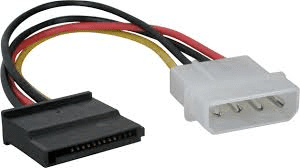
You only need 1 SATA power cable and 1 SATA data cable. Your current PSU should have (most likely) a spare power cable. If not, you can get a multiplier or a molex to SATA power converter for real cheap.

molex to sata power.png

Also buy a SATA data cable (the red ones will do just fine), you may even have one laying inside your motherboard box if you have kept it.

Then only adjust the BIOS hard disk boot order to start from the SSD.
 

My Computer

Computer type
PC/Desktop
Computer Manufacturer/Model Number
Custom Build
OS
Windows 7 Ultimate x64 SP1
CPU
AMD Phenom 2 1090T
Motherboard
Gigabyte GA-890FXA-UD5
Memory
2x8GB Kingston HyperX Fury Black 1600Mhz Unganged
Graphics Card(s)
MSI GTX 970 Gaming 4G
Sound Card
Realtek On-Board HD 7.1 Audio / Logitech G35
Monitor(s) Displays
3xAcer GD245HQ
Screen Resolution
1920x1080
Hard Drives
Samsung 850 Pro 512GB SSD - OS /
WD Caviar Black SATA 3 - 1 TBx2 - Dynamic RAID 0 /
WD Caviar Green SATA 2 - 640GBx2 - Dynamic RAID 0 /
WD Caviar Green SATA 2 - 640GB - Internal Backup /
Seagate Barracude SATA 3 - 3TB - External Backup/ Sync
PSU
HighPower 1000W
Case
Cooler Master HAF 932
Cooling
Noctua NH-D14
Keyboard
Logitech G19
Mouse
Logitech G500
Internet Speed
100/4 Mbit Cable (100GB quota)
Antivirus
ZoneAlarm Extreme Security / MBAM Pro / MBAE Free / SAS Free
Browser
IE 11 - Firefox - Chrome
Other Info
Logitech F710/ G27/ G940/ Z5500 // TrackIR 5 // Nvidia 3D Surround Vision

My Computer

Computer type
PC/Desktop
Computer Manufacturer/Model Number
Ignatz Special; 4 speed manual gearbox; factory air conditioning; one of one
OS
Windows 7 Home Premium SP1, 64-bit
CPU
Intel Skylake i5-6600K, not overclocked
Motherboard
AsRock Z170M Extreme 4, micro ATX
Memory
8 GB HyperX DDR4-2666 (2 x 4 GB)
Graphics Card(s)
none; graphics are integrated on CPU
Sound Card
onboard: Realtek ALC1150; external: USB Behringer UF0-202
Monitor(s) Displays
Dell S2340M 23 inch IPS
Screen Resolution
1600 x 900
Hard Drives
System: Crucial MX100 series SSD, 128 GB;
Data: Samsung Spinpoint 103SJ, 1 TB;
Backup: WD Caviar Green WD30EZRX-00D8PB0, 3 TB
PSU
Rosewill SilentNight 500 watt fanless, semi-modular
Case
Antec Solo II
Cooling
Noctua NH-U12S; Noctua F12 intake, Noctua S12A exhaust
Keyboard
Microsoft 200 6JH-00001 USB
Mouse
Dell or Microsoft optical wired; USB
Antivirus
Microsoft Security Essentials and Malwarebytes Premium
Browser
Pale Moon
Other Info
All fans PWM; speeds at idle: CPU circa 500 rpm; intake circa 600 rpm; exhaust circa 600 rpm; CPU temps 27 idle and 47 C load in a warm room (27 C/81 F) when running Intel Extreme Tuning Utility stress test.
I was under the impression that using it for data files (music/documents/videos, etc.).
 

My Computer

Computer type
PC/Desktop
Computer Manufacturer/Model Number
Custom Build
OS
Windows 7 Ultimate x64 SP1
CPU
AMD Phenom 2 1090T
Motherboard
Gigabyte GA-890FXA-UD5
Memory
2x8GB Kingston HyperX Fury Black 1600Mhz Unganged
Graphics Card(s)
MSI GTX 970 Gaming 4G
Sound Card
Realtek On-Board HD 7.1 Audio / Logitech G35
Monitor(s) Displays
3xAcer GD245HQ
Screen Resolution
1920x1080
Hard Drives
Samsung 850 Pro 512GB SSD - OS /
WD Caviar Black SATA 3 - 1 TBx2 - Dynamic RAID 0 /
WD Caviar Green SATA 2 - 640GBx2 - Dynamic RAID 0 /
WD Caviar Green SATA 2 - 640GB - Internal Backup /
Seagate Barracude SATA 3 - 3TB - External Backup/ Sync
PSU
HighPower 1000W
Case
Cooler Master HAF 932
Cooling
Noctua NH-D14
Keyboard
Logitech G19
Mouse
Logitech G500
Internet Speed
100/4 Mbit Cable (100GB quota)
Antivirus
ZoneAlarm Extreme Security / MBAM Pro / MBAE Free / SAS Free
Browser
IE 11 - Firefox - Chrome
Other Info
Logitech F710/ G27/ G940/ Z5500 // TrackIR 5 // Nvidia 3D Surround Vision
You only need 1 SATA power cable and 1 SATA data cable. Your current PSU should have (most likely) a spare power cable. If not, you can get a multiplier or a molex to SATA power converter for real cheap.

View attachment 369111

Also buy a SATA data cable (the red ones will do just fine), you may even have one laying inside your motherboard box if you have kept it.

Then only adjust the BIOS hard disk boot order to start from the SSD.

I do have an extra SATA cable I took out of an older PC. I don't see an extra SATA power cable. Also, my motherboard has 2 slots for drives & my CD player is plugged into one & my SSD is plugged into the other. My motherboard manual states it has 6 (six) Sata ports. Two are covered with something white. Now what?
 
Last edited:

My Computer

Computer type
PC/Desktop
Computer Manufacturer/Model Number
Custom Build
OS
Windows 7 Home Premium 64bit
CPU
AMD A8-3850
Motherboard
MSI A75MA-G55 (MS-7696
Memory
Type: DDR3 Size: 8192 MBytes
Graphics Card(s)
ATI AMD Radeon HD 6550D & ATI AMD Radeon HD 6670
Hard Drives
932GB Seagate ST310005 24AS SATA Disk Device (SATA)
Antivirus
Microsoft Security Essentials
Browser
Chrome
Back
Top